We remain fully operational. Our teams are working around the clock to ensure your deliveries continue safely.

Descargar la aplicación


Servicios al cliente
Sobre nosotros
Copyright © 2025 Desertcart Holdings Limited
Descargar la aplicación

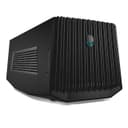

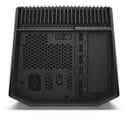


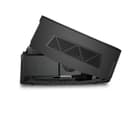

🚀 Elevate your Alienware gaming—desktop GPU power, laptop freedom!
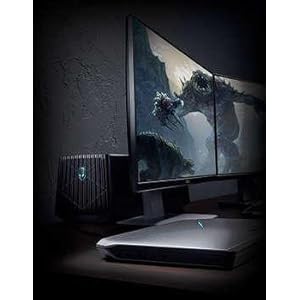
The Alienware Graphics Amplifier (9R7XN) is a high-performance external GPU dock designed exclusively for Alienware R2 laptops. It supports full-length, double-wide PCIe x16 desktop graphics cards up to 10.5 inches and 375W power, powered by a robust 460W internal PSU. Featuring four USB 3.0 ports and a proprietary single-cable connection, it delivers seamless, lag-free graphics expansion and peripheral docking. Its stealth black chassis complements AlienFX lighting for a cohesive gaming setup. Ideal for gamers seeking desktop-level graphics performance on the go.


| ASIN | B00PCJXN0I |
| Best Sellers Rank | #1,927 in Computer Graphics Cards |
| Brand Name | Alienware |
| Customer Reviews | 4.1 4.1 out of 5 stars (440) |
| Global Trade Identification Number | 00884116181996 |
| Included Components | proprietary cable |
| Item Dimensions | 16.1 x 7.3 x 6.8 inches |
| Item Weight | 7.7 Pounds |
| Manufacturer | Dell Computer |
| Model | 9R7XN |
| UPC | 884116181996 |
| Voltage | 240 Volts |
| Warranty Description | 1 |
M**W
Great boost for your Alienware laptop.
Bought this for my son's Alienware 13 R2. He is into games and wanted to hook the Alienware up to a monitor with a larger screen. At first we tried to avoid buying this amplifier and just connected a monitor directly to the HDMI port in the back of the laptop, but there was a lot of lag times...it just didn't work very well. In our configuration, we use a GeForce GTX 1060 Mini 3GB GDDR5 Super Compact Graphics Card ZOTAC GeForce GTX 1060 Mini 3GB GDDR5 Super Compact Graphics Card (ZT-P10610A-10L) and for the monitor we use an Acer XF240H Acer XF240H bmjdpr 24-inch Full HD (1920 x 1080) AMD FreeSync Display (Display Port, DVI & HDMI Port, 144Hz Refresh Rate) . At first, the signal from the amplifier was not picked up by the monitor. The laptop itself would not recognize the the second screen, although the light on the front of the amp would come on when we turned the laptop on. The signal just wouldn't transmit from the amp to the monitor. I then went online and downloaded the driver for the graphics card, rebooted, and then all worked well. We are using a display port connection. I highly recommend this if you want to give your Alienware a boost for gaming...it works perfectly. I also recommend the card and the monitor I mention above...no lag times, absolutely beautiful display. If things change as we use it more, I will update this review...thanks for reading....hope our experience helped!
A**R
Buy it now, while it's not too expensive.
Buy this now, because it seems as if they are gaining value every month. I bought this wonderful device for about $178. But before you buy this, MAKE SURE YOU HAVE A GRAPHICS CARD 10.5 INCHES OR LESS!!! Unfortunately they don't take big cards, and a lot of cards you see will not fit in this machine, but it is really a new concept that you can just drop in a desktop GPU and run your laptop off of it. Alienware really did it with this, a lot of companies don't really succeed, (I have never purchased another brand of amplifiers but I have heard they are not as efficient as Alienware's) this on the other hand, is absolutely marvelous. Make sure you dust it, just like desktops, they collect dust, and it can damage a computer. It will get a significant amount of dust in 2 months. Thankfully it will pop off real easy. Unfortunately mine gets stuck, and is super hard to open, but companies make lemons and I have coped with it, and it's not a big deal, just use some extra elbow grease. The real cool thing about this is, it syncs with your AlienFX, so it will change colors along with it. This is great for travel, just know, it is not made of metal, but a semi-tough plastic that I would imagine could crack if it got one good knock. Especially the grills in the front and sides. So be careful when transporting this on vacation or to a buddy's house. It's a great machine, it's not to expensive for what you get, but if you want this, I suggest you get it now, because it is getting more and more expensive (At least on Amazon.)
T**T
What to know in 2024
While you will need an Alienware laptop from a run of models that are no longer being made, the huge advantage that the Alienware Graphics Amplifier gives these laptops is that the custom cable is directly accessing the PCI BUS - no throughput delays having to go through the USB-C controller. For how old this product is, that is pretty impressive. That said, if you're looking for used, you need to be certain the one you're adding to cart includes cables because it'll have to have that very proprietary PCI cable to connect the AGA to the laptop (and should have a default PSU cable for the AGA's power supply). I happen to have a number of Alienware laptops to work with this and I can tell you that it easily supports the 3000 and 4000 series nVidia cards up to the 3070 Ti and 4070. This is with the native power supply that can provide up to 400W. I have used it in: - Area 51m - M17R3 - M17R4 - M15R2 Some of these have DOA PSUs, so you take a chance, but you can replace the PSU with a small form factor model such as the Corsair CX650M and be able to support a hungrier video card, which I had to do for one DOA PSU that I had. While I've read that some people have put a 4090 in one, I can't imagine that happened without leaving the lid fully open or removing it altogether and also replacing the default power supply. Other things to watch for: 1) Be patient and careful connecting and disconnecting the cable. It has buttons on the sides you need to pinch inwards before it will release and it can feel nerve-wracking the first few times you need to plug and unplug it. 2) Only ever connect or disconnect the cable when the laptop is 100% powered down. 3) You don't have to have an external monitor to get Windows to use the AGA. Windows 11 tends to know, Windows 10 sometimes needs you to specify which GPU you want it to treat as the primary graphics card. 4) You can mix GPUs - like a laptop with a 2060 that has an AGA with a 4070. You will need to install both sets of drivers, rebooting between installs, and then you're good to go. 5) The nVidia Control Panel's Help-->System Information will show you two video cards once the second one is detected 6) Whether the alien head lights up is anyone's guess. On one AGA I got Alienware's godawful buggy Alienware Command Center ("AWCC") to let me change the lights once, then the software crashed, the light went out, and the AWCC never saw it again. On another AGA the light lit up default blue while I was setting it up for the first time, then never lit again. On a third, the light was out until I launched AWCC, it lit blue, and I could never apply changes, so now it's forever just the default blue. 7) 4000 series nVidia cards have a custom power connector cable on the top of the card that sticks out straight up or at an angle, depending on the card's manufacturer and the model. I strongly recommend NOT closing the lid all the way on these because you would be putting pressure against that proprietary cable and the socket it sits in and in the long run that can damage both the cable and the card. 8) Dell support is nonexistent; for Windows 10 & 11, ignore the documents saying you need to install an AGA app, just let Windows, plug & play, and the AWCC pick up on the existence of the card. TIP: The USB hub that's part of the AGA is a fantastic way to plug in a monitor, keyboard, and mouse so it's easier to go from portable to desktop-level fun.
D**N
Took a while for me to get a functional Graphics Card but now that I got one and have it hooked up correctly this really proves the processing power of Alienware laptops immensely, easy to set up, always works when set up & the best connection bandwidth with thunderbolt component for high quality gaming, Dell makes some good gaming computer consuls
J**H
Tengo una ALIENWARE 17R3 con una tarjeta gráfica de 970, pero necesitaba aún mas rapidez en cuestión de gráficos, soy arquitecto y trabajo con programas demasiado pesados, además, me gusta jugar en mis tiempos libres en simuladores como el Flight Simulator que exige muchos gráficos, esto me vino de lujo sin tener que cambiar mi pc por una ALIENWARE nueva. El Amplificador viene super bien empacado, cuenta con todos sus cables y en mi caso compre una RTX 2060 de MSI y le quedo perfecta, batallé un poco para cerrar el cajón pero era cuestión de acomodar bien mi tarjeta gráfica. Contiene en el paquete: *Soportó gráficos 4K. *Hasta ahora el rendimiento ha sido espectacular, claro con su correspondiente tarjeta gráfica (que se compra aparte). *No necesité de actualizar todo el sistema para que la reconociera, solo descargue el driver en Dell y listo reinicié y la reconoció. *Cuando ya esta conectado el cable especial de ALIENWARE encienden ambas cabezas de un color blanco. Se puede cambiar la luz led de color desde el Alienware FX. *Trae su cable ALIENWARE especial. *Cable de corriente. Todo excelente, muy recomendable.
A**A
I just bought this graphics amplifier and its working brilliantly with my alienware 15 r2 which i bought late 2016.iam using the asus gtx 1070 8gb pascal graphics and all the latest editions of the game i can play with the maxed out settings at ULTRA settings at almost 65FPS.yes portability is a hinderance for this product but if you are planning to keep it docked somewhere for a long time then i think it just works fine.all you need to do is you should get slightly bigger luggage bag.its not that big and for me its portable as iam a sailor and would like to play all the latest editions with the maxed out settings in the middle of the ocean.This product is brilliant.
R**Z
Llevo algun tiempo usandolo y me parece excelente, lo unico que no me gusto es que no cierra con una Strix 1080 asus, pero no se si el problema es de que hicieron la grafica mas grande o el cajon muy pequeño por eso le doy 5, igual me gusta mucho como se ve abierto, hace lucir mas la tarjeta y sus luces ademas de que se ve pro. Rendimiento increible y la instalacion solo fue conectar el cable y encender la alienware.
S**R
It’d not quite as solid a design as the Razor Core (which is made out of a nice metal), and opening it is very cludgey as the plastic gets caught on stuff?!? .. but once I got my Titan X fitted inside (which took less than a minute) and connected it to my Alienware R3 17 inch it worked like a charm. Firing up by itself .. nothing I needed to do, just wait a little for it to engage. Played some games on it (Subnautica and Doom 2016). Flawless.
Trustpilot
Hace 2 meses
Hace 4 días