We remain fully operational. Our teams are working around the clock to ensure your deliveries continue safely.

Descargar la aplicación


Servicios al cliente
Sobre nosotros
Copyright © 2025 Desertcart Holdings Limited
Descargar la aplicación
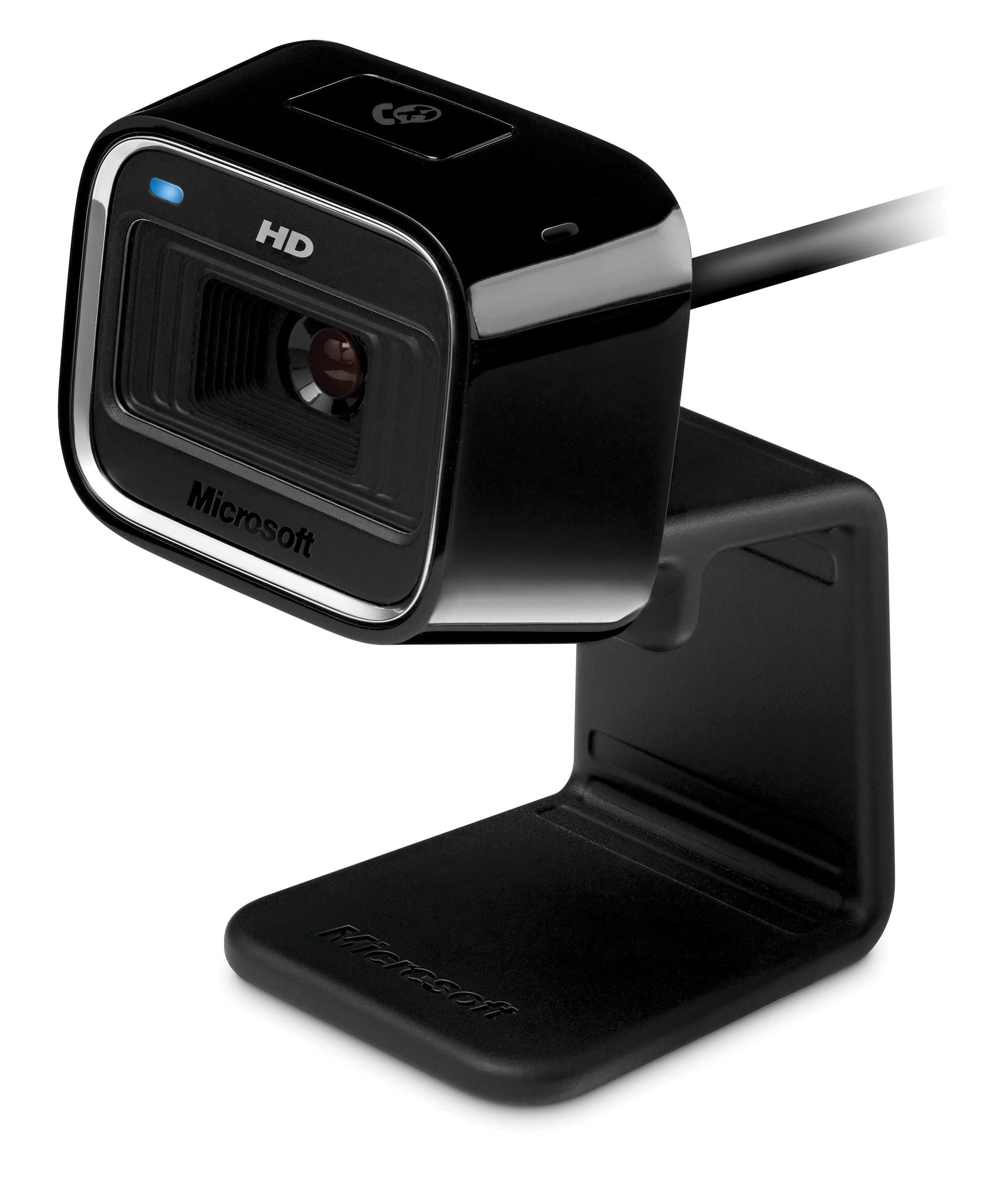
🎥 Elevate your video presence—because your image deserves HD perfection!
The Microsoft LifeCam HD-5000 delivers true 720p HD video with precision auto focus and TrueColor technology, ensuring vibrant, professional-quality video calls. Its versatile mounting options and noise-cancelling microphone make it a top choice for seamless, clear communication across laptops and desktops. Perfect for millennials seeking reliable, stylish video conferencing gear that keeps them connected and looking sharp.
| ASIN | B002XN7C6W |
| Are Batteries Included | No |
| Best Sellers Rank | #1,879 in Webcams |
| Brand | Microsoft |
| Built-In Media | Carrying Case, Curved Adhesive Mount |
| Camcorder Type | Video Camera |
| Color | Black |
| Compatible Devices | [Not Specified] |
| Connectivity Technology | USB |
| Customer Reviews | 4.3 out of 5 stars 360 Reviews |
| Display Resolution Maximum | HD |
| Effective Video Resolution | 1280720 Pixels |
| Exposure Control Type | Automatic |
| Features | Low Light |
| File Format | JPEG |
| Flash Memory Bus Interface Type | SBI |
| Flash Memory Type | SD |
| Focus Type | Auto Focus |
| Form Factor | notebook |
| Global Trade Identification Number | 00885370002881 |
| Has Image Stabilization | No |
| Image Aspect Ratio | 16:9 |
| Image stabilization | Digital |
| Item Weight | 0.21 Pounds |
| Lens Type | Macro |
| Manufacturer | Microsoft |
| Maximum Aperture | 1.8 f |
| Model Name | 7ND-00001 |
| Model Number | 7ND-00001 |
| Number of Speakers | 1 |
| Photo Sensor Technology | CMOS |
| Screen Size | 3 |
| Sensor Type | CMOS |
| Shooting Modes | Automatic |
| Style Name | Modern |
| Supported Audio Format | AAC, MP3 |
| Supported Image Format | JPEG |
| UPC | 885370239591 763615776233 885370002881 999991625104 |
| Video Capture Format | MP4 |
| Video Capture Resolution | 720p |
| Video Resolution | 720p |
| Viewing Angle | 70 Degrees |
| Water Resistance Level | Not Water Resistant |
| White Balance Settings | Auto |
| Zoom | Digital |
M**L
Nice features and quite good
The LifeCam HD-5000 is quite a decent webcam. For $30, I'd have to say it a great purchase. The picture is good with a good variability of resolutions. The microphone is great (seems to have decent noise cancellation in place). Great choice for Skype. Note that this is not a Skype HD rated webcam as the 720p video is encoded on the machine, not in the camera hardware itself. As of this moment, there are very few Skype HD rated webcams out there, so I don't expecting great 720p performance on every machine from this webcam. The following two paragraphs are relevant to Windows machines only: With regard to auto-focus, I would like to point out that contrary to some other reviews, the auto-focus can be disabled in the webcam settings without disabling TrueColor, which adjusts for brightness, hue, and saturation (as well as other aspects of the image). Overall, auto-focus is great to have, it works very well in certain setups, and very poorly in others. I do like being able to hold up text to the camera and have it focus on the image. If you have problems with the auto-focus, simply turn it off in the (advanced) webcam settings (which can be accessed in the control panel, in Skype, or through the LifeCam software). Here are some points on the LifeCam software. First, I would like to point out that you do not need to install it. Without the LifeCam software, the camera works great with the drivers Windows (7) chooses to install for it. There are, however, some differences. The LifeCam software is what provides TrueColor, which does make for a better video when chatting online. The LifeCam software also auto-adjusts the frame rate for your machine depending on the resolution, this makes for smoother video for online chatting. Auto-adjustment of the frame rate can be an issue if you want to shoot 720p at 30fps on a machine that the software considers weak. Many people will need to uninstall the LifeCam software and use MJPG compression to achieve 30fps at 720p on this webcam. Also, without the LifeCam software, many more of the webcam settings become available to the system, but TrueColor will be gone. In my experience, it is best to let the LifeCam software run if your main purpose is to use Skype or other video chat clients. Comments on using the LifeCam HD-5000 with Mac OS X: This webcam is (at least partially) UVC compliant, so it will work on Mac OS X (and Linux). Most webcams sold these days are UVC compliant, so this is not something particular to the LifeCam HD-5000. The microphone also work well. However, for those of you with Mac OS X, it very likely that an iSight (which most Macs have anyway) will work much better. With UVC drivers on Mac OS X, the video can be choppy and is at a fixed resolution of (what looks like) 640x480. No 720p for Mac OS X users. Auto-focus and image correction features are, of course, also not available on Mac OS X. Overall, the product is great to have. I appreciate the design, as it is both table and laptop compatible. For those of you eying a LifeCam HD-5001 or LifeCam HD-6000, know that the optics are the same, so the video quality should be identical.
C**E
Love.
I purchased this cam not really knowing what to expect. I just needed a cam to Skype with my daughter while she's gone. When I opened the package, I was surprised. I thought it would have been a little smaller. That being said, I really like it. The stand contorts to many positions for ease of use. Clip it to your laptop, stand-alone monitor, or curl it under so it can stand alone. The microphone works fantastically, which was one of my big worries. Not having a good stand-alone mic because most built-in mics tend to be really crappy. Not this one. It picks up everything you say with minimal background interference. The cam quality itself is what wowed me. Granted, it likes to auto-focus quite a bit if you have a high light source behind you (Including sunny windows) BUT the precise focus is fantastic. Some smaller things may take a second (like displaying items on cam) but as long as you create it so you're the center of focus with lighting and positioning, it will hold perfectly on you or that item with HD quality. I really love this cam. It's not the absolute best, but it's the best for it's price range.
A**A
Affordable Security! Well Manufactured
This webcam was bought to use as a make-shift security camera in the office of a business. Paired with freeware webcam software, it performed this function without a hitch. I was able to install the webcam on a Dell desktop from from 2000 or so, and while the running of the software does slow the computer down a bit, that would be expected with a computer having 512MB of RAM. The quality of the physical item is well designed and built. It is a small device, with the front profile the size of about a half a poker card (including the stand), which served its purpose well. However, being small and lightweight, it requires some manipulation to attain the wanted view. The picture is startling clear. Compared to any built-in webcam I've ever seen, it's night and day. The auto focus works well, although it does depend on the lighting. In a darker room, or with overly bright lighting, the focus can be a little slow to clear. With ideal atmosphere, it takes the webcam about a blinks worth of time to focus on a new area or object. Overall, this webcam performs exceedingly well for the price as an impromptu security camera. While I do not use it for any use other than that, I can say that it would most definitely perform well given any task expected of it. It is easy to install and operate, and with free software, versatile and inexpensive.
T**S
Excellent Product After Turning Auto Focus Off
A short video review of the Microsoft HD 5000 LifeCam. The review shows you how the webcam behaves under different conditions. The recording is done at the highest resolution available in the software, 1280x720, and the file is only 35 MB. One of the main things I point out in the video is the difference between using the auto-focus and having it switched off: The auto-focus is really only designed for when you want to show something within an inch or two of the webcam, not for when you are sitting in front of your computer talking. I tested it with close objects afterward and it works great for that. I've tested the webcam with Gmail video chat, Skype 5.1, and Windows Live Messenger. For Gmail, I would recommend enabling "Video chat enhancements" from Google Labs to take advantage of the higher resolution. One thing to keep in mind when setting up your webcam is that you need to make sure all the software is up-to-date. This includes the drivers, the firmware, and the application. When I plugged in the webcam, my computer got the latest drivers from Windows Update. When I installed the application from the included CD, it told me that the webcam required a firmware update. After that, the application crashed whenever I started it, so I got the latest from the Microsoft site ([...] Now everything works fine. As you notice in the video, the special effects are resource intensive - that section causes the audio and video to not be synced for a few seconds. This is only a problem if you want to record the effects - just turning them on and viewing them on-screen works fine. Overall, I think it has great video and audio quality, especially for such cheap prices as Amazon offers, and I recommend it for anyone looking for a HD webcam.
B**B
Awesome HD Cam
I purchased a Logitech HD Pro Webcam C910 and it REFUSED TO INSTALL ON WINDOWS 7 (64bit) Operating system.The software that came with it and the drive would not install at all and the cam was seen as connected however it refused to run.Logitech suggested installing it some stupid way citing that I was not following the instructions.After 3 emails to logitech support I returned the product to amazon for my money back. I know many people in the computer repair business and had a close friend suggest I purchase a microsoft lifecam hd5000 720p HD webcam.As soon as the cam arrived I plugged it in and barely got through the cd installer before it saw the cam and had it up running on my screen.The software and everything runs perfect and it has some very great quality features.IF YOUR RUNNING WINDOWS 7 64 bit or 32 bit this cam will not let you down.Its excellent and top quality. STAY AWAY FROM LOGITECH WEB CAMS!! THEY ARE A RIP OFF AND NEVER INSTALL OR RUN PROPERLY!! THEIR TECH SUPPORT SUCKS AND THEY HONESTLY DO NOTHING TO HELP YOU BUT TELL YOU TO KEEP TRYING TO REINSTALL.i WILL NEVER OWN ANOTHER LOGITECH PRODUCT AGAIN AFTER WHAT I WAS PUT THROUGH WITH THEIR SUPPORT DEPT.
C**A
Great for the price
Got one for me and one for my mom. I run Windows 7, she runs XP. It was easier to install on 7, than XP. It doesn't tell you that if you open the camera's app, you cannot use it while using chat. So if you can't figure out why it's not working on chat, make sure you are not logged in to the camera. Also make sure you have the latest version of Messenger, the recommended program for this camera. Shipping: Got mine right away in CA, just about 3 days. In WA, it took over a week. Picture: Pretty clear but slow. If you move alot, it blurs and has to refocus. Sometimes the sound goes out, but then comes back in for no apparent reason. Picture is pretty clear, but if someone runs a slower computer or older computer, they will come in much slower to you. You wont be able to use Skype unless you have enough memory. Works really good in low light, or even just the light from your computer. Adjust's easily to any position you want and sits perfectly on any flat screen or just on the desk. I was encouraged to buy this based on a video review by another user as it looked extremely clear and didn't focus when he moved. But that wasn't the case when I actually got it, otherwise it's a good little cheap camera.
D**R
Good webcam for videoconferencing
Great webcam. Adequate resolution, sharp focus, good exposure and excellent low light performance. Works fine in Windows 10. The built-in microphone does a good job too. The mount is bendy and does not intrude much over the front monitor bezel. The camera can be rotated left or right and tilted by moving the bendy bit. It is rugged, and has been perched on my monitor since 2011. See picture shot with a mirror and cropped severely. It cost me $25 back then so this now old tech is asking way too much, so I have bought a different brand for my wife.
M**F
nice product
i bought this since it was HD, and $50 in the big box stores, the picture quality and microphone was nice enough on the first unit i bought, to buy 3 more for my family members so i could cam with them (working 300 miles away every other week). my family and I are very satisfied, and works flawless with Google chat, and Skype. it also automatically turns on when i want to specify a sound source when im authoring some instructional videos and the program is going to record the screen and my cursor, while i talk. the sound quality for that purpose was also good, although if doing a serious instructional video, i would recommend a headset so that you don't hear a minor echo or sound bounce from the immediate wall behind the computer monitor (unless you have your computer screen in the middle of the room)
Trustpilot
Hace 2 semanas
Hace 1 mes