We remain fully operational. Our teams are working around the clock to ensure your deliveries continue safely.

Descargar la aplicación


Servicios al cliente
Sobre nosotros
Copyright © 2025 Desertcart Holdings Limited
Descargar la aplicación
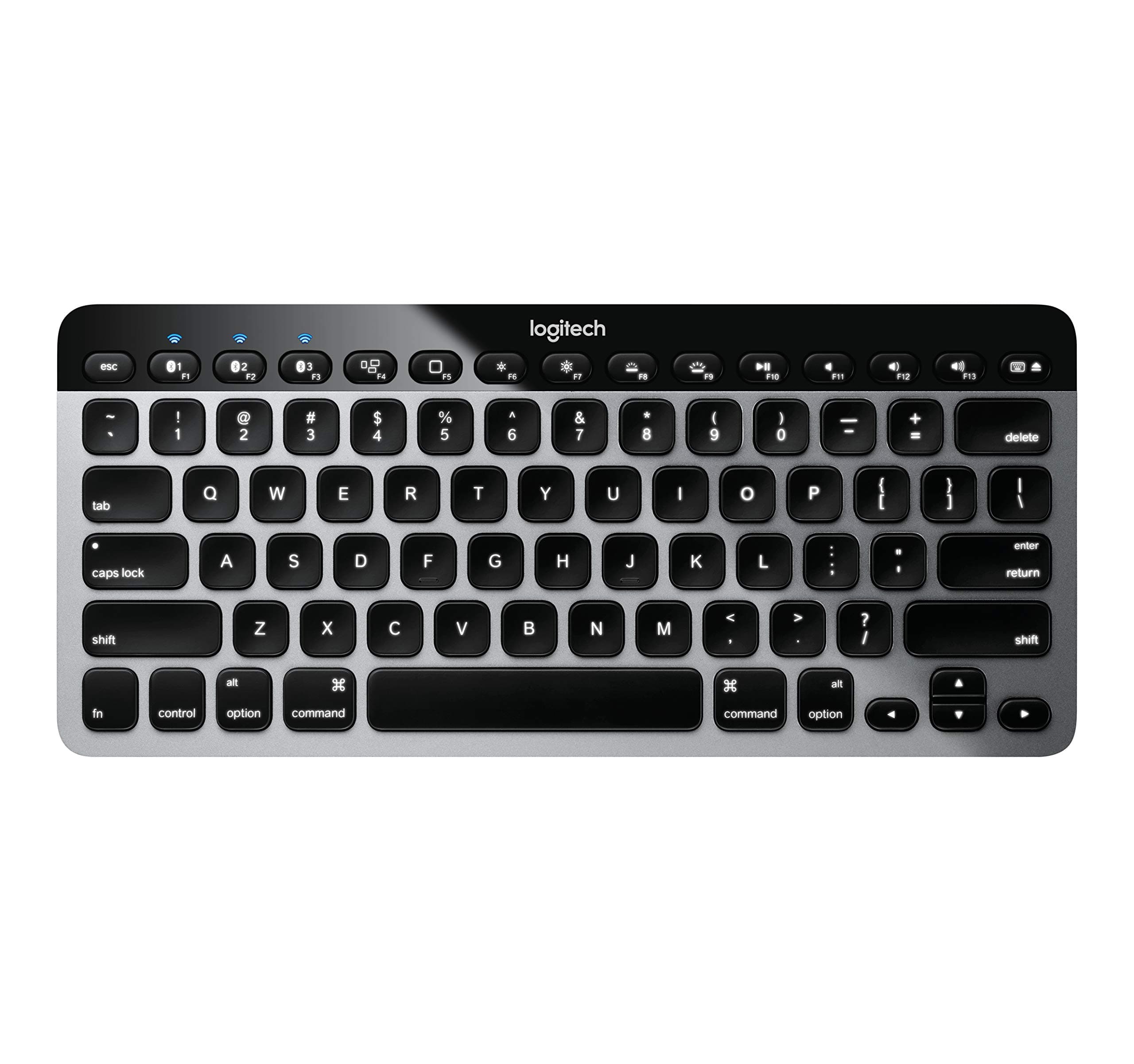



⌨️ Elevate your Apple setup with the keyboard that keeps pace with your multitasking life!
The Logitech Easy-Switch K811 is a sleek, rechargeable Bluetooth keyboard designed specifically for Mac, iPad, iPhone, and Apple TV users. Featuring seamless device switching, bright auto-adjusting backlit keys, and a premium aluminum finish, it offers a comfortable, whisper-quiet typing experience with up to 30 feet wireless range and a long-lasting battery that recharges via USB. Perfect for professionals who demand style, efficiency, and versatility in one compact package.
| ASIN | B0099SMFP2 |
| Additional Features | Bluetooth, Lighting, Wireless |
| Antenna Location | Office |
| Best Sellers Rank | #6,518 in Computer Keyboards |
| Brand | Logitech |
| Built-In Media | USB Cable |
| Button Quantity | 78 |
| Color | Silver |
| Compatible Devices | Mac with OS X 10.6.8 or later, iPad, iPad 2, iPad (3rd and 4th generation), iPad mini or iPhone with iOS 4.0 or later Compatible Devices Mac with OS X 10.6.8 or later, iPad, iPad 2, iPad (3rd and 4th generation), iPad mini or iPhone with iOS 4.0 or later See more |
| Connectivity Technology | Bluetooth |
| Customer Reviews | 4.1 out of 5 stars 1,377 Reviews |
| Enclosure Material | Plastic |
| Global Trade Identification Number | 00097855088390, 10097855088397 |
| Hand Orientation | Ambidextrous |
| Item Weight | 1 Pounds |
| Keyboard Backlighting Color Support | RGB |
| Keyboard Description | Wireless |
| Keyboard Layout | QWERTY |
| Language | English |
| Manufacturer | Logitech |
| Mechanical Keyboard Switch Model | Cherry MX Red |
| Model Name | Logitech Bluetooth Easy-Switch K811 Keyboard for Mac, iPad, iPhone - Silver/Black |
| Model Number | 920-004161 |
| Number of Sections | 3 |
| Power Source | USB Powered |
| Recommended Uses For Product | Office |
| Special Feature | Bluetooth, Lighting, Wireless |
| Style Name | Classic |
| Switch Type | Mechanical |
| Theme | modern design, Apple-compatible |
| UPC | 617407426984 012951721453 809394265466 803982742230 097855088390 066149096182 808112930112 804993513864 122440955822 606616206944 132017834078 163120900169 801721835922 |
| Unit Count | 1.0 Count |
| Water Resistance Level | Not Water Resistant |
G**Y
Whoa - they hit it out of the ballpark with this one
We 15-yr+ Mac users have been screaming for a dang backlit keyboard for years. Word on the street is Steve was about to fire the one Engineering VP that saw that ANY backlit keyboard was kept out of production. This same lady also prevented a backlit keyboard on the first MacBook Airs, most of which were returned for this reason. In fact, the time between the Air-1 and the Air-2 beat all records at Apple of only 3 months because of the non-backlit keyboard issue. Time between full design changes is usually 15 months at Apple. In any event, Steve didn't last long enough to toss this nepotistic (wife of a board member) idiot before he passed, so she's still there - and jokes around the office indicate she leads the Apple "Sales Prevention Team". She fights hi-res screens, backlit keyboards, thin bezels, and connectivity standards to this day. Seeing a huge opportunistic hole in Apple's marketing arrogance, Logitech quietly built this and had it on the market before anyone at Apple had a clue what they were doing. And as many others have done in the past, they beat Apple at their own game. This keyboard is the latest blockbuster to kick Apple in the but(t). First off it's designed by Americans, and as usual assembled in China. But Logitech rides herd on the Chinese to force quality assurance - a rare thing indeed. In order to be successful with Asian products nowadays, you've got to succeed at both good design and Chinese discipline. Logitech supposedly keeps an American QA engineer on-site, much to the aggravation of the Communist Chinese. The Chinese have an insatiable perversion for plastics, and a financial one for child labor. So to force them to keep to original design specs of aluminum was a real chore, believe me. The Chinese insisted this unit be made of the usual cheap injected plastics, but that was halted early on during initial tooling - and it remained a very high quality CNC'd aluminum. Again to the chagrin of the Chinese. There was even a design for Carbon Fiber, but that was dropped as the prototypes were just too light (and slightly more expensive). In any event that REALLY freaked out the plastics crowd so they settled on aluminum. The designers also put level 10 LEDs in the unit (the best quality diodes available), and put enough light channels and bulbs inside to light it well and uniformly. There's no dark areas, no gaps. And it'll go surprisingly bright if you want it to. They also put excellent proximity sensors in various spots on the top of the keyboard to turn on the lights even before you hand touches it. They also have a movement/inertia sensor that turns it on when picked up. The keys are solid, and feel like an Apple keyboard (which of course are mostly un-lit except for the MacBook Pro's). And to top it all off, they made it rechargeable with a *STANDARD* USB port. They used NiMH instead of NiCads. They brag the battery lasts 10 days of normal use (2-3 hrs/day), but I've found it lasts more like 3 weeks - 1 month and I'm a heavy user. It charges in about an hour unless it's really blinking red, then it'll take 2-3 hours. If I had a gripe about this unit is it's size. If you use it in your lap it's nearly impossible to keep it still while typing. It's the size of a standard MacBook Pro's keyboard, but the laptops have enough support around the sides to keep those keyboards still. So I use a laptop board while this unit connects to my iMac. If Logitech would have included a arrow/directional keypad with a numeric keypad, it would lengthen/widen the unit to where you could use it anywhere with stability. And, of course, you'd have a full keyboard as well. They could at least have put a mousepad out there or SOMEthing - anything to lengthen it. But watch - since this thing is selling faster than they can make them, I'll bet they'll build extended units with a touchpad and/or a numeric keypad within a few months. And if they can get enough power out of the new wave of solar panels, it may not even need charging once/month. So we'll watch to see - unlike Apple, one thing Logitech DOES do well is listen to the customer, especially when they comment by the tens of thousands about the same issue. In the meantime, find a desk or a laptop board to accommodate it's dinky size. But at least it's BACKLIT, Apple. I'm sitting in a dark room right now and I couldn't type this without the backlight on this keyboard. The only place you can use a non-backlit keyboard is in a well lit office. I know this infuriates you guys at Apple who are fuming that the customer won, but they're used to that. Thanks for a superior unit, Logitech. I'm waiting for a longer one, but in the meantime you beat Apple at their own game. I'd give this unit a 6 if Amazon would let me - every now and then a tech gadget comes out that just trumps everything - and this is it
W**.
Good alternative to my Mac keyboard,
Three year update: I'm still using this keyboard interchangeably with two MacBook Pros (2011 and 2017) and occasionally with my iPhone. Still works great. Holds a charge even when I don't turn if off and forget where I've left it for a month. I velcro'd it to 1/8" luan plywood, with a gel wrist rest. On the right side I have a 7"x7" area (same plywood, epoxy or urethane coating, buffed with steel wool so it's slick for using a wireless mouse. My attached mousing pad pivots closed so the whole thing fits in my day-bag. Just a terrific keyboard. Reliable. I can kick back and type with the keyboard in my lap or switch and use the new keyboard on the MacBook Pro. The distance between the keys is the same so there's no confusion. I've been having some shoulder issues lately and noticed that arm rests on my office chair, and typing on desk tops are uncomfortable or hurt. I noticed years ago that the arm rest in my car were uncomfortable. I wanted to get an ergonomic keyboard that I could use in my lap. For the Mac I didn't find any that I liked. This one has high customer reviews and it looks like the keyboard on my MacBook Pro..... The ergonomic keyboards I found had much longer movement of the keys. It was like going back in time. So I taped this one to a thin piece of plywood (9" x 18" mouse area to the right), found a tattered old wrist rest, and tried it out. Works Great! Absolutely no learning curve. I think I type at least as well using this in my lap starting this weekend as I've typed on various MacBook Pros for the past 8 years. Now when I type on the MacBook keyboard I notice it's just not comfortable. It's OK, but this is better. I really like this keyboard. They're about the same, so the difference is where the keyboard is sitting. It's also small enough, (5" x 11.5" 13 x 29 cm) that it's going in my computer bag. I'll figure out my board later. Another big plus is how easily it switches between my MacBook and my iPad. I've never before considered the iPad to be anything more than a toy. It's still a toy, but this keyboard makes it more useful. I've got other blue tooth devices that try to connect to everything at the same time and usually nothing most of the time. This absolutely works. Now Logitech, make one that splits in two so it can be more ergonomic. (Is there anyone who could cut one of these in two and solder wires to reconnect the circuit board shorts?) Update: How to turn off Caps Lock key Go to top bar, Bluetooth symbol Select Logitech K811 >> Open Key Board Preferences (this can aslo be reached by opening System Preferences, selecting Keyboard) In the Keyboard window, select the Modifier Keys button (bottom right) When this pops up at the top there's a button: Select Keyboard (the default is the computer's) click on this button and select Logitech K811 Then item Caps Lock Key, click on the button and choose menu item Do Nothing. Then OK, and close. That's it. Now the Caps Lock key does nothing, it won't even light up. Hope this helps. I personally loathe the caps lock key, I'd rather have an inverted thumbtack glued in its place. I've pried them off, hot glued them. Some manufacturers do not have this feature or knowledge. I added this because I sent another keyboard back because either it lacked this feature or I couldn't find it.
M**E
Better than Apple Keyboards
I have gotten to really appreciate the Easy-Switch as I find myself using it to move between my mac, ubuntu and my ipad and I really like its low profile and backlit keys. Some people may prefer the Apple Magic Keyboard, which is what I considered initially. However, if you examine them both, you will find that the Magic Keyboard lacks functionality when compared to the Easy-Switch. Both will work via USB or Bluetooth and are simple to pair.The Easy-Switch has a similar keyboard layout for the most part, but there are differences in the layout of the function keys. F1 - F3 are used to pair and move between 3 separate devices and there are 13 function keys vs 12 on the Magic Keyboard. Function key use on the 2 keyboards are different as well, so if you're used to an Apple keyboard, getting used to the Easy-Switch function key layout won't seem as natural at first, but you'll adapt very quickly. As I mentioned, keys F1 - F3 allow you to pair the keyboard with 3 separate devices which can be used simultaneously depending on the function key selected. and the keyboard has-auto adjusting backlighting. I have found myself working in the dark at times with just my monitors and keyboard illuminating my workspace. The keys are black and the backlighting illuminates the charters of each key. Some of the keys are not full size and might throw you off a bit at first, but I found that I adapted very quickly after the initial awkwardness. The battery life is fantastic and recharging is quick and simple using a USB cable plugged into your device or a USB plug. It's very lightweight and seems to have good range. I frequently find myself sitting the keyboard in my lap to use. The tactile feel of the keyboard is different than a typical keyboard, but I really liked the difference. The keys are firm to the touch and make very little noise which I would contribute to the fact that very little key pressure is necessary. The keys feel so much better than the keys on a typical keyboard. I find the keyboard very comfortable and easy on my wrists compared to using the keyboard on laptop. I would attribute much of this to the very low profile of the keyboard. The comfort factor alone makes the Easy-Switch worth it for me. I am not experiencing the wrist discomfort that I was experiencing using the keyboard on my laptop. While this keyboard has been specifically designed for the Apple Eco system, it works with other devices as well such as Windows devices. However, if you’re used to the typical Windows keyboard layout you’ll notice some definite differences which might require some getting used to. I have had this keyboard maybe 4 months now and have absolutely no complaints about the keyboard. I wish I would have purchased it sooner than I did. The only negative I have is that these have gone up quite a bit in price since I purchased mine.
D**N
This is the Keyboard Apple should have made but too fragile
Apple's keyboard looks great and looks durable, but I dropped one once and it never worked again due to the impact happening on the battery compartment. Also the lack of a definite off switch made it wake up in my bag. I switched to the Joy keyboard and it worked OK. This one though has a MUCH better feel for typing, it can connect to multiple devices at the touch of a button, and it is backlit. AND it has a good off switch so the iPad doesn't wake up in my bag when a key is jostled. Let me reiterate the feel. Apple's move to chicklet keys means that I get tiny little twinges of pain when I hit the keys while touch typing. I don't get that on a real keyboard with long throws and I don't get it on this keyboard either. There is a pretty short throw here, but there is a cushion of resistance on the keys that makes it feel better in typing. The keyboard is a bit larger than the others, but not too much to carry with the iPad. Also the keyboard doesn't tilt up as much as I like (as the Apple does). I have resorted to using rubber stick on bumpers mounted on the back of the keyboard so that it tilts upward a bit and I find this more comfortable. I did the same with the Joy keyboard. Really this keyboard is much superior to the wired Mac keyboards as well. Buy it and you may be spoiled for small portable bluetooth keyboards. UPDATE 12/2013. My second one of these keyboards has bit the dust from a very short drop to a hard floor. The first one had a similar drop which caused the plastic case to misalign. The second one's drop caused the electronics to go completely out. I've dropped my previous brand keyboard a few times and had no effect. This is a great keyboard if you treat it like glass. But it CANNOT TAKE ANY DROPS OR ROUGH TREATMENT AT ALL WITHOUT BREAKING, so beware. If you EVER drop your keyboard, don't buy this. Note that Logitech will NOT help you. Seriously either buy a case to keep it in or a better engineered keyboard. If you do buy it, treat it like it's made of crystal. I have reluctantly ordered a different brand. I just can't afford to keep buying new ones. UPDATE 4/1/2020 My last remaining one is going strong after a repair by a friend. I keep it in it's padded case and am very careful. It's bluetooth pairing is flawless. It's working perfectly and it's the best feel for any portable keyboard I've bought (and I've bought a fair number). It's nearly as good as the dasKeyboard mechanical wired keyboard I bought for my Mac. It's really amazing ... just don't drop it or carry it out of a case. It seems like Logitech's modern portables are just a lot more cheaply constructed than this one feels.
N**E
My new favorite keyboard
I've basically insisted on using Apple keyboards since they started producing the chiclet-style keyboards. Anything I had to type on regularly wound up with one attached. I'm particular about my keyboards, and the short-throw and solid feel of those devices helped reduce fatigue after a day full of 90+ wpm typing. I happily was using the Apple BT keyboard on my home machine until my new job provided me with a macbook pro identical to my personal computer, and I didn't want to deal with switching to the corded Apple keyboard plugged into my cinema display (and moving my mouse further away from where it normally is - I do a *lot* of computer work and these repetitive things matter), or with having to re-pair the BT keyboard each time I wanted switch laptops, or with having to have two keyboards. I looked and looked for a wired chiclet keyboard without a number pad but couldn't find one that looked of good quality, so I decided to give this a try. Let me just say, that as a many-hour-a-day, fairly fast typist, this thing has a better feel than the Apple keyboards. It's not massively better, but when you type it feels like it connects more at the bottom of the key-press. It's a subtle thing, and perhaps not all may agree, but it's a happy medium between this style of keyboard and the solid feel of the mechanical keyboards. Perhaps the most important thing to take away from this statement that it is subtle. Even if you find the Apple a little better than this one in terms of feel, it's probably not something you would mind too much if you desired the functionality. And what nice functionality that is. Switching between three devices (two macbook pros and my Nexus 7 tablet, the latter mostly to see if it worked), happens quickly and easily. They keyboard light is nice, even for a touch-typist that doesn't strictly need it, and is easily turned off. There's no real inconvenience if it runs out of power, since it operates plugged in just as well. My only complaint is that I wish the BT device switch wasn't the primary function of the F1-F3 keys. It's a little too easy to switch, and it's not something that I can imagine anyone having to do so often that the function wouldn't be better served by having separate buttons elsewhere on the device, or a button similar to the "fn" button, to toggle just that functionality. That said, the switching is fast - I've hit it on accident while playing games, and usually managed to have it switched back long before I finish swearing about having hit the button at an inconvenient moment. All-in-all and excellent keyboard, with no serious complaints. I'd buy another if this one broke.
A**B
Great keyboard WHEN it works. Wouldn't do another BT keyboard
I've only been using this keyboard for about a week now, but I go through keyboards quickly and was very skeptical about the positive reviews on this one. I was using an Amazon "standard" full-sized keyboard and mouse (both wired), after having gone through six Logitec and Microsoft keyboard/mouse pairs in the past 2-3 years. Like most, I'd rather not have wires cluttering up my desk so I prefer either IR-dongle keyboards or Bluetooth keyboards. I got sick of the dongles taking up precious USB ports or getting lost when they're removed to access the ports, or the requirement for a USB expander sticking out of my computer... Enter Bluetooth. My biggest problem with most Bluetooth keyboards is that they cut off (supposedly to conserve power) when they're not used for a few minutes. If you're doing a project, this is supremely annoying as you have to wait for a reconnect before you can resume inputting into your computer. This Logitech Bluetooth keyboard (K811) is outstanding, though--in ways I hadn't even anticipated. First, although the keys aren't as comfortable to type on as Apple and old-school IBM keyboards are (personal taste), they're satisfying and "work." Typing is a tad cramped for my average-sized hands, but I think I'll get used to this. What I really like: (1) keyboard is not only backlit, but the lighting activates when your hand approaches the keyboard and then turns off if you're away from the keyboard; (2) the keyboard is easy to pair; I HATE Bluetooth pairing problems--massive PITA and not worth my time; I'd rather return/not buy a Bluetooth device that has any pairing problems ever; (3) the keyboard ALWAYS reconnects INSTANTLY (or maybe it never disconnects). I'm just getting back from a trip to another city and just touched my keyboard to enter my password and the computer woke out of sleep INSTANTLY to accept my typed input. And no matter what other tasks I do during the day as I'm working, the keyboard is always ready for me to type on--no annoying delays. Something else I really like about this keyboard: its compact size. I can take this keyboard with me anywhere. It's only slightly larger than all my grotesquely annoying disconnect-wait-for-reconnect mobile keyboard--all which I'm recycling. I'd give them away, but there's no one I dislike enough to burden them with the constant disconnect. Anyway, I rarely give 5-star reviews, and, yes, there are a couple things I wish were different about this keyboard, but given the Apple version is NOT backlit (come on, it's 2017...) AND connects to only one computer at a time; and given this Logitech (K811) has not once left me hanging as I'm ready to type, this keyboard is my favorite I've ever used. EVER. I don't gift electronics, but if I were going to choose a device to gift someone, it'd be this keyboard. Happy typing! UPDATE February 2018 It's been about a year since I bought this keyboard. I've now downgraded my 5-star review to a 3-star review. I use the keyboard with a 2014 Macbook Pro & a 2017 Macbook. It works flawlessly on the Macbook but no longer works at all on the Macbook Pro. It's been so frustrating that I purchased an old school USB connected keyboard for the MBP which is my main work computer. I loathe Bluetooth technology. It's fickle, unreliable. I don't like wasting my time when I've got projects to do scouring the Internet for POSSIBLE BT connection solutions. After reading hundreds of Apple & Logitech BT posts, I just gave up. NOTHING helped. Worse, the keyboard would connect randomly to my MBP then disconnect. I'm glad I can use it with my Macbook, but the Macbook is so small I'm not interested in setting it up as a work computer. So... now I have a useless Logitech BT keyboard & a giant click-clack NON-backlit traditional keyboard that's useless half of the day (evening when I'd need a bright light to see unfamiliar keys as I work at home...). And these BT keyboards aren't cheap. Anyone want to buy a used Logitech K811 BT keyboard?
K**I
The keyboard Apple SHOULD have made
This is a fantastic keyboard. I come from a PC background but have used macs for the last several years. I find that Apple created some of the best keyboards around, including the bluetooth Apple keyboard, which I also own. However, what makes this one some much better are a few features that should have been on the official Apple keyboard: 1. Backlit keyboard: this is a must when you work into the night and don't want to turn on the lights! It has the same glow as macbooks do which looks really nice, without the light bleed that you might find on cheaper constructed products. 2. USB Charging: The battery life on this is fantastic, witch almost 14 days of daily use. When you need to charge it, all you need to do is blog the usb cable. The cable itself is well constructed and the fact that you don't need AA batteries is a huge feature. 3. Multiple Bluetooth Connections: As someone who is heavily in the Apple "ecosystem" , this has come in really handy. I have this keyboard connected to my laptop, so I can type through a monitor, and also connected to my phone, which I have displayed on my desk as well. It toggle between the different devices quickly and is recognized almost instantly. Saves me so much time when I need to type a caption for my instagram :) 4. Design: This keyboard just looks amazing. It matches most of the Apple product lines with its black "glass" and keys. The grey also matches very closely with the aluminum used on the macs, macbooks, etc. Overall, the best Apple keyboard you can get!
E**L
Great Keyboard - Just don't expect it to last too long
Facts are as follows: - I purchased this item on 27 December 2014. - Various keys began to become intermittently unresponsive around 13 April 2014. - the "P" key complete broke and fell off on Friday, 25 April 2014. - I went back to my Apple wireless keyboard on the 26th of April. - Usage: this thing never left my desk in it's short life. Not once (not even too my lap). It was not abused, not spilled upon, not dropped, not otherwise neglected or ham handed. Average usage is 40 hr work week. Factoring in shipping, WolframAlpha tells me this is 79 business days. Given that I travel about 25% of the time (i.e. no keyboard use) and use it lightly for web surfing on the weekends, we'll call it a wash at 632 hours. That's it. Conversely, I used my Apple keyboard for years. Literally. Opinions: - When it worked, the keyboard was pretty good. I'd say great, in fact. My touch typing was faster and gentler than on the Apple. - The shaped/formed keys are better than Apple's chicklets. - The shallower angle is better than Apple's. - The aesthetics are better than Apple's. - The backlight is better than Apple's. ITS AWESOME. - Other reviews mention "flexing." Using it on a desk, I had none. Complaints: - Well, it broke. That sucks. - There is no iTunes Skip Forward/Skip Reverse keys. Annoying at most (almost a deal killer at first, but I adjusted. Albeit reluctantly. In fact, in moving back to the Apple keyboard, it's nice to have them back). - I expected better longevity. 79 business days and I never had a chance to sync it to my iPad (which I got after the keyboard, to be fair) or my iPhone (which I didn't see the point, initially). Overall, this was a great idea/concept, with a half-assed build quality and shortsighted implementation. Why shortsighted? Because Logitech could have EASILY added a 50% markup for a bluetooth keyboard of better build quality with the ability to pair a mouse/trackpad TO the keyboard. This would allow the F1-3 keys to act in tandem for mouse/keyboard switching BETWEEN MACS!!! I can kinda do this with Synergy, but without this feature, it's currently nothing more than a gimmick. I mean really, at a desk, how hard is it to either a) grab a dedicated keyboard for this or b) dictate to Siri. It's not - given that most times I'm reaching for either one of those devices, I am mobile (hence the purpose of the products). All of this said: I'll probably buy another one and keep this one for parts (yes, this is incredibly lame). I work often with my office artificially dark, and/or at night naturally dark. The keys being lit is the primary feature. However, the nanosecond I find another 1) bluetooth 2) backlit 3) keyboard without the numberpad, I am gone. And yes, the F1-3 switching, in it's current state would not be enough to keep me. I hope this helps. Happy Hunting. Cheers. [bh] ############## UPDATE ############## On a chance, since this thing was not very old, I contacted Logitech support via email. I had little faith that I would get anywhere for such a seemingly little item (one key that keeps popping off). They contacted me (again via email) asking for additional info. I explained what happened, sent a photo and asked for them to send me a key pack so that I can replace the key myself. They politely declined; however, since this keyboard was still under warranty, they replaced it if I sent them my receipt - for free, no shipping nonsense, no hassles, no fuss. I didn't quite believe it; however, about a week later I got a new keyboard. Best part, they said keep the old one. While I did say above that there was problems in my initial review that "weren't enough to keep me," Logitech the organization rose above this to keep me as a customer. The kicker to this whole story? I didn't tell them I wrote this review - they did the right thing without being shamed into it. You gotta respect that.
Trustpilot
Hace 2 meses
Hace 1 mes