We remain fully operational. Our teams are working around the clock to ensure your deliveries continue safely.

Descargar la aplicación


Servicios al cliente
Sobre nosotros
Copyright © 2025 Desertcart Holdings Limited
Descargar la aplicación
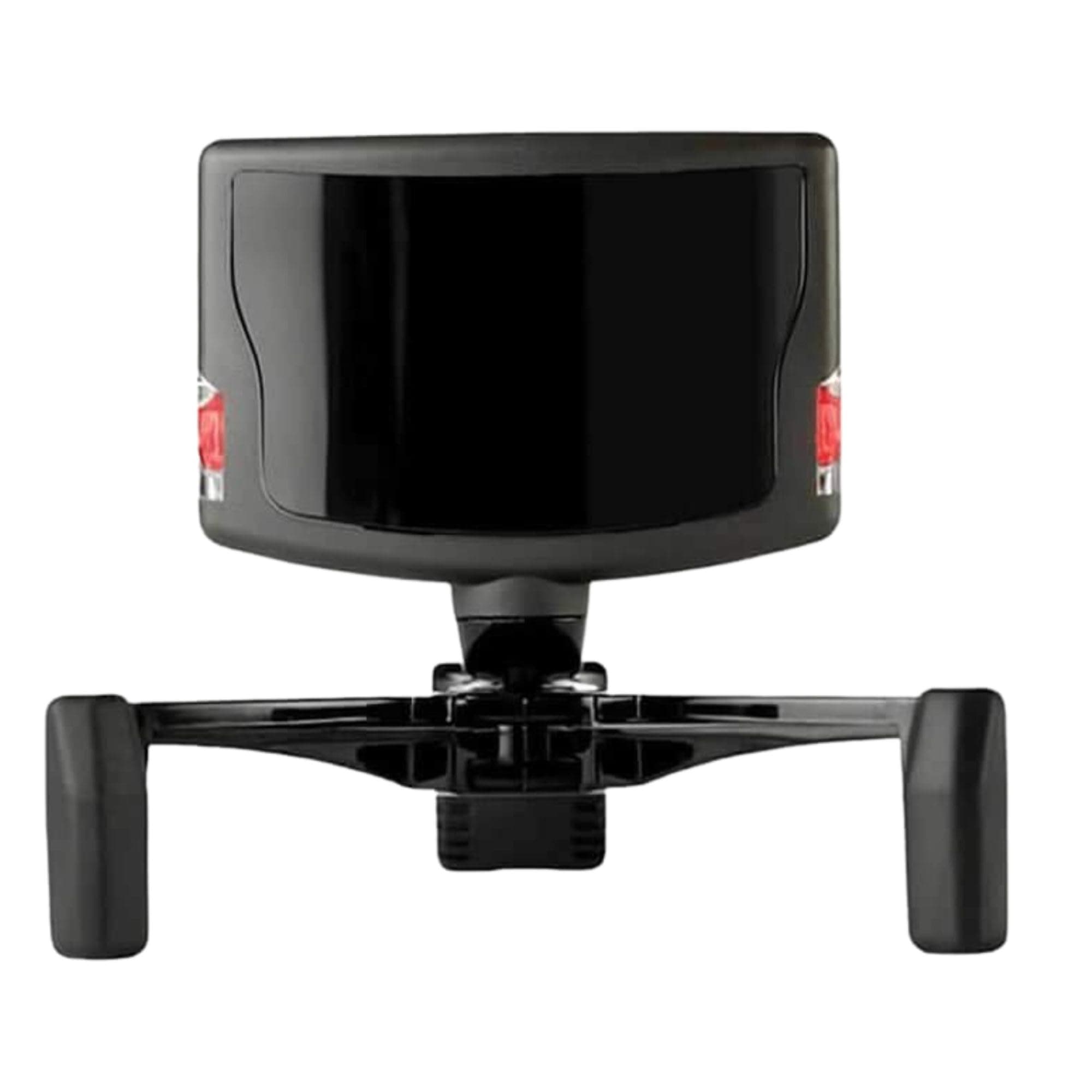
🎯 Level up your game view — don’t just play, live it!
The TrackIR 5 Head Tracking System delivers precise 6DOF motion tracking via a high-precision USB optical sensor, enabling natural head movement control in supported PC games and simulators. Its customizable software profiles and easy magnetic mount make setup and tuning effortless, while compatibility with Windows and popular simulation titles ensures immersive, low-latency gameplay that transforms your gaming experience.
| ASIN | B0029M6VKA |
| Additional Features | Accelerometer |
| Best Sellers Rank | #4,007 in Video Games ( See Top 100 in Video Games ) #233 in PC Game Controllers |
| Brand | TrackIR |
| Built-In Media | TrackIR 5 hardware, TrackClip, quick start guide (English language not guaranteed). Not in English) |
| Compatible Devices | Windows Vista or newer |
| Connectivity Technology | USB |
| Customer Reviews | 4.3 4.3 out of 5 stars (1,925) |
| Enclosure Material | Plastic |
| Global Trade Identification Number | 00895542000317 |
| Item Dimensions | 8.82 x 7.4 x 2.13 inches |
| Item Weight | 0.15 Pounds |
| Manufacturer | Natural Point |
| Mfr Part Number | 10969 |
| Model Number | 92994 |
| Smart Home Compatibility | Not Smart Home Compatible |
| Specific Uses For Product | gaming |
| Supported Application | Windows Applications, TrackIR Tracking Software |
| UPC | 895542000317 795971978570 |
| Unit Count | 1.0 Count |
| Warranty Description | 1 year |
M**O
Definetly a must have gaming accessory
This is a pretty neat gaming device once you get used to using it and spend time tuning it for your games. Boxing and hooking it up is easy. The USB cable is long enough that it can run from the sensor atop my monitor to the tower on my floor when I have my standing desk all the way up. The hat clip is fine too. I keep an old hat on my desk. First use is just getting used to using the software and seeing the results on screen. I watched some Youtube videos to understand the configuration options. I play mostly racing games, so I fired up Grid Autosport and went for a drive. The first thing to notice is that the default setting may be way too sensitive. A slight movement of your head translates into really big movements in game. I looked down to the wheel and I'm no longer looking out the window. I look slightly left on the monitor and I'm looking over my shoulder in the game. I messed with the settings and tuned them way down which made it far better in a racing game. The more radical movements are better when having a 360 degree view is useful such as in X-Plane or Microsoft Flight Simulator. You can set it up so that the in-game movement is amplified the more you turn your head in real life. You should be able to turn your had 1/8th of a turn IRL and look behind you in the game. It's all about tuning the curves so that it's not twitchy with little movements but helps with bigger ones. Once you get it, it's fun being able to look around easily. I can't wait to try it in a flight combat sim. Using it takes some retraining and I got the hang of it after maybe 10 hours in. While driving in real life, I naturally look to where I want to go. The view usually isn't far enough out that I can't see from my peripheral vision. In the game, I wanted to same effect so that I can see the corners and other cars while driving. Without the sense of motion, keeping the car in the right motion while turning the view is tricky at first. I continually turned the wheel less because I the view was turned more. I had to learn to pay attention to the visual clues of the direction of travel in the view compared to where I wanted to go. If the scenery was sliding by, I was either turning or looking sideways and I'd want to align the motion front to back. If the scenery was passing straight back, I was going and looking straight. 3 things to be aware of: I find I have to calibrate it often. This isn't a big deal in game but I have to remember to pick my moments such as not during a tricky corner, when passing, or other cases where I am occupied. When racing, I find I need to calibrate once a lap. The view becomes "off" and I seem to be looking askew. I mapped a button on my wheel to recalibrate so when I get a chance, I center my head and calibrate which takes affect either immediately or within a second. You can't have a bright window or light source behind you. It's winter here and the snow is on the ground. The reflections makes if very bright on my office and if I don't darken the office, the sensor is useless. I supposed the Pro attachment might help but I'm not that bothered by it. Not all games are supported and that's a drag. I did review the list of games on Natural Point's site and most of my games are supported, but not all. Don't be surprised check the list before you buy.
W**N
I'm Trackin'. You Trackin'?
Looking up TrackIR year back, and having used FreeCamNoIR for a while with just a webcam, it was exciting to try out an official TrackIR product. After getting it setup and using it for a while now, here's my takeaway! What You Get: In the package is the TrackIR Camera, a plastic bar made to fit on a baseball cap with the three reflective 'trackers' affixed to it, a small adjustable magnetic mount that you place the TrackIR Camera on and can then place on top of your TV or whatnot, and the usual promotional/instructions paper stuff. Programming: After downloading the drivers and software from TrackIR's website and getting everything plugged in, I gave the software a go. It's a handy tool that lets you preview movement in a 3D sphere and adjust some settings to your liking (turning range/sensitivity). There's profiles you can use or create for more settings, but I haven't done that yet. You might want to look into that first thing, as there's an 'auto-center snap' feature that means when you're looking close to dead-on wherever your center point is, the TrackIR feature won't turn your view until you move far enough outside of the deadzone. The size of the deadzone, for me at least, is small enough that I am at least aware of where my 'center' is at all times, but big enough where it's always a distraction to have my in-game-view suddenly snap whe I don't want it to--or where I have to turn my head further than I normally would, just to 'escape' the deadzone. Take this paragraph for what it's worth in my opinion: software good, but be prepared to look into changing deadzones if that's going to be a distraction for you. However, the head tracking itself is pretty darn good. There's no, or at least, very little latency--your head movement will move your view in real-time, and being able to look around in ARMA or Elite Dangerous is a pretty sweet experience! It is well implemented and functional, and that's definitely a good thing! When it comes to what games are supported, it depends. Obviously, simuation games like ARMA, Flight Simulator X, XPlane, Elite Dangerous etcetera, are going to have built-in support. Getting TrackIR working in those games was as simple as checking a box labeled "Enable TrackIR", and in Elite Dangerous' case TrackIR was working as soon as I started the game. And in ARMA 3, at least, TrackIR movement was interpreted as joystic movement--if that holds true for other games, you could probably use TrackIR inputs for other games as well--but that's just me speculating. All in all, I'm pretty satisfied with this. Fun stuff!
J**E
El track ir perfecto. No trae el track clip pro, sino el cacharrito metálico para montar en una gorra o los cascos (lo digo por si alguien no lo tiene claro). El funcionamiento, perfecto. Es el segundo que tengo, ya que antes tenía el track ir 4, que vendí hace algún tiempo. En cuanto a la entrega por parte de DHL, la hicieron dentro del plazo previsto, pero podría haber llegado mucho antes, ya que cometieron varios errores de clasificación del envío. Recogieron el paquete en Alemania el 29 de diciembre, y tenía que venir a España por transporte terrestre. El recorrido que hizo fue: Alemania, Lyon (Francia), Bruselas (Bélgica) (?!), Oslo (Noruega) (???!!!), de nuevo Bruselas, Barcelona, Coruña, y finalmente mi casa el 9 de enero. No ha llegado a tiempo para reyes (debido al viaje turístico que se hizo el paquete por el norte de Europa), pero al menos ya lo tengo...
C**N
Fonctionnel et simple à configurer. Seul inconvénient port obligatoire de la casquette avec les reflecteurs
S**N
I tried FacetrackNoIR for a few hours, thought it was really cool and gave me a taste of what headtracking would be like. But it was jittery and just not anywhere close to the level of precision I wanted. Ordered TrackIR5 a few days later after debating whether it would be worth the price and I'm happy to say I have absoloutly no regrets. I'm just using the basic trackclip that came with the product on a hat. Curves were solid out of the box and only needed like 10 seconds of tweeking on the Y-axis for me to work as I wanted. You're paying for the solid plug-and-play software just as much as you are the hardware itself. I've been using it with FSX;SE and the Chaseplane camera addon. Practicing GA patternwork has become a million times better now and just tracking your turn out on to final with your head feels amazing. In additon, I can look down to quickly access buttons and switches that before required me to hit buttons on my keyboard to swap to pre-set camera angles. If anything I just wish the mount was better suited for my laptop's thin screen. It works fine but is a tiny bit loose as it was designed for thicker bulkier monitors. It's sits okay but only at its most extreme position. Luckily the mount is magnetized and independent of the actual IR sensor / blaster meaning I can likely 3D print a new mount for my laptop or something. Otherwise tracks great, easy setup. Solid precision and absoloutly 0 un-wanted jitter or head movement out of the box. I suggest you try FacetrackNoIR to get a sense of what head tracking is and then purchase TrackIR after. It'll totally change the way you sim. Here are hopes we get TIR5 support for Flight Simulator 2020. For me its a far better solution than VR as I still get to run the sim at 1080p without it looking blurry like in VR (for me that also means less motion sickness). And overall significantly less money. I'd 100% recommend this product if you take sims even remotely seriously.
G**G
Der TrackIR 5 (in der passiven Ausstattung ohne aktive LEDs) ist bei mir seit ca. 6 Monaten im Einsatz für FSX und vor allem X-Plane (Flugsimulation). Die Treibersoftware ist einfach zu bedienen, läuft stabil (hier: Win7 64 bit) und es ist möglich, die Einstellungen durch einfachen Wechsel (Alt-Tab) oder mit frei definierbaren Hotkeys interaktiv anzupassen, ohne die Programme jedes mal neu starten zu müssen. Die Integration in die Programme ist gut, das Tracking auch bei normaler Raumbeleuchtung präzise und es wird trotz Echtzeitverarbeitung keine nennenswerte CPU-Leistung vom Rechner abgefordert (in diesem Fall ein Core i7 3770). Ich habe mich früher beruflich u. a. mit sehr hochwertigen Trackingsystemen beschäftigt und bin beeindruckt, was hier ganz leicht aussieht und verlässlich funktioniert. Handling: bisher musste der Blickwinkel immer von Hand eingestellt werden, mit dem TrackIR geht das alles nach kurzer Zeit intuitiv und man akzeptiert ihn wie selbstverständlich. Kleiner Nachteil: nach dem ersten Einsatz war mir erstmal etwas übel, die Diskrepanz zwischen leichter Kopfbewegung, großem Drehwinkel im Bild verbunden mit einem schwankenden Helikopter brachte mein visuelles System gründlich durcheinander. :-) Ich würde deshalb langsam anfangen und mit nur einigen Minuten Betrieb beginnen. Nach kurzer Eingewöhnung war aber alles problemlos und ich möchte nicht mehr darauf verzichten. Die Verarbeitung ist eher leichtgewichtig und sauber, EUR 140 empfinde ich durchaus als angemessen. Wer sich für "echtes" VFR-Feeling interessiert, bekommt die Möglichkeit, sich einmal von den Instrumenten zu lösen und virtuell nach draußen zu schauen. Klare Kaufempfehlung,
K**N
Excellent product. Bought it for using with Elite:Dangerous and it has transformed the game. Coupled with a hotas controller setup, this is the only way to get the best from Elite in my mind. I've heard people saying the Track Clip Pro is flimsy and doesn't work very well compared to the Track Clip used on a cap. I've tried both and can safely say that the Pro is superb and I have had no issues with it, nor does it feel like I could break it easily unless I grabbed at it aggressively. The only downside is that the Pro needs to fit to your headset, so there isn't the option to not used headphones when gaming. To be honest, I always wear a headset so it's no big issue for me. Can take a bit of getting used to, but after a week or so it becomes second nature. The added bonus is that it supports so many other games I have too. I also use Flight Sim and have done for years, but haven't yet tried TIR with it yet, so can't comment - but I have only ever heard good things about it. I just can't stop playing Elite, so haven't had the time! I expect using it with FSX addons like the PMDG NGX must be great though and hope to try it out soon. A few tips: Make sure you have enough room above your monitor for the camera to sit on. I had to remove a shelf that sat above my monitor to make room for it. Give yourself about 10cm and you should be fine. If using it for Elite, download a good Elite profile to use with it. Search the net and you will find them. Also try combining this with Voice Attack (http://www.voiceattack.com) and ED Voice Pack (http://www.elitedangerousvoicepack.com) and you will have the ultimate setup for Elite. Controlling your ship with voice commands is superb!
Trustpilot
Hace 2 semanas
Hace 1 semana