We remain fully operational. Our teams are working around the clock to ensure your deliveries continue safely.

Descargar la aplicación


Servicios al cliente
Sobre nosotros
Copyright © 2025 Desertcart Holdings Limited
Descargar la aplicación

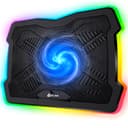



❄️ Stay Cool, Work Smart, Game Hard — The Ultimate Laptop Chill Partner
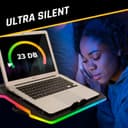
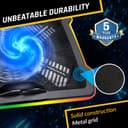
The KLIM Ultimate is a premium USB-powered laptop cooling pad featuring a large 200mm fan running at 750 RPM for efficient heat dissipation. It offers customizable RGB lighting with 7 colors and 5 effects, four adjustable tilt angles for ergonomic comfort, and a durable metal grid build. Compatible with laptops up to 17 inches (and stable for 19-inch models), it ensures silent operation and long-lasting performance. Supported by a 5-year warranty and risk-free return policy, it’s designed to extend your laptop’s lifespan and enhance productivity and gaming experiences.


| ASIN | B07NNQXTQT |
| Best Sellers Rank | 49,404 in Computers & Accessories ( See Top 100 in Computers & Accessories ) 85 in Laptop Cooling Pads |
| Brand | KLIM |
| Brand Name | KLIM |
| Colour | Black |
| Cooling Method | Air |
| Cooling method | Air |
| Customer Reviews | 4.5 out of 5 stars 6,014 Reviews |
| EU Spare Part Availability Duration | 5 Years |
| Enclosure Material | Acrylonitrile Butadiene Styrene (ABS), Metal |
| Item Dimensions L x W x H | 42.5L x 31.5W x 4.3H centimetres |
| Item Weight | 0.98 Kilograms |
| Item weight | 0.98 Kilograms |
| Manufacturer | KLIM |
| Material | Acrylonitrile Butadiene Styrene (ABS), Metal |
| Product dimensions | 42.5L x 31.5W x 4.3H centimetres |
J**N
Doing a good job
My laptop is 17 inch - it has AMD Ryzen 9 3900 12 Core CPU / NVIDIA GeForce RTX 2070. It's used mostly for web development, graphics (adobe CC) and a bit of warcraft but lately I've wanted to do some video editing on Premierepro and found it was getting too hot and shutting down. I tried cleaning it all out for dust but there wasn't much inside and still afterwards, there was a lot of heat, especially on the right hand side where I suspected the internal fan either wasn't working or not doing an awful lot. I had an N11 Tecknet cooling pad but it just didn't seem to be blowing out much cool air. So I bought this having watched Tech Tyrial's very helpful review on Youtube. From the comments it looks like he used the Mistral initially (I didn't fancy that because of the noise) but had some probs and moved on to the Klim Ultimate. It's a sturdy cooling pan and has a nice height adjustable feature. The lights are of course a nice bonus. It also arrives very nicely packaged. It plugs into the laptop via USB. It's nice and quiet even on the highest setting. I've had it just a day but I've noticed an immediate improvement. I've been able to run Premiere Pro and happily edit for hours with no shut down. I'm positioning the cooling pad a bit to one side so the big fan is blasting right under the warmest side. I'm using coretemp - temps seem cooler - I'd say about 10 degrees lower roughly - usually it climbs into the high nineties and then shuts out. So, so far a great purchase, I'm very happy. Obviously I can't comment on durability as I've only just started using it.
G**Y
Looks great: Works great
I needed this for my HP Omen gaming laptop. I wanted an easily-adjustable unit with a quiet fan & some nice gizmo lighting. This was the choice, & a very good one too. The Omen gets hot quickly, but the KLIM keeps it a lot cooler. It's silent enough to be unobtrusive & the laptop sits very well on it. I love the lighting: it adds a bit of class to the whole set-up & it's easily adjustable too, with 4 settings for tilt. The fan has a speed controller, but I keep mine on high as it's so quiet & keeps the Omen cool during gaming. I use power from an external USB 3 hub, which is mains-powered, although it could be plugged into a port on your laptop. The KLIM has a great build quality & a reassuring feel to it. The value is excellent: I paid under £30 for mine & I hope to use it for a very long time.
N**L
The large single fan is great for keeping temps down and being whisper quiet.
I purchased this laptop cooling stand based upon the amount of positive reviews it received. This particular cooling stand is more expensive than most of the cooling stands available on Amazon and i wanted something that would last and cool my laptop well. Out of the box, the stand feels very well built and sturdy. You definitely feel you are getting what you have payed for. The large single fan is great for keeping temps down and being whisper quiet. I have purchased several stands before this one and you would think having more fans would do a better job but that simply isn't the case, as my last stand had three fans but it was loud and didn't keep my temps as low as this stand. I also have to mention how good the RGB lighting is! It has a few preset modes and it looks great! Definitely worth the purchase.
V**Z
Good cooling pad for MSI GS66 Stealth
So I bought this cooling pad for my GS66 stealth (i7 & 2060 config.), not because it did not stay cool (it did, when turning 'cooler boost' on), but because it was relatively loud. With cooler boost, I can play Doom Eternal (ultra/nightmare settings) hitting about 75C (no cooling pad) average or about 71C (with cooling pad). It is worth mentioning, that turning the cooling pad's fan on/off made almost no difference here, so it was mostly the raising and allowance for better air flow that made the difference. However, WITHOUT cooler boost, I easily hit the 90-95C cap, while with cooling pad, it went down to an average of 85C (spikes to 90 happened occasionally, but really negliable). So, with cooling pad, I can comfortably play without thermal throtteling, reasonable temperatures and reasonable sound (fan noise from Laptop not cooling pad, the pad is almost silent). This trend was roughly observable throughout all games (Doom just being the reference of choice) RGB COLOURS: The pad has 6 different modes: Rainbows moving around the pad, RGB cycling (strip in one colour and cycling through the spectrum), Slow blinking, Fast blinking, Steady, Off. Slow and fast blinking have the colours: Teal, Blue, White, Purple, Red, Yellow, Green. Steady has the colours: Blue, White, Green, Red. Yes, steady does not have teal, purple, and yellow (which is a bummer, hence only 4 of 5 stars, would've loved all choices for steady. Also, I could nowhere find any information on which colour options/colours are available so I took the gamble when buying and feel like there should be a bit more transparency).
H**N
KLIM Laptop Cooler Stand
I don't often write reviews but I have to say I am pleasantly surprised at how effective the cooling element of this product is. I am a video DJ and use it to elevate my laptop to the first stage angle which I feel is right for me (see photo, it bit messy as I was just setting up for a party evening but thought I'd let you see it) When in full flow my machine does get hot with the resources I use including encoding videos while downloading songs I don't have following a song request while I'm simultaneously running 2 projector screens and it's noticeably cooler. Regarding the colour effects around the edge of the unit, there are 7 colours in either static of moving effects if you wish. I prefer the static blue which gives a nice glow effect but you can choose lots of other configurations such as strobe and running effects, too distracting for me but makes the stand very versatile. I'm really pleased with the quality of this product particularly the cooling effectiveness but also looks great.
M**I
The best tech investment
Wish I could give you 10 stars Klim for such a fantastic product you made. High quality build, extremely bright RGB, a huge and powerful fan which makes my gaming laptop cool in a few mins. I am soo impressed by how it increases the performance of my Asus Tuf gaming laptop. normally I observe 10-15 fps increase using this device. The only problem might be the noise. I use headphones all the time and I also play in my room so no problem at all for me but that’s something to consider. Overall, absolutely fantastic product!
A**R
Keeps my laptop cool during heavy use and hot weather
I bought this item as my laptop would sometimes overheat during periods of heavy use and hot weather. Since buying this item, I have not had any overheating issues. The fan itself is quiet, barely noticeable unless you're actively listening for it, even at max speed. My 13" laptop sits very nicely on the tray. I think 17" laptops might have some overhang either side. The 4 adjustable angles are useful: I like the second notch, which is at around a 40 degree angle. There is a plastic flap at the front to keep the laptop from sliding off. This seems fine for my lightweight laptop, but I'm not sure how this would cope with a heavier laptop. The LEDs are pretty snazzy with 6 different modes (including turned off). The item is expensive for what it is, but it does the job for me.
A**H
I really wanted this to work...
I'll start with the positives; the build quality appears to be good, it's relatively quiet and the RGB lighting definitely adds something to my gaming setup. In terms of performance, I’m actually really disappointed. I wasn’t expecting miracles, but after some comprehensive benchmarking and comparisons I’ve concluded that it has not made any difference whatsoever to my temps. To be clear, elevating your laptop with a stand like this will almost certainly be an improvement from having it running flat on a desk. For some context, its worth mentioning that I was already using a cheap “Kingston Easy Riser” laptop stand before making this purchase, but that doesn’t have a fan and isn’t aimed at the gaming market. My test scenarios all involved running Haven (a benchmarking tool) at max settings and monitoring the GPU and CPU temps throughout. This is what I tried: - Kingston Easy Riser laptop stand (no fan) - KLIM stand with the fan turned off - KLIM stand with the fan on max After each test, I confirmed that the ambient temperature of the room was the same, and that the CPU/GPU had cooled back down to idle temps before moving onto the next. I then repeated x3. In all tests, the minimum, maximum and average temperatures were all pretty much identical (within 0.5°C). Bizarrely, the KLIM with the fan on max actually performed the worst here, but it wasn't a clear enough margin to be conclusive. If you don’t currently elevate your laptop, and you want to add some RGB to your setup then this will do the job. However, I believe that the fan is honestly nothing more than a gimmick. After seeing the reviews, and claims of "up to 20°C difference" I really expected a bit more. My setup: Lenovo Legion 5 Core (15.6 Inch) i7-11800H16GB RTX 3070
Trustpilot
Hace 3 semanas
Hace 1 semana