
Descargar la aplicación


Servicios al cliente
Sobre nosotros
Copyright © 2025 Desertcart Holdings Limited
Descargar la aplicación
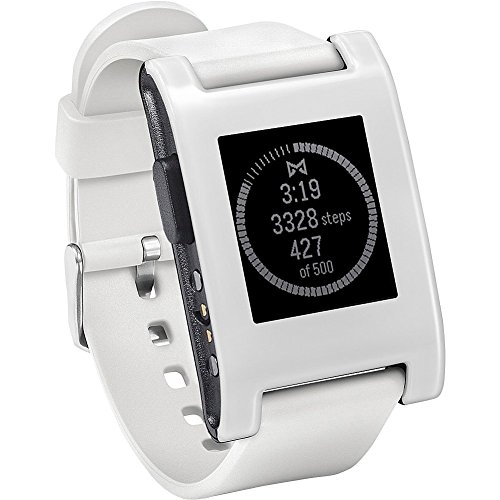

⌚️ The smartwatch that works as hard as you do—without missing a beat.
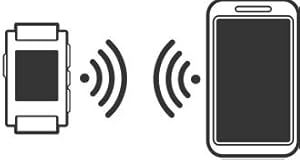
The Pebble Smartwatch White is a durable, water resistant wearable that syncs seamlessly with iOS and Android devices via Bluetooth. Featuring a highly readable monochrome display, it delivers notifications, calendar updates, and music controls directly to your wrist. Its standout 5-7 day battery life and customizable watch faces make it a practical yet stylish companion for busy professionals who want to stay connected without constant charging or distractions.




| ASIN | B00KX828DG |
| Batteries | 1 Lithium Ion batteries required. (included) |
| Best Sellers Rank | #689,236 in Electronics ( See Top 100 in Electronics ) #8,922 in Smartwatches |
| Color | White |
| Connectivity technologies | Bluetooth |
| Customer Reviews | 3.8 3.8 out of 5 stars (4,360) |
| Date First Available | June 15, 2014 |
| Department | unisex-adult |
| Form Factor | Watch |
| GPS | GPS Via Smartphone |
| Human Interface Input | Buttons |
| Is Discontinued By Manufacturer | No |
| Item Weight | 5.1 ounces |
| Item model number | 301WH |
| Manufacturer | Pebble |
| OS | google_android, ios, ios, google_android |
| Other display features | Wireless |
| Product Dimensions | 3.8 x 3 x 2.6 inches |
| Special features | Calendaring, GPS, digital_time_display, email, pedometer, phone_calls, sleep_monitor, text, text_messaging |
| Standing screen display size | 1 |
| Weight | 5.1 Ounces |
| Whats in the box | 1 Lithium Ion Batteries, Pebble Smartwatch |
| Wireless communication technologies | Bluetooth, Wi-Fi |
J**N
Helpful, durable and a pretty cool toy!
This thing is awesome. I have an android phone so it was extremely easy to get this set up. It has it's own program for apps and watch faces. I find a lot of the reviews for it online are similar. I'll give a quick summary of the usual positive comments on this watch.... 1, Battery life- Amazing. I tried to do that whole procedure where you wait for the battery to completely die before fully charging it again. It must have lasted for 7 days (as advertised). I would be very shocked when I would make it through another day on the same charge. 2. Durability- I'm a volunteer firefighter. So I wanted a watch that was water proof because I'm one of the guys that's usually on the hose line and getting soaked. It works VERY well in a situation like that. I keep my phone in my regular pants then put my fire gear on over it. The turnout gear protects my phone from the heat and water. I can still get messages on the watch and see who's calling without having to take off all of the gear which is just great for knowing if I need to answer the call now or if I can return to them later. I've taken it into the shower with me and it works great for that as well. If I need to take a fast shower and run out, I can still see what time it is and get all my calls and messages. The screen is pretty strong too. I have some minor scratches on it... But if this thing had a glass screen (like the apple watch or any of those touch screen watches) it would be shattered for SURE by now. I hit this watch with a titanium butterfly knife handle and it only got a small scratch on it. 3. Watch - It seems weird to say this is a perk but it should be mentioned that this is a watch before anything else. The screen is always on which is one of my favorite things about it. It actually functions like a real watch where if you want to glance at the time, you just look at your wrist. No need to push buttons unless you want to use the back light or change watch faces. The watch faces are something else I love about it. You can have a new watch face everyday if you wanted and since it is user generated, there are always new and original designs. I currently have an american flag watch face that's fully animated.. You know. Cause it's close to the 4th and I'm patriotic like that, 4. Hepatic Feedback - Okay... So there are no speakers on this watch. It was something I thought I was really going to care about but it actually turned out to be a positive thing for me. Ever since getting this watch, I keep my phone on vibrate/silent at all times. My notifications get vibrated right on my wrist and I really enjoy not getting startled by a loud ring tone or having the ring be too quiet where I don't hear it. I don't even need the phone in my pocket. I'll let my phone charge in another room while I'm on the couch watching TV. You can set response messages on the watch so you can have some simple answers for people texting you. 5. Alarm. This could go under Hepatic feedback but I use it so much it deserves it's own section. Another great thing about the hepatic feedback is using it as an alarm. I haven't used an audio alarm (I used to use my phone) ever since I got this. I really wake up a lot better with the watch vibrations as opposed to my phones alarm. I still set the phone as a back up alarm but my watch hasn't failed to wake me up once... As long as I fall asleep with it on my wrist. Also hitting snooze on this thing is very easy... Which is good and bad. I would never want to go back to a standard audio alarm clock. 6. Extras - The pebble is always getting new Applications. You can have a fitness tracker on it but I haven't found one I like just yet. One of the fun things is hooking it up to your music. I have spotify on my PS4 which plays through the surround sound in my house. I can control the PS4's Spotify through my phone. I can control my phone through my watch. While that may sound complicated, it just means I can play PS4 and switch songs using my watch without having to bring the menus up. I can walk around my house and switch/pause songs using the watch. And the music stuff is pre-installed. They're still adding functionality to the watch as more applications come out. I wasn't really a big fan of the rubber wrist band so I bought a 22mm metal band off amazon and had very little trouble replacing the strap and adjusting the metal one to my wrist. I wasn't really a fan of the plastic look, so I also added a wrap to the watch to make it look more metallic. My friends think it makes my watch look cheaper... but eh... I like it. I'll try to post pictures of the updated band and body at some point. All in all, I love this. It's something I've been using consistently everyday and it's so helpful that I can see myself getting the new "Pebble time" as well. Which is the colored Version of the pebble with better range and a more economic design. However, If you don't want to spend the $200 on the color screen, microphone; the original pebble is a great, durable and helpful smart watch that sells for around $90. DON'T GET THIS if you are trying to replace your phone with a watch. It's fairly low tech and is meant to be a WATCH first and a supplement to your phone. It can't answer phone calls for you like a star trek episode and it can't play music because it has no speakers. But I'll say it again... I. Love. This. Watch.
A**R
Fantastic smartwatch
Fantastic smart watch. This isn't like an apple watch with the ability to run a ton of high power apps in color. This watch allows you to receive SMS messages and respond with quick replies (either by using an improvised keyboard or pre-set messages). you are limited to 8 apps on the phone which you load via an app on your smartphone. What the watch lacks in raw processing power is made up in other ways. The monochrome e-paper display is really great. The contrast is the best I've seen on any digital watch -- easy to view even in very dim light. This is due to the silver background being super reflective and the black element is pure black - The contrast and reflectivity makes for a fantastic display. The battery life on this thing is crazy - you easily get 5 days of use before even thinking of needing a charge. This is with Bluetooth on at all times. My old Samsung smart watch needed a charge after about 8 hours with Bluetooth constantly on... To activate the backlite you flick your wrist - no G-shock button presses necessary and since you need a quick snap the wrist (not just at a certain angle) you'll find that the light comes on only when you really want it to come on... saving battery life and giving you really good control of the backlight. One thing I found really useful is that the watch has a very powerful vibrate mechanism. I set mine to make zero noise, instead any alert is done via vibration. I get woken up every morning by the watch madly vibrating on my arm when the alarm goes off... I never wake up when any watch makes an audible alarm but the vibrate alarm works every time! The apps I tried of far work great. ESPN apps display the scoress/start time of the sporting events (all major sports) realtime and is really handy when I need to know channel/time the game of my favorite team is going to be aired. If the game is in progress, it will show the current score. Really neat! Messaging app causes andy incoming SMS to appear and gives a vibrate notice. I set a bunch of canned responses like 'okay' or 'Sounds good' 'coming now', etc. and can deal with 90% of SMS responses with a few button presses from the watch. If you want a lenghty response you'll best be served by grabbing the phone. stopwatch/countdown timer apps - works like on any other watch. Music boss app works like a remote control for the audio apps on your phone. You get track listing and the ability to pause, play skip, etc... Really handy when listening to B/T headphones. The phone can be buried in your bag/backpack and you can contol music playback via the watch. The watch can be connted to the watch at the same time you have Bluetooth headphones connected so the watch does not get in the way of using audio Bluetooth devices on your phone. I do reccommend you get a screen protector as the watch is made of polycarbonate and the screen can get scratched easily. Armoursuit is the best I've found (fit is impeccable and application is easy), Skinomi is also a good choice (not quite as easy to put on, but decent fit and way cheaper than Armorsuit). The best advice i found on applying these 'military grade' flexible protectors is to use lots of the spray application liquid and then when you squeezed the bubbles out and positioned it perfectly, leave it alone for about 3 hours -- leave any flaps that won't stick alone. The protector will slowly adhere to the watch face and after about 3 hours it won't slide around and the flaps that wouldn't initially stick will now adhere to the watch. just stroke the protector outward from the center of the watch and everything should stick. Any bubbles or bumps form liquid under the protector will dissappear within 24 hours as the porous membrane will allow evaporation of the application liquid or trapped air to slowly pass thorugh the protector. After about 48 hours you should have a skin tight super smooth invisible protector. I forgot to mention one of the greatest selling points of this watch (smack forehead) is that this watch is WATER RESISTANT. This isn't simply taking a shower water resistant, but swimming laps in a pool water resistant.
A**R
Not for long term use, screen gets glitchy and worn off
T**Y
Before I start, please do research Rebble if you're going to be buying any Pebble since the online services have shut down. Rebble brings back all the features Pebble is known for, such as notifications, watchapps, watchfaces, etc, and really brings out the best in the Pebble. After installing Rebble, I'm super happy with this watch. It does everything I need a smartwatch to do - notifications, fun watch faces, games, calculator, timers, alarms, stopwatch, plus it's completely waterproof down to 5m, and lasts 5 days on a charge. It may not have a heart rate sensor or anything like that, but I don't need that in a smartwatch, and coming from a Moto 360, I never used that stuff anyway. However, if you want it, the Pebble Time has it, and still for much cheaper than an Android Wear watch with similar features, and with far superior battery life and waterproofing. The biggest con on this original Pebble is the lack of dictation, but again, the Pebble Time has this for much less than an Android Wear watch. All in all the Pebble is a fantastic choice, at least until they're all gone, as a cheap smartwatch that does everything a smartwatch needs to do.
I**R
Ayer me llegó, así que esta información es solo tras unas horas de uso. Con respecto al transporte fenomenal, el paquete llegó un día antes de la fecha prevista y en perfecto estado. La caja donde viene protege a la perfección el reloj. La información que aparece en el exterior de la caja viene sólo en inglés. En el interior, además del cargador (exclusivo de Pebble) y el reloj, vienen dos folletos (inglés) con información sobre guía rápida y garantía. En la guía rápida ni siquiera se indica cual es el botón para encender el reloj :( tuve que conectarle el cargador y fue así como se encendió. Lo primero que hice fue descargar del Apple Store la app Pebble para el Iphone. En cuanto se encendió el reloj lo enlacé con mi iphone 5s (ya con la app Pebble instalada) y en unos 3 minutos se actualizó el software (firmware v2.3). Empecé a jugar para ir viendo las distintas funciones y observé que no estaba operativa la opción de poner el vibrador enable (encendido), es decir, que me vibrará cuando recibiera alguna notificación. Tuve que darle a la opción factory Reset del reloj y empezar todo de nuevo. A partir de ese momento todo fue como esperaba, esto es, todas las notificaciones (whatsapp, gmail, llamadas, etc) que me aparecían en el teléfono medio segundo después aparecían en el reloj. Comprobé que cuando me alejaba más de unos 10 m del telefono el reloj me vibraba avisándome que perdía la recepción del teléfono y, por consiguiente, no me avisaría de las notificaciones. Esto me pareció genial. Sin embargo, cuando de nuevo me puse al alcance del bluetood del teléfono, se conectó pero tuve que iniciar la aplicación Pebble del teléfono y darle a la opción enlazar para que volviese a mandarme las notificaciones. Esto no me gustó nada. La app Pebble tiene muchas aplicaciones, no he echado de menos ninguna de las que utilizo habitualmente, entre ellas Evernote. El reloj no puede tener más de 8 aplicaciones instaladas al mismo tiempo. Si quieres instalar una y ya tienes instaladas 8, tienes que "bajar" otra. Sí, bajar, es decir, bajarla al teléfono y "subirla" al reloj cuando de nuevo quieras. Para mi es más que suficiente tener 8 aplicaciones instaladas, incluso menos sería suficiente. Respecto al diseño, Mi Pebble es de color negro, fundiéndose los bordes de la pantalla con la carcasa. Precioso. Los botones están muy bien diseñados y son fáciles de utilizar. Se aprende rápido. La correa y el reloj (de plastico) no tiene pinta ninguna de que no vaya a ser duradera, pero ya veremos. La pantalla se ve sencillamente genial, como un ebook. Mientras más sol hay mejor se ve. En la oscuridad y tras un golpe de muñeca se enciende la luz interior, bien para estados de oscuridad, por ejemplo cuando estamos en la cama por la noche. Esta opción tb se puede poner de manera automática. El reloj, salvo la guía rápida comentada anteriormente, no viene con instrucciones, ni existe un manual en pdf en la red (yo al menos no lo he visto). Esto me parece poco serio por parte de Pebble. Conclusión: Buen accesorio para el teléfono, de cero utilidad por sí mismo. Su precio, al ser todo de plástico (pero no feo ni en apariencia poco duradero), podría ser bastante más barato.
D**W
Da quando è nato lo spietato mercato degli smartwatch li ho sempre definiti inutili e tutt'ora ne sono pienamente convinto! A cosa serve un orologio che fa foto,scrive messaggi,fa vedere video o ascoltare musica, la BATTERIA non mi durà nemmeno 2 ore e sono costretto a camminare con il caricatore in tasta, come se già quello dello smartphone non bastasse! Ma il Pebble non è nulla di tutto questo! È un OROLOGIO, pratico, bello e utile...specialmente per leggere notifiche e al limite rispondere a messaggi con risposte preimpostate! La batteria dura circa 8 giorni (parlo per esperienza personale) e non è al plutonio! È vero, non ha colori ma lo schermo e-paper (lo stesso del KINDLE) compie egregiamente il suo lavoro, chiaro al sole più intenso e retroilluminato la notte! Una piccola nota di merito va alle watchfaces che tantissime e bellissime....ti permettono di avere un orologio diverso ogni giorno! Nel mio caso me lo hanno regalato e devo dire che è veramente un bellissimo OROLOGIO, NO SMARTWATCH! Secondo me un must per qualunque appassionato di tecnologia! 5 stelle meritate!
P**.
Die Einrichtung der Pebble ist problemlos. Nachdem ich aus dem Google Play Store die App "Pebble Time", nicht "Pebble"!, installiert hatte, wurde die Firmware in zwei Schritten auf Version 3.8.2 aktualisiert. Diese neue Firmware beseitigt übrigens das bisherige Limit von acht zur gleichen Zeit aktiven Anwendungen. Die Pebble war in der Geräteübersicht der bluetooth-Einstellung meines Handys (Galaxy S5) sofort sichtbar und konnte problemlos gekoppelt werden. Die Reichweite ist gut, zehn Meter und durch zwei Wände sind kein Problem. Wenn die Verbindung doch mal verloren geht, verbinden sich die Geräte schnell und problemlos neu. Es gibt natürlich etliche Apps im internen Pebble Store oder bei Google Play, z.B. Navi, Kompass oder Tachometer. Auch die Pebble selbst kommt mit einigen (wenigen) fest installierten Apps, z.B. Timer oder Stopuhr. Und dann die austauschbaren Zifferblätter... Ok, welche Apps es gibt, kann jeder mit wenig Aufwand selbst recherchieren. Hier sei nur gesagt: Eigentlich laufen die Apps meistens auf dem Handy, lediglich die grafische Ausgabe, das Bild sozusagen, wird auf die Pebble übertragen. Und es gibt den Rückkanal, man kann die Apps also über die Pebble steuern. Negative Auswirkungen auf den Akku des Handys konnte ich nicht feststellen. Das wesentliche Feature jedoch ist die Benachrichtigungsfunktion, und das ist das Feature, das ich nicht mehr missen möchte. Jegliche Nachricht, die das Handy sonst auf dem Display bzw. dem Lockscreen anzeigt, kann an die Pebble geschickt werden. Die Pebble vibriert dann kurz und man kann die Nachricht auf dem Display der Pebble lesen, in gestochen scharfer Schrift. Bei Anrufen z.B. zeigt sie den Namen des Anrufers, und man kann direkt über die Pebble den Anruf annehmen oder abweisen. Eingehende SMS werden angezeigt, die Meldungen von Nachrichtenapps usw., die kann man wenn sie unwichtig sind, auch gleich verwerfen. Gerade wenn man unterwegs ist, reicht ein Blick auf die Pebble und man ist im Bilde, was das Handy mitzuteilen hat, und wer will das nicht in Rekordzeit wissen ;-) Der Text wird natürlich irgendwann abgeschnitten, aber es reicht immer für die Entscheidung, ob man sofort weiter reagieren muss. Welche Apps Nachrichten senden dürfen kann man in der Pebble Time App auswählen. Und man kann Ruhezeiten für Wochen- und Feiertage festlegen, eine E-Mail um Mitternacht stört also nicht die Nachtruhe. Das war das für mich Wichtigste. Was sonst noch zu sagen wäre: Die angegebene Akkulaufzeit der Pebble erreiche ich nicht ganz, statt sieben Tagen sind es eher fünf. Das Display ist schwarz-weiß und von brillianter Schärfe, selbst kleinste Schrift ist problemlos lesbar. Die Steuerung erfolgt über seitliche Druckknöpfe und ist logisch und simpel.
Trustpilot
Hace 1 mes
Hace 3 días