We remain fully operational. Our teams are working around the clock to ensure your deliveries continue safely.

Descargar la aplicación


Servicios al cliente
Sobre nosotros
Copyright © 2025 Desertcart Holdings Limited
Descargar la aplicación

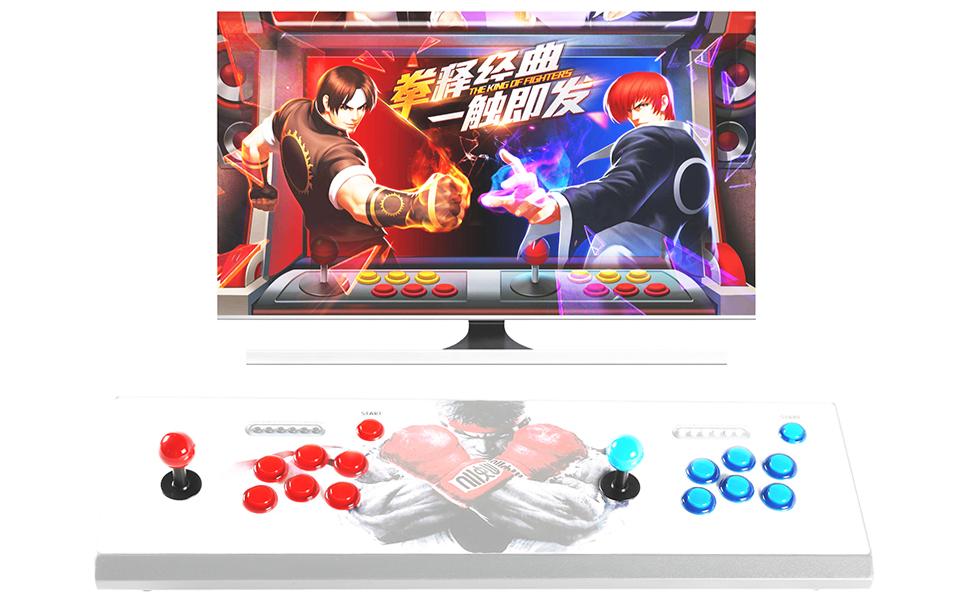
🎮 Level up your retro arcade build with pro-grade LED power!
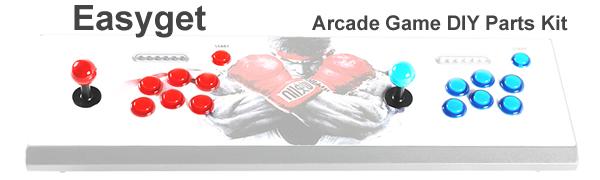
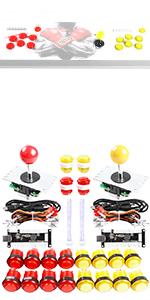
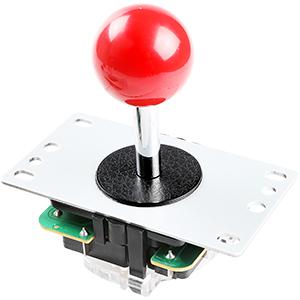
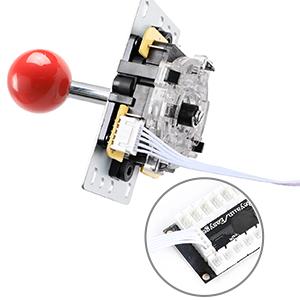
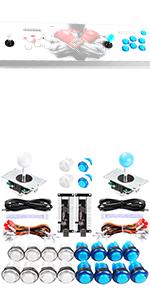
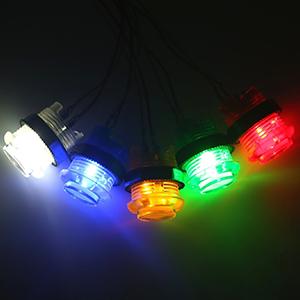
This Easyget LED Arcade DIY Kit includes 2 zero delay USB encoders, 2 professional 8-way joysticks, and 20 LED illuminated push buttons in red and blue. Designed for 2-player MAME and JAMMA arcade projects, it offers plug-and-play compatibility across Windows, Mac, Linux, and Raspberry Pi platforms. Crafted with heat-resistant, high-quality materials, this modular kit ensures precise control, vibrant lighting, and easy installation—perfect for millennials craving a nostalgic yet cutting-edge gaming experience.




| ASIN | B00WAY9848 |
| Best Sellers Rank | #15,832 in Video Games ( See Top 100 in Video Games ) #761 in PC Game Controllers |
| Customer Reviews | 4.4 4.4 out of 5 stars (490) |
| Is Discontinued By Manufacturer | No |
| Item Weight | 2.16 pounds |
| Item model number | 8541667404 |
| Manufacturer | Easyget |
| Manufacturer recommended age | 18 years and up |
| Product Dimensions | 8.27 x 4.33 x 5.51 inches |
C**E
Great product that's easy to assemble, even for beginners.
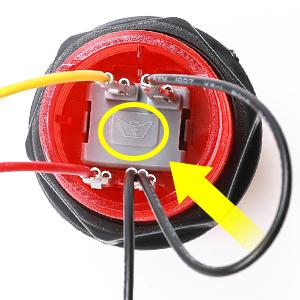
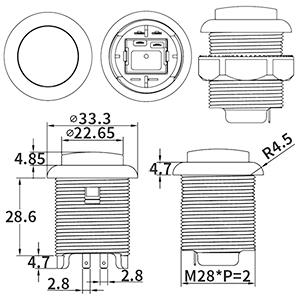
I ordered this set for the retropie powered bartop arcade we were building and I'm very happy with the results. I like the clicky feedback from the joysticks, how bright the LEDs in the buttons are, and how easy these were to put together. They perform well in all of the games I've played so far, including games on NES, SNES, and MAME. Now, that being said, I did a LOT of reading reviews and researching configuration issues with these controllers before/after buying these in preparation of my cabinet's final assembly. I learned a ton from other folks who used these before me, which is why I think the final steps of my build went so smoothly. If you're looking at these for your own retropie arcade, I thought I'd leave some helpful tips in this review for my fellow DIY-ers. First, like other reviewers and the seller have mentioned - when wiring your buttons pay attention to the crown logo on the back. With the crown logo facing the correct way, your red wire connects on the lower left post, your yellow wire connects on the upper left post, and your black wires connect to the posts on the right side. Once the wires are fully connected to the buttons' posts, they're extremely difficult to remove, so be sure you've got the right order before connecting them fully. Second, I recommend testing your joystick's orientation before you secure it to your controller board. When you first connect the joystick/buttons to your retropie, you'll be asked to configure your controller inputs. During this configuration it's possible for your backwards joystick to be configured to work correctly in the main UI, but still be backwards in retropie configuration, which I read can cause issues when using certain emulators like ones for MAME. This happened to us, and we had to unscrew the joysticks, flip them 180° and re-secure them to the controller board. Don't just test in the main screen of retropie - go all the way into retropie setup (like where you go to get new themes, perform updates, etc) and make sure your directional movements are correct. Third, if you're planning on using both sets of these at the same time for 2 player games, pay attention to how you're connecting your buttons to your encoder. If you look on the back of your USB encoder board you'll see notations where the buttons' wiring connects on the board. Mine were labelled ST, SE, K1, K2, K3, K4, etc. Connect the buttons to these slots: your start button should be connected to the slot labeled ST, Select goes to SE, A goes to K1, B to K2, X to K3, and Y to K4. I did use all of the buttons in this kit, so I also connected L to L1, R to R1, P1 coin to L2 and Player 1 Start to R2. For player 2 it was the same: Start = ST, Select = SE, A = K1, B = K2, X = K3, Y = K4, L = L1, R = R1, P2 coin = L2, P2 start = R2. The user I read this info from stated to be absolutely sure you connect both player 1 and player 2 button sets on the exact same slots on each encoder to avoid configuration issues. I'm not sure if this is still necessary (the forum thread was from a year ago) but it's how I wired mine and had zero configuration issues. Note: some MAME emulators default map your coin and P1/2 start buttons to your regular start and select buttons. If you're planning on using separate coin and P1/2 start buttons for MAME games like I did, you'll likely need to do additional configuration within the emulator. I'm using lr mame2003 and this is what I had to do to get my extra buttons working for coin/start. Fourth, I also read of potential configuration issues due to which USB ports these controllers are plugged into on the pi/USB hub. I'm using a powered, 7 port USB hub which is what I've connected my controllers into to avoid power strain on my pi. Looking at my hub, I plugged my P1 encoder into the left-most port, and my P2 encoder was plugged into the slot right next to that one. I also have dual USB ports for additional peripherals/device charging on my cabinet, and those were plugged into the next slots on my hub. I have my wireless keyboard dongle plugged into the Pi's USB slot '0' and my hub plugged into the Pi's USB slot '1.' Again, not sure how necessary this is, but I read of potential issues with the pi not correctly recognizing which controller was P1 and which was P2 due to which USB port each controller was plugged into. I connected mine in what appeared to be a correct numerical order, and again, zero issues doing it this way. Those are the big things I can think of, but one last tip: after getting my buttons onto my controller board, I used small labels on each wiring harness to label which button it was (start, select, a, b, x, y, etc) on the end that connects to the encoder. This made it wayyy easier to connect each button to its board in its correct slot without having to trace it back to the button itself. Plus during wiring I was pretty much looking at everything backwards from the inside of the controller board, so it made it easier to keep everything straight when connecting to the encoder. Overall, very happy with this set. My arcade works great, and I have had a ton of fun playing with it.
R**C
Great price, good build quality, easy installation
Works perfectly - as expected. I used this with a Raspberry Pi 3 (which I also got on Amazon) - installation is very simple, just plug in the USB controllers to the USB ports and the devices will automatically be recognized as Dragonrise USB Generic Controller. Word of caution when installing, make note of the pin connection plugs - if you pull them off the PCB. I did this when wiring and hooked them up wrong. It does not break anything, but you will notice the controller will not respond as expected, I had to flip the connection and all worked again. There is plenty of wire for various configurations. Note about wiring, make sure you wire as per the included instructions, it is not clear so I put an image I found that clearly shows the connections. If you do not get a lit LED your connections are wrong, if you get a lit LED but the light goes out when you press the button, your connections are wrong - just rewire. I am very happy with this purchase.
S**N
easy to assemble & get working
When building an arcade emulator using a RaspberryPi with HDMI display, this kit is a very simple way to be up-and-running with credible arcade-quality controls without a lot of fuss. The wiring harnesses make plugging the buttons into the encoder board very simple. Another reviewer here mentioned the importance of paying attention to the crown logo on the bottom of the button for orienting it to the diagram in the instructions. If you pay attention to that, there's really no way to mess up the wiring. I do take one star off because one of the crimps for ground keeps pushing out of its connector, and if people are having trouble with a button 'not working' I would advise them to triple check that no crimp has pushed out of its housing. On the other end, the wiring can plug into any which pins on the encoder. No order is important because you're going to configure it in the emulator. Speaking of which, I was able to launch MiniCakeTV (RecalBox) image from ArcadePunks and it recognized the encoder board and the config at startup was simple. The joystick is sufficient. The people criticizing the length of these joysticks are using thick MDF for their control panel. I'm using 1/4" and the joysticks protrude just fine. The other criticism here is the poor action on the buttons. I agree there. These are not click-responsive like a real Happ button. Something to consider for future upgrade would be to change out the primary 'fire' button for a real Happ button and keep these cheaper buttons for secondary, tertiary, etc. Finally, I'm not into the traditional fighter games, so I didn't mount all eight buttons in two rows of four. I went with three in a row next to the joystick. I installed the smaller buttons for navigating the UI for coin insertion, game start, etc.
J**T
super parfait pour mon projets de gamer
A**O
First off, this set was super easy to build and the instructions were clear. The buttons look and feel amazing, and they work perfectly. The joysticks are generic clones that can be found anywhere (Chinese sites), but surprisingly enough they work great and I have tested them intensively for a few days and haven't had any issues thus far. I even purchased a set of Sanwa Joysticks (which are considered by many as top of the line) to test them with these clones, and honestly I saw no difference. The bad side is definitely the price which is about $30.00 to $40.00 more than what you expect to pay, from other sources on the internet (but heck, I wanted them right-away and didn't want to wait 30 days for them). Kit works with both Recalbox and Retropie (tested) all you need to do is map the joysticks (takes 30 seconds to do). Definitely a great purchase for anyone who wants to relieve the golden ages of arcade games.
P**R
The parts came when expected and everything worked well. This is the first time I've done a project with rasberry pi and these parts are perfectly comparable and the only thing that I dislike is that they come with no instructions. If you hold the button with the two pins that go into the gray plastic on top,the wiring to the button is as follows: yellow wire goes on the top left, then black top right, then red bottom left and black bottom right. The black wires are positive. Everything g worked out fine and i would definitely recommend.
G**D
Just now realized i only have 17 x 3Pin wires for LED Push Buttons not 20 and will make the 2nd joystick useless as I'm unable to find the wire only. This is rather disappointing.
S**S
Awesome product. Easy to install and works great. Instructions are clear and there are alot of online resources that will help you out. One word of advice is that if you are using this with a Raspberry Pi (Retropie) to make sure that you connect both controllers the exact same way. Even though you configure them separately, they seem to override one another.
Trustpilot
Hace 2 meses
Hace 3 semanas