We remain fully operational. Our teams are working around the clock to ensure your deliveries continue safely.

Descargar la aplicación


Servicios al cliente
Sobre nosotros
Copyright © 2025 Desertcart Holdings Limited
Descargar la aplicación


🔥 Build smart, stay cool, and own the workspace.
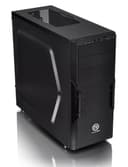
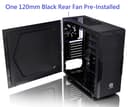
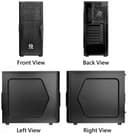
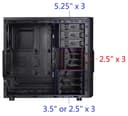
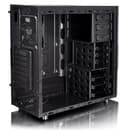
The Thermaltake Versa H22 2.0 is a sleek black mid-tower ATX case engineered for optimal airflow with perforated metal panels and pre-installed 120mm rear fan. It supports multiple motherboard sizes (ATX, Micro ATX, Mini ITX) and offers tool-free installation for drives and fans. With versatile drive bays (3x 5.25", 3x 3.5", 3x 2.5"), USB 3.0 connectivity, and a compact footprint, it’s designed for millennial professionals who demand a clean, efficient, and upgrade-friendly PC build environment.


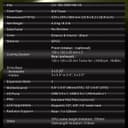
| ASIN | B07VGJDDHF |
| Antenna Location | Gaming |
| Best Sellers Rank | #1,262 in Computer Cases |
| Brand | Thermaltake |
| Case Type | Mid Tower |
| Color | Black |
| Compatible Devices | [Inferred broad compatibility with ATX components, but no specific device list provided] |
| Cooling Method | Air |
| Customer Reviews | 4.4 out of 5 stars 784 Reviews |
| Enclosure Material | Metal |
| Global Trade Identification Number | 00841163073247 |
| Hard Disk Form Factor | 3.5 Inches |
| Internal Bays Quantity | 9 |
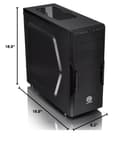
| Item Dimensions D x W x H | 16.9"D x 8.2"W x 18.9"H |
| Item Weight | 0.01 Ounces |
| Light Color | Blue |
| Manufacturer | Thermaltake |
| Material | Metal |
| Model Name | CA-1B3-00M1NN-A0 |
| Motherboard Compatability | ATX |
| Number of Fans | 2 |
| Power Supply Mounting Type | Rear Mount |
| Recommended Uses For Product | Gaming |
| Supported Motherboard | ATX |
| Total USB 2.0 Ports | 2 |
| Total USB 3.0 Ports | 1 |
| Total Usb Ports | 2 |
| UPC | 841163073247 |
| Warranty Description | 3 year manufacturer |
N**R
nice clean case, good drive mounting and cable run options
Just built a new PC in this case. No bling or excessive lights, just dark and quite. Very light weight and easy to work with. Buttons and LEDs discrete and inconspicuous. Both side panels remove with 2x thumb screws each, and fit well. Mounting the top rear cooling fan might be tricky depending on the motherboard, and I don't currently have anything mounted there. Might be some dust concern with the large vents in the top panel, but for me not an issue where I have the PC. Unusually, the power supply mounts at the bottom, with a separate dedicated intake and outflow for power supply air. This certainly helps with the heat flow, however the intake vent is on the bottom. They included a removable/easy to clean dust screen for it. I would put the tower on a hard surface or a stand instead of carpet to allow air flow to this bottom inlet. A flat piece of thin wood underneath would be sufficient. Also, there didn't seem to be a way to mount a front input fan, but this is likely not necessary. They took ventilation and dust filtering seriously. It has 3 mounts each for IDE style drives (DVD-RW for example), 3x smaller 2.5" drives, and 3x 3.5" drives. They have nice clippy trays, with plenty of airflow. One kind of weird thing is the SATA connections for the 2.5" drives are on the main side, but the 3.5" drives put the connections on the back. You could easily mount additional drives in the space between the "official" drive trays. They made a great wire run to keep a lot of cables tucked away out of the airflow. The CPU power, as well as the case front panel wiring can be run through here, and the channel has great access for all of the drive bays. Cleanest wiring imaginable. Took a few iterations to get as much of the wiring run through the channel as possible, but certainly worth it in the end. Best PC I ever built, and this was certainly the right case for it. (this was July 2020, pandemic/work from home project) ----- Minor update 2023. The PC described above is still going strong. Processing data, developing software, designing spaceflight instruments, occasional games. The interior stays quite dust free, and the fans are nearly sub-audible. Easy access to the disks allows frequent cloning. Nearly 3 years in, and the case might as well be brand new. I just bought a second Thermaltake tower to build another PC for work. Kept the Silencer power supply, upgraded to a newer ASUS TUF Gaming motherboard and newer CPU. Added a GeForce RTX 3060 Ti, which takes up a lot of room but fits. Again, this tower was just a joy to build up. The interior is just so airy and open and accessible. One minor caveat, was this time the 9x motherboard mounting holes were not threaded. I cannot recall if they were threaded on my 1st Thermaltake tower, or if the bolts self-threaded more easily. This time, I couldn't get the motherboard bolts to thread into their holes. So I used a 6-32 tap to thread the mount holes, then the motherboard bolted in easily. Maybe the paint was a little thicker this time, or I should have pushed harder? Not a big deal for me, since I had a 6-32 tap on hand, and it took like 5 minutes, barely produced any filings. Other than that things went smoothly. It is also worth noting that the back of the CPU area on the motherboard is accessible thanks to a clever cut-out. This allows adding brackets for heavier CPU heat sinks, without having to remove the motherboard. Again, bravo.
J**L
Great Case For The Price
I ordered this case mainly because of the price. I was looking for a good case at a reasonable price, and found one. I have ordered several cases on Amazon, so here are my thoughts. Pros: -Nice design. With some blue led fans in the front, it looks even better. -Good airflow -Great build quality. It's not made of cheap, thin, metal. -Air filters on the PSU fan and Front fans -Nice screwless drive bay design -The front panel is not connected to the front IO, meaning you can take the front off to clean the filters and install fans without ripping the front IO wires out or having to disconnect them from the motherboard. -The side panels have bumps that let you stuff more cables behind them -The case has bumps instead of standoffs for the motherboard much like oem cases. I personally like this because you dont have to install any standoffs. Cons: -The top screws on the motherboard are very difficult to screw in because the top edge blocks any regular sized screwdriver. I had to use a small screwdriver just to fit. -No cable holes near the top where you could put the 4/8 pin CPU power cable. -Cable management overall slightly difficult due to a lack of holes at the top of the case as mentioned above. So what's my final verdict? Well, although there were a few inconveniences, I still really like this case. It is made very well, and looks nice. I can recommend this case to anyone in need of a good ATX case.
C**C
Very decent case, especially if you need Internal and external Bays
I have been searching for a replacement case for my primary system. oOne of the biggest thigns I need are external bays as I use them for many things besides my Blu ray Writer. I also prefer to have my Hard drives in Hot swap bays in the front instead of inside as well as many other things. I also needed to upgrade to a case that could handle my 120 mm radiator. And I also have a couple of new case fans that are *sighs* RGB and I may as well see them. This case is pretty close to perfect as well as a great price. The RGB fans in the front look really good and the tooless desin is awesome. You simply click your fans in to the removable air filter and pop the flter in aith e acouple of clips. The fans barely fit with the expansive drive cages inside, but they do fit and work great. Was very impressed with this layout. It would be nice if you could remove the internal bays, but you cant. The external bays are pretty awesome as well where all my devices very easily slid into place. Very thoughtfull design. There is barely enouh room for a 120 radiator on the rear fan slot. and the top two are really more for air vents although you can fit another fan on the front location on the top. I am surprised there are no vents on either side panel as that would help. If it were just an inch taller for radiator room, that would be great. The bay areas are nice and solid, but the exterior metal is flimsy in places. Overall a really good design for lots of expansion capabilities. The case is not really geared towards an abundance of fans or viewing pleasure, but the 2 fan slots in the front can make the unit look nice with the RGB fans. Good budget case depending on your needs.
M**N
A great case!
Do not underestimate the importance of case selection in a build. This one has plenty of room, good cable management, more than ample expansion possibilities, and is attractive. My only reservation is I could not mount any front fans because the internal drive bays crowd the area, but the air flow is good without them so no big deal. I recommend this case, especially for inexperienced builders. I just ordered another one they are the perfect size for me, with outstanding flexibility. Update: I had airflow disruptions and have cut out the lower drive bay bracket; the modification was of moderate difficulty requiring tin snips and a power drill. The change made a big difference in component cooling. I still have three external optical drives and three internal 3.5 inch drive bays. There is still plenty of room for expansion. I'm happy with this case and I recommend it highly. Follow up: the expansion slot covers are indeed tack welded into place but case inserts are cheap and readily available. I installed a Asus NVidia RTX 3030 graphics card (300 mm in length), it was a little tight but went in just fine. The only difficulity I have had in over a years use is the mounting holes for the main board are prone to stripping out. Not a big deal but worth mentioning
T**L
I wish there were more cases like this
It's become very hard to find cases with 5.25 drive bays, and this one packs decent value and (some) smart design choices. But, I took 2 stars off for some boneheaded design choices that are almost free to fix: 1. The front connections are one USB 3.0 port and one USB 2.0 port. If you understand USB headers, you'll understand why I rage about this. Each header supports TWO USB ports, and this case uses only half of each of the USB 3.0 and USB 2.0 headers. I was able to make lemonade from lemons with this case and re-wired the connector for my AiO pump which also used only half a USB 2.0 port - this is not possible for the USB 3 though and really, really seems like a waste. Why not just put two USB 3.0 ports?? Also, this is a common problem for all case makers in 2022, but I expect to have a USB C/USB 4 port as well and that is not provided. 2. This is partially my fault as the case makes no promises of radiator support, but it is clearly punched properly to mount a 240mm rad at the top. After trying and pushing on my rad it just does not fit because part of the 5.25 drive cage blocks it. I'm not the type of person who will be told what to do so I took a dremel and removed about an inch of the drive cage and made the rad fit - but I do not recommend you buy this case with this mod in mind. Maybe a 120mm rad would be fine but that's really limiting and a small product change would fix this. 3. The right side door is just a bit too close to properly fit PSU cables behind it properly wire managed in the channel. I can make it close but it requires excessive force and 3 hands (or 1 foot) to get it to shut. If the shape of the indent on that door was a bit more fat, it would be fine. With all that said, this is not a bad case and the price is very reasonable. The 2.5 and 3.5 trays are nice to work with (I left the 2.5's out for airflow, I don't need them). I added two fans in the front and I consider that an essential addition. The filter foam is not that easy to take out and clean, which is a sacrifice I expect at this price point. If I need a full ATX case for a budget build again, I would consider this case - but not if I need a radiator or USB C.
D**R
A very good ATX case.
If you're looking for sleek, without the additional glass windows or lights or crazy designs, I'd highly recommend this case. Very easy to use and install many drives and expansions. Their video says that you don't actually need extra tools to secure your drives but you're definitely going to want to use some extra screws here and there. Their snap-in-place system just doesn't feel secure enough. The fans are also incredibly quiet. Like, almost inaudible. My only main gripe with this case so far is the power light. That thing is the bane of my existence. If you're keeping your PC in your bedroom you're going to want to cover it with something at night. It's extremely bright and also blinks in sleep mode and lights up the entire room. I was seeing it even with my eyes closed. One solution is to disable any lighting entirely if your motherboard has an option for that, but then you can't tell if the power is on at all. With all of that out of the way, I'd give this case serious consideration if you're in the market. Great quality for the price.
T**A
Mid Case
Nice Case has 3 each 5.25" ODD, 2.5"/3.5" SSD/HDD slots, 7 rear slots, full ATX spot at bottom with filter, front at top ower,reset USB2.0,USB3.0 case has plenty of room HDD cables mount from back has rear cable management super case good price and sturdy
D**A
Very good mini-tower enclosure for the price
I used this case to a new gaming PC build, using the ASUS ROG Strix Z490-E Gaming Z490 (WiFi 6) LGA 1200 (Intel 10th Gen) ATX Gaming Motherboard, the Intel i9-10100K CPU (125W), and a Cooler Master MasterLiquid LC240E RGB Close-Loop AIO CPU Liquid Cooler. Overall, I'm generally very happy with Thermaltake cases (this is my fifth build using one), as the quality of their products has always been top-notch. The motherboard installation was very clean and straightforward, mounting directly to the case instead of requiring stand-offs. The case provides 9 drive bays - three 5.25 at the top, accessible from the front of the case, three 3.5 bays for 2.5" HDD/SSD installation, and three dual purpose drive bays located at the bottom of the chassis. However, unlike other Thermaltake cases I've used previously, these drive bays are all permanently fixed in the case, rather than being snap-in modules as in the higher priced case designs. The only problem I had with the build was the installation of the CPU cooler radiator assembly. The mounting holes are at the top of the case, and (most likely) are positioned according to the specs for a dual-fan radiator design. However, the three 5.25 drive bay enclosure located at the top of the case is about 1/8" too deep, which interferes with the position of the radiator. To make it work, I had to literally shoehorn the radiator assembly into position, then use a screwdriver to try to lever it far enough towards the front of the case to get the screw holes to align with the clearance holes in the top of the chassis. But, for $49, you have to expect minor problems like that. If this were a $300 case, I'd have torn it to shreds and given it only 1 star... :P
Trustpilot
Hace 1 semana
Hace 5 días