We remain fully operational. Our teams are working around the clock to ensure your deliveries continue safely.

Descargar la aplicación


Servicios al cliente
Sobre nosotros
Copyright © 2025 Desertcart Holdings Limited
Descargar la aplicación

🧭 Never lose your way, always find your tribe.
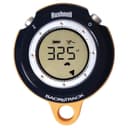
The Bushnell GPS BackTrack Personal Locator combines cutting-edge SiRF Star III GPS technology with a self-calibrating digital compass to provide accurate direction and distance to up to three saved locations. Its weather-resistant, compact design powered by 2 AAA batteries ensures reliable navigation in any environment. Ideal for urban explorers, outdoor adventurers, and festival-goers alike, it offers simple two-button operation and a handy lanyard for easy carry—making it the essential tool to never lose your way again.
| ASIN | B001F7BKZQ |
| Battery Average Life | 20 Hours |
| Best Sellers Rank | #235,886 in Electronics ( See Top 100 in Electronics ) #255 in Handheld GPS Units |
| Brand | Bushnell |
| Built-In Media | Battery |
| Compatible Devices | Smartphone, Tablet |
| Customer Reviews | 4.1 4.1 out of 5 stars (313) |
| Global Trade Identification Number | 00029757360052 |
| Item Dimensions | 5.4 x 5.1 x 2.9 inches |
| Item Weight | 0.25 Pounds |
| Manufacturer | Bushnell |
| Mfr Part Number | 130805 |
| Model Number | 36 0050 |
| Supported Application | GPS |
| UPC | 999992548914 029757360052 024145038872 066510872438 666669927135 |
A**R
location location location
A nice device, especially for the price. I bought this after I visited a new city, went from the hotel about 10 blocks to get some chips and pop, and on my return I wondered if x was the street I should head back on, or was it further up, or back one, because I hadn't gotten this unit yet. This is a basic GPS unit that doesn't find street addresses, doesn't have a database of roads or restaurants or anything, but is intended for a simpler use. And it does that well, as it saves a location (up to three) and guides you back to that location. You turn it on, takes about 10 seconds to orient itself, and then you press one of three buttons to save this location as location a, b, or c (the unit helps you a bit, as it shows an icon for either car, home, or star, but the naming is arbitrary--I could have saved that hotel's location as the "home" icon, the "car" icon, or the "star" icon for favorite spot.) Then, when you are done wandering away, turn it on and it shows you the direction and distance in yards to the spot you saved, or to one of the other two icons if you ever saved anything to them. Note that the distance is indicated, not just the direction, so you know if you are 10 yards or 1000 yards away from the spot you saved (switches to miles when relevant) as well as which way it is. I used it in a wooded nature park last week and saved the entrance location. No matter where I wandered it showed the direction back to the entrance and how far away it was (I know the geography of the nature park so I knew it was giving me accurate info.) As for accuracy, I used it in my driveway to save a spot, walked 10 yards away, and let it guide me back to the saved spot, with an accuracy of +- 3 yards. Not as accurate when I stood next to the basketball pole because of the magnetism, and you gotta give it 4 seconds or so to orient itself. Its other mode instead of GPS is as a compass, showing you where N is, again after giving it a few seconds to stabilize. Construction appears robust, with a nice strong lanyard to hang around your neck or your wrist, and the unit likely would survive a drop to the ground. It's 3" across, 3/4" thick. Two buttons: one button that turns it on, selects mode (GPS/compass), and selects one of the three icons, the second button that saves the spot, or turns on a backlight. Also works in meters instead of yards. I now have two of these. I have no financial interest in anything I review.
M**E
It does exactly what real GPS technology does -
Real GPS technology is a large number of satellites 12,500 miles in orbit sending a very weak time signal for a computer processor to calculate the holders position in space. Most users don't know or understand that the receiver is not getting blasted with 50,000 watts from their favorite rock station ten miles away, or even a cell signal two miles away. Interference from structures will stop the signal, period. I recently purchased a Backtrack as an economical aid for deer hunting and travel cross country. At the price, Brunton and military compasses can't and won't do the same job without a geodesic map and literally days of training - training I've had repeatedly in 22 years in the US Army Reserve. Much of where I hunt has no decent map, and overhead satellite photography is remarkably low quality in these less densely populated areas. If there is any difficulty in the woods, the real issue isn't which way is north, it's the actual distance and heading from a known point. For the price point, the Backtrack works fine. It does not have an extremely fast response time, but given reasonable patience, it will orient you to the compass and let you know what heading and distance you are from the start point. Reasonable is up to two minutes - which is all it needed the first startup. At that point I set the home icon with the extremely simple two button controls. I tested the unit at distances of yards and miles, and found when handled properly like a compass - held parallel to the ground with no motion - it would show equal distances and complementary headings between two points. At about 700 yards it changes to tenths of a mile, and when between home and say, a parking point, you can measure the exact distance between - straight line. When traversing rough terrain with a unscaled pictographic map, such as printed by the conservation department for most areas, it was simple to keep aware of our position on that map and get a basic idea of the scale involved. I felt more secure with the Backtrack telling me my car was 739 yards away at 356 degrees than trusting my memory of which way an old wooded ravine might go. Again, a compass would have only told me which way was north - something I checked using a Silva Ranger model I purchased while in the Infantry school. It can't tell me a distance and heading to a known point unless I literally pace it out and recognize it on an accurately scaled map. As for literally following the arrow, even a compass won't help you make a better decision to avoid the rough patches and get on a trail heading in the general direction. The Backtrack can't do your thinking for you. Will a GPS show you your car's location in a parking lot? Yes, and for the price, it should. But you will have to learn the menus, operation, and still set the start point where you parked it - raining or not. Just put it on the dashboard and wait. When you're done, give it a minute, hold it flat, don't wave it around, and use normal routes. Walking through walls is asking a bit much. The Backtrack will get you there - if you can remember what you drove. At that point, you might try your keyfob.
C**C
Great device, would definitely recommend it
I wanted something very simple to help me get back to my car/camp when I am out camping and I was not disappointed with the BackTrack. The device is simple in nature, which is what I like most about it. Just wait for GPS lock, set your current location, and you are done until you need to return. I went camping last week and set the device at the location of my friend's car. We hiked in about a mile or so and I turned on the device to see if it worked. Sure enough it pointed in the general direction of the car. Now by general I mean it was not dead on, but it was close enough. The device is just 40 bucks, so give it a break for not being pinpoint accurate. I continued to hike a few more miles into the forest and set up camp. When the time came to return I kept the BackTrack on the entire time and followed it every step of the way to see if it would get met lost. Sure enough it brought me right back to the vehicle without any problems at all. I was very skeptical when I first bought the device, but I am very happy with the purchase. I would definitely recommend it to anyone out there that wants a simple device to get them home again. As with all technology, do not put your life in the hands of an electronic gadget. The BackTrack is a neat tool and great just in case you do lose your way, but it does not take the place of good navigation principles. Learn to use a map and compass and be aware of your surroundings at all times. Thanks for reading, and happy camping!
B**B
Good performance for a small cost.
Good product for a small investment. Need to allow it to get a good position fix before saving or using it, otherwise it can send you to the wrong location. Advertising and product information imply you just turn it on and save a position. It's not that fast.
H**T
Received the BackTrack earlier than predicted. Nightmare getting it out of the "clamshell" packaging, nearly sliced my finges several times in the process. WHY do manufacturers package things like that? Sigh!!!!!! However, once in my hand, it was one of those things that gave a nice solid feel to it which personally I always take as an initial impression of quality. Operation is simple; the instruction leaflet is basic, but you don't really need any more with only two buttons and limited functions. Oh, and "limitied functions" is NOT a criticism - I bought it because I did not need or want "bells and whistles". I just wanted it for what it is designed for - to find my way back to a particular location. I took it on holiday to Mallorca with me, knowing that sooner or later we would go on a coach trip somewhere and would have to find our way back to the coach. Unfortunately, it just so happened that it was easy to find the coach again WITHOUT the Backtrack as there were convenient landmarks nearby. Despite that, I used the Backtrack anyway. I thought it was a good idea to use it when I WASN'T lost to get used to how it worked. In each case it simply pointed us in the correct direction to reach the coach. If we could have walked in a straight line in the direction indicated we would have collided with the side of the vehicle!!!! So, as far as I'm concerned, it worked perfectly. There are a couple of minor niggles that detracted from giving the BackTrack a perfect 5 star rating. It can take a long time to lock on to the satellites. On one occasion it couldn't get a lock after 10 minutes and so the auto power off kicked in!!!! Once locked, however, the next time it is turned on, the lock appears within a few seconds. It seems to be a simple equation - the longer you leave it off, the longer it takes to lock. Or, I assume, if you travel a large distance. The lock I got in the UK was not much good by the time I reached Mallorca. Logic says this is correct to a point - satellites have a nasty habit of moving, so the more time has passed or distance has been travelled, the more the satellites have moved. But it would be good if the initial lock time was shorter. I got into the habit of switching it on well before I needed it to get the inital lock and this got around the problem. In fairness this trick IS mentioned in the instructions. The compass needs calibrating EVERY time the device is switched on. I must admit, I didn't notice if it needed calibrating after a quick subsequent satellite lock or only on the initial lock. But you would think that once the lock has been obtained, then the compass would be ok too. I'm wondering if the compass works like a mechanical compass or is using the satellites. I'm thinking the latter - so I'm still wondering why calibration is required. Note that calibration is not mentioned in the instruction leaflet supplied. I downloaded a Quick Start Guide from the Bushnell web site to find that out. Re-reading said guide, I'm now of the opinion that you only need to calibrate the compass if you want to use the device purely as a compass, i.e. you are not finding your way back anywhere. Again, I will have to "have a play" to confirm this. The distance to your destination decreases in a "lumpy" fashion. As you walk, nothing happens for a while then all of a sudden the distance goes down by 10 metres or so. I'm sure there is a good technical reason for this, probably to do with how many satellites are in range, but you do need to be aware. Finally, if no buttons have been pressed for 10 minutes it will automatically switch off. So if your destination is, say, half an hour away, you have to remember to keep pressing a button every so often to keep it turned on. Or let it switch off and hope you haven't overshot your destination when you think to turn it on again. However, the niggles are exactly that - niggles - and if you take them into account when using the device they do not cause any real problems. Therefore I am pleased with my choice of BackTrack, and would still recommend it to others, although I would make them aware of the niggles I've mentioned. I cannot comment about battery life because I've not had or used it for long enough.
B**X
Exactly as described. Arrived on time usual good packaging. Very good for the job it was designed for. Buy now you won't get lost.
T**M
I am 6 months in to a round the world trip. I saw the backtrack on a suggested list from another traveler and i'm very glad I brought one with me! Most backpackers nowadays (including me) have smart phones with GPS etc. So in a sense it would seem redundant to carry something like this. However, using something like this has some distinct advantages over a smartphone: - Its really really simple to use, you set a favorite point and it will point you in the direction back there. Sometimes you just want to have a simple way to get home, without have to mess around with maps on a smart phone, and this does the job. - Battery life is epic. I haven't used it every day, but I have used it fairly consistently for 6 months, and the display is still showing that the 2 AA's n there are still full. I did buy Energizer Lithium AAA's which are definetly more expensive, but for this I think it makes a lot of sense. I don't have to worry about the battery running out or keeping it charged (if it did run out i have a spare set of AA's in my day pack), I can keep it in my daypack and rely on it to work. - It doesn't look expensive. If you pull out an expensive smartphone in the developing world, you run the risk that someone will try and snatch it. I think its less likely potential thieves will go for this compared to an iphone or something. Even if they do it is a lot cheaper to replace. - The back light is quite dim, but more than effective at night. This also if you are trying to find your way back to your hostel/hotel late at night, in a dark road, you wont be lit up like a Christmas tree, as might happen with a smartphone. - This also seems to be a lot more weather proof than a smart phone as well. Overall, in general use I found sometimes it took a while to get a first lock, especially when I had moved cities, however the first lock it seemed to lock on way faster in that city. It worked surprisingly well in big cities like Delhi, where I would have been totally lost without it. I have given it 4 stars, as I think its an excellent product, however dropped the 5th as I think its a bit expensive for what it is. IF it was something like £35-40 i'd definitely give it 5 stars.
D**S
satisfait, je ne l'utilise pas souvent mais il est efficace pour des promenades dans les bois ,ramassage de champignons etc.....
M**O
Si le fonctionnement par lui-même est sans grand reproche et rend de précieux services pour peu que l'on prenne la peine de mettre l'appareil à l'horizontale, le temps de recherche des satellites peut être impressionnant: il lui arrive de se mettre en veille, au bout de 10 minutes, sans s'être connecté!!! Ce qui oblige à le mettre en route dans la voiture avant d'arriver. Défaut rédhibitoire.
Trustpilot
Hace 3 semanas
Hace 1 día