We remain fully operational. Our teams are working around the clock to ensure your deliveries continue safely.

Descargar la aplicación


Servicios al cliente
Sobre nosotros
Copyright © 2025 Desertcart Holdings Limited
Descargar la aplicación

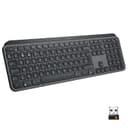
⌨️ Master your workflow with every keystroke — illuminate your productivity!
The Logitech MX Keys Advanced Illuminated Wireless Keyboard combines premium Perfect-Stroke keys with smart backlighting and multi-device Bluetooth connectivity. Engineered for professionals, it offers a stable, quiet typing experience with adaptive illumination and up to 10 days of battery life on a single USB-C charge. Compatible across major OS platforms and designed for seamless switching between devices, MX Keys elevates productivity with precision and style.


| ASIN | B07W6HXZ5J |
| Antenna Location | Gaming |
| Best Sellers Rank | 1,059 in Computers & Accessories ( See Top 100 in Computers & Accessories ) 13 in Keyboards (Computers & Accessories) |
| Box Contents | USB Cable |
| Brand Name | Logitech |
| Button Quantity | 104 |
| Colour | Graphite |
| Compatible Devices | Gaming Consoles, Laptops, PCs |
| Connectivity Technology | Bluetooth, USB-C |
| Customer Reviews | 4.6 4.6 out of 5 stars (3,782) |
| Enclosure Material | Plastic |
| Generation | 1st Generation |
| Global Trade Identification Number | 05099206086906 |
| Hand Orientation | Ambidextrous |
| Item Dimensions L x W x H | 43.2L x 13.2W x 2.1H centimetres |
| Item Type Name | Keyboard |
| Item Weight | 810 Grams |
| Keyboard Backlighting Color Support | Single Color |
| Keyboard Description | Advanced, Illuminated, Mechanical, Numeric, Wireless |
| Keyboard Layout | QWERTY |
| Language | English |
| Manufacturer | Logitech |
| Mechanical Keyboard Switch Model | Logitech |
| Model Name | Logitech MX Keys Advanced Wireless Illuminated Keyboard |
| Model Number | 920-009413 |
| Number of Batteries | 1 |
| Number of Keys | 104 |
| Number of Sections | 2 |
| Power Source | Battery Powered |
| Product Features | Customizable Display Keys, Easy-switch, Perfect stroke keys, Smart backlit keys |
| Product Warranty | 2 year manufacturer |
| Series Number | 920009413 |
| Style Name | MX Keys |
| Switch Type | Tactile |
| Theme | keyboards |
| Unit Count | 1.00 count |
| Water Resistance Level | Not Water Resistant |
D**Y
Finally, a decent keyboard!
As a programmer who lists technology as a hobby/curse, I've been known to type a few lines. For a good few years now, I've been trying to find a suitable keyboard for a reasonable price. I didn't think my list of requirements was excessive as it comprised of R/F wireless and backlit. I believe my mistake was "reasonable price" After trying a number of offerings from companies such as Jellycomb (which are good, I don't deny), I decided to bite the bullet and shell out for one of these to go with my excellent MX Anywhere mouse. I should have got one of these in the first place. It's solid it weighs as much as a medium-sized bungalow. The case is so sturdy with its construction from a neutron star. If anyone ever breaks in, I'm clouting them with this Typing has become enjoyable again! Just the right amount of travel, good consistency and nice tactile feedback. The solidity lends confidence to keypresses and helps eliminate "bounce" (sometimes my fingers don't hit with the right pressure and cause two keystrokes as a sort of bounce). It's quiet, but not so silent it starts to feel mushy. There's a nice resistance to keypresses The backlight is so handy and pretty clever. Other keyboards I've found (all one of them) require a keypress to illuminate whereas this just needs me to reach my hands towards it. Neat! It does result in random illuminations when I place it next to me and grab a drink, but I'd say that was a bit of a niche issue I've seen such complaints as "too heavy" and read this as "too quality" and also a complaint that the charging cable doesn't act as the data cable. The *charging* cable. On a *wireless* keyboard. I suppose in that vein, I could complain the USB-C isn't Thunderbolt compatible. What if I want ray-traced backlighting? I think some of the hotkeys might suffer the worryingly prevalent "repeat strike" which causes them to fire 8-12 times per keypress, but I've only experienced that with the Task View key so far. If it goes all K380 on me, I'll update this response I don't game, but from what I know, I'd never give a low-profile keyboard a high gaming score. This is a productivity keyboard, rather than a gaming one. Though if you don't prefer a mechanical for gaming, give this a try! The tank-like build should handle a losing streak pretty well. Just don't slam it into a wall unless you want to lose the wall Key layout is fine and if the multi-OS key-printing confuses a little, just remember the Windows characters are on the right side of the key and the Mac version on the left Update: I've had this for a little while now and by this point, the K380 had started exhibiting weird key repetition behaviour. This is a known thing for Logi keyboards, apparently. I got worried when, while using AnyDesk, I started getting multiple versions of keys sent through at random. However, I'm 99.9% certain that the repetition there was the product of the connection/software rather than the keyboard. Connected directly, I've had no issues at all. Such a relief as I love this keyboard (enough to spend £21 on a hard case)! The Flow software is, as ever, really useful. I've switched off Caps Lock, Num Lock, Scroll Lock and Insert (bloody annoying keys) and set up my own versions of the hotkeys. A neat little feature is gestures: Hold the fn key and move the mouse to perform an action I have to use Ubuntu 18.04 in work and was a bit disappointed to discover that Logi doesn't provide *nix software. But I was determined to get this working. Bluetooth may have worked, but my work machine has no adapter. There was no recognition when I connected it. Bugger. But it wasn't beating me, so after a bit of looking around, I found Solaar. It's not perfect and it can't alter keyboard or mouse settings, but it at least gets them working and even takes a guess at the battery level! I say 'guess' because the two display locations change frequently and never agree with each other Anyway, more than happy now to recommend the absolute s&*t out of this keyboard. And the MX Anywhere 2S mouse
M**N
Definitely a quality product
This keyboard feels lovely - quiet action, good tactile feel and a reassuring weight. The illumination is refined and classy and just about perfect. It has nothing of the 'gaming' feel about it - just elegant precision. I hesitated before spending this much on a keyboard because I wasn't sure it was going to be THAT much better than a standard one but, for me, it definitely is. I have been using it for about 9 months now (professional CAD, software coding and general use for about 10 hours a day, most days )and I am still extremely happy with it. I like the fact that it works with the MX Anywhere 3 mouse with the 'flow' - when you move the mouse from a monitor on one computer to a monitor on a different computer, the mouse and keyboard automatically switch over. What's more, anything you copied into clipboard one the first computer is still in the paste buffer on the second (e.g. copy a browser link, a screenshot or text form an editor using any normal copy command, and it's there for pasting when you move the mouse to the second computer. No more emailing things to myself or waiting for Dropbox to sync). This is a very significant advantage to me. Battery life seems reasonable - I was unsure whether I wanted a rechargeable keyboard as wireless ones I had lasted about a year or more with one or two AA batteries but it isn't a problem. I plug in the supplied USB C cable every 3-4 weeks for an hour, and don't really have to think about it. Having a cable on your keyboard very occasionally isn't a problem to me at all. The only very slight negatives are: 1) the 'flow' can be slightly sluggish and take a second or three when moving from one computer to another. That might be more a mouse thing than a keyboard thing but it's hard to tell. 2) The keyboard layout seems to be dual format for Windows/MacOS. I knew this when I bought it but in an ideal world I would have only the layout for the OS I am using. I use both Windows and Mac so it's easier for me to confuse myself and press " instead of @ or ~ instead of ~ . I don' t know whether it would be such a useful experience without a 'flow' enabled mouse but it would still be a lovely keyboard to use and I would purchase this for use on its own. It pairs with up to 3 computers so, even without 'flow', you press the key associated with each computer (see photo) to swap. In this case the swapping from one to another seems flawless and instant. The user experience is so good, that despite the very minor points, that I still feel it deserves five stars.
P**R
Excellent keyboard, highly recommend Great feel, low profile, reliable, programmable, no sign of keys wearing even with my intensive use
H**S
Clavier excellent, achat super recommandé.
M**O
Ich kannte diese Tastatur bereits aus meiner Arbeit und musste sie dann auch privat haben. Tolles Schreibegefühl, nicht wuchtig und qualitativ hochwertig. Die Verknüpfung mit der Logi+ Software ist wunderbar und man kann hier viele Einstellungen vornehmen.
A**F
كيبورد محترمه جدا وفخمه وتقيله و ماسكه نفسها مبتتحكرش من مكانها والتخصيص فيها على اعلى مستوى خصوصا مع برنامج Logi Options لو عندك ماوس MX Master تقدر تستخدمهم الاتنين على نفس ال Unifying Reciver من عيوبها سعرها مش رخيص و كمان الحروف العربي مكتوبه للويندوز والماك مع بعض فممكن تلخبطك شويه في الاول الحروف اللي على لليمين للويندوز والشمال للماك لازم تحط في بالك انها كيبورد للشغل و لصناع المحتوي ومصممي الجرافيكس و المبرمجين دا مش كيبورد للالعاب خالص او للاستخدام العادي
L**O
Bella, qualità che si sente. Layout inglese che uso per sviluppare in C++ (ha il layout UK, non US, quindi è perfetta) mi permette di controllare portatile, Mac Mini e desktop. Silenziosa, illuminazione ottima e durata della batteria idem (sono tre settimane che non la carico). Arriva con un cavo usb to usb-c, quindi la si carica serenamente con pc anche vecchi. La uso con un mouse MX Master 3. Da più di 20 anni uso tastiere meccaniche serie, di prezzo paragonabile, Dell, qualche vecchia Digital etc..., non la tastiera da primo prezzo, quindi ho voce in capitolo. I soldi meglio spesi da anni.
Trustpilot
Hace 3 semanas
Hace 3 días