We remain fully operational. Our teams are working around the clock to ensure your deliveries continue safely.

Descargar la aplicación


Servicios al cliente
Sobre nosotros
Copyright © 2025 Desertcart Holdings Limited
Descargar la aplicación
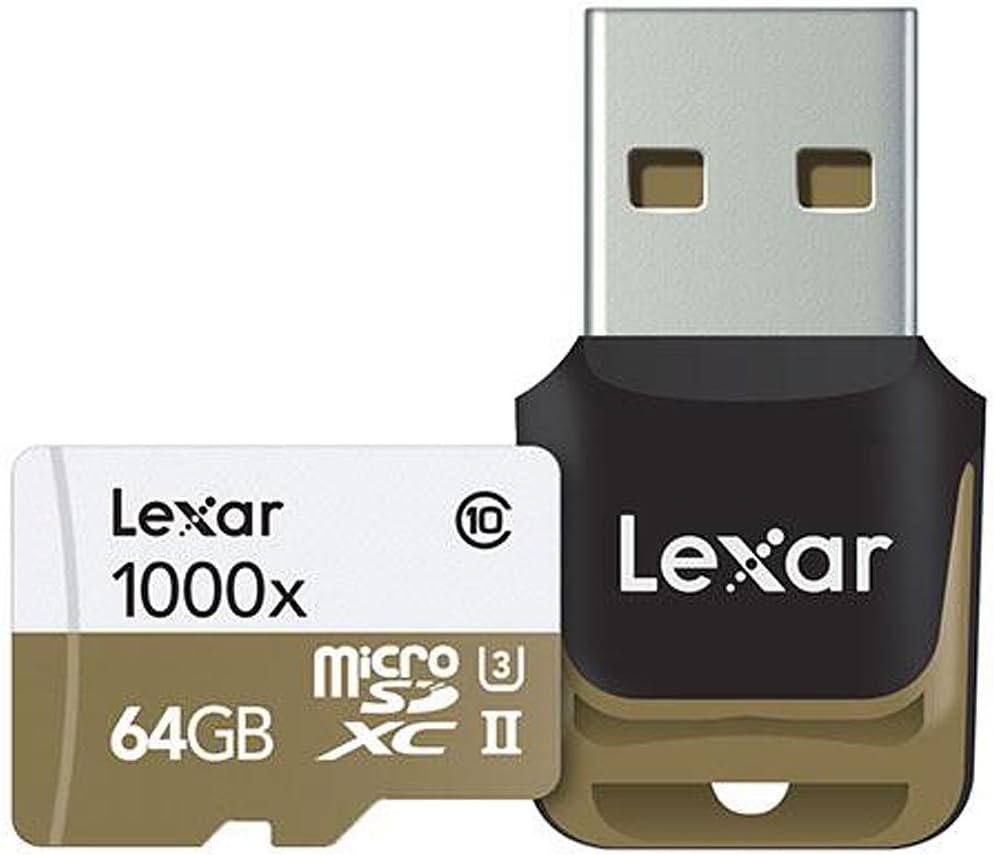
🚀 Elevate your content game with Lexar’s pro-speed microSD!
The Lexar Professional 1000x 64GB microSDXC UHS-II card offers ultra-fast 150MB/s write speeds and UHS Speed Class 3 (U3) performance, ideal for capturing high-quality 1080P, 3D, and 4K video. Designed for sports camcorders, tablets, and smartphones, it features water and temperature resistance, backward compatibility with UHS-I devices, and limited lifetime support, making it a reliable choice for professionals and enthusiasts alike.


| ASIN | B00U77V5IW |
| Additional Features | Temperature Proof, Water Proof |
| Best Sellers Rank | #1,647 in Micro SD Memory Cards |
| Brand | Lexar |
| Color | Brown, White |
| Compatible Devices | Smartphone, Tablet |
| Customer Reviews | 4.5 out of 5 stars 1,952 Reviews |
| Flash Memory Type | Micro SDXC |
| Global Trade Identification Number | 00650590189595, 00650590200825, 00843367115372 |
| Hardware Connectivity | SDXC, microSDXC |
| Item Weight | 9 Grams |
| Manufacturer | LSDMI64GCBNA1000A |
| Media Speed | 150 MB per second |
| Memory Storage Capacity | 64 GB |
| Mfr Part Number | LSDMI64GCBNL1000R |
| Model Name | Professional 1000x |
| Model Number | LSDMI64GCBNA1000A |
| Read Speed | 90 Megabytes Per Second |
| Secure Digital Association Speed Class | Class 10 |
| UPC | 650590189595 843367115396 843367115372 650590200825 843367110117 |
| Warranty Description | Limited lifetime warranty on card and one-year limited warranty on reader |
| Warranty Type | Limited |
P**N
Great USB3.0 card bundle, keep constant speed while getting hot.
Compare Lexar X1000 microSD $25(with USB3.0 reader) with Samsung Evo microSD $9.9 in 3 different readers. **Lexar X1000 32G microSD card with bundled USB3.0 Reader: Bundled USB3.0 reader: R/W/4kR/4kW 153/70/16/1.6 MB/s PCIe SDHC reader: R/W/4kR/4kW 81/62/12/1.2 MB/s USB2.0 SDHC reader: R/W/4kR/4kW 19/17/4.2/1.2 MB/s Lexar X1000 32G microsd card has very fast read speed and pretty fast write speed. The USB3.0 reader can keep a constant write/read high speed, though it gets very hot while transferring full 32G data. I have used 3 kinds of flash drives from Samsung and SanDisk, all of them reduced speed to usb2.0 level after a few Gigabytes of data transfer. Recommend it to any one. **Samsung EVO 32G microSD card: Bundled USB3.0 reader: R/W/4kR/4kW 46/39/10/4.0 MB/s PCIe SDHC reader: R/W/4kR/4kW 44/32/10/2.0 MB/s USB2.0 SDHC reader: R/W/4kR/4kW 19/14/4/2.5 MB/s For smart phones still using USB2.0 card reader, Samsung Evo is good choice for its good performance and cheap price. While Lexar X1000 can provide much faster download speed and pretty good writing speed.
A**F
Works with Garmin VIRB Ultra 30 Action Camera, 4K/30 FPS and I love the USB adapter
I bought this to use with the Garmin VIRB Ultra 30 Action Camera . I have recorded several videos at 4K/30 FPS (max resolution that the camera can dish out) without any issues so far. I also did some benchmarks using Ubuntu (dd, gnome-disk, iometer and bonnie++) and it has very high reading speed (+ 100 MB/s), but not so high writing speed. Initially I bought Samsung Pro Plus 128GB MicroSDXC Memory Card (MB-MD128DA/AM) , which had away better benchmark when writing, but, at the end, what really matters is if the card can keep up with what the camera is dissing out and I ended up constantly having corrupted videos and/or corrupted G-Metrix, so I returned it. Before returning it, I tested the card for corruption, I did many benchmarks and the card passed on all of them. I still do not know why so many corrupted files (some of the videos would not play and I could not import the G-Metrix). The other thing that I love is the USB adapter, it has far better performance than the SD adapter that comes with most of the other brands, it fits on a regular USB port (no need to have a card reader) and it is easy to use. It also works with other brands of Micro SD.
J**A
Card reader is not ideal as a permanent flash drive replacement
I bought this largely because of the great-looking microSD card reader that came with it. High-quality, USB 3 readers of this form factor are not very common. I like to use them as flash drive replacements (I leave the cards in them). I do this for three reasons: microSD cards are far faster than any USB flash drive I have ever researched except a few very large and expensive ones (I paid only $20 for this in Jan. 2017); the microSD card can be removed and inserted into other devices such as phones and media players to exchange files, making the device much more versatile; if the USB device is damaged, I can reuse the microSD card in another device. The features I want in such a reader are: - Very small size and only the one slot. - USB 3 speed. - Lanyard loop. - Secure mounting of the microSD card with no risk of it falling out or being damaged while hanging from a lanyard or being kept in a pocket or backpack. - Activity light. This reader meets only the first three criteria. The card hangs part way out of the reader when fully inserted (see my photo), and while it is fairly secure in the slot, I do not feel that it is quite secure enough never to work its way out. (I use a small piece of adhesive tape on the top face of the reader that reaches around the back edge of the card to hold it in.) There is also no activity light. Aside from that, I like it a lot. It is durable, attractive, and very fast, and has given me no trouble. There was one instance when I thought it had gone bad. I relate this story to help anyone else who encounters something similar with any device. A few days ago I inserted the reader into my computer's USB 2.0 port and the screen went dark and the computer became unresponsive and did not recover. I rebooted the computer and from then on the reader would not work properly in it. Windows 7 recognized that something had been plugged in, but the card's partition and data were not recognized. Computer Management would not even allow me to assign a drive letter to the device. To cut the story short, the only problem was that the default Windows driver for the device had somehow gone corrupt. The device worked on all other computers and when I launched Device Manager, I found an "unrecognized storage device". I uninstalled the driver and then reinstalled it, and the reader has worked ever since. I have never seen this happen before. So try reinstalling the driver (or using an alternate computer) before deciding that a device has gone bad.
J**Y
Lexar 1000x microSDHC: Good but not Great. Actually pretty decent.
Read performance is great -- using the included USB reader I was able to get 140MB/s read. Write speed on the other hand is disappointing, again using the included USB card reader, I was only getting 40MB/s. Update: retested this on a PC running Windows 10. Previous test was done on an iMac and I mistakenly made the assumption that the test result on iMac would be comparable to test results posted by others using CrystalDiskMark. A sequential write speed of around 60MB/s was obtained on a PC, making it a significant improvement of write speed over the blue colored 633x card. I am updating the score to 5 stars. Realizing that the benchmark results posted by other folks are not necessarily directly comparable to mine I set out to create a comprehensive list of current microSD cards on the market. The results are below. --------------------------------------------------------------------------------------------- I had the opportunity to compare the performance of the fastest microsd cards currently available from top manufacturers. All cards mentioned in this review are obtained from Amazon during the last week or two except when noted otherwise. Test Setup: Lexar Professional workflow UR1 microsd card reader was used for all tests except when noted CrystalDiskMark 5.0.2 x64 was used to produce all the test results and was set up with 2 passes and 100MB read/write size All cards up to 32GB are formatted as FAT32 with 32KB allocation unit size, all 64GB cards are formatted exFAT with 128KB allocation unit size Test Results (Numbers are Sequential Read, Sequential Write, 4K Random Read, 4K Random Write in MB/s, speeds greater than 10MB/s were rounded to the whole numbers) 16 GB Alphabetically Lexar 633x** -- 88, 25, 8.7, 1.2 Panasonic U3** -- 93, 42, 11, 0.7 Sandisk Extreme Pro -- 95, 80, 7.6, 2.6 32 GB Alphabetically Delkin U3 -- 93, 59, 11, 0.6 Kingston 90R/80W -- 93, 58, 11, 0.6 Lexar 1000x -- 90, 57, 10, 1.4 <== the listed product Lexar 1000x with Bundled Reader* -- 148, 60, 10, 1.4 <== the listed product Patriot EP -- 90, 35, 10, 0.6 PNY Turbo Performance -- 91, 55, 6.9, 0.9 PNY Elite Performance Lime Green -- 94, 55, 7.4, 1.0 Samsung Pro gray -- 92, 82, 10, 3.6 Sandisk Extreme Pro -- 94, 87, 9, 3.0 Sony up to 95MB/s -- 91, 51, 4.8, 0.9 Transcend Ultimate 633x -- 93, 85, 8.1, 1.4 64 GB Alphabetically Delkin U3 -- 94, 27, 13, 0.3 Kingston 90R/80W -- 94, 25, 13, 0.3 Lexar 1000x -- 92, 56, 12, 1.5 <== the listed product Lexar 1000x with Bundled Reader* -- 153, 66, 11, 1.7 <== the listed product Patriot EP -- 81, 22, 11, 0.6 PNY Turbo Performance -- 92, 54, 6.9, 0.9 PNY Elite Performance Lime Green -- 92, 54, 7.5, 1.0 Samsung black -- 82, 20, 8.8, 2.1 Samsung Pro gray -- 90, 80, 10, 3.5 Samsung Pro+ *** -- 92, 86, 10, 5.3 Sandisk Extreme Plus**** -- 92, 58, 10, 2.8 Sandisk Extreme Pro - 97, 91, 10, 3.0 Sandisk Ultra ***** -- 46, 16, 7.0, 2.1 Sony up to 95MB/s -- 92, 49, 5.2, 0.9 Transcend Ultimate 633x -- 93, 83, 7.3, 1.4 128 GB Alphabetically Lexar 633x -- 78, 28, 3.3, 1.4 Sandisk Ultra -- 92, 19, 6.4, 2.4 * The Lexar 1000x card is the only UHS-II card available and tested, the bundled USB reader has extra pins for reading UHS-II card ** Came bundled with a device *** Purchased from a large west coast electronics retailer. This card is a new release and not currently available on Amazon. It is different from the gray-colored Pro card **** old model tested, not the current U3 model ***** old model tested Fastest Sequential Read: All tested cards were able to accomplish > 90MB/s, with the Lexar 1000x able to take advantage of UHS-II speed when using the bundled USB reader and leading the pack Fastest Sequential Write: Sandisk Extreme Pro, Samsung Pro+, Transcend Ultimate 633x Fastest Random Read: Kingston 90R/80W. Fastest Random Write: Samsung Pro+ Best overall: Samsung Pro+ and Sandisk Extreme Pro Other observations: Performance and price are not proportional when it comes to selecting a microSD card. Some of the worst performing cards in this review also happen to be the most expensive. Not all 633x cards are created equal. The two cards reviewed from Lexar and Transcend are both marked as 633x but vary in performance greatly. 4k video recording using action cams and drone cameras have a typical bitrate of 60mbps or 100mbps, corresponding to 7.5MB/s to 12.5MB/s. All cards in this review should theoretically be able to handle this usage easily. Using microsd card as supplemental phone storage potentially could benefit from a faster card, Best Looking Card (if it matters): Sandisk Extreme Pro: Red/Gold with white print Lexar 1000x: White/Gold with Black/White print Samsung Pro+: White/Black with a red stripe and Black/White print PNY Turbo: Lime Green/Black with Black/White print Update 9/14/2015: Added additional cards to the list. Update 9/18/2015: Added 128GB Sandisk Ultra and Lexar 633x Update 9/21/2015: Added 2 PNY Elite Performance cards
S**1
Good card, excellent and fast USB adapter.
I bought this for my job to use in a stand-alone data logging system installed in a test vehicle. The card is plenty fast and large for data logging with an Intrepid Control Systems neoVI Fire. There's not much else to say on that front. It works for the intended purpose. Regarding read and write speed I must say this USB adapter helps the card when connected to your PC. The card is going to do whatever it can when directly in your device. When reading data off the card or adding anything to it via USB adapter this Lexar adapter is the fastest I've used. As mentioned this product was purchased for use in a data logger. Write speed was important to ensure we can capture bursts of data. Reading gigabytes of data back off the car is also a necessity and time consumer. Thus I tested read and write speeds using Crystal Disk. The comparison was to the SanDisk microSD cards and Rosewill USB 3 adapter/reader provided by the logger supplier. This Lexar microSD was faster than the SanDisk cards, though that was expected given it has a higher speed rating. What I didn't expect was that every card tested, Lexar or SanDisk, showed higher read and write speeds with the Lexar adapter than with the Rosewill adapter.
C**H
Great for GoPro but MacBook Pro does not permit usb 3.0.
So far so good. Bought it for a GoPro Hero 4 black. Need the high speed for 4k and 240fps stuff. It seems to work just fine for the high bandwidth formats used on the 4 black. I did have trouble getting my MacBook Pro to see it. When directly plugged in with the little usb reader it prompted an error message ("unable to read card"). I was able to get the video off from the camera by using usb to the gopro, but without the little reader I could not get the usb 3 speeds. I blame Apple (their unwritten motto is "does not play well with others"). I work in video production, and if I could have a nickle for every time I had a problem with our Macs not connecting with something non-apple... Anyhow it works just fine on my PC.
M**R
Perfect for my GoPro 4
Perfect for my GoPro 4 This is actually the second one I’ve bought this week, which should tell you how well the first one performed. I originally picked up this Lexar 1000x 64GB microSD card for my action camera, and it exceeded expectations right out of the box. The included USB 3.0 reader was a nice bonus—it made transferring footage to my computer super quick and hassle-free. I was getting read speeds close to the advertised 150 MB/s, and write speeds were strong and consistent for my 4K recording needs. What really sold me was how reliable and fast it was while filming longer 4K clips. No buffering, no frame drops, and no heat issues. It just worked—smoothly and without any surprises. I’ve also used it in a drone and a mirrorless camera, and it had no problem keeping up with burst shots or high bitrate video. After using the first one for a couple of days, I ordered a second to rotate between projects. It’s the kind of card you don’t have to worry about. For the price, speed, and reliability—especially with UHS-II support at this capacity—it’s a great value. If you're looking for a dependable microSD card that performs like a pro without breaking the bank, this one's definitely worth picking up.
B**E
Updated review! Trash the adapter and you'll be fine.
Update on 12/12: I originally gave it one star because of the card froze during a large amount of file transfer to the computer. Now I'm raising it back to three stars. Today I tried it again to transfer 26 files from the card to my Mac, as expected it froze again. Then I plugged the card into a SanDisk adapter and tried it again. It was so smooth and everything went well with the SanDisk adapter. So I know the problem is the nice looking adapter came with the card. As a conclusion, the micro SD card itself is ok, it performs well. But the adapter came with it is a fault. In any case you see a problem while transferring files, try it with another adapter. Original Post on 12/11: Put it in GoPro Hero 5 Black, took a few photos and videos, then the first time I plugged it into my Mac, it got stuck during the transfer and became very hot. I had to terminate the process, pulled out the card without being able to eject it before hand, and re-did it two more times to finish the transfer. It's not only a pain to transfer files from the card, but I think there's a great potential the card would fail and lose all data recorded in it. It scares me away just to imagine the card fails to read after a long trip with a large amount of photos and videos. I'm glad I had found this issue before our family trip and have the chance to avoid it. But now I have to get to the backyard and dig out the package from trash bin...
Trustpilot
Hace 2 semanas
Hace 2 semanas