
Descargar la aplicación


Servicios al cliente
Sobre nosotros
Copyright © 2025 Desertcart Holdings Limited
Descargar la aplicación
🖋️ Stamp your mark with style — because your brand deserves to be unforgettable!
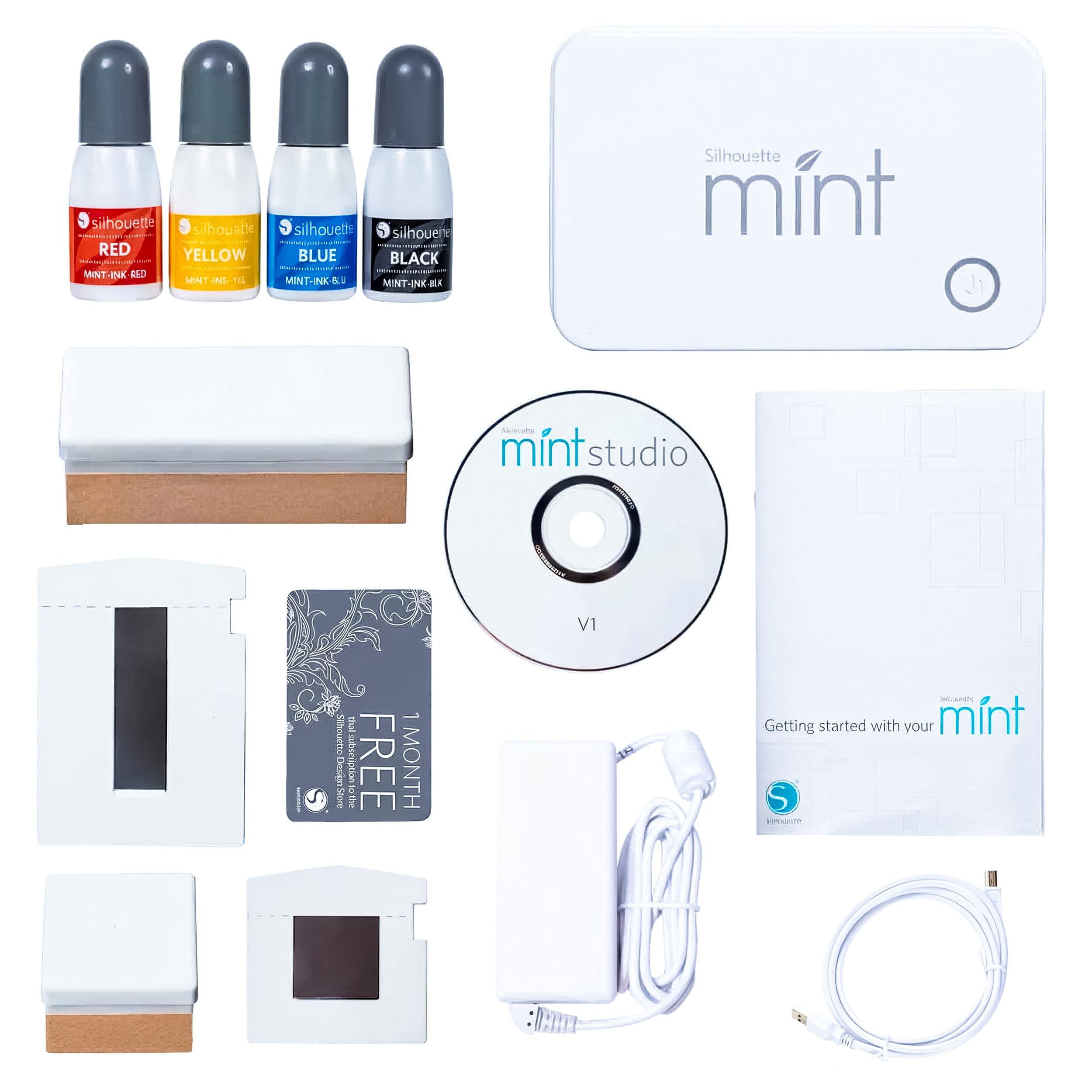
The Silhouette Mint Custom Printer is a compact, high-quality stamp maker designed for professionals and creatives who want to produce custom stamps with ease. It supports two stamp sizes (15x60 mm and 30x30 mm), includes four vibrant ink colors, and comes with user-friendly software and 50 exclusive designs. While the proprietary ink and stamp refills can be pricey, the machine delivers precise, durable, and colorful stamps perfect for personal branding, office use, or creative projects.
| ASIN | B00ZSQX63O |
| Best Sellers Rank | #66,683 in Office Products ( See Top 100 in Office Products ) #68 in Ink Tank Printers |
| Customer Reviews | 4.5 4.5 out of 5 stars (1,451) |
| Date First Available | June 16, 2015 |
| Is Discontinued By Manufacturer | No |
| Item Weight | 11 ounces |
| Item model number | SILHOUETTE-MINT |
| Manufacturer | Silhouette America, Inc |
| Product Dimensions | 3.25 x 4.75 x 2.25 inches |
K**T
Easy to use and high quality stamps, great value
In love with this little machine! The software is really easy to use for designing the stamps and printing them is quick, easy and safe. I wouldn't recommend it if you are planning to give away the stamps because the stamp kits are not that cheap. But if you are planning to keep your stamps, this is the machine for you. If you have kids, it is also an excellent choice to spend quality time with them creating and the machine is super safe.
C**D
Pretty awesome, but it's an expensive product in the long term.
I got this for my birthday after waffling for a bit on whether or not I wanted it. I was thinking about trying another system that uses photo-sensitive polymer packs (which is also one way that commerically-produced stamps are manufactured), but those are even harder to find than refills for the Mint system and are also only made by one company (based in the UK). The Mint is definitely capable of doing detailed images at a fairly high resolution. It's not going to do microscopic shapes, but I was impressed with the quality of the first stamp I made. I've also added some screenshots of what my original image looked like and how it looked after the Mint's filtering was applied to prep for making a stamp. I've tried to find information on the potential to use non-Silhouette inks. I've come up with pretty much nothing. The inks are oil-based, and while I doubt they are unique to the Mint system (or its Casio-branded Japanese counterpart, the Pomrie), I can't find enough information on the ink to trust that a cheaper alternative will work. I may risk one of the smaller, less-expensive stamp sheets with some oil-based self-inking stamp refill and see what happens - if I do, I'll make sure to update my review. The downside of the Mint is that it is a completely unique and proprietary product. This is a rebranded and repackaged version of the Casio Pomrie, which is also unique and proprietary in its market (East Asia), so there's really no way to get refills on the cheap. I found inks and stamp sheets for a bit cheaper than other sites (including Amazon), but even at $2.95 per 5mL bottle of ink and $3.95 to $12.95 per two-pack of stamp sheets, the cost adds up. I spent $65 on the machine and another $100 on ink and stamp sheets so that I'd have a variety of sizes and all the available ink colors. Theoretically you should be able to mix ink colors together, but since it's difficult to do that at the time of applying the colors to the stamp (without wasting a bunch of ink and sourcing extra application bottles), I don't know if it's worth it. The stamp sheet refills are quite expensive as well, and unlike the dyes I don't think there's any potential for a cheaper alternative from a third party. The stamp itself is made of some kind of heat-reactive (aka thermal) material. From what I can tell, heat applied to the sheet in the shape of your design causes the heated portions to become porous and slightly raised, allowing the ink to soak into the design for self-inking stamping. The material is very resistant to the ink otherwise, which I think is how you're able to apply a blob of ink to a small design and, after waiting a bit, all but a minute amount of ink has disappeared into the stamp material. So far, I am very happy with my Mint. I'm disappointed that the refills are so expensive, because it means that I have to be choosy about my designs, whereas with my Cricut I can just use scrap cardstock and even cheap printer paper to test a design before cutting it on more expensive specialty materials. That being said, it's definitely a unique product that packs a lot of creative punch, depending on your needs. One tip - the stamp kits are not worth the money. A stamp kit costs more than a stamp sheet set and isn't at all necessary for making your stamps. A kit comes with a single stamp sheet and a stamp base, whereas a stamp sheet set comes with two stamp sheets. A stamp sheet in this context means a stamp sheet to run through the Mint, a plastic base onto which the printed stamp is adhered, and a plastic snap-on cap to protect your stamp and prevent the ink from drying out as quickly. The thing is, the stamp base is literally just a piece of composite material (something similar to MDF) with a plastic bit glued on. A completed stamp can slide into that plastic bit so you can swap out different stamps with a single base. Instead, you can just use some foam squares on the underside of the completed stamp base and adhere your stamps to wood blocks! Buy some scrap wood and saw it down to the sizes you need, or look on Amazon for cheap wood blocks. You'll end up saving a decent amount of money, and you won't have to change out the stickers on the back of your blocks since the stamps are permanently attached rather than interchangeable. I also learned the hard way that if you want to use multiple colors on a single image and you want them to blend smoothly, you need to use something small and pointy (like a pin or needle; I used a dental pick) to mix the ink where the colors meet BEFORE it absorbs into the stamp. On the other hand, if you do want colors side-by-side without bleeding into each other, this stamp material is amazing - colors don't seem to bleed at all unless you force them to by mixing.
V**A
Impressive
My business had a request for some stamps, we knew we could easily do the art work but the rubber for our laser wouldn't arrive in time to fulfill. I came across this when looking for alternatives and pulled the trigger. Device arrived next day. Full plug and play no messing around. In 10 min I uploaded the art work that we created in Adobe, inserted the blank and we had our stamp. Quite amazing. No fumes, no mess no hassle. This Device saved the day for sure. It does have a few cons but if you are a crafter or hobbyists this is everything you'll need for making a stamp. Pros: - User friendly - Speed - Cost to value Cons: - Expensive blanks - No self ink stamp pads - Designed/ Advertised to work only with Silhouette materials. Inks, blanks and so on. Possibly no market for cheaper alternatives.
T**E
Very poor experience
UPDATE: After a great deal of wrestling with the software and signup process, we were finally able to get my daughter signed up for the shop and started printing stamps. On one hand I would give this four solid stars. The stamps are VERY neat and they come out far better than I would have expected. Kudos to the clever engineers who made this kit happen and work. On the other hand, BOY are the stamps expensive. It seems like very few use-cases could be profitable for this product. It is a toy, or fun adult $ toy at best. It is great if you have the disposable income to pay $15 for a very small stamp of something to stamp on your homework when you turn it in... But I can't imagine what you would need a stamp so badly for that you would make sense of the high price to use these stamps. STILL, it is FUN. We caught the unit on sale, but in the long run it isn't the price of the stamp maker - but the high price of the stamps that will put you in the red. I'm going to give this a SOLID 3.5 stars, and I guess that I will round up to four on Amazon. But just be aware of the following... The stamps are smaller than you probably think; They are expensive. Roughly $15 a stamp. There are kits with 2/$15 but they don't come with the wood blocks needed and I can't quite figure out what that means to us yet. Could make them closer to $8 a stamp if it works. The look awesome! The engineering is exceptional IMHO. The ink is also a little costly, not sure if you can use other inks or not. Software is pretty good. The signup and ongoing fees for the design templates is costly, but you don't really need it. Go in with your eyes wide open. If you have the disposable income, they are fun. ------------------------------------------------------------------------------------ First, let me tell you a quick background on me. I am pretty computer savvy - I am the computer friend to most of the people I know. Technology doesn't faze me and I welcome challenges. I _do_not_ appreciate poor design and poor support. One last thing - I have a 12 year-old daughter that LOVES CRAFTS. We have several Cricut devices, but this is our first, and likely our last, foray into Silhouette products. The difference in the two is JARRING... I'm going to leave an open review here that is subject to change if Silhouette reaches out, explains and fixes the problems. But I will be impressed and shocked if that happens. We will see... Here's our experience. My daughter, through a combination of good grades and other chores and behavior, earned a reward. The Silhouette Mint was something she had been wanting for some time and we ordered it. It took a little longer to arrive, but we chalked that up to Covid and didn't worry about that. It arrived today and it looked to be in brand-new shape and we were excited about getting it set up. That's when things took a turn for the worse. SERIAL NUMBER... As we installed the software, we tried to register the Mint "printer" with Silhouette. After inputting all the required data, we looked on the bottom of the unit and found what appears to be the serial number. There is NOTHING else that could possibly be the serial number anywhere on the unit, in the paperwork or anywhere. When we tried to input the serial number, it would not accept all of the letters/numbers. So we tried to guess at the last parts of the serial number. For example, if the serial number on the back was: 123AB45CD100123 We tried the full number 123AB45CD100123 We tried the last six digits 100123 We tried the last eight characters CD100123 We tried any reasonable version of those numbers and NONE of them worked! So we did a google search - I recommend that you search as well. We searched for Silhouette Mint Serial Number and found lots of comments about not being able to input the serial numbers in the product registrations forms. THEN, I told my daughter, let's just click the "Register Later" button and deal with this later. Let's have some fun with this thing... She got out the card that is supposed to give her a free month of their "Design Store." The directions on how to input the card information were terrible, but we persevered. UNTIL it came time to create an account. We began the process by putting in her name and e-mail address. We put in everything and then it asked us to create a password. My daughter loves critters. She has pets of many different types, so the directions of the password were simple (but annoying) enough. You must use at least 10 characters and one character has to be a number. We used Critter2021 Then we had to click on all traffic lights in a zillion pictures to prove we weren't robots. And... it said our password wasn't correct. Not sure why... We tried many versions of different words and numbers and made sure we didn't have anything input incorrectly - it just didn't work. UPDATE: I finally went to a different computer and created a Silhouette account from the internet, we are going to see if that has worked or not. We still don't have the device registered and aren't sure how to get it registered. I am going to revisit this and update later after the irritation has worn off and we aren't frustrated anymore. Maybe using the device will take some of the edge off of the installation/sign up process and we will like it better then. For now I am leaving this up to let people know how irritating the situation was for us. I hope that you do not have the same problems.
K**R
What a neat little stamp maker.
Got the Mint to make a signature stamp for a friend who was getting writer's cramp from signing customer receipts. I am now hooked on designing and making stamps with the Mint. And like with any other digital software it does take a little time and patience to learn it. The process of making stamps with the Mint is awesomely easy tho. The quality of the Mint machine, its materials and the stamps is impeccable. I am "talking up" this machine to everyone who will listen.
S**T
Brilliant fun x
B**Y
Nice 👍
R**A
I spend a good $100 a year on stamps for work and it takes ages to arrive. With this guy, my stamps look a lot better and they're printed in seconds. The quality is amazing too. This was definitely worth the money spent.
そ**し
ソフトが格段に使いやすくよくなっていますが、中に入っていたデザインストア1ヶ月無料券が使えなかったので星を一つ減らしました。 家庭用浸透印作るのに最適。住所印もしっかり読み取れる解像度です。
H**R
This is the coolest little machine ever! In no time at all you can be making your own stamps. It is as simple as designing something in the Mint software and then running a stamp sheet through the printer. That's it. The package includes the Mint printer, four bottles of ink (red, yellow, blue, and black), two reusable stamp blocks (for mounting your stamps while stamping), and two stamp sheets (one in the medium size of 30mm x 30mm and one in the small size of 15mm x 60mm), the required cables, and a free one month subscription to the Silhouette image store. There is also a disc which contains the Mint software, but I suggest going to Silhouette's website and downloading the newest version directly. The software is very easy to use and offers lots of options for customizing stamps. It is able to create stamps from lots of different sources, including simple line drawings all the way to photographs. You can import PNG, JPEG, TIFF, BMP, GIF, and .studio files; in addition, you can also use any of the fonts installed on your computer. The quality of the finished stamp depends on the style options you choose and the size of the stamp you create. I would recommend picking up a Stamp Set in each of the sizes not included in the kit. The sets include the reusable stamp block and one stamp sheet. From then on you can just get the stamp sheet sets, which include two sheets but no blocks. Silhouette sells ink made exclusively for use with these stamps. The stamps are self-inked and need to be re-inked after about 50 uses. It is possible to use some other inks, but not all will work. I'd suggest doing some research to see what other people have discovered. Silhouette has a great series of short videos available that will teach you how to use the software. I found them very helpful. Overall, I feel that this is a great addition to my craft room. I'm able to make stamps that help me embellish my cards (made with a Cricut, sorry Silhouette users!), return address stamps, and more. I seriously love this little machine.
Trustpilot
Hace 2 semanas
Hace 4 días