We remain fully operational. Our teams are working around the clock to ensure your deliveries continue safely.

Descargar la aplicación


Servicios al cliente
Sobre nosotros
Copyright © 2025 Desertcart Holdings Limited
Descargar la aplicación


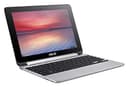



💼 Flip your productivity, anywhere, anytime!
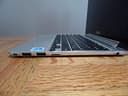
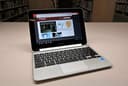
The ASUS Chromebook Flip C100PA is a lightweight, 10.1-inch convertible laptop featuring a 360-degree hinge, 1280x800 touchscreen, and a speedy 1.8 GHz Rockchip processor. With 4GB RAM, 16GB SSD storage, and up to 10 hours of battery life, it’s designed for mobile professionals who need versatile, all-day performance with seamless access to Chrome and Android apps.


| ASIN | B00ZS4HK0Q |
| Audio Output Type | Headphones |
| Audio Recording | Yes |
| Automatic Backup Software Included | Chrome OS |
| Battery Average Life Standby | 10 Hours |
| Battery Cell Type | Lithium Ion |
| Battery Life | 6 Hours |
| Best Sellers Rank | #143,946 in Computers & Accessories ( See Top 100 in Computers & Accessories ) #2,349 in 2 in 1 Laptop Computers |
| Bluetooth Version | 4.0 |
| Bluetooth support? | No |
| Brand | ASUS |
| Built-In Media | 2-cell battery, Chromebook - flip design, Power adapter |
| CPU Model Generation | Rockchip RK3200 series |
| CPU Model Number | Ryzen 3-7320C |
| CPU Model Speed Maximum | 1.8 GHz |
| Camera Description | Front |
| Chipset Type | Rockchip RK3288 |
| Color | aluminum chassis |
| Compatible Devices | Devices with USB, HDMI, Micro SD, Wi-Fi, and Bluetooth connectivity |
| Connectivity Technology | Wireless |
| Control Method | Touch |
| Customer Reviews | 4.0 4.0 out of 5 stars (1,834) |
| Display Resolution Maximum | 1280*800 Pixels |
| Display Technology | LED |
| Display Type | LED |
| Form Factor | Laptop |
| Graphics Card Ram | 4 GB |
| Graphics Coprocessor | ARM Mali-T764 |
| Graphics Description | Integrated |
| Graphics Ram Type | DDR4 SDRAM |
| Hard Disk Description | SSD |
| Hard Disk Interface | Solid State |
| Hard-Drive Size | 16 GB |
| Hardware Interface | USB |
| Has Color Screen | No |
| Human-Interface Input | Touchscreen |
| Item Dimensions L x W x Thickness | 12.63"L x 8.13"W x 0.62"Th |
| Item Weight | 2 Pounds |
| Keyboard Description | Flexible |
| Keyboard Layout | QWERTY |
| Lithium-Battery Energy Content | 31 Watt Hours |
| Manufacturer | ASUS Computers |
| Maximum Display Brightness | 350 Nit |
| Memory Clock Speed | 1.8 GHz |
| Microphone Form Factor | Integrated |
| Model Name | Chromebook Flip C100PA |
| Model Number | C100PA-DB02 |
| Model Year | 2015 |
| Native Resolution | 1280 x 800 pixels |
| Number Of Cells | 2 |
| Number of Ports | 2 |
| Operating System | Chrome OS |
| Power Device | AC adapter |
| Processor Brand | All winner |
| Processor Count | 4 |
| Processor Series | Apple A4 |
| Processor Speed | 1.8 GHz |
| RAM Memory Installed | 4 GB |
| RAM Memory Technology | DDR3 |
| RAM Type | Unknown |
| Ram Memory Maximum Size | 4 GB |
| Rear Facing Camera Photo Sensor Resolution | 8 MP |
| Refresh Rate | 60 |
| Resolution | 1280x800 |
| Screen Finish | Glossy |
| Screen Size | 10.1 Inches |
| Series Number | 100 |
| Speaker Description | Single built-in speaker |
| Specific Uses For Product | business, personal |
| Supported Monitor Maximum Quantity | 2 |
| Total Number of HDMI Ports | 1 |
| Total Usb Ports | 2 |
| Touch Screen Type | capacitive |
| Touchpad Feature | True |
| UPC | 889349109946 |
| Unit Count | 1.0 Count |
| Video Output | HDMI |
| Video Processor | ARM |
| Voltage | 3.6 Volts |
| Warranty Description | 1 year coverage for labor, 1 year coverage for parts, 1 year coverage for the battery |
| Warranty Type | 12 |
| Webcam Capability | Yes |
| Wi-Fi Generation | Wi-Fi 5 |
| Wireless Compability | 802.11ac |
| Wireless Technology | Bluetooth, Wi-Fi |
P**E
AFTER 1 YEAR -- STILL A SIMPLY INCREDIBLE CHROMEBOOK -- UPDATED
When I first opened the box, I happened to place the Flip on my desk next to my macbook air 13" and would have sworn the Flip was the new 12" macbook just from its outward appearance and build quality. I was expecting a nice aluminum case, but nothing like the ASUS Chromebook Flip.. I plugged the very small A/C adapter in, opened the lid (like the macbook, the Flip isn't the easiest to open since it's so thin), and in seconds was connected to my fast FIOS wifi service. I elected to give the Flip a try using guest access, and in in another few seconds I was browsing the internet. The pages all loaded as quickly as those using my macbook air, and the Flip's screen actually surpassed in color rendition and clarity that of my MBA. Now, my references herein to my macbook air aren't intended to denigrate it; rather, I hold the macbook air up as a near perfect computer, and was shocked that the ASUS Flip matched and in some cases actually exceeded the MBA. Needless to say, macbooks can do things a chromebook cannot, but I wanted to give those intending to use the Flip for internet browsing, emails, movie streaming and the like a comparison with an outstanding computer like the macbook air. I've been "auditioning" low cost ($200-$300) notebook computers for some time now, both chromebooks and the Windows options out there, and in all cases I just couldn't make the significant compromise required to get past their low-quality, washed out LCD's. Notably, the Flip features IPS screen technology, like you will find on iPads. The Flip's screen is vibrant, and unlike some other reviewers, I found the screen to be quite bright. In fact, along with the overall build quality, the quality of the screen is one of the Flip's most notably pleasing features. As much as I appreciate the screen, I think the trackpad is the very best I've ever used. It scrolls with two-fingers accurately and responsively, without "stuttering" or the need to retrace your path; and like the macbook air the entire trackpad is "clickable," and particularly responsive. The keyboard looks and feels like ... that of the new 12" macbook. While it may take some time to get completely comfortable with the slighter smaller keyboard, I'm finding little difficulty in doing so. I didn't expect the quick page loading as I browsed the internet that I am getting from the Flip. As other reviewers have noted, it is plenty fast, but I did opt for the 4GB of RAM. While l hadn't heard of the processor's manufacturer before, their 1.8GHz processor is running fast and smooth so far. With no fans, the Flip runs noiselessly, too. I checked the overall internet speed of the Flip to gauge it's WiFi adapter and overall system performance, and consistently averaged 75 down and over 80 up on both the Flip and 13" macbook air using my 75/75 FIOS connection. Retesting has shown speeds in that range to be the norm. Since these are only my initial impressions of the Flip, I intend to update this review with my further experiences in the coming week(s). One thing you will note: I haven't even mentioned the price. I'm amazed at what I have here for $259; it doesn't seem possible the Flip could be this good! July 27 update: I've used the Flip extensively all weekend, and it is still "incredible!" I have installed a VPN which, for Chrome, wasn't always that easy ... and I am anything but an expert on VPN installation; however, after a little internet research, I installed a VPN in minutes and it has worked flawlessly so far. The main feature I miss, but didn't expect in a notebook at this price, is a lighted keyboard. When you think about it, and given its small size, using the Flip fairly frequently in a dark bedroom would be common practice, and I bet a future model might well offer such a keyboard. I've watched Netflix with no issues, no buffering, etc., and while Chrome doesn't support an app for Slingbox, an easy "workaround" is to use the Facebook Slingbox. I'd never heard of it before, but it works without any issues. At this point, I'm just hoping the Flip continues to work so well. I will update this review as I gain more experience in using the ASUS Flip. August 9th Update: Have now been using the Flip for hours each day, and it continues to excel. The feel of the solid aluminum case makes it a pleasure to open each day. I've come to really appreciate the keyboard, both the key spacing and the positive feeling you get as each key registers. I compare the keyboard favorably with that of my 13-inch macbook air, even though it is smaller. The touchpad continues to be the best I've ever used...scrolling is smooth and I don't find myself having to "go back" and re-scroll. Clicking the touchpad results in assured positive feedback. You can "right click" using a two finger click just like on a macbook. I continue to be amazed at the speed of this small laptop. I get no spinning colored balls or the like...it's highly responsive. Web pages load almost instantaneously. Streaming movies and my Slingbox all work flawlessly, almost always with no buffering. I continue to find the bright, crisp IPS screen excellent, and don't share some other reviewers' feelings that the 1280 x 800 resolution is a weakness. I had been searching for a small laptop, and the major problem with others in the $200-300 price range was their washed-out, low resolution LCD screens. The speakers are certainly adequate, but I never do any serious listening on laptop speakers anyway so perhaps I'm not a good reference point. With Bluetooth built into the Flip, better sound is easily obtained. I was able to purchase the 4GB model from Amazon, which has now been out of stock for about two weeks. I cannot find it elsewhere, either. While I haven't used the 2 GB model, all I can advise is that the 4GB configuration really flies! The aluminum case of the Flip seems to me to be identical in design and of similar quality as that of a macbook air; and the overall build quality is like that of a far more expensive laptop. One point I'd make in response to several other reviews I've read relates to the fact that the Flip offers only WiFi connectivity. I access the internet with the Flip using both WiFi and my iPhone's "Personal Hotspot" connection, and it works perfectly on cellular as well as WiFi. I also continue to use a VPN service which I installed on the Flip, and the connections are fast and stable; I've yet to have a connection drop. After using the Flip for about three weeks, I have a good feel for battery life, and it is as good as other reviewers have suggested. I never have to think too much about, and just plug it in every night or two. I will update this review again as my experiences dictate. At this point, I am beginning to think a quality-built chromebook like this ASUS Flip will be my preferred notebook in the future. If you have any specific questions, I will be happy to try to answer them. UPDATED -- August 14, 2016 -- Owned for 1 year As promised, I am updating my review of the ASUS Flip Chromebook, this time after almost 13 months of ownership. I have had absolutely NO issues whatsoever with this Chromebook, and use it about 3-4 hours daily. Everything I stated in my earlier reviews remains valid, including the incredible battery life. If a smaller, very INEXPENSIVE but highly responsive notebook computer featuring a fantastic IPS screen, very nice (and not at all too small) keyboard, highly responsive touchpad and "Apple-esque" design and quality is something you are considering, I couldn't possibly recommend a chromebook more highly than the ASUS Flip.
B**5
so far... (updated 9/30/15)
I got this cute little thing shipped to my door yesterday and i'm already in love. now, i realize that things can start messing up in just a couple of weeks so i'll be updating this post with any relevant information i think you great people of amazon should know. PROS: this things is so LIGHT. i took it to school today and man, my backpack felt like clouds without the chunky 15.6' lenovo that i'm used to lugging around. it looks elegant yet oh so adorable at the same time. the chromium os is everything you'll pretty much need for your laptop. no useless clutter at all. you can delete the very few google apps that come preinstalled in the laptop if you decide you don't need them. and yes, this laptop is faaaaaast. i love it. literally all you could need if you're just looking for a basic laptop to do homework on, surf the internet, check your email, watch netflix, all that basic stuff. there's no point paying double or more for a bigger laptop if you're just gonna use it to do the same stuff. it's going to be a little hard to get used to a chromebook if you're switching from a more traditional laptop. luckily, google expected this and has made a fantastic tour of the laptop that is part of your little welcome to your new notebook process and i really recommend you take it. it includes tips for keyboard and touchpad functionality and use. CONS: it will take you a while to get used to the keyboard. i'm struggling with it right now. but asus rocks and they try to think of everything you could possibly need and offer it to you for a cheap price. they've made the keys big enough to where i think in a couple of weeks typing on this thing will be easy as pie. the speakers are not the best, that's true. but honestly, if you're in your room listening to music or watching a tv show and there isn't excess noise drifting in from the outside world, it'll do. CONCLUSION: if you travel, are in school, and/or are on a budget, this is a fantastic laptop for you. extremely portable, easy to use, everything you'll need in one package. the option of using it as a laptop or a tablet is also a great feature, especially for students. makes it a lot easier to take notes and it won't take up the space of your whole desk! the ability to flip also is great for watching shows and movies. PRO-TIP: after you get your laptop, register it with asus to get free 5 gbs of cloud storage for life! this chromebook also comes with 12 free gogo wifi passes that you can use on select domestic flights which i believe expires 12 months after you purchase the laptop. i have no idea when these deals are over so don't blame me if when you buy the chromebook they're not offered anymore! again, i will be updating this post as soon as more pros and cons come up! hope this helps! UPDATE: here is a great and short little video illustrating what a chromebook really does/is https://www.youtube.com/watch?v=0QRO3gKj3qw -------------------------- alright, so it's been about a week since i've started using the ASUS chromebook flip. still fast, still adorable! updated pros and cons list (including previous pros and cons) : PROS: light, fast, no malware or spamware, no programs preinstalled, incredibly fast start up time, tells you the percentage of battery you have left and the time you have till you will need to charge your laptop again (very helpful!), looks stylish, easy to clean, will get used to typing on the keyboard in a week or two, decent speaker quality for the price CONS: no torrent client available for chromium OS other than one you have to BUY from the webstore. it's just about three bucks, but it's annoying when there are so many free ones out there. a good way to fix this problem is by downloading crouton and installing linux; unfortunately, crouton is having some major issues right now- and who knows when they'll be fixed? there are two other alternatives that i know of- bitford in the chrome webstore is free but super new and so doesn't work that great..yet bitport.io allows you to download torrents straight to the cloud! which seems like a good fit for chromebooks, eh? there are a few other cloud torrents so just find the one that's right for you if you decide to go this route. Because of the frustrating ordeal it has been to find a way to download torrents, i'm changing my rating from 4 to 5. hopefully google developers will have easier solutions to this in the future.
S**Y
Fantastic Chromebook! It's very close to a laptop replacement with only one complaint. The 16GB hard-disk memory is small. But the solution is very easy too: I'm getting a 128GB flash drive or micro SD card to create a workable hard-disk. Other than that, I love the touch screen, it's very responsive. The touch pad is quite good and smooth, the keyboard rivals my Lenovo laptop and the 90% size is very easy to adjust to. The four modes are a joy to use and has already proved itself extremely useful in my classroom situations and at home in bed too. The clarity of the screen is sharp and clear and although it's not a full 1080p quality (1200 x 800) it's extremely clear enough. You can still watch 720p and 1080p YouTube videos with great ease overall (I have the 4GB RAM version). Best thing: it lasts a full 9 hours with moderate use throughout the day. I may well find this perfect to use while traveling overseas as a laptop replacement. So light and strong, it's really an amazing tablet/laptop. Recommended!
Z**U
Es ligero. Es muy bonito. ¿Ya dije que es ligero? Me gusta la Macbook Air, pero no me gusta el iOS y además cuesta una barbaridad. Along comes Asus Flip. La Flip es un extraño híbrido entre laptop y tablet que justo reúne todo lo que quiero a una fracción del costo de una Air: ligero, práctico, de aluminio, con una bonita pantalla, mucha batería, buen teclado y sobre todo: rápida. Con 4gb de ram y Chrome OS como sistema, no necesitas más. Y ahora con la posibilidad de instalar aplicaciones de la Play Store, la Flip se vuelve aún más versátil. Y si te preocupa que no vas a alcanzar a leer algo o ver bien una imagen dado el tamaño de la pantalla, el pinch-to-zoom en este aprato es un regalo de los dioses. Y funciona de maravilla. Mis únicos dos minor complaints (porque nada es perfecto): las bocinas suenan bien, pero les falta potencia. Y me falta acostumbrarme al trackpad (a veces creo que ya le "di" cuando resulta que no). Pero hey, es una budget chromebook, no le puedes pedir que sea una Pixel. (Y es por ello que no le puedo deducir estrellas). All in all, y después de mucho... muchísimo research, si buscas una chromebook con las características arriba descritas y no quieres romper el cochinito, this is the one. *Nota: no olvides canjear tus 100gb de storage por 2 años en Drive si lo adquieres ; )
J**®
Compacta y poderosa, con una autonomía de batería respetable y en un rango óptimo para largos periodos de uso. Es ligera y de magnifica resolución, a un precio justo y en buena paridad con la calidad general del artículo, que como siempre, Asus proporciona satisfacción segura con sus productos, y está Chromebook no es la excepción, les va a encantar. Gracias por leer mi reseña, espero que sea de buena utilidad. Saludos cordiales.
H**.
Excelente desición, para programas mas pesados me conecto via remota a mi pc en casa y listo. Recomendada 100 %
C**R
Performs as advertised. Son uses it in grade school. Somewhere between a laptop a tablet and a phone. Mostly compatible with Android apps but not all. Relies on Internet connectivity to do almost anything. Good quality rugged build and expected for the price. Excellent battery life. Tricky to get connected to local wireless printer but worked my way through that. Basically print to the moon and then it bounces back to the printer sitting right next to it. I expect a bleeding edge $90 printer would be seen right away. All in all a good product with a niche purpose. If it fits your needs great. If not I'm guessing there'd be a lot of grumbling. Easiest to embrace the Google ecosystem (google docs, calendar, gmail etc.) if your gonna go this way. If you don't have virtually always on Internet, forget about it. Would be nice if it supported a SIM card as an option.
Trustpilot
Hace 2 meses
Hace 3 semanas