We remain fully operational. Our teams are working around the clock to ensure your deliveries continue safely.

Descargar la aplicación


Servicios al cliente
Sobre nosotros
Copyright © 2025 Desertcart Holdings Limited
Descargar la aplicación

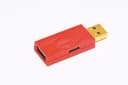
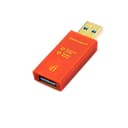

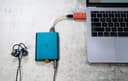
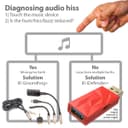


🔊 Cut the noise, not the vibe — hear your music like never before!
The iFi iDefender+ USB Audio Ground Loop Eliminator is a compact, high-tech device designed to reduce unwanted ground loop noise in USB audio setups. Compatible with USB Type A connections, it preserves USB 3.0 high-speed data transfer while disconnecting USB power grounds to minimize interference. With an optional 5V power input for enhanced noise filtration, it’s ideal for professionals and audiophiles seeking cleaner, clearer sound from their PC or laptop audio chains.


| ASIN | B0849J33T9 |
| Best Sellers Rank | #1,824 in USB Cables #3,257 in Home Audio Accessories |
| Brand | iFi |
| Color | orange |
| Compatible Devices | Laptop, Personal computer |
| Connector Type | USB Type A |
| Customer Reviews | 3.8 3.8 out of 5 stars (690) |
| Finish | Metallic |
| Input Voltage | 5 Volts |
| Item Dimensions | 5 x 3.6 x 0.6 inches |
| Item Weight | 6.6 Grams |
| Manufacturer | Abbingdon Music Research |
| Model Number | iDef+ |
| Nominal Power | 5 Watts |
| Number of Items | 1 |
| Number of Ports | 4 |
| Package Quantity | 1 |
| Power Plug Type | No Plug |
| Specific Uses For Product | PC, laptop |
| Unit Count | 1.0 Count |
| Warranty Type | Limited |
N**U
Helped with white noise problem
Made a noticeable difference in the sound quality. I had been dealing with a heavy noise floor for a long time. Tried all the tips for solving ground loop issues and nothing worked. In my case it was what sounded like loud radio static on a dead station. I thought maybe I had a bad SM7B or interface and it was very frustrating. The mic and audio was always unusable due to a super heavy amount of white noise, more than you'd expect from a typical noise floor. This appears to have drastically lowered the noise. It isn't 100% but the audio is absolutely usable now compared to the hot trash I was dealing with prior. It's expensive for what feels like a fancy flash drive, but it was worth it in my case. The noise issue must've been something interfering from inside my PC, if you've done enough troubleshooting with ground loop noise and still have static and think it is your computer that might be the culprit, then this will likely help with your issue too. I also coupled this with a cable that had ferrite as well to further help with reduction.
M**H
Doesn't work well at all
I have attached 3 photos showing the line noise from a uac222. One with no usb ground eliminator and the other with the eliminator powered and not powered. Doesn't work well at all. I would have no problem if this was a ground noise reducer bevause then the product you are being sold would be accurate. This does NOT eliminate ground noise. It may reduce audible ground noise to a more acceptable level. Hoever this porduct by no means will elikinate ground loops. The frequencies if searched for can be easily found in a spectrum plotter tool. I have reported this losting to amazon as being inacurate. If you need to redice ground noise: then this is a good product for you. If you are looking to eliminate it as the product clearly states it will. This will simply not do that. And marketing the product as so is a somewhat dishonest dipictiin of yhis products capabilities. Please see attached images for reference and proof of function.
S**T
Quiets the Noise in My Line6 Helix Studio Setup
I have a couple of Line6 guitar processors (Helix Floor and HX Effects) that both inject ground loop noise into my amps and recording interface when plugged into my PC to use their editing software. This device succeeds in breaking the ground loop that causes the noise and does not disrupt the software communication with the device. Just be sure to power it using a phone charger rather than a port on the PC. I was hoping I could use it passively like a transformer-based solution, but it does require power.
E**A
This thing sincerely works.
I have a Schiit Modi and Magni stack. They're attached to a system running an Nvidia RTX 3080 GPU, and whenever a game is running north of 60fps, the graphics card dumps so much electrical noise through my system that it becomes readily audible through the headphones or speakers I have attached to them at higher volumes. This happens even when absolutely nothing is attached to the PC other than the USB DAC - no external ground loops. It's a droning, grinding sound that is extremely obnoxious and changes in pitch based on what's being displayed. Just plugging the Modi in through this dongle (while keeping the modi itself powered by an external usb connection) cuts the electrical noise by roughly 90%, which is enough that I can't hear it in the slightest until pushing the headphones/speakers to unreasonable listening levels. Plugging a small external USB power supply to the iDefender+ itself (even the 5 volt 1 amp switching variety like what comes with most phones, for example) further reduces the noise at high volumes, until it's only just barely audible through a silent line at 100% maxed out volume. I can only assume some graphics cards cause an internal ground noise loop. Whatever the case, this little dongle does a terrific job of silencing the noise.
T**Y
Does what it's supposed too!
I was getting a high pitched whine due to alot of interference in my studio because of all of my electronics and I gotta tell ya, it was driving me insane haha. Plugged this bad boy in and it worked right away, zero noise. Silence! Now I can live and work in peace. Keep in mind you need a 5v / 1.5a-2.5a power adapter to have it work properly. Update, this thing is better then I even expected. Ended up wondering if I can plug a USB hub after it to integrate multiple interfaces for aggregated I/O. I have of course my SSL2 that I photographed above, then as well as a UMC1820 Which does my outboard rack work, and I wanted again added a few additional channels with 2 avid mbox pros (awaiting more outboard gear so its necessary.) Well anyways! I was super surprised to find out it works flawlessly all of them . I was able to track with little latency at 32 samples, didn't deal with any crackling or audio data loss or degradation. I'm very happy with my purchase and highly recommend it to any audio professional, and of course even the beginners that want that peace of mind. I have it ran from a Thunderbolt 3 adaptered to USB A > iFi Defender+ > USB HUB > multi I/O.
D**.
Ich nutze Yamaha HS7 als PC Lautsprecher. Fürs Zocken, Filme schauen und so weiter. Also keine studiotechnischen Anwendungen. Angeschlossen sind diese an einem Audio Interface, dem Steinberg UR22C. Das Ergebnis ist wirklich gut, kein Rauschen, Summen etc. WICHTIG! - Unbedingt ein passendes Netzteil [5V/2,5A] verwenden. - WICHTIG! Hatte den iFi iDefender+ per USB-C auf USB-A Kabel direkt an der Stromleiste angeschlossen oder wahlweise mit einem anderen Netzteil (Amazon Alexa-Echo-Dot Netzteil, Samsung Charger). Es muss nach meiner Erfahrung nicht das iFi iPower2 sein. Habe ein Netzteil [5V/2,5A] für 15€ inkl. Kabel beim Elektrofachhandel gekauft und das Ergebnis ist nochmal besser als zuvor. Das Behringer MicroHD HD400 wird nun NICHT mehr mit genutzt. ///Alte Bewertung: Allerdings gab es je nach Anwendung - Knistern / Rauschen bei Mausbewegungen - Knistern / Summen bei Downloads - Knistern / Summen / Rauschen bei Arbeit in grafikintensiver Software / oder Videogames Einmal den kompletten Raum auf den Kopf gestellt und versucht die "Störquelle" zu finden. Neue Kabel, alles. Bis ich den iFi iDefender+ (Typ A bis A) bestellt und angeschlossen habe. Knistern und Rauschen sind deutlich besser geworden, jedoch nicht zu 100% verschwunden. Daher hatte ich lange überlegt die dazugehörigen Netzteile zum iFi iDefender+ dazu zu bestellen. Bei der Recherche bin ich jedoch auf das Behringer MicroHD HD400 aufmerksam geworden. Die Störgeräusche sind nun völlig auf 0. Meine Empfehlung liegt daher ganz klar erst das Behringer MicroHD HD400 zu testen da es deutlich preiswerter ist und passiv eine deutliche Verbesserung bewirkt. Sollte das nicht ausreichen, kann immer noch mit einem iFi iDefender+ nachgeholfen werden. Erdungsschleife hin oder her, das Rauschen auf den Lautsprechern/USB Interface ist nun Geschichte!///
S**E
Ayant récemment remplacé tout mon materiel de MAO (Tour PC, carte son...) par du tout frais, je me suis heurté aux problèmes que beaucoup rencontrent: buzz, interférences... une horreur quoi. J'ai tout tenté (utilisation de jacks symétriques, placements des cables audio par rapport aux alimentations.....) sans succès... J'ai identifié une boucle de masse générée par mon préampli guitare externe connecté sur ma carte son, et dont l'alim est sur le même réseau électrique que le reste de mon materiel, mais buzz et interférences étaient toujours bien présents. Je n'avais jamais rencontré ces soucis avec ma config précédente, que j'utilisais depuis plus de quinze ans. Après pas mal de recherches, je me suis décidé à tenter cet isolateur USB car tout me menait vers cette option... Et bien gagné !!!!!! Plus le moindre souffle, pas de buzz, pas une interférence, le silence absolu !!! Certes, ce petit isolateur est assez couteux, mais franchement impossible de s'en passer lorsque on rencontre ces problèmes. Ma config est la suivante: - tour PC type "Gamer" bien puissante, mais naturellement source d'interférences pour de la MAO (ventilateurs, carte graphique, wifi...) - Interface audio Steinberg UR242 (du coup pluggée sur l'isolateur en entrée usb du PC) - Processeur externe guitare Avid Eleven Rack - Plug-in guitare Bias FX2 de chez Positive Grid sur PC - routage de la carte son et du processeur guitare via une petite mixette analogique Behringer (de manière à pouvoir utiliser l'eleven rack pour jouer sans avoir à allumer le PC) - Enceintes de monitoring Samson Resolv 40A en sortie de la console - Cubase 11 pour l'enregistrement - Clavier Nektar Panorama T4 pour le pilotage de Cubase et le jeu sur des instruments virtuels Tout ce petit monde cohabite maintenant dans la paix et l'harmonie :-) Précision importante: l'isolateur doit être impérativement alimenté (même si la carte son à elle aussi sa propre alimentation électrique) via son connecteur USB C (perso j'utilise mon chargeur de téléphone, peut être en achèterais-je un dédié...) Je souhaite que ce petit isolateur fonctionne bien dans la durée parce qu'il reste quand même assez cher... J'ajusterais mon commentaire si je constate quoi que ce soit qui cloche. J'espère que mon avis pourra aider ! et... mort aux buzz !!!!!
V**D
Its do nothing
A**R
When I moved house and setup up my guitar and synth bits in the new place, I was treated to the most horrendous ground hum, staticy, zuzzing noise through the monitor speakers from the USB audio interface attached to my desktop DAW system. I never had this problem at the old place aside from a very small hum which a small Behringer Hum Destroyer/Suppressor fixed. This little iDefender fella removed most of the noise, leaving only a very faint electrical connection sound in the distance if you put your ear to the speaker and which you'd easily forget about when audio was coming through. So, it did the job it was supposed to do but it is quite expensive at £60. The reason I say "check you really need it" is because I did little more investigation and found a better and cheaper solution for my setup. As I had never had a real problem before, my Steinberg audio interface had always been connected to the Mackie monitors via mono 1/4" cables. Apparently, these are called Unbalanced. The Steinberg and the Mackies both support TRS (stereo) cables otherwise known as Balanced. No idea what all that means but professional stuff all generally supports Balanced. I bought a pair of TRS audio cables from Amazon (RUXELY 6.35mm TRS Instrument Cable) for a grand total of £12 and voilà. ALL the noise vanished. Nothing evident even with your ear up against the speaker. Didn't even need the Behringer. Problem solved. iDefender not required. iDefender returned. Balanced is clearly the way to go and I probably should have known this but I'd never had this problem before in the previous 15 years with all sorts of kit and different interfaces. Balanced TRS cables on everything from now on. That said, if that doesn't do it in your situation then the iDefender will likely get the job done.
N**.
Ragazzi, Funziona! Appena Collegata, il rumore di corrente che producevano le casse è letteralmente scomparso. assorbe tutto il rumore di corrente che genera il pc
Trustpilot
Hace 2 semanas
Hace 2 semanas