We remain fully operational. Our teams are working around the clock to ensure your deliveries continue safely.

Descargar la aplicación


Servicios al cliente
Sobre nosotros
Copyright © 2025 Desertcart Holdings Limited
Descargar la aplicación

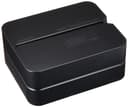
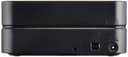

🖨️ Print your story directly on your discs—because your data deserves to stand out.
The Casio CW-E60 CD & DVD Disc Title Printer offers professional-grade thermal printing at 200 dpi resolution, directly on discs. Featuring USB connectivity for fast PC integration, an on-screen preview for precise design control, and dual power options (battery or AC), it’s a portable, all-in-one solution for labeling your media with style and accuracy.
| ASIN | B000H3M2I8 |
| Additional Printer Functions | Print Only |
| B&W Pages per Minute | 480 ppm |
| Best Sellers Rank | #883,565 in Office Products ( See Top 100 in Office Products ) #620 in Inkjet Computer Printers |
| Brand | Casio |
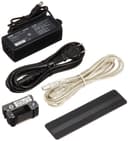
| Built-In Media | AC adapter, USB cable, software, black ink ribbon |
| Color | Black |
| Color Depth | 24 bpp |
| Compatible Devices | PC |
| Connectivity Technology | USB |
| Control Method | Touch |
| Customer Reviews | 3.0 out of 5 stars 82 Reviews |
| Display Type | display |
| Dual-sided printing | Yes |
| Duplex | Manual |
| Global Trade Identification Number | 20079767174143 |
| Hardware Interface | USB |
| Ink Color | black |
| Item Weight | 3.1 Pounds |
| Manufacturer | Casio® |
| Maximum Copy Resolution Black and White | 200 dpi |
| Maximum Copy Resolution Color | 200 x 200 DPI |
| Maximum Media Size | Disc (120mm diameter) |
| Maximum Print Resolution Black and White | 200 dpi |
| Maximum Sheet Capacity | 1 |
| Maximum print Resolution Color | 200 x 200 DPI |
| Model Name | CW E60 |
| Model Number | CW-E60 |
| Model Series | CW |
| Number of Drivers | 1 |
| Number of Trays | 1 |
| Other Special Features of the Product | Portable |
| Paper Size | 12 centimeters |
| Print media | Labels |
| Printer Connectivity Type | USB |
| Printer Output Type | Monochrome |
| Printer Type | Thermal |
| Printing Technology | Thermal |
| Processor Count | 1 |
| Resolution | 200 x 200 DPI |
| Special Feature | Portable |
| Specific Uses For Product | Label Printing |
| Total USB 2.0 Ports | 1 |
| Total Usb Ports | 1 |
| UPC | 079767174149 079767139438 |
| Warranty Type | limited warranty |
C**Y
CASIO JUNK
I bought this printer because of its small footprint and because it had a brand name I thought I could trust. Boy was I wrong on that last one. The driver will not install. Hardware Installation pops up a message saying "The software you are installing for this hardware: CW-E60 has not passed Windows Logo testing to verify its compatibility with Windows XP. This hardware will not be installed. Contact your system administrator." I went to Casio Support where I spoke with a very nice guy who in the end told me that he would have to refer my problem to a computer tech, the problem was beyond has realm. I'll have him call you, he says. Casio has no email support so with no other choices I take a day off work to wait on the call. Everywhere I go I carry a phone. Don't want to miss this call. Didn't dare have a shower. Couldn't work outside. Just wait for the phone call from Casio. Their Customer Service is open until 8pm, so I wait and wait. No Call. I tried uninstalling and reinstalling many times, it won't work. Lost a day's work, have to pay shipping back to J&R and don't have a badly needed printer. NEVER AGAIN WILL I BUY CASIO OR J&R MUSIC. Why should I have to pay to return junk that should not have been sold in the first place??
D**Y
Awesome
Wish they made these for multiple cds. Love how easy it is to use
L**R
Good for the money
This printer works as advertised. For the money you pay, you can't expect a piece of professional quality equipment. But it's good enough to get the job done. If you treat it properly it will label your disks easily without having to scribble your messy handwriting all over them. Mainly it is for printing text labels, though you can also print graphics, which I haven't tried yet. To print the top and bottom of a disk you have to insert one side of the disk. The printer prints upside down and moves the disk as it prints. Then you rotate the disk 180° and print the other side. The software that comes with it is fairly easy to figure out. One negative I would mention is that the printable area is restricted to a band along the disk that is equal to the wide of the ribbon, which is 3/4". That leaves extra space that you can't print to, which means you might have to use a smaller font then you otherwise would have. Still, because the printing is clearer then writing you can generally fit more readable text in the limited space then writing by hand with a marker using the whole disk. Another negative is the ribbons only last about 40 disks so you need to keep a large supply if you use it often. And that can be a bit expensive.
M**N
The original cheap and cheerful (or at least smiley)
Needed to label 40 or 50 CDs. This does the job but is slow, rather finicky, tends to jam, and uses proprietary ribbons. Also the software isn't very impressive (actually, it sucks). Despite all this, if you don't want to spend a fortune on professional equipment and/or you don't do this on a regular basis, this is just what you want and you cannot beat the price (I bought a reconditioned one). I doubt I have $35 in the whole setup, all other alternatives would have been several hundred dollars and up (WAY up), so I can "endure" this device quite well, thank you. I'll keep it and keep using it, and I won't even complain about it (too much).
D**L
Steer clear
Bought two. Despite numerous positive reviews on multiple sites neither printer could print legibly on any type of CD we tried, including blank white disks. The labels always came out spotty/patchy. The area on the disk these printers can print on is smaller than expected from available information. Once we determined they wouldn't work we found it would be far more to ship them back to Japan than the original cost of the printers.
A**R
Excellant machine.
This is a great way to title dvd/cd's. I use it all the time.
B**Z
Good simple product
This labeler works as advertised. It does stop in the middle of printing sometimes for no apparent reason, but unplugging and replugging it in solves the problem. Even though the ink tapes are very small, they seem to last longer than expected. I am pleased I bought it since the printed titles are much better than my handwriting.
C**E
works great now after hours of research to get the correct ...
works great now after hours of research to get the correct software as the included software had no English version...but Casio website is where I ended up finding correct software. overall good experience
Trustpilot
Hace 2 meses
Hace 2 días