We remain fully operational. Our teams are working around the clock to ensure your deliveries continue safely.

Descargar la aplicación


Servicios al cliente
Sobre nosotros
Copyright © 2025 Desertcart Holdings Limited
Descargar la aplicación

🔒 Unlock your productivity with a tap—security that keeps up with you!
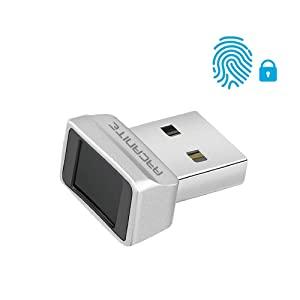
The ARCANITE USB Fingerprint Reader (AKFSD-07) is a compact, ultra-fast biometric device designed exclusively for Windows 10 and 11 Hello. Featuring 360-degree fingerprint detection and a smart learning algorithm, it delivers lightning-fast authentication in 0.05 seconds. Supporting up to 10 fingerprints, it offers advanced security with effortless plug-and-play setup. Trusted by IT pros for its reliability even with damp fingers, this device transforms login security into a seamless, time-saving experience.




| ASIN | B07VK71TST |
| Best Sellers Rank | #5,227 in Our Brands ( See Top 100 in Our Brands ) #51 in Security & Surveillance Biometrics |
| Brand | ARCANITE |
| Customer Reviews | 4.0 4.0 out of 5 stars (4,608) |
| Date First Available | August 23, 2019 |
| Item Dimensions LxWxH | 0.83 x 0.67 x 0.47 inches |
| Item Weight | 0.317 ounces |
| Item model number | AKFSD-07 |
| Manufacturer | ARCANITE |
| Product Dimensions | 0.83 x 0.67 x 0.47 inches |
| Series | AKFSD-07 |
N**L
Very fast and consistent, even when fingers are slightly damp
I've had a few finger print readers that support Windows Hello but most of them are slow and/or randomly stop reading and require re-enrolment. I've had this reader for almost 2 years and it still reads instantly. I will tap it as fast as I can and it will still work. I compare it to the reliability and speed of Apple's Touch ID. I can also go to the bathroom and wash my hands and come back to my desk and it will still read reliably without having to dry my hands for 20mins to get them perfectly dry. I have my Bitwarden password managed set to lock when I lock my computer so I'm constantly typing my password to unlock the computer and then again to unlock Bitwarden. Now I just tap my finger to unlock windows and another tap to unlock Bitwarden. I also have my middle finger tied to my admin account so when I get a UAC prompt, I just tap my middle finger. This saves me so much time throughout the day as an IT professional. I have my reader stuck to the bottom of my desk at the end of a USB extension cable where it's easy to tap.
J**M
Excellent Fingerprint Scanner
Very pleased with the Arcanite Scanner. Worked as advertised. Easy to install, just insert in USB port and your ready to go. Setup was very straight forward, took less than 5 minutes including initial fingerprint scan. This was my second scanner purchase from Amazon. This one is the keeper, I sent the first one back.
A**R
Easy to setup
I had no issues setting it up. It feels well built and I feel it's at a good value. It reads my prints quickly and accurately. For some reason though, it won't load the drivers correctly for all the USB ports. It connects fine to many different hubs but only half of my ports directly.
M**3
WORTHLESS & Waste of Money
I added a TEC brand reader to my main laptop a few years ago and it has worked flawlessly. Purchased a new laptop for just our financial stuff and purchased this reader to go with it and it rarely works. Plugged it in, mapped two different fingerprints, works fine the first couple of times then quits working. I map two fingers because I have a tendency to not wear gloves and get cuts on my fingers preventing a successful scan. Whenever it would not scan on the new laptop I would scan the same finger using the TEC reader on my main laptop and it would work fine. Then I used the TEC scanner on the new laptop and it worked fine so it wasn't the laptop or my fingers. I ended up throwing this away and getting another TEC reader and again, works flawlessly on the new laptop. Don't waste your money on this one as it is truly worthless.
D**.
Convenient and Simple Biometric Solution — Worth Considering for Windows 11 Pro Users
As a licensed clinical professional and healthcare administrator, I’m constantly accessing sensitive patient records and protected files on a secure workstation. I purchased the ARCANITE USB Fingerprint Reader to streamline access and improve data security without the hassle of typing a password multiple times a day. I'm currently running this device on an Asus TUF ROG laptop equipped with an AMD processor, 64GB of DDR5 RAM, AMD Radeon 8GB dedicated graphics, and Windows 11 Professional. It plugs directly into a USB port (not via a USB hub), as I’ve read several mixed reviews regarding reduced functionality when routed through hubs. I took that advice seriously, and I believe it contributed to the device’s solid performance so far. Pros: Effortless Login: Signing in and unlocking the workstation is as easy as a single touch. It saves time and reduces frustration—especially in clinical or professional environments where efficiency and confidentiality matter. Compact & Lightweight: Although the construction is basic and feels quite minimalistic, it's discreet and doesn’t obstruct adjacent USB ports. Plug and Play: Installation was straightforward. Windows Hello recognized the reader immediately, and setup took less than five minutes. Secure Access: For a behavioral health professional, fast access must be paired with HIPAA-conscious security. This reader strikes a practical balance. Cons: Basic Build: The physical device feels a bit flimsy. Based on build quality alone, I would have estimated a retail value closer to $15. Occasional Delay: There have been rare moments of brief lag during fingerprint recognition, though not enough to disrupt workflow. Final Thoughts: If you're using a high-performance AMD system with Windows 11 Pro, and you prefer fast, password-free access to your machine, this is a solid little tool. While it won’t impress you with fancy features or premium design, it gets the job done. From a medical and professional standpoint, I’d recommend it—with the caveat that it works best when plugged directly into the machine.
G**N
Nice fingerprint reader upgrade for PC desktops and laptops without a reader
I'm using it with my Alienware M15 R6 laptop with Windows 11 Pro and it is working flawless with Windows's Hello. It even works better that the integrated fingerprint reader in my HP Envy 15 360 work laptop. It is plug and play and not drivers needed, Windows recognize it and let enable the Fingerprint recognition feature. I love that it is compact and that it doesn't interfere with the connection of the near USB port. I believe that the $30 that I pay are worth for giving my gaming lay and upgrade, comparing othe fingerprint reader around.
L**N
it just works
got two computers, a win10 laptop and a win11 desktop. had no trouble whatsoever with the laptop, plugged in, gave it a minute for set up, and it was good to go. wish i could say the same for windows 11. it does NOT work out of box, and i tried every solution to get it to work i could think of. ultimately, device manager just keeps throwing error 10. this error indicates one of two problems. bad driver, or bad device. can rule out the driver i guess, as it works properly on windows 10. i did every workaround i could think of. disable power management for usb devices, uninstall and reinstall directly from manufacture website (big yikes on the site, btw...). heck, went so far as to manually copy the drivers from the laptop. it gets 3 stars, because it does technically work. just not where i intended to use it..
K**K
Windows Helloでのログインを簡素化するために導入しましたが、もっと早く買えばよかったと思うほど快適です。 最大の特徴は、Windowsのサインインだけでなく、Googleアカウントなどの「パスキー」認証にもそのまま使える点です。面倒なパスワード入力や2要素認証の手間が省け、指を置くだけで一瞬で認証が終わるスマートさは一度使うと手放せません。 認識精度も非常に高く、どの角度から指を当ててもバッチリ反応してくれます。公称0.05秒という速さに偽りはなく、ストレスを感じることはほぼありません。コンパクトなのでUSBポートに挿しっぱなしにしても邪魔にならず、手軽にPCのセキュリティと利便性を両立できる素晴らしいガジェットです。
G**R
Ürün yurtdışından gelmesine rağmen hızlı bir şekilde elime ulaştı. Ama paketlemesi pek iyi değildi. Windows 11 otomatik olarak tanımadı fakat ürünün resmi sitesinden gerekli driveri indirip kurunca hemen tanıdı. 10 parmak izi ekleme özelliği var. Parmağınızı hemen algılıyor ve Windows açılıyor. Facebook,youtube vs gibi daha bir çok site için de yine kendi resmi sitesinden indireceğiniz smart-id yazılımı ile parmak izi ile oturum açma özelliği var. Bu sitelerde oturum açma bilgilerini saklayıp her sistem kurduğunuzda smart-id programına import ederek kullanabiliyorsunuz. Şu an için bir sorun yaşamadan kullanıyorum. Bilgisayarı her açtığımda şifre girme derdinden kurtuldum. Alacak kişilere kesinlikle tavsiye ederim...
A**Y
Cómodo, rapido y funcional.
V**1
Tellement bien que j'en ai racheté ! Pratique pour se connecter à son ordinateur sans code pin ou mot de passe, pour éviter les yeux baladeurs...fonctionne très bien !
E**M
J'ai jeté mon dévolu sur ce modèle de lecteur d'empreintes pour ne pas avoir à taper mon mot de passe Windows. Il suffit de le brancher et il est directement reconnu. Ensuite il suffit d'aller dans les paramètres Windows pour créer une connexion via Windows Hello et on vous demande d'ajouter une empreinte. A partir de là, il faut suivre les indications pour que votre empreinte soit bien sauvegarder selon divers positions de votre doigt. Une fois sur la page de connexion Windows, il vous suffit de poser votre doigt pour accéder à votre compte. Globalement ça fonctionne bien. Parfois en fonction de comment on pose son doigt, il arrive que le premier essai ne soit pas validé. Alors je bouge un peu mon doigt et la détection se fait. J'avais peur des avis négatifs qui disaient que ça ne fonctionnait pas ou bien que taper son mot de passe ça allait plus vite. Perso je pense que ces gens là ne savent pas s'en servir et/ou sont trop exigences (dans le sens où si ça ne répond pas immédiatement à la première pose du doigt, c'est que c'est nul). Chez moi ça fonctionne bien. Dernier point : en fonction des applications ou des sites internes, vous pouvez également utiliser le dongle. Par exemple ma banque accepte d'ajouter une connexion via ce genre d'outil. Je l'ai donc ajouté dans mes connexions sécurisées et je me connecte au site internet via le dongle. Pareil pour vos comptes Outlook par exemple.
Trustpilot
Hace 4 días
Hace 2 días