We remain fully operational. Our teams are working around the clock to ensure your deliveries continue safely.

Descargar la aplicación


Servicios al cliente
Sobre nosotros
Copyright © 2025 Desertcart Holdings Limited
Descargar la aplicación



Buy anything from 5,000+ international stores. One checkout price. No surprise fees. Join 2M+ shoppers on Desertcart.
Desertcart purchases this item on your behalf and handles shipping, customs, and support to Mexico.
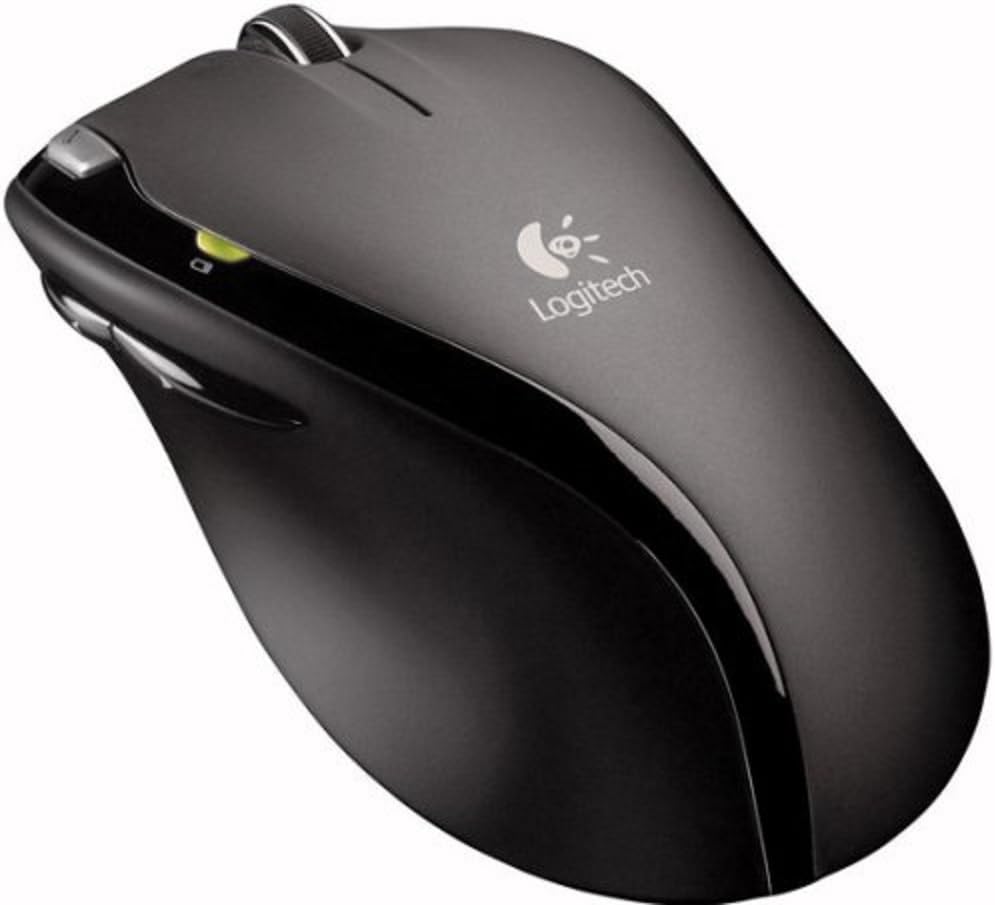
🚀 Elevate your productivity with precision and freedom—never miss a beat!
The Logitech MX620 Cordless Laser Mouse combines advanced laser precision with a hyper-fast scroll wheel and a lag-free RF wireless connection. Designed for professionals seeking reliable, long-lasting performance, it offers up to one year of battery life with included AA batteries, six customizable buttons, and adjustable scroll firmness. Compatible with Windows and Mac, this ambidextrous mouse delivers smooth, accurate control without the clutter of charging cables.
| ASIN | B000QJ3DZE |
| Additional Features | Wireless |
| Antenna Location | Office |
| Are Batteries Included | Yes |
| Are Batteries Required | Yes |
| Best Sellers Rank | #7,858 in Computer Mice |
| Brand | Logitech |
| Built-In Media | Logitech® MX™ 620 Cordless Laser Mouse, 2. |
| Button Quantity | 6 |
| Color | Gray/Black |
| Compatible Devices | Personal Computer |
| Connectivity Technology | USB, Wireless |
| Customer Reviews | 3.4 out of 5 stars 122 Reviews |
| Global Trade Identification Number | 00097855044822, 10097855044829 |
| Hand Orientation | Ambidextrous |
| Hardware Platform | PC |
| Item Weight | 0.85 Pounds |
| Manufacturer | Logitech |
| Model Name | MX620 Cordless Laser Mouse |
| Model Number | 910-000240 |
| Movement Detection | Laser, Optical |
| Movement Detection Technology | Laser , Optical |
| Number of Batteries | 2 AA batteries required. (included) |
| Number of Buttons | 6 |
| Operating System | Windows XP |
| Power Source | Battery Powered |
| Range | 30.0 meters |
| Special Feature | Wireless |
| Style Name | Modern |
| Theme | Modern Technology |
| UPC | 097855044822 |
| Unit Count | 1.0 Count |
| Warranty Description | 5-Year Limited Warranty |
M**W
Fantastic Wireless Mouse, buy this today!
I love this mouse, it uses "fast RF" technology, not Bluetooth, to connect to a small USB receiver. The scroll wheel has adjustable firmness, which allows you to either scroll through a couple lines at a time, or through many pages in seconds. The laser for this mouse is invisible, which is good for people who hate the bright red LEDs of optical mice. The mouse worked instantly when connected to my PC running Windows Vista. Optional software can be installed from Logitech to take advantage of various customization choices (button assignments, on-screen battery indicator, etc.). A button on the bottom can be used to turn off the mouse when not in use to conserve battery life. Logitech states the batteries will last for 1 year, and two Duracell AA batteries were included in the package. Nice. A battery indicator LED on the mouse shows when it's time to swap out those cells, which I haven't had to do yet after one month of ownership. I bought this mouse to replace a Microsoft Blutooth mouse that was part of the "MS Optical Desktop Elite for Bluetooth" which was ALWAYS dropping its connection and for which I had to recharge NiMH batteries every few weeks. This mouse was worth every penny, I would highly recommend it to right-handers looking for a simple, elegant mouse that will provide them with many years of happy mousing. EDIT: Here I am in the beginning of September, and the low battery light finally came on! These batteries have been in constant use (maybe 5 hours+ per day) since December 2008. The battery level states that I have 30 days left to replace the AA batteries.
M**K
One of the best mice for Mac I have found
This is one of the best mice I have found to work well on Mac. I've been using Mac now for several years after being a lifelong Windows user. I had been using the Apple bluetooth wireless mice and in general I liked them, but after a while they would start acting up. It would become very difficult to right-click or the scroll ball would get dirty and start sticking. The dirty scroll ball is easy to fix (just clean it) but the right-click issue would really become a problem. I ended up going through probably 4 or 5 of these mice before I decided to ditch it and try something else. I then did some research online and ended up buying quite a few more mice. The first was a Microsoft bluetooth mouse. It took a bit of "hacking" to get it working on Mac but eventually it paired up but I didn't like the performance at all. It was very laggy and unprecise. After more research, I then ordered the bluetooth mouse from Razer. Razer is very well known as the makers of some of the best mice for gaming. Very precise and accurate. But, they are a bit expensive. I ended up ordering two of these based on the great reviews (one for my Mac Pro and one for my laptop). These turned out to indeed be very precise and accurate but they had an irritating trait. If you let it sit still for just a couple seconds (and I mean only 2 or 3 here), when i went to move it again it would have a slight delay in responding and thus the mouse pointer would end up jumping. I found this extremely annoying and made it very difficult to use. I contacted Razer about this and after a few email exchanges and testing on different computers (I tried on a total of 6 different Macs all with the same experience), they told me this was due to it going into a "power saving" mode to make the batteries last longer. I told them this was ridiculous and this should only happen maybe after a couple minutes of sitting still. Not just a couple seconds. They told me they'd bring this up with their engineers. I then decided to give up on bluetooth as nobody seems to make bluetooth mouse that responds well with the exception of Apple but their mice have different issues. So, I then tried a Microsoft wireless mouse that uses a USB dongle instead of bluetooh for wireless communication. This mouse turned out to also have bad delay problems. So, finally I decided to give Logitech a try and ordered this mouse (MX620) from Amazon. The same day I also ended up going to a local big box store and picked up the Logitech VX Revolution Cordless Laser Mouse for Notebooks as it was on sale. The VX Revolution is very similar to this mouse but it is marketed as a "notebook" mouse and is thus a bit smaller. I figured I'd use the VX for my laptop. So, I tried them both. First I tried this mouse from Amazon and it worked great! Very responsive and accurate. No delays. No lag. It was just perfect. I was so relieved to have finally found a decent Mac mouse! I then decided to try the VX Revolution and it worked just as well as this one (MX620). But, I liked it a bit better due to the "feet" on it. They are made out of some kind of very slippery material and it glided much smoother over my hard plastic Everglide mouse pad. The MX620 has feet that aren't quite as "slippery" and thus takes a bit more effort to get it to start moving. The result ended up being that the VX was better for making very small movements. So, I love both the MX620 and the VX Revolution mice. They are both excellent mice for Mac users out there. They also make an Logitech MX Revolution Cordless Laser Mouse which also sounds great (same slippery feet as the VX Revo but is a full size mouse). But, I didn't want to give it a try as it is rechargeable and thus requires a charging base to be on your desk and you have to remember to keep putting the mouse back in the charger. For me, I didn't want the extra desk clutter and yet another power brick to deal with. I'd rather have a mouse that uses normal batteries which these two mice do.
M**K
Great when it works - choppy & unresponsive the rest of the time
For the most part, this mouse is comfortable to use and has a perfect contour. Its biggest selling point is the mouse wheel - this thing can really scroll a pages-long document in a handful of seconds with a simple flick, saving a lot of strain on your finger. A switch under the mouse will put the wheel in "traditional" wheel mode, where it restrains mouse movement with tick marks (not really sure how else to explain that). I simply installed this mouse directly through Windows - no other software or drivers needed (I'm using Vista Ultimate). Another bonus - this mouse uses a USB stick to receive its signal...no more of those ridiculous USB platforms that you have to make room for on your desk. Battery life is decent - the two AA's will last quite awhile, and I use my mouse constantly on a daily basis. I think I've replaced the batteries every several months. A battery indicator light on the left side of the mouse will let you know when it's time to change the batteries. My biggest gripe with this mouse is that it constantly experiences bouts of non-responsiveness, where the mouse cursor becomes choppy and appears to suffer terribly from skipping. When this happens, the cursor moves sluggishly and it is impossible to target something on the screen, as it jumps and skips to its path, moving at half speed. It almost has the feel of using a mouse on a computer that has used up all of its memory (but that's not the case, I have 8 GB of RAM). At first, I thought it was because one of the batteries was dying out, but the issue persisted even with brand new batteries. This is completely unacceptable and just this one issue is enough to warrant giving the product a bad rating. I am really disappointed with this mouse because of this issue, and am almost compelled to go back to a corded mouse so that I don't have to deal with it again. For the record, I think Logitech makes great products. This one, in my opinion, fell short - and it is a shame, because all of the other great elements were there (contour, USB adapter, fast scrolling, etc.)
P**S
Sketchy performance - poor support
I wanted to like this mouse. I have tons of Logitech products from keyboards to mice to speakers to headsets and, while I have never before filed a service claim, they seem to be decent products. Until they break, that is. A set of fresh batteries lasted only a few weeks. The next replacement set (fresh, new premium batteries) the Logitech SetPoint software told me I could only expect about 92 days but each day I checked the estimate kept rapidly going down. I contacted Logitech and a rep named Benjamin R had me test a few things. He then had me uninstall the current SetPoint software and install a much older (and more limited) version. That didn't work. At that point he declared the mouse defective and offered to replace it. These are his broken-English words: "It seems that the mouse is begging to be faulty with losing battery life at a much higher rate. Kindly update this incident with your contact details to update our database This is to check and verify if our System Generated contact details are correct, and in order for us to proceed with your warranty replacement" I sent him everything he needed including 2 photographs and he refused to do anything more, citing that I didn't have an original receipt (Amazon only does packing slips as receipts) and he is under strict orders to require one. But nowhere when you purchase the item do they tell you that they won't honor their warranty without a hard copy of what they consider an receipt. Given time I might be able to find mine but he only gave me 168 hours (totally weird) to produce the receipt otherwise the case was closed. So let's say the mouse didn't fail and Logitech didn't refuse to do anything about it, how do I like it? The "in-hand" feel is nice. I like it except for some bad ergonomics. My thumb naturally seems to drape over the "forward" button rather than the more used "back" button on the side. The user-button next to the left-click button is too easy to press accidentally. The scroll wheel is user selectable to be either clicky or smooth scrolling. Clicky is too clicky and smooth isn't really smooth. It will often stall as I am vertically scrolling and refuse to budge. I use the mouse often for graphics and photo editing and find that it stutters when trying to move it in a straight line or make circles or squares. To be fair that is something more suitable to a graphics tablet but I have seen many mice much smoother than this one. It just appears that it forgets what it's doing and has to stop and think about it. Not a good thing for a mouse. If not for the bad customer service I would have probably rated this a 2-star. Why? Because it costs $90, a ridiculously high price for a computer mouse that is a mediocre performer. It drops to 1-star because of Logitech's poor customer support.
C**S
Another pretty disaster from Logitech!
After having an excellent experience with the Logitech MX-1000 Laser, i next purchased the much-hyped MX-Revolution though i was a bit dubious about the sturdiness of it's "Micro-Gear" scroll wheel which switched between smooth and clicky modes via software or pressing it. The relevance of my experience with the MX-Revolution to the MX-620, is that the "hyperfast" scroll wheel on the 620 is essentially the same as that on the MX-Revolution, without the software control of mode switching. Being a Mac user, i had to download the "Logitech Control Center" software which is not included on the PC-only CD, despite Mac compatibility being specified on the box. The software was, and still is horrible. It was riddled with bugs, had a poor feature set, and crashed virtually every time i tried to change settings. There followed a completely unproductive 2 weeks of haggling with Logitech's (non)support department. I thought i was going to be okay once i switched to a 3rd party driver, though i had to sacrifice the "auto-switching". Unfortunately, my worries were justified. The fancy scroll-wheel broke down after just a couple month's use and i returned the Revolution, replacing it with another MX-1000. When the battery on that mouse began failing to charge after a couple months, Logitech replaced it... with another MX-Revolution. I sold it. Though loath to take another chance with Logitech, i was unable to find any mice comparable to Logitech's for comfort and number of buttons, I decided on the MX-620 because it was cheaper (not being rechargeable) and because i was fairly certain i could avoid using LCC, which has made little improvement through the 3 or 4 recent updates. I was really loving the 620 (used with SteerMouse) for a couple months. The fast scroll wheel can be very useful and the life of ordinary AA batteries is phenomenal on this mouse! I haven't changed them yet, whereas past alkaline powered mice i've had gobbled them in about 3 weeks or less. However, over a recent period of just a couple days, the "hyperfast" scroll wheel began to require more and more force to make it coast. Refusing to buy a 4th mouse in less than 10 months, or deal with Logitech support, i've continued using it. However, the scroll wheel now requires significant force just to roll at ANY speed. The small rubber strip down the center of the wheel which gives one's finger traction, has slowly become more and more stretched and seems to be interfering with the wheel's spin somewhere underneath. This will definitely be my LAST Logitech mouse unless they make serious improvements to their Mac OS compatibility, their customer support, and the durability of their hardware. These snazzy innovative gizmos aren't worth the premium price if they're only going to last 2 or 3 months!
K**Y
Great Wireless Mouse for Work
I've always liked the form factor of Logitech mice, so I was going to buy a Logitech mouse; I just wasn't sure which one. Since this mouse was going to be for work, I didn't want to spend an arm and a leg on it, and I didn't need too many bells and whistles. I wanted a good sturdy wireless mouse with a long battery life and two thumb buttons. This mouse delivers in all of those areas. The MX620 has the same great fit in my hand that I've come to know and love from Logitech mice I've purchased in years past. It's built sturdily, and the batteries help give it the nice weight that's light enough not to strain my wrist but heavy enough not to float around at the slightest touch. All of the buttons are programmable, which is good for me, since I don't have much use for a "search" button next to the left click. The hyper-scroll wheel is an excellent concept, but the execution could be slightly better - it takes a bit of getting used to. Fortunately, if you don't like the free wheel, you can always just flip the switch on the underside and it'll act like a "normal" scroll wheel. It's a wireless mouse, so if you game with it, you'll notice that after not moving for a certain amount of time, there's a (barely noticeable) response time - this is true with all wireless mice (it's a battery-saving feature) but with this one, it's a lot less noticeable than with others I've used. Overall, it's an excellent mouse that I use without even thinking about - at a price I hardly had to think about too. Pros: + Sturdy build; solid buttons let you know when you've clicked them + Hyper-scroll wheel with switchable mousewheel mode + Excellent design, feels great in my hand + Never have to think about its movement - it just works + Battery life is excellent Potential Cons: - Some may not like the free scroll wheel - sometimes a little too "free" - Wireless mice aren't great for gaming due to wake-up time - (I actually can't think of any other potential cons!)
M**T
Love the wheel, but it takes getting used to
I really love this mouse. I've had Logitech mice for years, and this feels as good as any Logitech I've ever used. I have fairly big hands, and some mice feel cramped. This does not. I don't notice it at all. Some have complained about the weight, and it is a little heavy, but I find that to be a boon. It stays where I put it. I don't overshoot my target at all, and if I did, I'd probably just need to turn down the sensitivity. I use a Mac, and have no use for the extra buttons on mice today. I just want a mouse with three buttons (left, center, right), and a scroll wheel. The fact that this scroll wheel also tilts left and right is another bonus. I don't even use the other buttons on the mouse. My favorite, FAVORITE part about this mouse is the scroll wheel. I have it turned to flywheel mode, and this thing spins like crazy! I can get to the bottom of a long document EASILY now. I hate having to scroll, scroll, scroll to get down through a long document. Now I can just give my wheel a good spin and it takes me a nice long way down the document. Sometimes I find myself spinning the wheel just for fun. That brings me to the thing that takes getting used to, and why this only gets four stars. The wheel likes to spin. If you even barely touch it in passing, it'll start to spin. I have had to learn how to keep my finger on the wheel if I need to make fine adjustments, and how to lift my finger off of the wheel so I don't inadvertently cause it to start spinning again. It's not a huge problem, but it just takes a little getting used to. I find its accuracy to be top-notch, no issues there. I upgraded from a corded Microsoft mouse, and on that one I found myself often accidentally pressing the center key when I was just trying to scroll, and accidentally pressing the right mouse button. This Logitech has much more resistant buttons, which I personally find a huge improvement. I haven't accidentally pressed any of my mouse buttons once since I bought it. The teflon feet look perfectly solid on this, but I have no doubt they'll eventually peel off. All mice seem to have this problem. To the reviewer whose feet came off in the first day, I don't know what to say. Mine have been fine. All in all, a great, well-made product. Not too expensive, great features, and a nice-feeling mouse. I would definitely buy one of these again, even for my Mac laptop.
F**N
Fast and Sexy like a Ferrari!
Pros: Hyper-Fast wheel makes it easy to scroll down on a "never ending webpage from hell." Also great on long text files and CLIs. The contour is as comfortable as my old Microsoft mice (I have switched to Logitech mice). The one-touch search button is a useful feature on Windows (so far not working on FreeBSD). Looks great! The grey on matte black and shinny wheel makes the mouse look very elegant (and sexy) on my Desk. Cons: The wheel can be sensitive on quick side-to-side movements, therefore not a gamer mouse. You can switch the sensitivity down to a regular "clicking" wheel which may help gamers, but I have not tested it because I'm not a gamer. FreeBSD drivers Please. Some users have complained about the battery life. I have owned mine for a little over a month so it's too soon for me to comment on battery life.
Trustpilot
Hace 2 días
Hace 2 semanas