We remain fully operational. Our teams are working around the clock to ensure your deliveries continue safely.

Descargar la aplicación


Servicios al cliente
Sobre nosotros
Copyright © 2025 Desertcart Holdings Limited
Descargar la aplicación

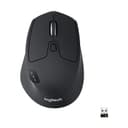
🚀 Elevate your workspace—one click, three devices, zero compromises.
The Logitech M720 Triathlon is a versatile wireless mouse engineered for professionals juggling multiple devices. Featuring a 24-month battery life, dual Bluetooth and USB Unifying receiver connectivity, and 6 customizable buttons, it offers seamless switching across up to 3 computers. Its ergonomic design and hyper-fast scroll wheel optimize comfort and efficiency, making it the ultimate productivity tool for laptop, PC, Mac, and iPadOS users.


| ASIN | B087Z6LSHW |
| Additional Features | Wireless |
| Antenna Location | Office |
| Are Batteries Included | Yes |
| Are Batteries Required | Yes |
| Battery Average Life | 24 months |
| Best Sellers Rank | #16 in Computer Mice |
| Brand | Logitech |
| Built-In Media | Logitech Unifying receiver, batteries |
| Button Quantity | 6 |
| Color | Black |
| Compatible Devices | Laptop |
| Connectivity Technology | Bluetooth, USB |
| Customer Reviews | 4.5 4.5 out of 5 stars (13,007) |
| EU Spare Part Availability Duration | 2 Years |
| Enclosure Material | Rubber |
| Hand Orientation | Right |
| Hardware Platform | Linux, Mac, PC |
| Item Dimensions L x W | 4.5"L x 2.9"W |
| Item Type Name | Wireless Mouse |
| Item Weight | 4.76 Ounces |
| Manufacturer | Logitech |
| Model Name | M720 Triathlon |
| Model Number | 910-006036 |
| Mouse Maximum Sensitivity | 1000 Dots per Inch |
| Movement Detection | Optical |
| Number of Batteries | 1 AA batteries required. (included) |
| Operating System | Windows 10, 11 or later, Linux +no software support legal footnote, Chrome OS, macOS 10.5 or later, iPadOS 13.4 or later, Android 5.0 or later |
| Power Source | Battery Powered |
| Range | 5.0 meters |
| Style Name | M720 |
| Theme | Office |
| UPC | 097855162144 |
| Unit Count | 1.0 Count |
| Warranty Description | Manufacturer’s warranty can be requested from customer service. |
S**G
Great functionality, very satisfying mouse!!
Just got this mouse today and already love it. Extremely smooth, love the hand feel and materials. The forward/back buttons on thumb are awesome, and love the hidden thumb button. Wireless bluetooth connectivity is seamless for my Mac and the logitech app is great for integrating multiple product and customizing function. Scroll wheel has the infinite scroll option which I was missing on my previous mice. Everything about this mouse is satisfying and I like its simplistic/clean look compared to more expensive complex models. Highly recommend.
J**E
About as perfect as I have seen in 40 years of using nice
Overall: Everything is pretty great about this mouse: I have experienced no issues and have found no flaws with this mouse over the few months I have used it. Moreover, the ability to seamlessly use it across devices as awesome (simply press a single button to connect to each device.) Usage (main): software development (Visual Studio, Visio, etc) Portability (tested on MS only): Works seamlessly on/across three separate Windows (11) laptops. Ergonomic: Feels great in the hand. Scroll: Two different scroll settings worked flawlessly. Settings: numerous adjustments like dpi, paging, etc - flawless and robust
B**S
Logitech M720 Mouse Continues the Quality Experience Legacy
This mouse is impressive. It is simple to use, connects flawlessly, and has great battery life. The mouse works on both wood surfaces and mouse pads, with my preference being a mouse pad. A mouse pad is not always an option for me, so top performance across multiple surfaces is essential, and the Logitech M720 delivers. Speaking of Logitech, I've been using their keyboards and mice for many years and have been very satisfied with their performance, which is what drove me to buy this Logitech M720 to go with a new laptop. The M720 continues the Logitech quality experience legacy.
A**M
Great mouse, lifespan is OK
Functionally, this is a great office work mouse. The button features, scroll wheel modes, wifi switching, are all great. Precision is good, and it's fairly priced. The only issue is I have now bought three of these, because the left click button has failed on the previous 2 I've had. The first one I bought I lasted from March 2017 to April 2023. The Second from April 2023 to Jan. 2026, and now here I am buying this again. Is that average lifespan good enough for your $40? You Decide.
S**V
"Is This A Good Mouse For Windows And Linux?"
Is this a good mouse? Yes it is. You don't need to read any further if you want to know if it lives up to the hype. However, for those with concerns like I had, I hope to clarify some points. From the moment I grabbed the box, I felt I had something special. Upon opening it, I fell in love. The look and feel were akin to buying the Ferrari edition of a mouse. I had my doubts before purchasing, but I'm glad I took the chance. One of my biggest concerns was transitioning from Windows to Linux since I had no plans of going back. I tested the mouse on both Windows (64-bit and 32-bit) and Linux. For Linux, you'll need to download some programs: primarily Solaar for the unifying dongle, along with Piper, LogiOps, and LogiOpsGui. I used LogiOps for button remapping, which saved me from some headaches due to issues I faced. I encountered an intermittent problem where the two side buttons reverted back to default while all other remapped buttons stayed in place. It turned out that Solaar and LogiOps were conflicting. Long story short, if you find yourself in a similar situation, delete the existing configuration files in the ".config/solaar" directory—specifically, "config.json" and "rules.yaml". This allows Solaar to create a new default "config.json". As long as you don’t unlock anything, you can use Solaar to pair the device and LogiOps to remap the keys. This small tweak can make a big difference! My Biggest Worries 1. Default DPI was set at 1000 2. Compatibility with Linux or Windows 32-bit systems 3. Accidental presses of the side buttons 4. Weight: Switching from a mouse that was already too heavy at 3.5oz to a whopping 4.8oz 👀 was somewhat daunting. 5. Material quality: Some rubber materials deteriorate on other electronics over time. 6. Click noise: Going back to clicking sounds after using silent-click mice. 7. Drop test durability Worries Alleviated 1. DPI Adjustment: The 1000 DPI can be adjusted through LogiOps, Solaar, or mouse settings for pointer speed on Linux or Logitech Options on Windows. I typically used other mice with adjustable DPI up to 1600, so 1000 DPI felt slow and laggy. However, after adjusting the sensitivity to 466 in Solaar, it felt no different from 1600. I briefly tried the stock settings and adapted to 1000 DPI within a few hours, but the memory of 1600 lingered. As mentioned, I figured out how to set it in LogiOps while leaving Solaar in its default settings. 2. Plug-and-Play Compatibility: It worked on Linux right out of the box via Bluetooth. Switching to the USB Unifying dongle required no configuration—just plug it in, and Solaar handled the rest. However, I can't seem to figure out how to switch back to Bluetooth on 1, even after a reset at the time of writing this. But I can set 2 and 3 to other devices using Bluetooth, like my phone and Windows PC. 3. Button Design: I own several mice and have found that some come with sensitive side buttons easily pressed. This mouse's side buttons are well-designed and require a firmer press, minimizing accidental activation. 4. Weight Comfort: Surprisingly, the increased weight hasn’t been an issue. The ergonomic design makes it easy to pick up and move without worrying about it slipping or accidentally pressing buttons. You only notice it if you’re paying close attention; when focused on work, you won’t even realize it. I frequently pick up and relocate my mice, and this one handles that gracefully. 5. Quality Material: The rubber feels luxurious, similar to what you’d find on a premium car gear shifter. 6. Click Sound: My favorite previous mouse had almost silent clicks and was nearly perfect but lacked extra buttons, and its batteries barely lasted a month. The M720's clicks provide pleasant audio feedback. 7. Durability: I accidentally knocked it off my stand-up desk from about three and a half feet 😮💨. Luckily, the carpet cushioned the fall. I received a low battery warning, but resetting the battery fixed the issue. The drop test gets a passing score 👍. This mouse is a game-changer for programming. Scrolling through lengthy code or documents used to be a hassle, but now, the infinite scroll wheel with left and right horizontal scroll This mouse is a game-changer for programming. Scrolling through lengthy code or documents used to be a hassle, but now, the infinite scroll wheel with left and right horizontal scrolling allows for seamless navigation. You can also map the side buttons to HOME and END, making document and code navigation a breeze. If you’re scrolling through long documents, web pages, or anything similar, this type of mouse is essential. The contoured and ergonomic design makes it incredibly comfortable. Previously, I wasn’t a fan of Logitech mice due to past experiences, but the positive reviews I found swayed me. Many users report having this mouse for 4 to 8 years, with only one mention of it finally failing after long use. Conclusion Disclaimer: This is not just a mouse; it's a magic wand disguised as a mouse. Overall, this device is truly a game-changer for any user, especially beneficial for programming and navigating lengthy documents. The infinite scroll wheel, along with left and right horizontal scroll functions, provides seamless navigation. If you’re in the market for a new mouse, I highly recommend this one. It's worth every penny, and I plan to purchase a couple of backups in the future. FAQ Q: Does it work if programmed on Windows and then used on Linux? A: I couldn't find a solid answer, so I tested it, and as expected, it didn’t work. The programming appears to stay on the PC you programmed it on; returning to Linux retained the previous settings. Q: Is there a downside between this mouse and some others? A: Yes and no. The primary downside is that the unifying dongle doesn’t pair automatically without installing an app, which can be a hassle. For Linux users, there is no official Logitech Options package. Fortunately, the Linux community has developed solutions like Solaar, which greatly simplify the connection process. After a recent kernel update on Linux, I experienced a moment of panic when the mouse disconnected. However, I quickly resolved it by unplugging the dongle and unpairing the device in the Solaar app using another mouse, then pairing it again. While not a significant issue, it’s something to be aware of. The best upside is that you can buy another unifying dongle if you lose it, unlike regular dongles where losing it means needing to buy another mouse. Q: Is this mouse worth the price? A: Absolutely! It’s worth every penny. I will definitely be buying a couple of backups in the near future.
D**.
great product you will be happy with this one. a must if you use multiple laptops or computers
very easy to use and set up. I switch between work home laptop and room for one more set up with the 123 switches smooth touch not some lightweight cheap plastic, it is very accurate smooth moving across desk with or without a mouse pad and very quiet as well not loud like the cheaper one's, the color on mine is a soft black great design love it
A**N
When I received this mouse, I was not really sure if I should keep it for my daily office work. I am glad I did. The mouse is a tad heavy, which works well on a mouse mat and glides effortlessly. This is a battery operated mouse and after using it for three weeks it still shows 100%, not many of my rechargeable mice have done this. Connects to three Bluetooth sources and one on the dongle, plenty for working in the office. I have big hands and I needed to take time to get used to this mouse. I think after about three days I was very happy to find the mouse beside my keyboard and since it has become a good buddy of my setup. Not only that, but I do game quite a bit and for games where I use a mouse it is more than adequate. I know it is a Logitech mouse and their options+ software really is annoying, but it keeps the firmware up to date. The scroll wheel is precise, but in free flow it does need some changing parameters here and there in Windows. Great mouse, hope to be able to enjoy it for a long time.
A**O
Es un mouse muy completo, la batería le dura mucho, la calidad del materia es buena, tiene botones para personalizar y realizar ciertos comandos que son muy prácticos en el día, de igual manera es muy sencillo realizar el cambio de dispositivo hasta en tres equipos esto con un solo click. Excelente precisión, tienen un botón para realizar desplazamientos rápidos o lentos en la pantalla, lo cual se agradece al estar revisando documentos de muchas páginas.
E**Y
Overall amazing, but the only downside is the clicking sound. I prefer it to be silent
I**Z
Los mouse Logitech salen muy buenos en cuanto a ahorro de pila, desempeño, tamaño (soy de mano grande), configuraciones (la rueda para desplazarse ya sea en pocas líneas o muchas) son excelente. No requiero muchos botones y con los que trae ajusto lo que siempre ocupo. No es de los que no hacen ruido en cad click pero es mínimo el ruido. Calidad probada y comprobada a un excelente precio.
M**N
Very comfortable. Premium feeling track wheel. Just overall excellent quality you'd expect from Logitech. This mouse however is perfect for me as I have 3 computers I use and now I can assign each one via bluetooth and easily transition from each computer. I love how the input selection is on the top of the mouse and how easy and fast it is to transition to my other computers. I needed an extra unifying receiving for another old logitech mouse I have that had its receiver bust recently. Overall very happy with this! Hoping it lasts several years.
Trustpilot
Hace 1 mes
Hace 2 meses