We remain fully operational. Our teams are working around the clock to ensure your deliveries continue safely.

Descargar la aplicación


Servicios al cliente
Sobre nosotros
Copyright © 2025 Desertcart Holdings Limited
Descargar la aplicación



🔗 Connect to the Future of Smart Living!
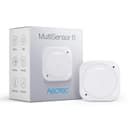
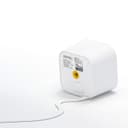
The Aeotec Multisensor 6 is a versatile 6-in-1 Z-Wave Plus sensor that monitors motion, temperature, humidity, light, UV, and vibration. Designed for indoor use, it features a compact design, easy wall mounting, and operates on a single CR123A battery, making it a perfect addition to any smart home setup.


| ASIN | B0151Z8ZQY |
| Antenna Location | Driveway, Garage, Garden |
| Battery Description | CR123A or CR2450 |
| Best Sellers Rank | #365,794 in Electronics ( See Top 100 in Electronics ) #1,135 in Motion Detectors (Electronics) |
| Brand | AEOTEC |
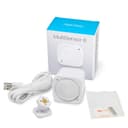
| Built-In Media | Back-Mount Arm, Battery Cover, Double-Sided Tape, Micro USB Cable, MultiSensor, Screws (×2) |
| Color | White |
| Compatible Devices | Z-Wave Devices, Security Systems, Smart Home Hubs, Lighting Controls |
| Customer Reviews | 3.9 3.9 out of 5 stars (744) |
| Global Trade Identification Number | 00810667023201 |
| Item Type Name | Multisensor 6 |
| Item Weight | 0.13 Pounds |
| Manufacturer | Aeotec |
| Manufacturer Warranty Description | One Year |
| Maximum Range | 16 Feet |
| Mfr Part Number | ZW100 |
| Model Number | ZW100 |
| Mounting Type | Wall Mount |
| Number of Batteries | 1 CR123A batteries required. |
| Operating Temperature | 32 Degrees Fahrenheit |
| Power Source | Battery Powered |
| UPC | 810667023201 642872867260 |
| Unit Count | 1.0 Count |
I**C
great sensors, good battery life
These are fantastic sensors. I bought them to replace some GE motion sensors I have installed around the house for intrusion detection. Those units use the same batteries but burn thru them in about a month, whereas these units have been running for over a month and haven't cracked the 95% battery level yet AND they come with a whole mess of extra sensors like temperature, light, and humidity. I also found these units to be way less prone to false-positive motion detection (while still triggering for actual motion), which is probably a big part of their better battery efficiency. I do have one minor quibble, although I decided not to remove any points for it, which is in regard to how the units are powered. In addition to battery power, they have the ability to take a micro-usb cable plugged into an outlet for power, which was my initial plan for setting them up. However, I quickly discovered that because of how they place the micro-usb jack, you can't insert a cable and also use the wall mounting plate without some dremmel surgery on the case. Still, my plans were based upon the assumption that these units would drain battery power like the GE sensors and they don't, so in the end I didn't feel like this was a big negative. These sensors are also significantly more expensive than some other comparable brands, but considering how much better my experience was with these I think this may be a you-get-what-you-pay-for kind of thing.
M**S
A great device that gives you plenty of rope to hang yourself with.
I am a complete novice when it comes to Zwave protocols but it was immediately clear to me that misconfiguration of this device is going to cause you all sorts of troubles. High report rates when running in battery mode will drain the battery quickly. battery life statistics of Zwave devices are based on how often they wake up to send reports. Increase the report rate, decrease battery life. This is normal for battery powered z wave devices. If you want to pull lots of data from one of these sensors, plug it into external power. Make sure the device is in range of your other devices. Range is not like wifi, so don't think you can use one on one end of the house with your hub on the other end of the house. In an empty room you might get the advertised 80 feet of range, but go through a single wall and you'll probably want them to be within 20 feet of each other. Again, this seems to be related to Zwave devices in general rather than the product itself. The report rate can be adjusted by changing internal parameter settings, as well as dialing in calibrations for all the sensors. Firmware upgrades are available but can only be applied with a windows based Z-wave controller, There is no firmware update program for linux or OSX. This is probably the biggest downside I've come across. I'm not impressed with the feeling of the action button. pushing the action button feels like you're doing something to the device that you should not do. Tactile feel aside, the button works just fine. Takes 2 CR123A batteries, but can operate on a single battery as well. Include it into your network while running on whatever power source you intend to run it on. Battery powered Zwave devices will not act as repeaters, and this setting is configured by checking what power source the device is using when you include it into the network. I contacted their technical support for an issue with the temperature unit setting and they responded almost immediately with some good information on what might be the problem, and confirmation that I'd set the right parameters in the sensor. It turns out that the adjustment had to be done on the controller side of the network instead of the device. The problem I had wasn't with their device at all, but they were still able to give me the clues I needed to solve my issue. Very friendly too.
B**N
Once you get this configured correctly, these work great.
I've put in several of these Multisensors and they work pretty good once i figured out how to best set them up. I found the built-in device handler in the Smartthings hub to be lacking for these, so I installed a device handler (robertvandervoort : Aeon Multisensor 6 - RV 2.2) in place of the stock device handler and it seems to work good for me. Also if you are using any of these with just the battery and not the USB power, you need to be aware of the fact that you have to wake up the device by long pressing the button on the device for about 4 seconds before you can send configuration changes to the sensor. If USB powered, it's always awake and you can make changes on the fly. When you first install this sensor, give it an hour or so for the temp, humidity, and lux readings to stabilize, they are off quite a bit when you first power the sensor up, but after they stabilize, all my sensors were pretty close to being correct, I only made slight offsets to the readings so all my sensors match each other and my main house thermostat. When the sensors are USB powered, they act as a Z-Wave repeater and they have some awesome range. I was able to put two sensors out in the yard, 1st one 100 foot away from the hub, and the 2nd one 200 foot from the hub and both sensors readout out fine. This is pretty good range. I would have given these 5 stars, except it took me a while to figure out how to install the non-standard device handler and to figure out how to configure these things properly, it's not self evident on how to do all of this.
S**N
Very good product, easy to install, stable and fiability
A**N
Good device, easy to connect, great to have option of battery or plug in power, very useful light , temperature and motion to triggers devices and events. Only downside is the cost. Should be around 50 dollars (cdn) instead of 80 dollars.
B**E
Sensor worked perfectly right out of the box with my Z-Stick and Indigo V7 software. I am using this sensor in the bathroom to activate and dim lights based on the time of night as well as activating exhaust fans when the humidity level hits the threshold.
G**S
Excellent product! Looking to replace my Wireless Tag with these sensors as they integrate with my Samsung Smartthings Hub. Love that they have the option of being USB power driven and battery.
A**R
When it works it's alright, but that's only about 50% of the time (probably less). This device has been a constant source of troubleshooting, problems, and headaches. There aren't many ZWave motion sensors available, but you'd do well to avoid this one.
Trustpilot
Hace 2 días
Hace 4 días