Some deliveries may take a little longer than usual due to regional shipping conditions.

Descargar la aplicación


Servicios al cliente
Sobre nosotros
Copyright © 2025 Desertcart Holdings Limited
Descargar la aplicación

⚡ Elevate your workspace with lightning-fast, invisible Wi-Fi power!
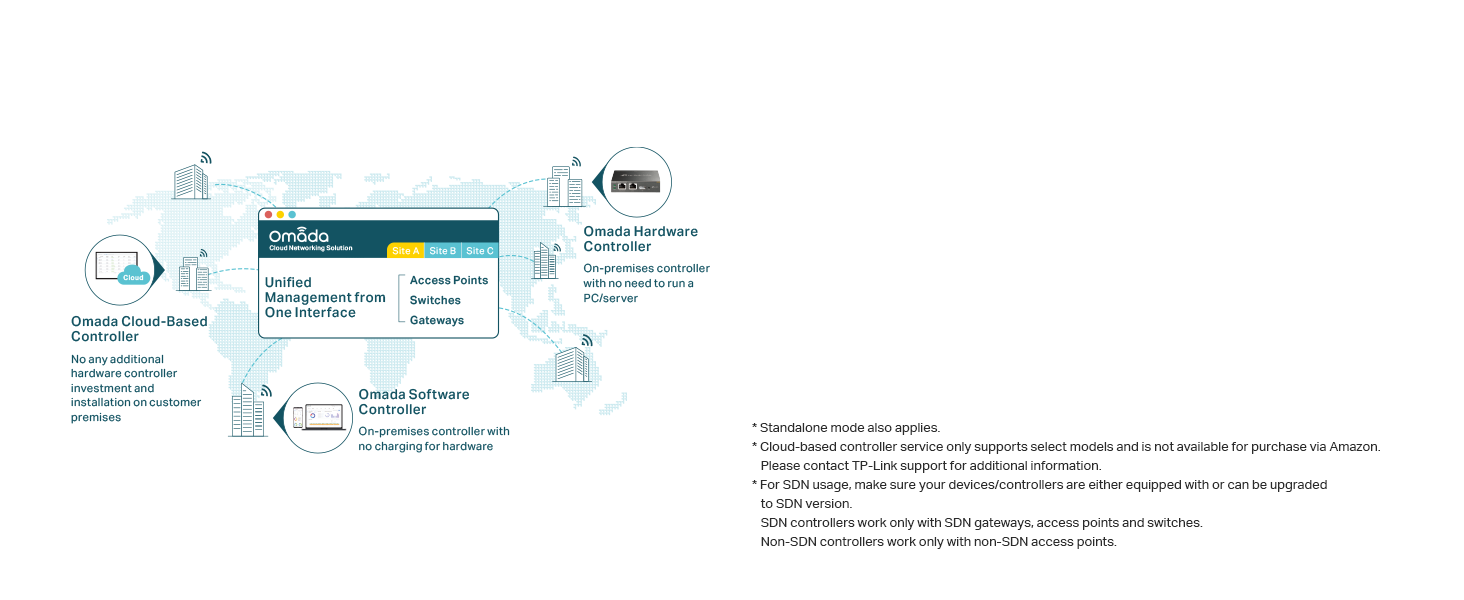
The TP-Link EAP235-Wall is a high-performance in-wall wireless access point delivering dual-band AC1200 speeds with MU-MIMO technology. Featuring 4 Gigabit Ethernet ports with PoE support, it offers flexible wired connectivity and easy installation. Integrated with Omada's cloud-based SDN platform, it enables centralized remote network management via the Omada app. Designed for professional environments, it combines sleek aesthetics with robust performance and is backed by a 5-year warranty.


| ASIN | B08HSNYH57 |
| Best Sellers Rank | #30 in Computer Networking Wireless Access Points |
| Customer Reviews | 4.6 4.6 out of 5 stars (809) |
| Date First Available | August 28, 2020 |
| Item Weight | 7.8 ounces |
| Item model number | EAP235-Wall |
| Manufacturer | TP-Link |
| National Stock Number | 0 |
| Product Dimensions | 5.63 x 0.78 x 6.17 inches |
C**P
great access point, great support, some critical flaws for guest networks
Great access point and range for indoor use. The white status LED is not too bright at night and the 3 ports on the bottom are great for connecting additional devices if needed. Easy to mount to a standard single-gang electrical/data box. This was installed as part of an Omada deployment for a campground guest WiFi network that was replacing aging/outdated Ubiquiti equipment. Coupled with outdoor WiFi 6 EAP610s, these indoor units were used in trailers and campers that had weak signal from the outdoor units. Overall, these are great APs for short range needs like single rooms and small areas and works just fine. However, there is an overall flaw with all Omada APs regarding guest networking that was confirmed by TP-Link engineers that is important to note. TP-Link Omada access points of any flavor do not support Layer 2 client isolation. Even with guest network settings applied in the controller (or on the AP itself if using standalone), Layer 2 communication between clients still works despite not being able to ping those devices or reach any kind of a webpage or open port. While the guest settings do block the above types of client access, multicast packets still flow freely and everywhere. As such, our guest campground network let anyone anywhere wirelessly cast their screen via AirPlay, Google Cast, or Miracast to anyone's unsuspecting smart TV without warning. That is a huge security issue not to mention asking for problems to occur, so unfortunately I was left no choice but to return all of the Omada units and return to Ubiquiti equipment. With that being said, if that is not an issue for you, they work great in any other environment that does not require L2 isolation. they boot up incredibly quick, offer good signal and speed, and overall are a great product for the price. After escalating this issue with support, I was eventually put in touch with their engineering team running diagnostics with them and submitting Wireshark logs to get to the root of the problem. They said it would be added to a list for future firmware development, but I cannot wait for that to happen. It was upsetting to leave TP-Link because I know for a fact I would not get this kind of support with Ubiquiti (part of the reason I was trying to leave that ecosystem), but I didn't have much choice.
C**.
Excellent for home use
I got tired of the mesh system optimum put in with their little wps access points, the speed was ok but the ping times were way higher than they should've been. So I decided to invest into the tp link ecosystem, I gotta say these things are very nice. As you can see this one has 2.4gbps of bandwith, which is more than enough for the average 1 gig service. I only have the 300/300 plan from optimum currently and these little things slam the meter every time. As you can see, these APs have way less delay compared to the mesh ones optimum gives you, with the test server I'm showing, on a wired connection my idle ping is a 3 with sometimes a low of 2. So these access points only add 2-3ms of delay compared to a wired connection(back and forth ping, actual airtime fairness is probably close to a millisecond). I like these wall access points because of their passtrhough ports but I'm sure the ceiling mount ones are just as good. What's great about the two access points i have currently (definetly going to add some more soon) is the seamless roaming between these. The second my phone sees a lower signal strength on one it instantly connects to the other. Plus these designs are just so sleek, they're easy to miss if you hide them well. It will sure have guests confused on where the hell your router is. I would definitely reccomend this product to anyone who's like me and wants a wired system rather than a mesh one, or if you have low single in a portion of your house where it's easy enough to run a wire back to your router. Keep in mind these are POE powered and this particular wall unit DOES NOT come with a poe injector. Be sure to check the pictures of what tp link includes in the box if you need one. Otherwise I'd reccomened their POE switch or even their omada controllers. Though they aren't necessary for a small home.
R**A
WORTH IT!!!!
I placed this upstairs to cover just the upstairs corner of my home. This thing puts out a wireless signal stronger than the enterprise equipment that it replaced. The enterprise equipment I had was a mixture of Cisco APs and Watchguard APs. I had them in use for a few years with adequate coverage and quality of the signal to all my devices. Eventually, the Cisco APs were starting to show their age and the Watchguard APs have built-in licenses that were set to expire. I placed this smaller device in that corner of the home to test it and it just took over the entire AP duty. I get complete coverage, more than I expected. That is in standalone mode. I purchased another one for the downstairs a couple of months later and still have not had the need to put that up because.. this thing is just rocking it. The setup was easy and all documentation is online and easy to find and understand. You can set these to be managed with an Omada controller which would help if you have multiple AP's to manage. The nice thing about the wall plate model I have is that it's slim low profile and that you can pass PoE on to nearby devices is pretty darn awesome to boot. Couple that with the abiltity to tap an ethernet jack in when needed for older devices. This is the AP most homes need.
A**K
Pretty Good
Pretty good. A little complex to get connected. But once set up properly, they work great and look good. I had to use Chat GPT instructions to help me because it didn't like the way it was supposed to via the box directions.
J**H
Works great! Easy to setup.
This has been a great addition to my network.
M**Y
eap facil instalacion, discreto y practico, facil manejo gracias a omada
M**I
Good quality
C**N
(reseña para EAP235-Wall) Compré dos de estos aparatos para extender el Wi-Fi a las recámaras que están al extremo opuesto del router donde llega el internet. Anteriormente había usado repetidores que usan la línea eléctrica (incluso de la misma marca TP-LINK), pero siempre se desconectaban o fallaba la conexión. Aproveché que me mudé a un lugar nuevo para hacer esta instalación. Sí es más elaborado que los repetidores porque requiere lanzar cables de Ethernet (aproveché los ductos de la pared que ya existían), pero una vez armado queda muy elegante y discreto, además de dar internet de alta velocidad. Es importante notar que tienes que comprar por separado un injector PoE para darle energía a los access points. Y en mi caso, también compré un extensor PoE de 1 entrada a 2 salidas para cablear el segundo access point. Todo eso se consigue desde aquí en Amazon. La descripción del producto dice que está pensado para hacer la instalación del internet de un hotel o lugares similares, pero creo que es excelente opción para uso residencial. No me metí con VLANs ni nada de eso. Sólo le configuré el mismo SSID que el router para extender el internet por toda la casa.
S**N
Tut was es soll.
B**E
Excellent access point. The specs say coverage is 50m² which is very accurate. It provides full coverage to my 100 m² single floor house but for strong signal everywhere you will want 2.
Trustpilot
Hace 1 semana
Hace 3 semanas