We remain fully operational. Our teams are working around the clock to ensure your deliveries continue safely.

Descargar la aplicación


Servicios al cliente
Sobre nosotros
Copyright © 2025 Desertcart Holdings Limited
Descargar la aplicación

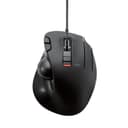
🎯 Elevate your workspace with precision and control — don’t get left behind!
The ELECOM EX-G Wired Trackball Mouse combines high-precision optical tracking with an ergonomic thumb-operated design, featuring 6 programmable buttons and adjustable DPI settings (750/1500). Its smooth artificial ruby ball bearings reduce maintenance, while broad compatibility with Windows and macOS ensures seamless integration for professionals seeking comfort and efficiency.


| ASIN | B016QCPO0G |
| Additional Features | 4 Way Scrolling, Ergonomic Design, Programmable Buttons, Wireless |
| Antenna Location | Gaming |
| Are Batteries Included | No |
| Are Batteries Required | No |
| Best Sellers Rank | #40 in Computer Trackballs |
| Brand | ELECOM |
| Built-In Media | English manual, Japanese manual, Trackball mouse |
| Button Quantity | 6 |
| Color | Black Ball |
| Compatible Devices | Personal Computer |
| Connectivity Technology | Wired |
| Customer Reviews | 4.2 4.2 out of 5 stars (2,868) |
| Embellishment Feature | Logo |
| Enclosure Material | Plastic |
| Global Trade Identification Number | 04953103473737 |
| Hand Orientation | Right |
| Hardware Platform | Laptop, PC |
| Item Dimensions L x W | 4.9"L x 3.7"W |
| Item Type Name | ELECOM Wired Thumb-operated Trackball Mouse, 6-Button Function with Smooth Tracking, Precision Optical Gaming Sensor (M-XT3URBK) |
| Item Weight | 0.44 Pounds |
| Manufacturer | ELECOM |
| Model Name | EX-G |
| Model Number | M-XT3URBK |
| Mouse Maximum Sensitivity | 1500 Dots per Inch |
| Movement Detection | Optical |
| Number of Batteries | 1 AAA batteries required. |
| Operating System | Windows 10, Windows RT 8.1, Windows 8.1, Windows 7, Windows Vista, Macintosh OS X 10.10 |
| Pattern | No pattern |
| Power Source | Corded Electric |
| Range | 5.0 meters |
| Style Name | Wired_BlackBall |
| Theme | Office, Home, Telework, Cafe |
| Unit Count | 1.0 Count |
| Warranty Description | 1 year manufacturer |
A**R
Great mouse, might want to change out the ball.
Had the mouse for over a month now and it's great! I'm going to break down the main points and recommendations for people who are thinking of buying this mouse. --- The included black ball doesn't work consistently. Mine seems to have a "dead spot" on the ball and I have no idea why. Best recommendation is to swap to a red colored ball from another mouse or purchase one, but unfortunately, they aren't cheap. https://www.amazon.com/gp/product/B071NX7Y2J/ref=ppx_yo_dt_b_asin_title_o02_s00?ie=UTF8&th=1 I bought this along with the mouse as a "just-in-case" and I'm glad I did because it works flawlessly. There could be cheaper options out there so feel free to look. --- The trackball companies have said that a matte finish is better for precise and fine movements for text editing but the one on Amazon is sold out with the "we don't know if it's coming back" dialogue. I found one on Newegg if anyone is interested. https://www.newegg.com/p/0J2-01FT-008W3?Description=logitech%20mouse%20trackball&cm_re=logitech_mouse_trackball-_-9SIAMTFB6X3276-_-Product I don't have a matte finish ball so I can't say for sure if it actually does what it claims. --- Depending on how you place your hand on it, you will accidentally right click multiple times until you get a good rotation and hand placement. Don't worry, it sounds worse and harder than it really is. --- I don't use the third mouse button and I haven't downloaded the software specifically for this mouse because I have 2 mice plugged in all the time. One is a gaming mouse with its own software that I don't want to break by having conflicting software from this mouse. This mouse works just fine after being plugged in. No muss, no fuss. Both mouse buttons work, scroll wheel works, forward and back buttons work, and DPI switch all work. --- Play around with the DPI switch on the mouse as well as the mouse options in Windows or whatever operating system you're using. TURN OFF enhanced pointer precision, it is not your friend and will send your pointer to the moon. The 4th tick on pointer speed in Windows works well for text editing, for me, anyways. --- It can be used for gaming but I keep it to certain types of games (ARPG like Diablo, Path of Exile) or single player. Online FPS games require more precision and speed than I can do with this. If you can, you should get a medal.
G**U
Excellent trackball solution for MacOS
Excellent trackball. The programable 6th button is great! The new SW works nice with MacOS.
L**Z
Decent wired thumb trackball for the price, but sensitivity and palm comfort are lacking
This mouse does the job. It is a reasonably good wired thumb trackball mouse. For the price, it's really reasonable, but I won't be using it in the long run because it doesn't fit my hand well. I only use this for office work (no gaming). I bought this because my work computer's bluetooth stopped working with my beloved Logitech MX Ergo (not Logitech's fault--corporate IT...). I simply don't find it as comfortable in the hand as the Logitech MX Ergo -- the shape doesn't fit me as well, I guess. I have very small hands and am very sensitive to ergo. I expected the smaller mouse to be better! The good: 1) The ball is smooth. It is really easy to pop out for cleaning. 2) I like the scroll wheel--it feels nice. The "it just is" (not good, not bad): 1) I'm using this thing on a corporate Linux machine, so all the extra features of the software aren't usable for me. That includes the extra button. The bad: 1) The two DPI settings are very very far apart. Low DPI is too low, high DPI is jittery. I find I have more trouble confidently getting the pointer on what I want versus the Logitech. 2) It slides around much more easily than the Logitech. I use a keyboard tray that has a slight tilt, so I realized I'm pushing it forward all the time to keep it where I need it, causing fatigue. No good--trackball mice should stay put. 3) The cord is a bit short. Another reviewer mentioned that the buttons are too sensitive. That might be causing me issues too, but I wasn't cognizant of it if so.
C**R
Surprisingly good for medium and smaller hands. Not so much for mine.
I wish they made this just a little bit bigger because other than the hand-feel, like my hand is hiding it from bandits, drooped over it so as not to crush it, I LOVE this mouse. The trackball position is perfect. The scroll buttons on the left are great. The dpi switch while not in an optimal place provides something special. You can feel with your palm where it is positioned. You start to remember. You can also quickly verify visually. Having a physical sliding dpi changer isn't something you know you wanted until you use it. The extra finger mouse button is just, perfect for binding mouse-look in games so you can quickly look around. It's not heavy but it's not light so it doesn't wander, but it's not hard to get it out of way quick to put down a pizza or drink. It feels quality. While the page buttons on the top near your pointer finger don't lend themselves to rocker style pressing without moving your finger, they do have positive click and feel very natural to use by curling your pointer finger and pressing them deliberately. This makes them better for precision actions in games like firing a secondary weapon or precisely dropping a bomb on a target. The scroll wheel has the most amazing left-right panning tilt I've ever seen on a trackball. Logitech could learn something here. instead of being completely useless because of hard switches like almost every single other device in existence, they are just compliant enough that you can actually use them for useful things in games that recognize them. If you are an elite dangerous player, this trackball would be perfect for left-right menu navigation binding. If you don't have a good hotas yet (rolls eyes). But if you have bigger hands, all this awesome still won't feel good because you feel like you are riding a childs bicycle. Or you accidentally bought the travel version. And it's just so frustrating because its not that far off. 4 or 5 more mm of base length and it might be perfect for big hands. It's still an outstanding device. Superior to even the MX Ergo I'm using again in many ways, but it doesn't feel good with my big paws. If you have the regular hands they designed this for, you'll love it.
E**O
Es la versión mejorada del M-XT2URBK de bola roja. Este M-XT3URBK, aparte de las características que podéis leer en la página del producto, trae un botón más y lo mejor, unos microswitches OMROM que duran unos teóricos mil millones de pulsaciones frente a los 500 millones del M-XT2. Hay por ahí una versión del M-XT3 de bola roja pero se eleva el precio. En esta página de Amazon dicen que es Wireless, pero es un error. No es wireless ni falta que le hace. La bola gris dicen que no es muy buena pero a mí me está dando muy buenos resultados. De todas formas se la voy a sustituir por una Perixx más clara. También he comprado el Elecom M-XPT1MRXBK que es un modelo algo superior en diseño y prestaciones, e inalámbrico, y me parece que en precisión y comodidad el M-XT3 está bastante a la altura. Y los materiales no son el ABS de alta calidad del M-XPT1 pero son suaves y bien acabados. Lo único que le hace falta a este ratón es una forma de regular la inclinación para lograr una postura más cómoda de la muñeca. Por eso solo le he dado 4 estrellas en la parte de ergonomía. Mientras encuentro una solución definitiva he comprado unas cuñas engomadas de 20º. Pero lo que más me gusta es lo cómodo que es. Quizá es que se adapta bien a mi mano, por que dicen que los Elecom están diseñados para manos japonesas. Yo soy de mano normal tirando a grande pero la ergonomía y la suavidad de los materiales es una gozada. Me parece una excelente compra si no te importa la postura de la muñeca, ni utilizas almohadillas, etc.
J**N
無線を買って3年間使っていたが、ホイールの調子が悪くなってきたので今回は有線に買い替えてみました トラックボールがつるつる過ぎて操作感が悪い、と悩んでる人がいたらトラックボール全体をやすりがけしてみるとよい かなり細かいカーソル移動ができるようになります 無線買ったときボールが滑りすぎて使い物にならなかったのでね、もし同じ状態の人がいればおすすめです やすりは1500番のものを使いました。百均で買えると思います。 ひと手間必要ですがトラックボールマウスの中でも安い方だし、やすりかければ使用感は抜群によくなるので今後も使い倒していくつもりです
A**O
Excelente fabricación, funciona perfectamente con IOs Apple
I**E
So glad to find this USB trackball, I cannot tell you how happy! It is similar in design to the Logitech M570 (which is a wireless device), but because it is directly plugged into a USB port it does not have any of the awful headaches encountered with the Logitech M570 and it's troublesome "Unifying Receiver Dongle" (which must be plugged into a USB port to connect to that Logitech M570). The problem with the Logitech unifying receiver system, is that because it relies on radio signal between the dongle and that trackball to function, is prone to inaccurate cursor movement and interference with "touch screen" monitors and other features of your normal PC peripherals. I had nothing but headaches with the Logitech M570 and spent hours on the phone with their tech support people, after which they finally admitted "a plug-in USB trackball will always be more accurate and have none of the RF interference issues of our Unifying Receiver Dongle". Well then, why the heck do they keep selling? Anyway, I switched to this wonderful ELECOM Wired trackball in themselves that I did! Because it plugs directly into the USB port, the tracking is much more accurate than the Logitech, and it has no RF ( radiofrequency interference) issues, no matter how many computers or devices that are in your office. The feeling of this trackball is even MORE COMFORTABLE on your hand than the Logitech M570. It just feels better. It has the very convenient left right (or custom assigned feature) tilt of the scroll will (which the Logitech does not). It also has an extra third right side button which you can assign. In a very handy "fast/normal" cursor speed switch right on the top beneath the trackball. I find this very handy because sometimes you want your cursor to move quickly, and sometimes we need to move slowly for finer detail. It is super easy to switch back and forth using the switch, and a little red light indicates by 1 or 2 blanks which you are on. Well done ELECOM! Fantastic feature.Make sure you download and install the free "ELECOM Mouse Assistant" app that goes with it, because it is very slick and allows you to customize all these buttons to your hearts content. So this is definitely my dream trackball, and I'm in the process of ordering tomorrow for my other computers. ELECOM is a Japanese company (not Chinese), and like many other Japanese products, they are well-designed. The company actually makes about 8 different trackballs. (Google "Elecom trackballs" and visit their website ). So, this trackball is more comfortable, offers more features, is more accurate, has none of the RF always present RF interference unifying receiver dongle problems associated with the LOGITECH M570. In the free app you can download is also much more versatile and extensive than the silly Logitech "setpoint" similar app ( which is very limited by comparison in features).
A**I
Good
Trustpilot
Hace 3 semanas
Hace 5 días