We remain fully operational. Our teams are working around the clock to ensure your deliveries continue safely.

Descargar la aplicación


Servicios al cliente
Sobre nosotros
Copyright © 2025 Desertcart Holdings Limited
Descargar la aplicación
Buy anything from 5,000+ international stores. One checkout price. No surprise fees. Join 2M+ shoppers on Desertcart.
Desertcart purchases this item on your behalf and handles shipping, customs, and support to Mexico.
📲 Control your entire IR universe with a single smart hub!
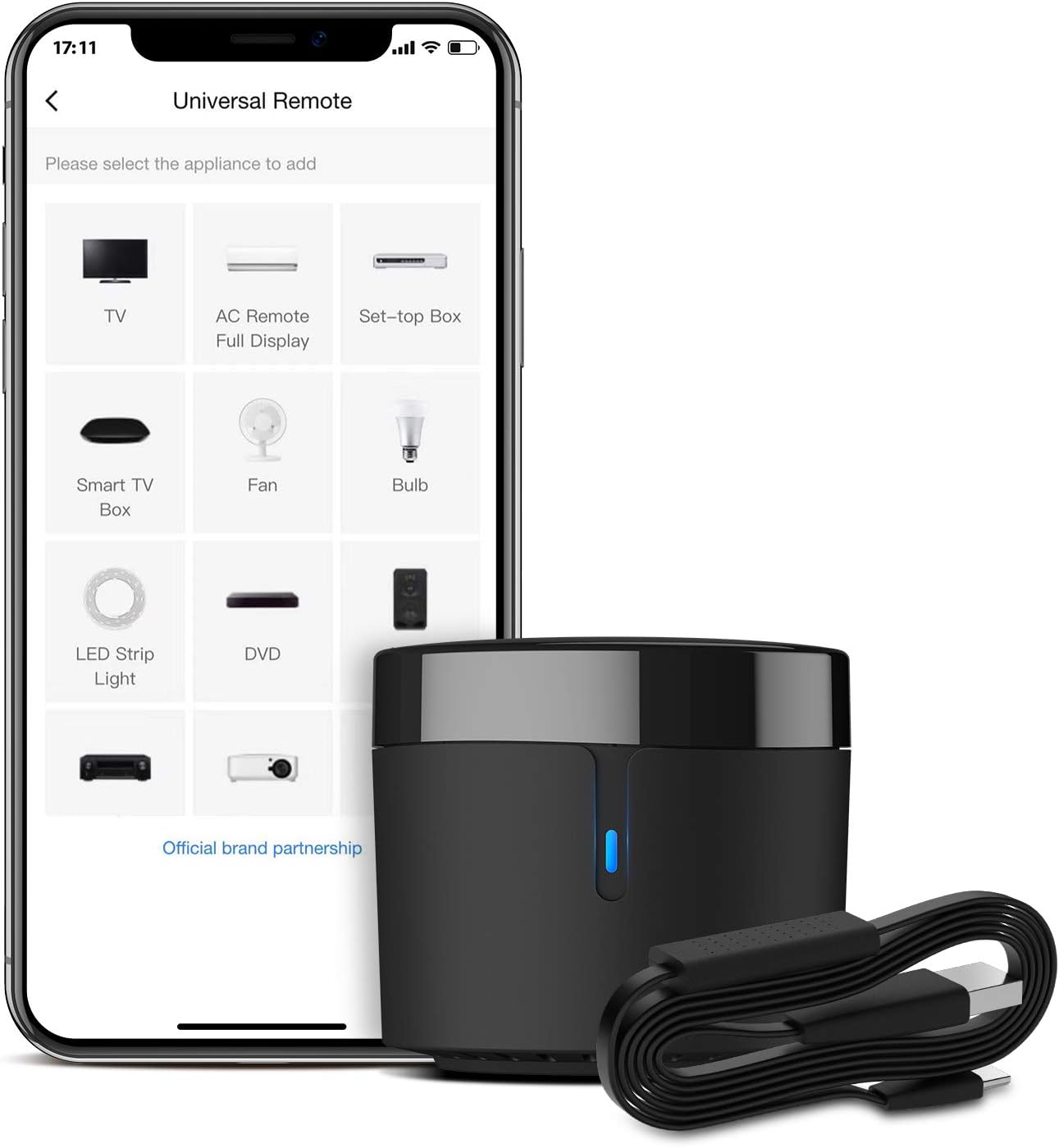
The BroadLink RM4 mini S is a compact universal IR remote hub paired with a temperature and humidity sensor cable, enabling smart automation of over 50,000 IR devices. Compatible with Alexa, Google Home, Siri, and IFTTT, it offers voice control, customizable scenes, and real-time environmental monitoring. Designed for 2.4 GHz Wi-Fi, it ensures seamless integration and shared family access, backed by 24/7 support and a one-year warranty.


| ASIN | B0872PPSGM |
| Battery Types | AAA |
| Best Sellers Rank | 130,248 in DIY & Tools ( See Top 100 in DIY & Tools ) 188 in Smart & Remote Controlled Plugs |
| Brand Name | Broadlink |
| Button Quantity | 1 |
| Colour | Black |
| Compatible Devices | Air Conditioner, Cell Phone, DTH |
| Controller Type | Infrared (IR) |
| Country of Origin | China |
| Customer Reviews | 4.2 4.2 out of 5 stars (3,336) |
| Item Weight | 2.1 Ounces |
| Manufacturer | Broadlink |
| Manufacturer Part Number | RM4 mini |
| Maximum Number of Supported Devices | 255 |
| Maximum Range | 8 Metres |
| Model Name | RM4 mini |
| Model Number | RM4 mini S |
| Network Connectivity Technology | Infrared |
| Number of Batteries | 2 AAA batteries required. |
| Product Features | Universal |
| Unit Count | 1.0 count |
W**L
Amazing for the price
I use this though home assistant to keep things local. Works well and the temperature humidity add-on was very much worth the extra. Speed and reliable the pairing process for remotes is simple even in home assistant and even easier in the app. Just need a physical remote to tie it all together now
B**M
Recommended
Worked as intended
S**C
Finally one that works! (although setup could be better)
So have tried a few of the cheaper ones and I was having an issue with the cheaper ones as they would just keep dropping off (after reading a few reviews looks like they go to sleep - kind of defeats the purpose as it needs to be on 24x7) so though would give this one a try and BINGO - it just works - stays on all the time so no issues there - very pleased with it... Have to deduct 1 star though for setup... whilst the "cheaper" ones have the edge in setting up over the Broadlink [the cheaper ones seem to do bluetooth setup so are easy to add to the apps] the Broadlink ones mandates you *HAVE* to connect to 2.4Ghz WiFi - have you ever tried that? (You basically can't disable 5GHz on most smart phones and indeed routers!) so managed to finally get it to go into 'AP' mode [instructions are not very forthcoming for that! it's like mentioned in a small paragraph] also the Voice Intergration [Alexa] setup is a little counter-intuative... In the App there is a 'link' button but never seems to be enabled (tried on both an iPhone and Android device) - turns out you have to go into the Alexa App and enable the skill which then links your account - found this "mentioned" in the manual - so why have that button in the App? at least get it to display a little help and maybe launch the Alexa App... But overall, would recommend
S**K
Tiny
Smaller then I thought it would be even when described as mini, works as it should
K**Y
Fundamentally flawed
I know... Amazon reviews. Who to believe? Well here's what you need to know here. This product - in fact Broadlink's entire range - does not work easily or often at all with any modern router. The first thing to know is that it requires the older 2.4ghz WiFi band (I can see you glazing over already... bear with me). Most routers now use 5ghz, and often the user cannot choose which of the two standards to connect to (as is the case with my Orbi19). Your iPhone or Android won't help either, they will automatically connect to 5ghz whether you like it or not. If you have an old phone in a drawer that is 2.4ghz only, chances are that the OS is so old that it won't download the Broadlink app. If you are lucky enough to have one of the routers where you can connect manually then you may be in luck. But read on... Once you're over that hurdle, then it gets really tough. Here's the important info they don't tell you, that support supplied to me (to be fair, they were quite quick): 1. Check the router's settings and make sure the encryption mode for the 2.4Ghz network is WPA2. 2. Turn off the firewall setting. 3. Enable DHCP function. 4. Check the port forwarding to make sure TCP 80, 8080, 16384, 1812 are enabled. With (1), my router cannot set the encryption method even in advanced mode. I'm not sure about the other stages, but you'll clearly need to be diving right into the innards of the thing. Finally, you have to turn off the firewall, making you less safe online. Clearly, all this is madness. You just want a product that works - connects to the wifi like everything else, and then the app can find. At this point, none of Broadlink's products support 5ghz, and that's true of all competitors that I can find. So this is a great idea to make older products work - I just needed a timer for an aircon/heater basically - but there doesn't appear to be any product in the world that can actually do it without a degree in Computer Science and a 2nd hand router.
N**A
It Works, just not as expected
This is brilliant little remote. It works with a little bit of patience and remote training it works brilliantly in the app. In the app, Alexa integration is awful and very difficult to set up and get working correctly and for the standard user.
D**O
I bought this IR blaster to help improve my home automation set-up. I wanted it mostly to be able to turn on my TV and AVR at the same time, and this came up recommended a bunch of times online. Package came quick, came with everything needed, and the device itself is so small that it doesn't clutter up your TV setup. It's also USB powered; I haven't tried my TV USB port, but the power output hints that it should work. I just use a USB port on my power bar and it works no problems. Note; it doesn't include an adapter plug, so make sure you have one, or a USB port free to use. Setup is super easy in the app (word of warning, there are a lot of translation errors in the app), and the learning feature of it is easily the best part. There's a very high chance that your device will be supported from the get-go just from the brand name, but if there are some buttons that are missed, just use the original remote to program the missing ones, it's really easy! I also found a really nice use case where it can also control some IR controlled candle lights. I didn't expect this to work at all since they were brandless, but again I just learned it with the remote and they all turned on at once, super happy :) The app also supports NFC tags, which is huge if you want to have a tag somewhere near where you sit, ready to be scanned to switch on all your supported devices. Lastly, it works with Google Home, but just be careful how you name the devices if you have a Chromecast, so that there are no overlaps. 10/10, get this if you have a non-smart TV.
N**O
Scrivo questa recensione dopo alcuni giorni di utilizzo e di smanettamento con l'app. Io l'ho acquistato con il cavo che ha il sensore di temperatura e umidità perché dovevo programmare delle routine in automatico con il mio vecchio condizionatore che utilizzassero come variabile la temperatura o l'umidità. Pro: - l'RM4 mini è davvero mini, potete metterlo ovunque e non si vedrà. - l'App è davvero completa, potete configurare praticamente ogni elettrodomestico, basta che abbia un telecomando a infrarossi - Integrazione con alexa: naturalmente accende e spegne gli elettrodomestici che installate sull'app, ma ogni scena che create, è comandabile dicendo: "Alexa esegui [nome scena]", davvero molto comodo. Ad es. Scena "Umidifica": 1. Accendi condizionatore 2. Dopo 3 secondi imposta deumidificazione - Le scene create sono utilizzabili con le routine che volete creare, non dovete riscrive la scena per ogni routine. Ad es. Routine "Troppa Umidità": Quando l'umidità raggiunge il 70% allora esegui scena "Umidifica". - Questa cosa nemmeno è menzionata, ma se nella Home dell'App cliccate sul vostro RM4 mini, e nella successiva pagina dove vengono visualizzate Temperatura e Umidità, se cliccate sulle opzioni ("...") -> Property -> Nome bande, e date un nome alla temperatura e all'umidità, ad es. "Temperatura Camera da letto" e "Umidità camera da letto", potete visualizzare questi dati sull'app di Alexa e addirittura se dite "Alexa qual è la "Temperatura camera da letto" vi dice qual è, questa cosa non funziona con l'umidità, ma è comunque una funzione interessante e non documentata. Contro: - Cavo HTS2 (con sensore di umidità e temperatura + alimentazione) un po' troppo corto - Manca la spina USB, perché se non l'avete in casa, dove acquistarla - Nelle Routine che programmate non funzionano le notifiche sul telefono, ma tutto questo può essere ovviato creando delle notifiche ad hoc, ma non dalla sezione Routine, per farlo eseguite questi passi: Nella Home dell'App cliccate sul vostro RM4 mini, nella successiva pagina, dove vengono visualizzate Temperatura e Umidità, cliccate sulle opzioni ("...") -> Property -> Impostazioni di notifica -> Aggiungi notifica. Ora potete aggiungere tutte le notifiche che volete e scatteranno correttamente - La registrazione del prodotto tramite QR code non funziona e quindi il prodotto non può essere registrato. Non che cambi qualcosa, ma per completezza io preferisco sempre registrare tutto quanto Spero che questa recensione sia stata utile a qualcuno
K**A
BroadLink RM4 mini Universal Remote First of all I had trouble setting it up when my Router is set to “Smart Connect” which allows devices to automatically connect to either the 2.4 Ghz or 5 Ghz Wi-Fi bands. To work around this I temporarily disabled “Smart Connect” feature on the router so I could to complete the initial setup of the BroadLink RM4. Once the RM4 was successfully connected to my network after its initial setup - I was able to re-enable “Smart Connect” feature on my Router and then after a router reboot all of my devices were able to automatically connect as before… even the BroadLink RM4. I’ve only experienced this configuration setup issue with 3 smart home “2.4 Ghz Only” devices: 2 BroadLink devices and the other one was Sanoff RF Hub. All my many other devices (Wemo, Wink, August, Amazon – to name a few) that only use the 2.4 Ghz Band worked great with “Smart Connect” enabled on my router so I believe the issue is with the setup software of the two manufacture’s that don’t work - in this case the BroadLink App. I bought this device to issue IR commands with my Amazon Echo voice – Specifically my TCL Roku TV which I can normally control from my Echo via the network commands - except when the TV is set to Energy Saving mode with Fast Start disabled and the TV has been powered off for more than 12 minutes. Then I must first use the IR Remote to power it on. Which is where the BroadLink RM4 comes in. At first I added the remote for my “ROKU TV – IR”– as a TV Remote which is available for my Amazon Echo. The remotes they had on file were flaky on the power button so I created my own and used the Learn Feature to assign to the power button. Next, I added the command to my Amazon Alexa App’s “TV” Routine that I previously created. I just added the device “ROKU TV – IR” to Power On at the top of the TV Routine since it takes a couple seconds longer to power on the TV when fast start is disabled. I left the original power command that is sent via network control in the routine which is further down in the routine after all of the lighting controls. This Alexa “TV” routine worked perfectly when I say, “Computer TV” – it first sends the power button IR Code to the TV then processes the rest of the routine normally. NEXT, I added the eROD Motorized Drapery Rod’s remote to the BroadLink RM4’s App. This time I selected User Defined Remote. I added the three buttons: OPEN, CLOSE, & STOP and it easily learned their IR commands. I was able to control the curtains perfectly with the remote. THEN I added a Scene in the BroadLink App. I chose the General Scene type so that I could control the IR eROD Remote I had just created. I named it “Curtains OPEN” and set it to activate the Open Button on the eROD remote I made. I then created Scenes for both the Close and Stop commands as well. Next I created an Alexa Routine, “Open Curtains” and then added Smart Home activity which controls the Scene “Curtains Open” I created with in the BroadLink App and is published in the Alexa scenes. I also created Alexa Routines, “Close Curtains” & “Stop Curtains” which control there corresponding scenes. I also added the Smart Home activity which controls the Scene “Curtains Close” scene to the Alexa “TV” Routine I talked about earlier. Everything worked as expected. Later on I removed the ROKU TV “TV type remote” and recreated it as a User Defined Remote instead. Then I added & learned the POWER button. Next I added a Scene in the BroadLink app that activates that button. Once that was complete I then added the Smart Home activity which controls the “ROKU TV POWER - IR” scene to the Alexa “TV” Routine I talked about earlier. This method works better for me since when I originally created the “ROKU TV” remote I selected the “TV Remote” type and only assigned IR commands to the power button and that left a remote inside the BroadLink App with only the power button working… the rest of the buttons did not work because I didn’t assign them IR commands. Besides the BroadLink App discovered my TCL ROKU TV via the network and is available if the TV is powered on and so I wanted to get rid of the original “TV Remote” type I created with mostly non-working remote and create one using the “User Defined” type with only one button instead. All in all - I am extremely happy with the BroadLink RM4 IR control capabilities. It’s much better than using Harmony Hub to control devices like the Curtains or other devices that would automatically end activities running when you start another. I have already ordered a second BroadLink RM4 Mini with sensor cable to migrate some devices away from my Harmony Hub that interfere with its primary activities. I think Harmony Hub is stupid to end the active “Watch Movie” activity (Which turns off the Projector and surround sound when the automated sunset closing of the curtains is kicked off. A major issue with Harmony Hub. FYI: Sensor cable – with built in temp & humidity sensors. So far only the current temp is available with Amazon Echo – which is seen as a temperature sensor to the Amazon Echo. Alexa does not currently support the humidity function. However, hourly temp & humidity data readings are available inside the BroadLink App. I named my temperature sensor, “Living Room” inside the BroadLink App. So now I can say, “Computer, What is the Living Room Temperature?” Alexa responds, “The Living Room Temperature is 75.1 degrees!” I also created a Group in the Alexa App named, “Inside” and added the Living Room temperature sensor to that group. So I can also ask, “Computer, What is the Inside Temperature?” I know this review was rather long, but I wanted to add some “how to” information and issue work arounds I did that other users have reported as issues while setting up their BroadLink RM4 Mini to help fill in the gaps for the somewhat lacking instructions on how to setup and configure the device and BroadLink app. Happy Automating and thanks for reading!
M**P
Fungerar felfritt och kan styra ACn både temperatur samt fläkt, ON/OFF, samt även schema med automat styrning. Krånlig installation med app, men fungerade till slut. Mäter temperatur och luftfuktighet i rummet vilket är toppen så man vet om man behöver slå/av på ACn.
H**N
Muy práctico y excelente funcionamiento
Trustpilot
Hace 1 semana
Hace 1 día