We remain fully operational. Our teams are working around the clock to ensure your deliveries continue safely.

Descargar la aplicación


Servicios al cliente
Sobre nosotros
Copyright © 2025 Desertcart Holdings Limited
Descargar la aplicación
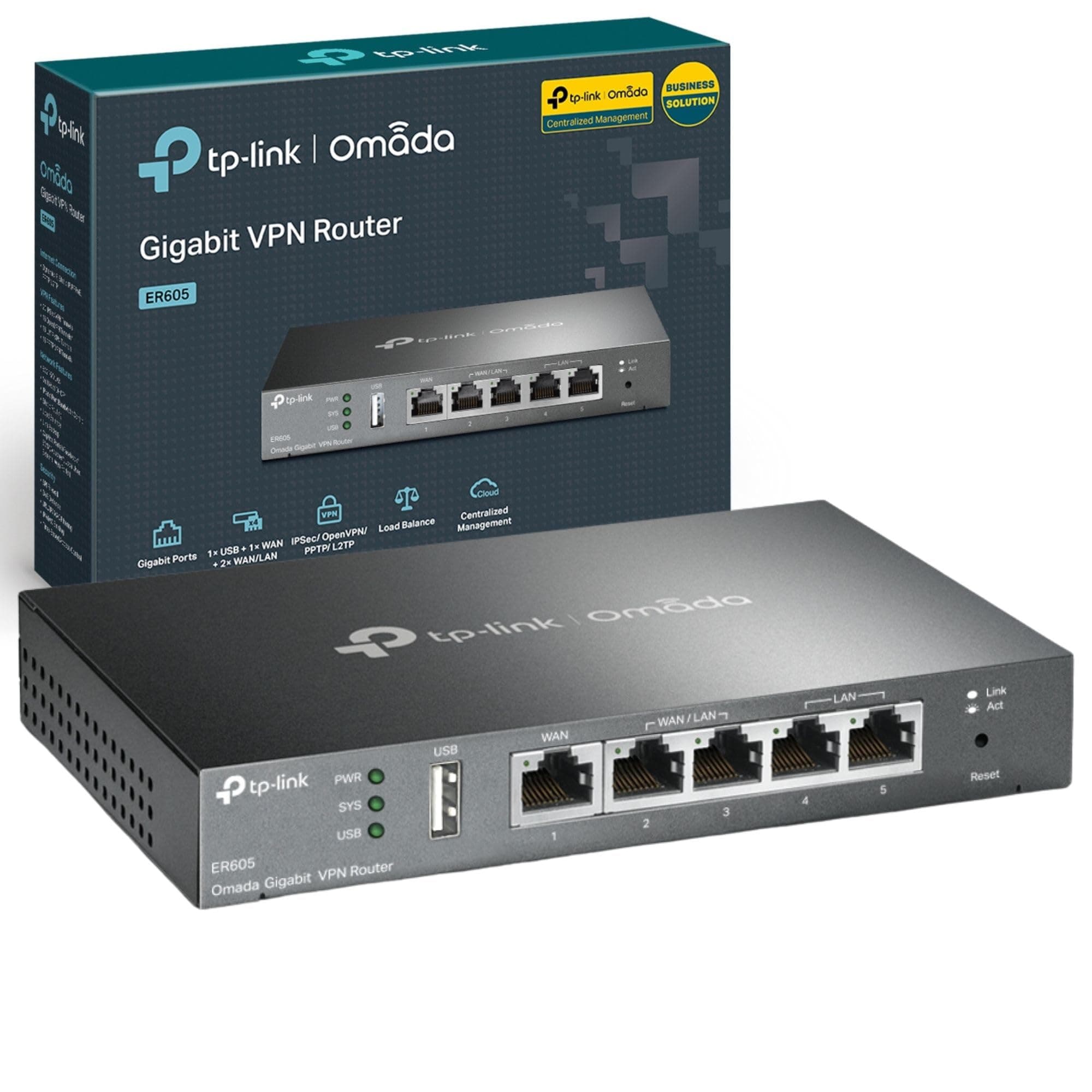
🚀 Power your business network with speed, security, and cloud control!
The TP-Link ER605 is a high-performance gigabit VPN router designed for business and advanced home users. Featuring 5 gigabit ports including 4 WAN ports for load balancing and redundancy, it supports up to 20 IPsec VPN tunnels for secure remote connections. Integrated with Omada SDN cloud management, it offers zero-touch provisioning and centralized control via app, making network management effortless. Enhanced with advanced firewall policies and lifetime warranty, the ER605 delivers reliable, secure, and scalable wired networking tailored for professional environments.






| ASIN | B08LQMJCPG |
| Antenna Location | Home, Small Office |
| Antenna Type | Internal |
| Best Sellers Rank | 3,637 in Computers & Accessories ( See Top 100 in Computers & Accessories ) 30 in Routers |
| Box Contents | TL-R605 |
| Brand Name | TP-Link |
| Colour | Black/White |
| Compatible Devices | Laptop, Smartphone, Tablet |
| Connectivity Protocol | Ethernet |
| Connectivity Technology | Wired |
| Control Method | App |
| Controller Type | App Control |
| Country of Origin | China |
| Customer Reviews | 4.2 4.2 out of 5 stars (331) |
| Data Transfer Rate | 1000 Megabits Per Second |
| Frequency Band Class | Single-Band |
| Has Internet Connectivity | Yes |
| Has Security Updates | Yes |
| Is Modem Compatible | Yes |
| Item Dimensions L x W x H | 15.8L x 10.1W x 2.5H centimetres |
| Item Weight | 0.68 Kilograms |
| LAN Port Bandwidth | 1000 Mbps |
| Manufacturer | TP-Link |
| Manufacturer Part Number | ER605 |
| Maximum Upstream Data Transfer Rate | 1000 Megabits Per Second |
| Model Name | ER605 |
| Model Number | ER605 |
| Number of Antennas | 3 |
| Number of Ports | 5 |
| Operating System | Mac |
| Other Special Features of the Product | QoS |
| Product Warranty | Lifetime |
| Router Firewall Security Level | Tall |
| Router Network Type | LAN |
| Security Protocol | WPA2-PSK, WPA-PSK, WPA3, WPA2-Enterprise, WPA-Enterprise |
| Voltage | 12 Volts |
| Wireless Compability | 802.11.be |
S**S
if you want load balancing go for it, cost effective solution.
This is a very good bit of kit, well priced and the functionality is great. I was debating buying another Draytek router for the load balance facility or try this out. I have a 5G router plus an ADSL landline, I had been using my Draytek router to balance between 5G and landline. I ended up finding that the TP link unit will load balance up to 4 lines. the good part with this unit is that you can use you ISP standard equipment and plug and play no issues if one drops or if one is performing better than the other, the load balance unit will take care of it. In a nut shell if you want redundancy from multiply internet connections this will save you a lot of time and money. the Draytek unit although it can do more will cost around 6 time the cost. being able to use other providers equipment to feed into the one route also provides greater resilience.
J**S
ER605 - Really happy with this as a home user who just wanted vLANs
I think this router is great value for only £50. Even though I had to also buy a wireless access point for ~£40 for this setup to fully replace my ISP router, it still came in much cheaper than other "prosumer" routers with built in wireless. I just wanted to segment my network into two vLANs so I could host a minecraft server from my house on an isolated vLAN and then have all my personal stuff on the other. This router has done the job perfectly. I didn't need to use an omada controller or anything additonal, the built in router management page let me do everything needed, and it was (fairly) straightforward to set up everything up. The router just plugged straight into my BT ONT box and worked, I just had to enter in my ISPs credentials which Plusnet helpfully provides on a help page. Managed to replace my ISP router entirely. The router even supports geo-blocking in the ACL rules which was a surprise to me, I was able to set up a rule to only connections to my server from UK IP addresses, great!
R**P
Seems to load balance fine...
It seems to work well. It does get a little high on CPU on occasion. It lacks stats to show which connection is being used. But is super easy to setup, and seems to work well.
K**L
Solid performance - A huge upgrade from my old setup!
I’ve gone through a few networking configurations over the years. I'm stuck on a slow FTTC connection (still waiting for FTTP) and originally ran a TP-Link VR900 in modem/router mode, later switching to a cheap TD-W9970 when the VR900 started playing up. For Wi-Fi, I used a Tenda MW6 mesh system (four nodes in total). The internet connection was rarely stable - daily dropouts were common, and Tenda’s performance felt limited. Neither the modem/router nor the mesh system could handle the sheer number of devices in my home (The house is fully networked with Excel Cat6, all terminating in a network cabinet in the dormer loft). I was on the verge of spending a fortune on Ubiquiti gear, but with a tight budget and assistance from ChatGPT, I decided to try Omada instead, and I’m glad I did. If Ubiquiti is the Apple of networking (polished, closed ecosystem, expensive), then Omada is like Android - flexible, capable, and much better value. I swapped the four Tenda MW6 nodes for two TP-Link Omada EAP653 UR access points (one wired, one wireless), added this ER605 gateway, and paired it all with an OC200 controller. I swapped the TP-link modem(s) for a 'used' DrayTek Vigor 130, which has been bulletproof. Since then, stability has been flawless and performance has improved across the board. Managing the network with Omada is night and day compared to my old setup. Device management is excellent - you can see real-time connections, monitor logs, review network attacks, and keep track of performance with ease. The Omada app makes this even better, letting you manage everything from anywhere. Whether Omada is better than Ubiquiti, I can’t say for certain, but considering I have a whole network upgrade for less than a Ubiquiti UniFi Dream Machine Pro, I'm happy with my choice.
N**H
Great router for small office team - connect to switch and controller its perfect to grow into.
Great little box, fast and easy enough to setup. The backend connection with TpLink is good. I set everything up with a switch (TP-Link TL-SG3428 | 24 Port Gigabit Switch) - abit complicated for a novice but chatGPT helped me out. I then seen the Omada software to put on it and thats when things went bad... the Omada software took over, reset stuff, starting from scratch but not fully understanding the process or linking to the TPlink account - it was all abit confusing but got there in the end. I got a OC200 (an omada controller) to stop using my work PC as a software Controller - i aint gone fully to the OC200. We are a small office with 100mbps line so don't need anything crazy expensive and this is great and should support us for a few years while growing. with the 24 port switch, we got alot of Vlans between machines etc.
T**E
Don’t understand all the praise this gets
Terrible performance for a modern home network. I run a Virgin Hub in modem mode connected to a TP link Deco WiFi mesh. I got this with the intention of having a 4G router attached to this as a second WAN for a failover connection should Virgin ever go for as I work from home and staying connected is important for me. I did a lot of research before buying this and a lot of reviews and AI suggestions pushed me towards this as a small business level router with excellent reliability for a low price. Interestingly the lack of a proper QOS did not come up at all while reading. Once installed in my home I wasn’t able to run Teams calls without everybody complaining of me freezing repeatedly. Despite tinkering no end with its archaic port based QOS system and bandwidth control settings it made no difference. I’ve returned it for ASUs’ EBG wired router instead (look up EBG15 or EBG19 if you need more than 5 ports). Both do failover 4G backup faster, have a really user friendly system and great QOS. No Teams complains with those. I’d avoid this if using it for any real modern purpose.
T**S
Good quality and specs for price.
Works perfectly, can finally use full potential of isp speed.
G**A
Version 1 not 1.6
This is V1 not V1.6 I did a firmware update before configuration as advised by reviewer. Works great. Got it because of the Authntication feature. However, it doesn't give a report showing usage per user.
A**X
Il prodotto è molto affidabile. 2 cose importanti da sapere. L'accensione non è immediata. Occorrono circa 5min per l'attivazione della connessione. Il prodotto è fornito con presa di alimentazione UK. Quindi occorre utilizzare un adattatore UK verso EU.
L**E
Einfache Einrichtung, schnelle Lieferung. Für den Preis wirklich super
R**S
Como router funciona muy bien, pero como yo lo necesitaba como balanceador de 2 redes proveedoras de internet, pues ahí no está demasiado fino. No cambia automáticamente al fallar una red, ni si falla la otra, tampoco.
E**O
E' un prodotto di buon livello, al momento funziona correttamente.
M**O
Uso questo router da qualche mese e devo dire che sono rimasto davvero soddisfatto. Il TP-LINK TL-R605 si è dimostrato stabile e affidabile anche in situazioni di utilizzo intenso, con più dispositivi collegati contemporaneamente. L’interfaccia web e l’integrazione con Omada lo rendono molto semplice da gestire, anche per chi non è un esperto di rete: in pochi minuti avevo già configurato VPN, firewall e controlli di sicurezza. ### Pro - Connessione sempre stabile, niente disconnessioni improvvise. - Gestione centralizzata tramite Omada Controller, comodissima se si hanno altri dispositivi TP-LINK. - Buon livello di sicurezza, possibilità di utilizzare diverse VPN senza complicazioni. - Qualità costruttiva solida, con design compatto che non scalda eccessivamente. ### Contro - L’interfaccia base non è la più intuitiva del mondo per chi parte da zero, bisogna un attimo prenderci la mano. - Non ha Wi-Fi integrato (serve abbinarlo a un access point, ma per me non è stato un problema). In definitiva, il TL-R605 è un prodotto che consiglio vivamente a chi vuole costruirsi una rete domestica o da ufficio stabile e strutturata. Per il prezzo che ha, offre una qualità e una flessibilità davvero difficili da trovare altrove.
Trustpilot
Hace 3 semanas
Hace 1 día