We remain fully operational. Our teams are working around the clock to ensure your deliveries continue safely.

Descargar la aplicación


Servicios al cliente
Sobre nosotros
Copyright © 2025 Desertcart Holdings Limited
Descargar la aplicación
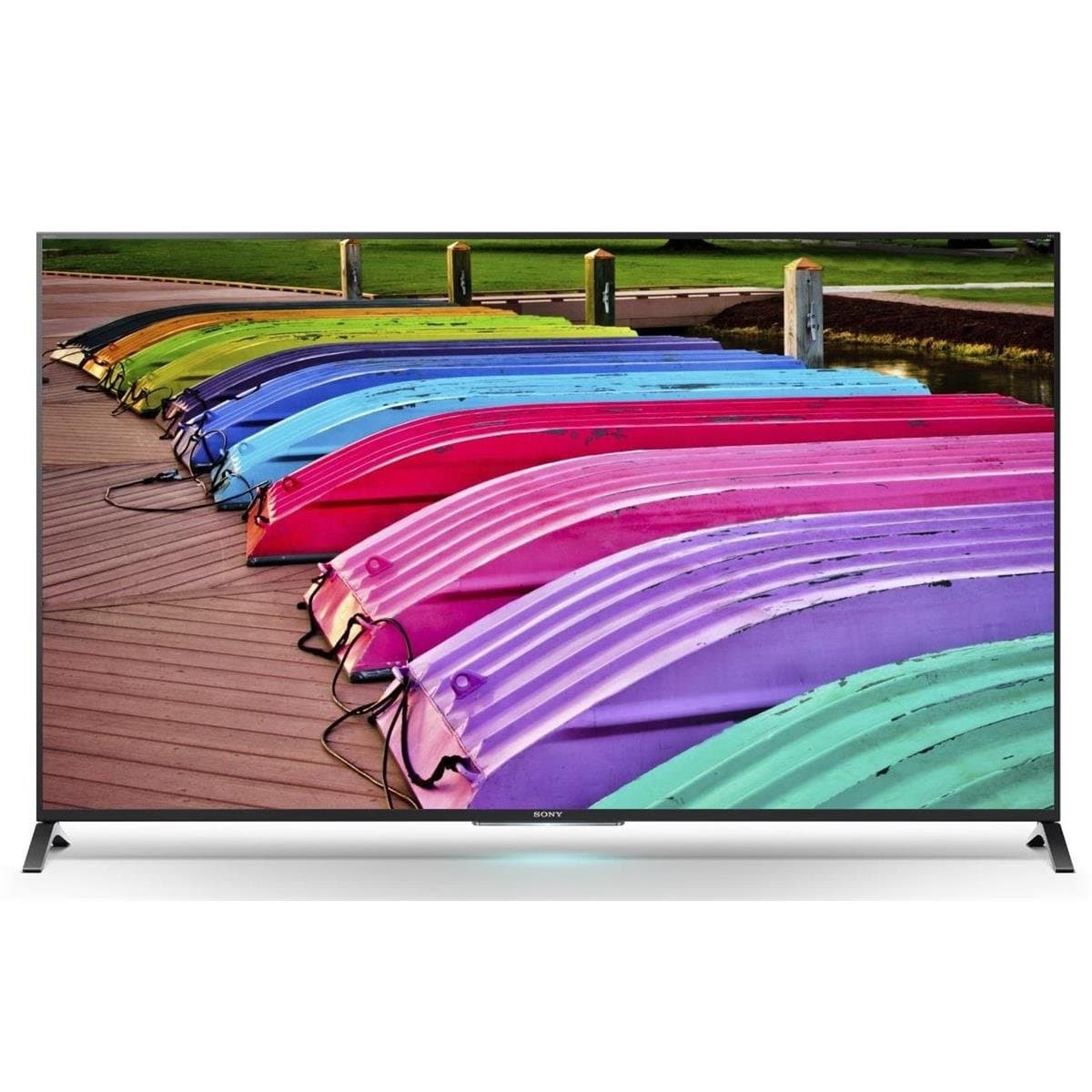






🎉 Elevate Your Entertainment Game!
The Sony XBR70X850B is a 70-inch 4K Ultra HD Smart LED TV that features a native 120Hz refresh rate, edge-lit LED backlighting, and a variety of smart functionalities, including popular apps and internet browsing. With multiple HDMI and USB inputs, this TV is designed to enhance your viewing experience while providing all the connectivity options you need.
| ASIN | B00J585ORC |
| Additional Features | Flat |
| Aspect Ratio | 16:9 |
| Audio Input | HDMI, USB |
| Brand | Sony |
| Built-In Media | Touchpad Remote Control, Remote Control, 3D Glasses (TDG-BT400A x2pcs),Batteries (R03 x 2), AC Power Cord, Screws, Operating Instructions, Table Top Stand (Attached), *Items may vary by country and model |
| Color | Black |
| Connectivity Technology | Ethernet, HDMI, IR, MHL, RF, USB, Wi-Fi |
| Connector Type | USB |
| Contrast Ratio | Moderate to High |
| Control Method | Remote |
| Controller Type | Remote Control |
| Customer Reviews | 4.1 out of 5 stars 333 Reviews |
| Display Refresh Rate in Hertz | 120 |
| Display Technology | LED |
| Global Trade Identification Number | 00027242879157 |
| Hardware Interface | HDMI, USB |
| Internet Applications | Browser, Skype, YouTube |
| Item Dimensions D x W x H | 14.4"D x 62"W x 38.75"H |
| Item Weight | 97 Pounds |
| Manufacturer | Sony |
| Mfr Part Number | XBR70X850B |
| Model Name | XBR70X850 |
| Model Number | XBR70X850B |
| Model Series | XBR |
| Model Year | 2014 |
| Mounting Type | Table Mount |
| Number of Audio Channels | 2.1 |
| Picture Quality Enhancement Technology | TRILUMINOS, Sony's widest color spectrum |
| Refresh Rate | 120 |
| Resolution | 4K |
| Response Time | 2 Milliseconds |
| Screen Finish | flat |
| Screen Size | 70 Inches |
| Signal Format | Digital (HDMI, USB, MHL, IR, Wi-Fi, RF, Ethernet) |
| Size | 70-Inch |
| Special Feature | Flat |
| Total Number of HDMI Ports | 4 |
| Total Usb Ports | 3 |
| Tuner Type | ATSC |
| UPC | 027242879157 |
| Video Encoding | HEVC |
| Warranty Type | Limited |
| Wireless Technology | Wi-Fi |
A**R
Very pleased with it as a PC monitor AND a TV
I've had the 65-inch version of this TV for about 4 months, and wanted to really put it through its paces before submitting a review. Overall, I highly recommend this TV. With the tons of reviews already listed here, I'll focus on the on a few points of emphasis from the last few months. AS A WORK PC MONITOR: Work, believe it or not, was the initial reason I got this TV. I work at home occasionally (software industry), and my old 46" Samsung hi-def was previously the 'monitor' for my home PC. The Samsung was starting to get a bit old at the 7-8 year point (dead pixels), plus I was tiring of the limitations of 1080p resolution with a PC. You can't open a whole lot of windows with an appreciable amount of content on one 1080p screen (and getting a bigger 1080p TV simply results in bigger, uglier limited-content windows). I loved the idea of having a 65-inch screen in 4K, where I could tile Chrome, Firefox, a Firebug window, FTP, and email all at once. And actually SEE an appreciable amount of content in each window. I went with the 65" version of this TV, upgraded my PC with the eVGA nVidia 970 GTX card (HDMI 2.0 capable, and enough horsepower to move the pixels in 4K), and am running Windows 7 at 4k/60p. In terms of creating a nice, large workspace, I got everything I hoped for. Some applications do have some scaling issues at 4K, but the blame for that falls on Windows 7 and the applications. I'm hoping Windows 10, along with better app development will cure a lot of this. The TV renders everything like a champ, and I can multitask much better than I did on my old Samsung, where I constantly had to alt-tab between windows. PC GAMING: I also do Steam gaming on my PC. The GTX 970 was a good pairing with the TV without breaking the bank, as it can run some games decently at full 4K, and pretty much anything just fine at 2560x1600p. I often opt for the latter even when full 4K plays smoothly, as most games I play will have some miscellaneous problem at 4K like menus so small you have to walk right up to the TV to read them. I'm not as picky on things like latency as some hardcore FPS/racing gamers would be, but I've had outstanding performance on this TV with games that I play. Playing Skyrim, Civ V, Assassin's Creed, and Burnout at 65" inches is a total blast. 3-D BLURAYS: Outside of a PC monitor, my second most common use of this TV is with blu-rays, which I play with a Sony 3-d capable blu-ray player. This TV uses passive 3-d, so you don't have to spring for those expensive, battery-powered glasses. Most of what I've heard about home 3-d was basically "meh". As a result, I wasn't factoring 3-d capability in very much when I purchased this set. But thanks to this set, I've now become a big fan of 3-d. The main variables when using 3d with this set are: 1) The movie itself. Some producers do 3-d better than others. Avatar was a jaw-dropping experience, as if there was a portal to an alternate universe in my living room. i-Robot, on the other hand, merely left me with a slight headache. 2) Distance matters. Good 3-d movies look great when I sit between 6-10 feet away. When you get too close to the screen, you start getting a double-vision effect in the peripheral areas of the screen. 3) Angle matters. I mounted my TV fairly high on the wall, and was initially having trouble getting the downward tilt on my mount to work. This left us looking up at the TV about 15 degrees off-center, and the 3-d was hit-and-miss, especially higher up on the screen. Once I was able to tilt the set downward so we were looking perpendicular into the screen, the 3d was as good as the movie allowed for. Anyway, the biggest curse this TV brought into my life was the breaking of my vow to never buy optical disks again. Thanks to streaming and Redbox, I hadn't bought a disk of anything in years, and was happy to have shed that expense. But now I find myself budgeting for decent 3-d movies (which stay expensive a lot longer than their non-3d counterparts). Just make sure and google the reviews on 3-d movies before buying, as some movies sell the medium better than others. STREAMING I'm a Netflix and Prime addict as well. I often do this while in PC mode (with a small window tucked into a corner while I do other work), and didn't see myself using the TVs apps much for this. However, the TVs native apps can do Netflix and Prime in 4K. I've upgraded my Netflix account to allow for 4K streaming, and watched some Breaking Bad and Blacklist in 4K so far. Very nice picture. There still needs to be some more 4K content put out there, but there's still enough to keep you busy for awhile. For myself, I think the extra 4 bucks a month to Netflix was worth it, even with the limited content at the moment. Prime seems to want you to pay dearly for most of their 4K content (there wasn't much in the free-streaming category, though plenty that you could buy), so I haven't done much prime in 4K. There's a pretty heavy selection of streaming apps besides Netflix and Prime ("channels" of various sorts), but even after 4 months with this TV, I can't comment too much on anything but those two. Those work great. I don't care much for any of the others. MEDIA CENTER This TV has several USB ports, and one potential use of them is hooking up a USB drive with digital media on it. Because I already have a PC hooked up to this TV, I didn't see much use for this at first. However, I went ahead and dumped a few hundred gigs of movies, music, and pics to a Western Digital 3TB My Book, and was somewhat sold on the result. Upside: I think the TVs app does a better job rendering the movies in hi-res than my PC does, particularly when it comes to upscaling. A lot of my movies are DVD rips, which don't supply nearly enough pixels for optimal effect on a 4K screen. A lot of them manage to look pretty good in the media center app even full screen, where on my PC, they look pretty bad unless I shrink the window down. Downsides: 1) A lot of my rips were in wmv format. The media center app doesn't like them. Don't know if it's the WMV format or the WMA audio I used with them, but it doesn't recognize a single one of those. Lucky for me, a couple of years ago I started ripping to mp4 and mkv containers, along with AAC passthru on the sound, and the app plays those nicely. But WMV on my early rips proved to be a bad choice here. I'll have to dig my DVDs out of storage and start a massive re-ripping project if I want to truly take advantage of this. 2) Browsing a media library isn't the greatest experience at this point. It's a combination of waiting and nearly wearing out your remote buttons. When picking a movie to watch, it takes a minute or two for the app to even give me a good idea what's on the disk. When you start browsing, there's quite a lag as the media center app renders the titles and thumbnails. And long titles are a bit hard to read due to character cut-off. Also, even if your movies are spread out into different folders, the app just lists them all on one screen. One very...big...long....screen. Good thing the remote is pretty serviceable. The end result: I don't use this much right now for my pics/music/videos. It's much easier to flip to my PC input and view them there. Some improvements to the app could change this. Overall: I like what Sony has done with this set. As a final thought: GO BIG! I got the 65-inch, which seemed absurdly large coming from a 46-inch Samsung. Yet I'm already wishing I got the 70-inch. You can really put those pixels to work with large real-estate. I briefly thought about the 50 or 55 inch models due to much lower cost, but am glad I went higher. The overall experience relative to standard HD would only have been marginal at lower sizes. If you're on the fence, buy this TV.
M**D
Excellent 4K TV at a good price point
I have had this TV for a little over a week now. It is a very nice TV. I didn't really need to get a 4K TV right now, but since I was going to move my older Sony LCD 52 inch into the basement, I wanted a TV that would be ready for the future (next couple of years when 4K content becomes more readily available. I got this over the other similar model (800B) which is $300 less because it had the Triluminos display and the 3D. I didn't really care for the 3D but for $300 more I figure I might as well go with the Triluminos display. To be honest, I don't think I could really tell the difference when I saw both models at Best Buy. I used the amazon white glove delivery service, and that was flawless. They came when they said they would, two guys unboxed and unpackaged it and set it on my TV stand. I have it paired with a 4K Onkyo receiver, Bose sound system, Sony 4K Blue Ray DVD player, and verizon FIOS Motorola Box. Below is the good and the bad. Good: ==== - Looks great, easy to set up - 4K content looks very good. I had to go to Youtube and browse through some 4k videos, Amazon and Netflix do have some 4K shows now, but very little. One thing they say about 4K tv and I find this to be true, is the closer the better. This 65 inches looks fine in my room. I thought it might be too big. The optimal sitting distance is probably about 5 ft. My sofa is a good 10 ft from the TV. It still looks great, but the further you sit from a 4K screen the more it looks like a 1080p. If you are going 4k, buy the biggest TV you can afford. I looked at the curved Samsung but find it to be a bit gimicky at 65 inches. If you are going to get curved, IMO you need at least 75 inches or larger screen. - 1080p content is upscaled to 4k, and looks good. - 3D works nice. I had to browse for some 3D content on Youtube to test out. I can't say I really would watch much 3D, but it looks nice. Bad: === - None really. but some minor points. - TV screen has some glare. If light is shining on it, makes it a bit annoying. Sony's menu system is about the same, and I always found it kind of klunky. - Sony's remote. Acutally comes with two. They are ok, but normal Sony boxiness. I replaced them with a Logitech Harmony for my entire system anyway.
D**N
and I can easily say that this TV has a simply phenomenal picture ...
This applies to the 70 inch version. To be brief, it is stupendous! It replaces a 65 Sharp Aquos 1080p set, and I can easily say that this TV has a simply phenomenal picture that blows the Sharp away. I don't know what some of the reviewers complain about on terms of startup speed or picture issues . . . this TV has no issues at all. However, I understand from chatter on AVS forum that the 70 inch uses a different LCD panel than the smaller size 850B models. That may have no effect or a lot -- no idea. On native 4K material from Youtube or Amazon, the picture is just outstanding. The TV's upscaler engine works great and everything looks sharp. Even lower quality torrents look significantly improved. Setup was a snap, but then again, I also read the Owner's Manual cover to cover to try to figure out all of the things that the TV can do. And on this set, there are so many ways to adjust the picture, I tend to set it on basic settings and not tweak it too much. I may experiment with that later. The 3D works well. This has active 3D and comes with two pairs of active 3D glasses. They are comfortable and work. I was actually surprised at how well the "simulated" 3D works from regular 2D source material. I am not obsessed with 3D, but it is rather cool and does work. I have no native 3D content, but I will probably try some out just to see. There are numerous apps installed with the TV, and the Skype app is cool because you can sit in the living room and use the camera on top of the TV for a wide view. You can also watch TV with friends and have Skype running on the side so that you have a sort of "virtual party" if your friend is watching the same show. A little gimmicky, but may be fun. There are many other apps that can update via an internet connection. I had no trouble plugging the TV into my network at all, although I use a hardwired LAN rather than Wifi. The TV required no network setup other than plugging in the Ethernet cable. With 75 mB download speeds, and a hard-wired network with CAT6 cabling, I have no problem streaming 4K content, whether from my media server or from the Internet. Summary: if you're looking for a new big TV, I highly recommend this 70 inch model. Even my wife, who tends to view my obsession with quality audio and video with a bemused eye, agrees that she has never seen a picture like it. Don't listen to people who complain that there is no 4K content. Although 4K content is not prevalent, it is the current standard, and upscaling really works! You won't be disappointed with this TV!
P**E
Amazing TV – One major flaw for me
This TV easily earns a five-star review. Everything positive you've read about this television is true. The picture, features, and price are phenomenal. Do a software update!! The TV will say it is up to date, but you will find there is a newer version online that you must use USB to download and update your TV. This fixed some quirks and the TV is rock solid now. Here is my issue: I do not understand how a high-end, media playing device released in this decade does not have a gigabit Ethernet connection. I was SHOCKED to see this TV connect to my network at 100 Mbps. Unfortunately I didn't even think I’d need to look into something like this in 2015, but it’s still my fault for not doing so, but I have confirmed in the manual > LAN: 10BASE-T/100BASE-TX. Why is this bad? Sure, you might be able to stream highly compressed 4k video to your TV without a problem. What about going through 22 MB DSLR photos quickly? Not so much. For a device that is meant to be an entertainment hub of your home, obviously connected to any NAS or server, to need to wait 3 to 5 seconds per photo to view my photos is essentially unbearable. Even my old PS3 connects at gigabit. So now I have to have a device between my NAS and my TV, that can then connect via HDMI. This has just made one of the reasons I wanted this TV vanish into thin air, which was viewing my photos in 4k directly from the TV. I even come to the table with a band-aid fix… how about at least update the media server app to pre-load the next image? The 'slideshow' function in the app evidently does the pre-loading. Maybe this can be added for manually going through photos please? Seriously that would really improve the experience. Oh well. For the price and quality, again it’s a 5-star TV. But honestly, I felt a bit of real disappointment when discovering this. ** Quick update ** Found another annoyance, but also found a solution online that will likely benefit some people. There is a 'Content Not Supported' message when playing certain video files via DLNA, which does not go away, * even though the video plays just fine and looks correct *. Doing a search, this seems to be prevalent on a lot of Sony models. There is a solution that seems to work for this TV, which is pressing Options > Picture & Display > Picture Adjustments > then Return back. This seems to be the only thing that can make this message go away.
K**A
Great picture quality, constant wi-fi connectivity problems, and sluggish UI.
I have been a fan of SONY Bravia TVs since 2006 when I got a 40' LCD set, and it worked flawlessly since then. Now scroll forward 9 years, and voila, I am an owner of another Sony Bravia TV packed with new features. The picture quality is great, the sound is decent (i got a sounbar to go along with the TV) so why two stars?? Sony, do something about the Wi-Fi connectivity on this otherwise 5-star set! I watch all of my content through the Web (Amazon instant video, YouTube), and the stability of the internet connectivity makes me feel like Al Gore just got done inventing the Internet, and the paint is yet to dry. I turn on the TV. It tries to connect to the internet or whatever it wants to connect to. 30 seconds later, a message pops up: Sign in unsuccessful. Ok, hit the Home button, go to Apps. Slowly it refreshes the list of apps. The UI is sluggish (down one star), but I can get to the content finally. I go to YouTube and put on a favorite cartoon for my kid. The TV starts playing it, and then everything freezes. Now, it doesn't happen all the time, maybe every 10th or even 20th viewing or so, but needless to say, after dropping $2K on a TV, I want it to work every time. So the cartoon is frozen, and the kid is looking at her dad with a big question mark in sad, disappointed eyes. Daddy will fix it, sweetie. I look at the Internet connectivity sign on the screen, and as my kid would say, "oh no". The icon has a bad omen sign on it - no connectivity. I go into Internet options, reconnect to WiFi (which the unit does after some deliberation), and the show finally continues. I go through this at least once a week. Two more stars gone with the wind. I am sure you folks are wondering, where is zee router? Well, the TV is on first floor, the wireless router is on the second floor. With that setup, the TV never showed full wireless connectivity and worked even worse. So i got an extender and at first placed it directly below the router on the first floor and about four yards aways from the TV. All my other devices (two Mac laptops, Kindle, two smart phones, a Windows laptop, a Chromecast stick, and a wireless Sonos unit) all show full connectivity. But not the SONY TV. It holds the line and shows 75%. Next I move the extender on the same wall with the TV, and it's almost below it. Finally, the connectivity goes to 100%. I thought the relief had arrived, but even with this kind of placement, the TV keeps getting disconnected from Wi-Fi. Did i mention I would really like Sony to do something about it? Maybe a software patch? Even Tesla cars get those. Anyhow, my conclusion for the curious reader is this: great picture quality and good sound, but unstable wi-fi connectivity. If you are planning to hook up your TV to wi-fi and need a modern and fast Smart TV user experience, go with something else. A friend of mine has a smart Sony TV, and his experience (and conclusion) is virtually identical. Too bad I didn't talk to him before I purchased mine.
A**F
This TV has been a fantastic and worthwhile investment
My profession is in the film, video and visual effects industry, so I tend to scrutinize image quality, resolution, color and detail more than anything else. This was my first 4K consumer television, and I have so far been extremely impressed. The first thing I did when setting up this TV was to ensure the correct color calibration settings, based on some tools I had on-hand. I concluded that the following settings really hit the mark with this TV: Picture mode: Standard Backlight: 5 (6 if you feel you want it a touch brighter) Picture: 72 Brightness: 56 Color: 53 Hue: 0 Sharpness: 52 Noise reduction and all other "enhancement" features: Off. However, if you want to add a bit more "vibrancy" to the color, you may choose to have your "live color" setting on "low", which will give the saturation a subtle boost without overdoing it. Granted, some of the enhancement features can do a good job with certain content, I found that overall it is better (as a safe solution) to keep them all off. That way you are receiving the content the way it was meant to be shown. Other features you may want to disable are the Eco features such as local or environment dimming. While these are great for reducing your power bill, they tend to fluctuate the image a bit too much during presentations. With the above settings, I was able to achieve a phenomenal picture quality, with vibrant colors and a very diverse dynamic range of tones. I have paired this with a Sony Receiver, and through the Bravia Sync and Audio Return Channel (ARC) features, I was able to ensure unified control of all my devices through a single remote. This feature was a MUST HAVE for me and I am happy it was easy to set up and use. It also comes with the "IR Blaster" universal remote relay device, which helps the Sony remote also communicate with virtually any other external device, including cable boxes. It's a bit complicated to set this up, but worth it to ensure a unified set-up. The Smart features, menus and other content applications built into the TV (Netflix, Hulu, YouTube, etc.) are also very high quality and are easy to use. The Netflix application supports the new 4K subscriptions so I am able to stream Netflix in 4K without and issue, and it looks great! One of the biggest gripes is the boot-up time. The TV itself starts up very fast, provided you do not plan to switch inputs right away. However, while booting up (and it can take up to 30 seconds) you cannot use any menus, features or even switch input. However, there is a feature to help this. In the menu, you can set specific "fast boot" times, which tell the TV when you are most likely to use the TV during the day. Once you have set-up this schedule, you are basically saying that during certain hours you will want to TV to use the extra juice in stand-by mode to ensure a faster boot up. This reduces your boot-up time in designated time slots to about 5-10 seconds. Of course you have the option of having a fast-boot option all day, but the TV will consume more juice in standby mode. The passive 3D is a real treat for me. I HATE the active 3D, because I can clearly see the flicker from the active shutter on the glasses. However, this TVs passive 3D provides great quality 3D (with excellent depth) without the flicker, bulky glasses or batteries. Most people will tell you that passive 3D fails due to its halving of the vertical resolution. But considering the TV up-scales the content to 4K for display anyway, you perceptively do not lose much video resolution, if at all. You honestly have to sit a couple of inches away before you can even tell you may be interlacing the image. To be honest, other than an IMAX 3D feature (and we are talking Sydney's IMAX screen here), this TV is the closest thing to the best 3D I have experienced. The TV is also quite durable. We went away for a couple of weeks, and came back to discover that our cat had attempted to climb up on top of the set a few times while we were away! He obviously tried multiple times, and failed (due to how thin the TV is). But I could see plenty of scuff marks, paw prints where he obviously was clinging to the top and using his hind legs to try and crawl his way up the screen. When I discovered this I was so scared that he had scratched the front panel. However, ALL of the marks were easily removed with a glasses cleaner (a dry microfiber cloth), and the TV was as good as new with no scratches on the panel. The cat has been spoken to. So this TV is obviously quite scratch resistant and stable enough to withstand a cat (and a pretty fat one at that) attempting to tug, pull and crawl on it. Overall, the picture quality, image fidelity, feature set and durability of this TV has given my the ability to safely say this has been my best TV purchase yet. I can't wait for more 4K content... some day...
A**E
Internet problems found common in a few months - fix was easy!!
As always, Sony, you did not let me down. External design of this 850-series, while more modest than flashier 900 with its added speakers and glossy gorilla glass, projects enough aesthetic dignity so distinctive for a majority of Sony products. And picture quality and colors are great. While the majority of LCD screens made for all (and Sony is no exception) by just a handful of manufacturers, most likely by Samsung or LG, Sony does something to make colors look more "natural", pastel-like classics rather than screaming abstractionist storm of colors produced by others - and that is more to my liking. I think that magic is their very own digital image processing, which makes the quality of a picture so amazing and distinctive from others. The sound quality is not great, like from a majority of flat screen TVs, even though the set has a setup for steering sound a bit depending on where TV is located (wall-mounted or tabletop) and that was expected. After some deliberation I focused on another piece from Sony, soundbar HT-CT370, which matches TV perfectly by looks and various compatibility aspects. While not a Cadillac of home theaters, far from that, it does the job well for my not too big living room in modern apartment and improved my listening experience a lot. Had I a bigger family room in the house I would probably settle for a better and much pricier (how about 5x?!) option, like a sound projector from Yamaha 3300 or Sony HT-ST7 with 7.1 ch simulator (not like real home theater but not to hang too many boxes and bring wires to them also). But then this TV would be too small for that. Compromise... Well, it's been just a few days so far and I will alert here if encounter anything unusual. I would recommend this TV to anyone and hope that you will enjoy it just as much as I do. Update: Feb. 7, 2015, about 5 months since my purchase and what a disappointment. All what other reviewers noticed is true, picture quality is good, but black levels - not quite, control responses sluggish, software awkward - appropriate for mastodontic era but not acceptable today . Friday night and Netflix and Amazon Prime movies apps are gone from this TV and all attempts to revive failed. There is no easy way to re-install software, yes this is not Apple. Expect to pay $2000 (well, that's what I paid, price fell now and some reported buying for 1500, but anyways) and be very-very disappointed. Good bye my love, goodbye Sony, never again. I've had enough tonight dealing with useless support site, out of sync with the rest of the world Sony that can't read simple USB sticks etc. My kids were right laughing at my loyalty to this brand, they got two Samsungs with similar apps and even after years of abuse those still go strong. Will dust off my Roku now, what's the point to have this "smart" TV? Feb. 9th, 2015 -FIXED!! Dreaded to call SONY support after reading numerous posts on unsuccessful attempts by others, my idea of warranty is not how many years the guarantee is for, but rather trust in brand that you never have to call them. Well. I did call SONY today and was amazed that it took only about 10 minutes to fix it. Here is the recipe: Reset to factory settings: Hold an arrow up button on key remote and reach to the power button on the back of TV, release both, watch a message "RESET" in the corner of the screen. Voila...You have to re-do basic set-up after that, network setup, etc. because the TV is reset to the original pristine (well, almost) condition. Now, I don't expect that it won't happen again, that glitch, but hopefully at least I have a cure. Thanks SONY support, sorry can't recall the name of a real person who helped me, but thanks!
S**3
One word... Incredible!
This is by far the most incredible TV I've ever owned! I didn't jump on the 3D band wagon before. Now I'm driving that bad boy! You'll need to tweak it a little, but trust me it's awesome! The 3D is better than the theatre. I've watched "Man of Steel" many times and in 3D IMAX. I feel like I've just watched it for the first time and see so many subtle things I missed. Same thing with Star Trek: Into Darkness. With both movies, I said after watching them in 3D at the theatre, I could take it or leave it. This TV changed that!! I'm glad I picked this over the LG. This 65" is replacing a 60" Vizio that decided to grow red lines in the screen. (That Vizio was a huge mistake). For $3,000, I got a $3,000 TV. Worth every penny!! Even the regular FiOS TV signal looks incredible. The colors explode! Great job Sony!! Update: After a month with this wonderful piece of technological mana from the Gods, I can say, I love this TV! If it was a lady, I would be insanely jealous, and only let her out to get the mail! My friends have all been amazed! Madden on xbox-one looked crazy good! My daughters were trying to pet the Potato Cod in "IMAX: Under the Sea". It felt like the fish was swimming into our living room in 3D. Watching "Oceans" on Netflix in 4K was AMAZING! The NFL looks fantastic! I'm sorry, any complaints about picture within these reviews is just nitpicking! Every single person who has watched this TV is amazed! You can hook a portable Hard Drive to it and watch HD codecs. I'm absolutely blown away by this TV, and find myself stalking it, while it's turned off. I will just stare lovingly at it. Not to mention, you get 5 free movies included. One of the movies I chose was "Step Brothers". How can a TV that gives you "Step Brothers" in 4K, ever do any wrong?????? Go buy this TV now! GO! Stop reading this review, and get to clickin' your mouse!!!! Sell some plasma, family heirlooms, anything to get this TV on your wall!!!!!
Trustpilot
Hace 3 días
Hace 5 días