We remain fully operational. Our teams are working around the clock to ensure your deliveries continue safely.

Descargar la aplicación


Servicios al cliente
Sobre nosotros
Copyright © 2025 Desertcart Holdings Limited
Descargar la aplicación
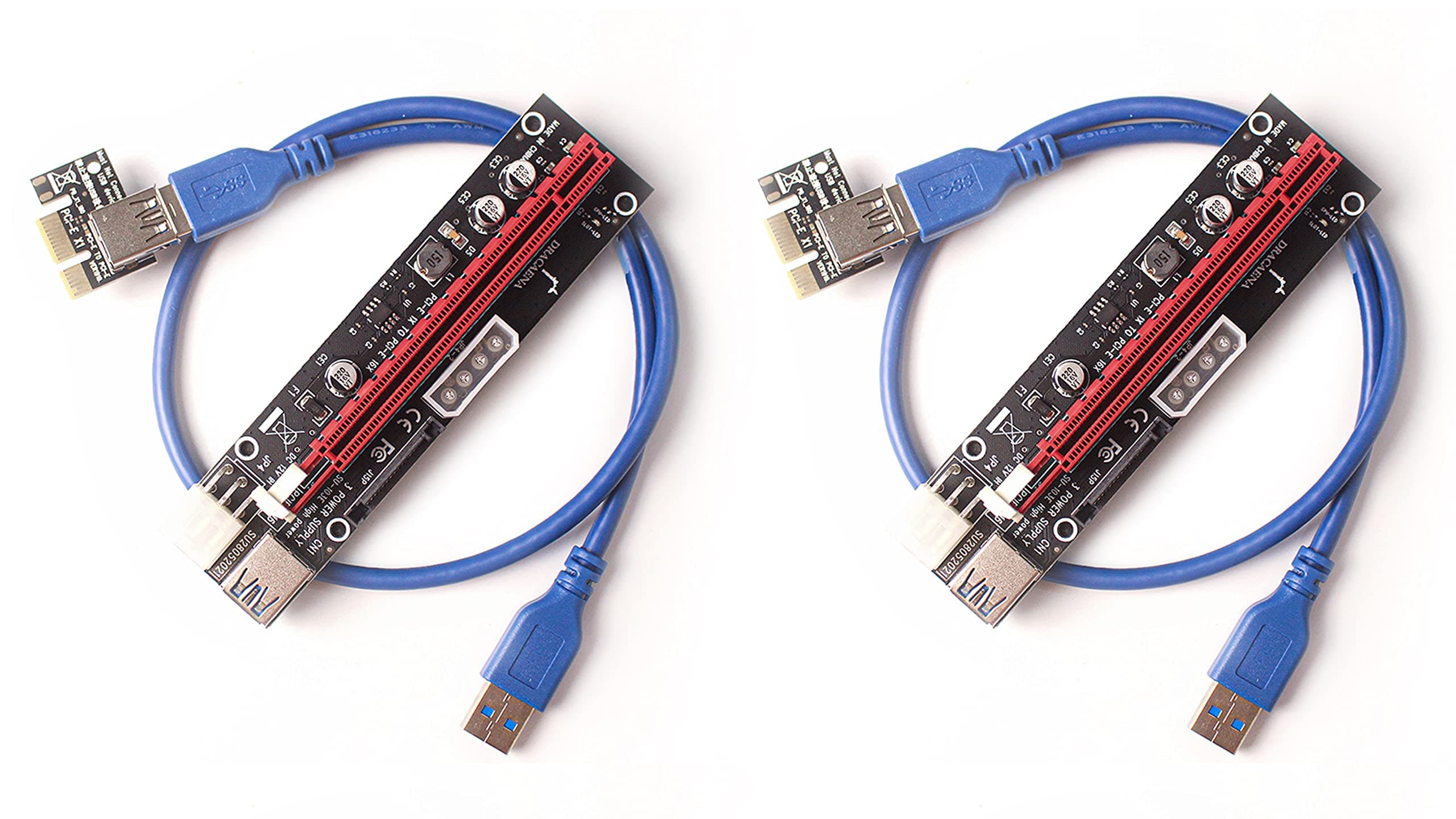
⚡ Power your crypto hustle with Dracaena’s triple-threat riser!
The Dracaena.io 2 Pack PCIe Riser Adapter Cards convert PCIe x1 slots to x16, enabling stable, high-performance GPU connections for crypto mining rigs. Featuring three power input options (6-pin, Molex, SATA), LED status indicators, and a flexible 60cm USB 3.0 cable, these risers ensure reliable power delivery and signal integrity with multi-layer shielding and electromagnetic interference reduction. Ideal for Ethereum and GPU mining setups, they offer easy installation and enhanced stability to maximize your mining efficiency.
| ASIN | B08NP9YLHB |
| Best Sellers Rank | #115 in USB-to-VGA Adapters |
| Brand | greenDracaena |
| Compatible Devices | Personal Computer |
| Customer Reviews | 4.6 4.6 out of 5 stars (547) |
| Hardware Interface | PCI, PCI Express x1, PCI Express x16 |
| Item Dimensions L x W x H | 5.12"L x 1.18"W x 0.47"H |
| Manufacturer | Dracaena |
| Model Number | 719833853591 |
| Operating System | Windows, macOS, Linux |
| Style Name | Simple |
| UPC | 719833853591 |
| Unit Count | 6.0 Count |
| Warranty Description | 30 days |
N**L
Great for powering PCIE cards
Purchased this to power a SAS expander in a DIY disk shelf for Unraid. Works perfectly for my needs! Multiple ways of providing power is great; would always recommend using 6-pin power if possible, but for less demanding devices SATA power or molex should be just fine in theory
A**E
what your looking for
worked great for mining.
O**O
Nice product
Product recommended
K**X
Plug and Play
Needed an additional PCIE slot for a custom OpnSense build. My converted PC only had one, all the rest were x1 slots. (4 of them). This fit the bill perfectly. I installed my 4 port NIC in to the existing slot on the MB, and put the video card on this jumper. I routed it to the bottom of the box, as I had some decent empty slots in the back plate. This allowed the card to sit on the bottom of the case. No drivers necessary, worked out of the box. Only thing I wish were included is some kind of mounting option. The card is pretty light weight, so the screw to the back plate is probably sufficient, but an adhesive mounted standoff for the card would have made it more secure.
M**O
Worked with no issues on a 3070ti Evga FTW
So I’ve had a 3070ti sitting around for a couple months and finally put it to use. Since I had a itx motherboard I only had one pcie slot. Ended up buying this and a m.2 to pcie adapter, connecting it to the back of my motherboard. (Aorus b550i). I did have to buy a psu separately but after putting everything together, it turned on with no issues. I’ll report back if an issue arises but everything seems to be working just right for now.
W**N
Pcie Adapter Riser Cards...
Takes a little work to figure out how to use on certain cards but work and are of good quality. Would buy again...
G**N
Beat customer service!
My capacitor broke off when opening the baggy but when I emailed no questions where asked and they gave me a replacement, they went as far as giving me an extra one for coming to them with the problem. This was fast and precise and their pcie are high quality. Definitely buying more for my next 3 mining rigs!
B**N
Excellent risers.
Great value, and not just for the money. Always use 6 pins to power your risers. Unless you have the money (and stock) to not care about a bricked card. These are top of the line and I will continue to purchase these. Ive built a few rigs and all my cards are on these or an equivalent.
A**X
Great project, performed as described.
M**.
Sometimes when testing computer hardware, you need to test graphics cards. If you have a testing motherboard hooked up to a power supply on a table or bench, sometimes the GPUs can be hard to stand upright or they have a decency to “lift” themselves out of the slot. This adapter, even though it was designed to be used in a *coin mining environment works great. Simply connect the adapter to the PCIe connector on the GPU, apply a power connector to the adapter, plug the PCIe x1 connector in your motherboard and off you go. The USB 3 cable is the link between the motherboard adapter and the PCIe slot adapter. Note: don’t use multiple power connectors plugged into the adapter. You may overload the power delivery circuitry and make it release magic smoke. I haven’t tested this, but more just a friendly heads up. Note that this will not power a GPU solely from the PCIe slot, you’ll need to plug another connector into the GPU power connector. It may even fail if you solely ran the GPU from the power the slot provides. I tested it with a bus powered GPU with the adapter connected via the male SATA connector and it was peachy. Recommended, but don’t push it too hard.
A**R
Pretty classic item here. All mine worked. Would order again.
T**E
Easy way to add functionality to a motherboard with limited PCIEx16 slots. I needed an extra couple of ports for PCIEx 4 adapters and thiese worked perfectly. Have good power connection options as well, with Molex, 6 pin and Sata power sockets available. USB cable is sufficient length to use outside case if required and the build quality is excellent.
R**E
Purchased this as I messed up and bought a 2x PCIe USB card when internally I had a 1x slot. This solved all my problems. Simple yet effective.
Trustpilot
Hace 1 mes
Hace 2 días