We remain fully operational. Our teams are working around the clock to ensure your deliveries continue safely.

Descargar la aplicación


Servicios al cliente
Sobre nosotros
Copyright © 2025 Desertcart Holdings Limited
Descargar la aplicación

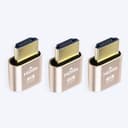
🖥️ Elevate your headless setup—because your GPU deserves to shine, even when no one’s watching.
The DTech HDMI Dummy Plug 3-pack is a compact, gold-plated HDMI emulator that enables 4K resolution (up to 4096x2160) on headless PCs and Macs. It activates discrete GPUs for remote desktop, gaming, VR, and GPU-intensive tasks without needing a physical monitor. Compatible with Windows, Mac OSX, and Linux, it’s plug-and-play with no drivers or external power required, making it an essential tool for server farms, remote workstations, and multimedia streaming setups.
| ASIN | B07C4TWZRM |
| Best Sellers Rank | #10,324 in Computers ( See Top 100 in Computers ) #15 in DVI to HDMI Adapters |
| Brand | DTECH |
| Color | Gold |
| Compatible Devices | Computer |
| Connector Type | HDMI |
| Customer Reviews | 4.6 4.6 out of 5 stars (890) |
| Finish | Matte |
| Item Weight | 0.04 Pounds |
| Manufacturer | DTech |
| Model Number | T0667-3 |
| Number of Items | 3 |
| Number of Ports | 1 |
| Package Quantity | 1 |
| Power Plug Type | No Plug |
| Specific Uses For Product | Computer, Laptop |
| UPC | 714131650149 714131650118 |
| Unit Count | 3.0 Count |
| Warranty Type | Limited |
S**.
After setting up my first mini PC with an Intel iGPU as a headless server, I ran into what is apparently a common issue: the PC would not boot into the GUI without a connected monitor. In addition to that, the Intel video driver would not load properly, meaning I couldn't use the GPU for Plex hardware transcoding. And finally, I couldn't RDP/VNC into the machine. It seems like this little dummy plug fixed all of my issues. Linux recognized it as a connected monitor, and now the machine boots properly, the Intel video driver loads as expected and I can remotely connect to the PC. An interesting solution to an interesting problem.
N**H
Perfect for what I needed, which was to act as a display emulator plug on a server, for the HDMI port. Decent quality and worked as expected.
F**0
لايعمل
N**.
I host a couple servers that are sitting in a utility closet. I mostly RDP into them, and I was annoyed that the RDP session would mimick the resolution of the cheap, old monitor I had hooked into the servers in that closet, and that they had to have a display connected into them to get any kind of visual out, even through RDP. I bought these so I could have the full 4k that my home office computer uses, and without having to have a physical display connected into them all the time. and for that it works great. If I put the RDP in full screen, it looks and behaves like my monitor is connected directly to the target machine. I understand a lot of people use these for Crypto Mining, and to those people I wish your profit margin tanks and you lose everything you've invested. You deserve it. Sincerely, everyone who actually cares about computers and can't afford parts anymore.
J**L
all good
Trustpilot
Hace 2 semanas
Hace 5 días