We remain fully operational. Our teams are working around the clock to ensure your deliveries continue safely.

Descargar la aplicación


Servicios al cliente
Sobre nosotros
Copyright © 2025 Desertcart Holdings Limited
Descargar la aplicación



Buy anything from 5,000+ international stores. One checkout price. No surprise fees. Join 2M+ shoppers on Desertcart.
Desertcart purchases this item on your behalf and handles shipping, customs, and support to Mexico.
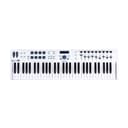
🎶 Unlock your sonic potential with the ultimate 61-key command center!
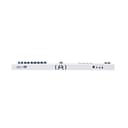
The Arturia KeyLab Essential 61 is a professional-grade MIDI controller featuring 61 velocity-sensitive keys, comprehensive hands-on controls including pads, encoders, and sliders, and seamless integration with Analog Lab software. USB bus-powered and driver-free, it offers versatile connectivity with full-size MIDI output and sustain pedal input, making it an ideal centerpiece for modern music production on Mac and PC.


| ASIN | B06Y4CKTTL |
| Additional Features | Recording |
| Brand Name | Arturia |
| Color | white/black |
| Compatible Devices | PC |
| Connectivity Technology | USB |
| Connector Type | USB |
| Control Method | Touch |
| Control Type | Keyboard Controller |
| Customer Reviews | 4.6 4.6 out of 5 stars (751) |
| Global Trade Identification Number | 03760033531106 |
| Hardware Interface | USB |
| Hardware Platform | PC/Mac |
| Human Interface Input | Keyboard |
| Included Components | Arturia Keylab Essential 49 Controller Keyboard |
| Instrument | Keyboard |
| Instrument Key | Any |
| Item Dimensions D x W x H | 24.8D x 78.4W x 7.6H centimeters |
| Item Type Name | MIDI Keyboard |
| Item Weight | 3 Kilograms |
| Keyboard Description | 61 velocity-sensitive keys with pitch and modulation wheels |
| Manufacturer | Arturia |
| Material Type | Stainless Steel |
| Model Name | KeyLab 61 Essential |
| Model Number | KeyLab61Essential |
| Model Year | 2017 |
| Noise Control | None |
| Number of Keys | 61 |
| Platform | Windows |
| Product Style | Modern |
| Supported Software | Ableton Live |
| Total USB Ports | 1 |
| UPC | 642892818679 |
| Unit Count | 1 Count |
A**.
The Arturia KeyLab Essential 61 really impresses for the money, it has a nice smooth key action (synth style, non-weighted) and the modulation and pitch bend controls feel nice and smooth and solid. The only problem I've had with mine, is there is no official map available to integrate the DAW controls with Reason, so I can't use most of that at the moment. The parts I can use are great though, this keyboard will not disappoint for the money. Definitely recommend it!
G**L
aussi tôt commander et reçue dans les 4 jour bien emballer et protéger livrer collissimo colis pas très lourd sauf le prix merci au vendeur.
I**N
Firstly, as others have noted, the photo shown on Amazon is NOT the Keylab Essential 61. The picture shown is the 49 key version. I've attached a photo of what the 61 actually looks like. I bought the 61 not as a performance instrument but as a tool for playing/recording to Logic Pro X. I was originally planning on purchasing the Alesis V161 (which I still think would be a good buy) however the factors that led to me choosing the 61 are functionality, software and looks. I have owned the controller for several weeks. Functionality: this controller has all the features you would expect. Drum pads, pitch and mod wheels, octave up/down, encoders and faders. I've yet to use the pads as I haven't decided upon a function to assign. The encoders and faders work as expected, manipulating the parameters of sounds. The 61 has a nice multifunctional control centre interface with a press to select jog wheel enabling easy navigation through the copious options. For me, the standout features are the DAW controls, transpose and chord keys. Placed in between the pads and jog wheel/display screen the DAW control centre has controls for some of the most used functions (see photo) enabling Daw control directly from the keyboard. The clever transpose key lets the user play a song/piece in any key without having to learn to play in a new key. A user can play with the fingering they know, but in any key. Great! I also love the 'chord' key - play any chord while holding 'chord' and it is remembered. Thereafter any single key pressed will sound the chord, transposed to that particular root note. Very useful and also great! The keys themselves are quite springy, but also feel robust. The 61 is nice to play. Software: this was one of the final deciding factors in my decision to buy the 61. It comes with a software centre, midi control centre, Analog lab 3 sound library and a Steinway model D grand piano! The 61 comes with an important serial number used to access software - there's a lot of account creation and downloading involved. The process was fairly painless, and the software merged with my Logic library seamlessly. Analog lab 3 is a library interface containing 6.5k instrument presets (synths, bass, keys etc) all of which can be manipulated as required. Although many of the preset sounds are quite similar or variations on a particular theme there are a lot to choose from! The midi control centre is used to assign any of a huge range of functions to the keyboard controls and the software centre provides access to the created Arturia account/product downloads. And the Steinway grand sounds wonderful; it's a nice bonus. The software is interactive and offers a large number of features/functions making the 61 highly customisable. Looks/appearance: You will be aware that midi controllers generally come in one colour - black. So it is good to see one manufacturer bucking the trend. The 61 is bright in appearance and looks very attractive. Contrast between the light body and black encoders/faders ensures clarity. All the controls to the left of the keyboard illuminate when in use. The pads can be assigned colours according to personal taste. Overall i the 61 feels well made and sturdy. It also feels very nice to play. In conclusion, if like me, you are seeking an attractive, quality midi controller loaded with features, an ergonomic user interface and a huge library of sounds, then I would suggest the Keylab essential 61 will meet and surpass all of those needs. This is the best controller I've owned. For just under £200 this is surely a best buy.
I**.
De los mejores midis y el precio bastante bien y mejor que Ml
R**F
Ich kann hier nur über das mir zugestellte Gerät folgendes erzählen. Nach dem Auspacken, zugestellt von einem Musikhaus im Allgäu nach 12 Tagen, wegen Schnee ;-), steht das optisch wirklich schicke Gerät vor mir. Da haben die Designer Tolles geleistet. Habe es auf die Granitplatte unsere Küche gestellt und mal "trocken" die untere Oktave gespielt. Dabei hob das Gerät mit der rechten Seite ab. Nach der Kontrolle, ob etwas darunter liegen würde, mußte ich feststellen, das das Gehäuse total krumm ist und nur auf dem mittleren Füßen steht. Links und rechts "hängen" sie in der Luft. Habe es mir aber nehmen lassen, das Gerät zu testen. Erster Eindruck auch hier top. Dann stellte sich aber heraus, das die Transporttasten und das Jogwheel sich nicht zur Zusammenarbeit überreden lassen und einfach gar nicht reagieren wem man nicht die zum Gerät mitgelieferte Software nach einer Registrierung beim Hersteller herunterlädt und auf seinem Windows oder Mac Rechner installiert. Warum geht das bitte nicht direkt am Gerät? Der Versuch, einen Hardware Synthesizer oder Sequenzer vom Arturia aus zu bedienen wird somit wohl scheitern. Das Gleiche gilt auch, wenn man ohne Windows oder Mac eine Software auf einem anderen Betriebsystem betreibt. Dort stellt sich Arturia stur und versorgt den Benutzer weder mit Treibern noch andersweitigen Support. Mir ist nicht klar, warum man bei den User Setting den Transporttasten und dem Jogwheel keine MIDI Befehle zuordnen kann, bei den Fadern und Potis, die übrigens genau so schlecht sind wie beim NEKTAR, geht es ja auch. Man könnte eine Absicht dahinter vermuten aaaaaber..... Beim dem Novation Impuls ist dieses übrigens problemlos ohne zusätzliche Software direkt am Gerät möglich. Selbst die Werkseinstellungen lassen sich modifizieren. Ebenso sich die Encoder von deutlich besserer Qualität Somit waren genug Argumente vorhanden, um mich von dieser Schönheit zu verabschieden.
Trustpilot
Hace 3 semanas
Hace 2 semanas