We remain fully operational. Our teams are working around the clock to ensure your deliveries continue safely.

Descargar la aplicación


Servicios al cliente
Sobre nosotros
Copyright © 2025 Desertcart Holdings Limited
Descargar la aplicación
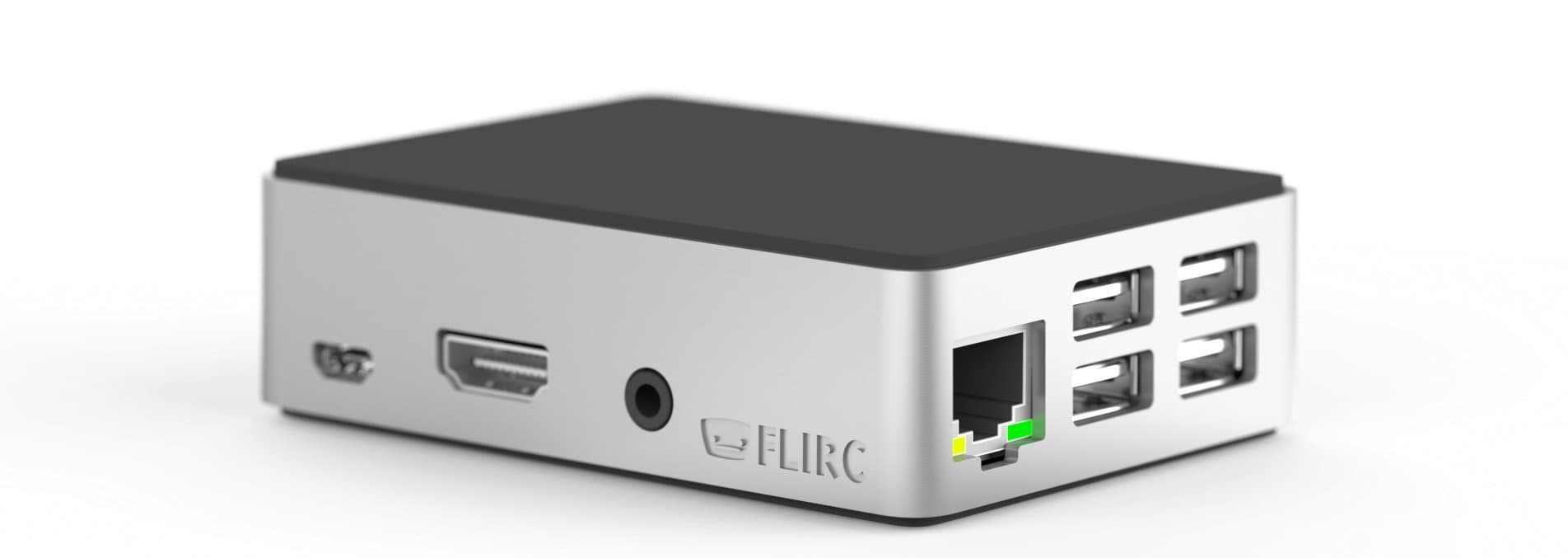

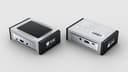
✨ Elevate your Pi game with the coolest case in town! ❄️
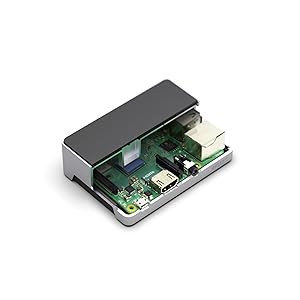
The Flirc Raspberry Pi Case Gen2 redefines Pi enclosures with its premium aluminum construction that doubles as a built-in heat sink, ensuring superior cooling without fans. Designed for seamless compatibility with Raspberry Pi 3 B+ and earlier models, it offers full access to all ports and GPIO pins through a smart bottom design. Its sleek, soft-touch finish and rubber feet make it a stylish, functional centerpiece for any tech-savvy professional’s setup.


| ASIN | B07349HT26 |
| Antenna Location | Business |
| Brand | Flirc |
| Case Type | Raspberry Pi |
| Color | Black |
| Compatible Devices | Computer |
| Cooling Method | Air |
| Customer Reviews | 4.6 4.6 out of 5 stars (1,502) |
| Enclosure Material | Metal |
| Fan Size | 80 Millimeters |
| Global Trade Identification Number | 00090281102647 |
| Hard Disk Form Factor | 2.5 Inches |
| Item Weight | 113 g |
| Light Color | Enhanced |
| Manufacturer | Flirc |
| Model Name | Flirc Raspberry Pi 3B Case |
| Number of Fans | 2 |
| Other Special Features of the Product | Heat Dispersing. Case, High Efficiency |
| Power Supply Mounting Type | Bottom Mount |
| Supported Motherboard | Raspberry Pi Model 3 |
| Total Usb Ports | 4 |
| UPC | 090281102647 |
D**L
PROs: (Basically everything...) 1. Excellent build quality and materials selection. No visible defects whatsoever. No sprue remnants, no split lines, nothing. Flawless. 2. Every bit as attractive IRL as in the published images - possibly more so. It's really the finest looking gadget-related accessory I've purchased in recent memory. 3. Very tight (in the sense of exact) dimensional tolerances. All port openings line-up perfectly with the ports on my test device. 4. Functionally, the case cools the CPU as advertised. One could only hope for additional heat-sinking of the other IC's, but it's not clear that it matters in my application. CONs: (Hard to cite any...) 1. Instructions concerning the installation of the heat-transfer pad were lacking. Not a big deal. There seems to be some confusion about whether or not to remove both the paper adhesive-patch cover AND the clear, thin adhesive-patch cover on the other side of the pad. FWIW, I removed both. I do not get the sense that it matters which side contacts the CPU and which side contacts the aluminum heat-sink. In fact, it may be acceptable only to remove the paper backing from one side of the conductive foam and to leave the very thin plastic on the other side, if future disassembly and access to the Pi are expected to be necessary. 2. Instructions on exactly how to pivot the Pi into place would have been helpful, given the precision fit. In my experience, it worked best to assemble the unit by (1) removing the SD card so that it does not protrude, (2) removing the backing from one side of the heat-conductive foam and adhering it to the CPU, followed by removal of the backing from the other side of the foam for mating with the top shell heat sink protrusion, (3) holding the metal case upside-down with USB port cut-outs to the right, lowering the farthest (connectorized) edge of the board into place, permitting the power, HDMI and audio connections to mate with the cut-outs in the aluminum case, (4) pivoting the board into its final position lowering the nearest edge gently onto the screw mounts, (5) placing the bottom plastic cover into place, (6) screwing the bottom shell, Pi and top shell together with the four included screws and finally (7) re-inserting the SD card. For me, attempting to insert the Pi3 by other strategy resulted in it binding into an incorrect position and almost refusing to yield for re-positioning. Alternative to my method might be the attachment of the conductive foam to the interior protrusion from the top aluminum cover, if preferred. I haven't tried it. Pleased with the thermal performance, ruggedness and aesthetics, I have purchased two of these cases so far, and I plan to purchase several more of them for use in my application.
あ**い
2018年12月に「高速冷却アルミ製保護ラズベリーパイケース ブラウン(20018年7月改善版)」を購入した。あまりに性能が良い(冷却効果は抜群)ので買い足そうとしたら、わずか2か月で完売して(2019年2月)既に購入不可。途方に暮れたところで見つけたのがこのケース。 このケースは、CPUの上部に金属柱があり、そこをCPUに接触させて冷却を行うようになっている。 Raspberry pi 3 model B+のCPUはヒートスプレッダが載っている分だけ厚みがあり、従来まで(Raspberry pi 3 model B以前)のRaspberry pi 対応のCPU冷却ケースだと、CPUの厚みがわずかに増している分だけ干渉し、ケースが完全に閉まらない。 英語版で「Raspberry pi 3 model B+では使えません」の報告がいくつかあるが、原因が判明した。このケースに付属している放熱シート自体に厚みがあり、これが邪魔をしていることが判明。つまり、付属品の放熱シートを使わずに、薄手の放熱シートを別に調達すれば、Raspberry pi 3 model B+で利用することが可能になる。 自分は「アイネックス AINEX CPU用熱伝導 両面テープ PA-069」を使っている。 2つのケースを比較してみると 「高速冷却アルミ製保護ラズベリーパイケース(2018年7月改善版)」は ・CPU・NIC・メモリの3つを同時に冷却できる ただしCPU接触面が小さい ・裏面に引っ掛け穴があり、壁掛けが可能 ・堅牢だが無骨、デザイン性には欠ける。いかにも「業務用」といった感じ ・フラットケーブルを出すスリットが側面にある ・電源LEDと動作LEDが見えない(NICの動作LEDで稼働状況を推測する) ・ケース装着のままmicroSDカードの交換が可能 ・Bluetoothキーボードやマウスなら使えるが、内蔵WiFiの利用は無理 ・ケース全面から均等に放熱される 今回の「Flirc Raspberry Pi用ケース 第2世代」は ・冷却できるのはCPUだけで、NICやメモリの冷却機能はない しかしCPU接触面が大きい ・裏面は放熱穴があるが、壁に引っ掛ける事は出来ない(床置き専用) ・デザイン性は抜群で、見栄えは断然こちらが上 ただしNICやメモリが冷やせないので性能的にはこちらが劣る ・GPIOフラットケーブルのスリットは底面にあるが、使いにくい ・pi 3 B+の電源LEDと動作LEDが直接確認できる(NICの動作LEDも確認できる) ・ケース装着のままmicroSDカードの交換が可能 ・Bluetooth機器やWiFi接続が利用できる。外部からSSH接続環境での使用なら、本体に繋げるのは電源ケーブル1本だけ ・ケース側面の金属部分が主に放熱し、天面や底面の黒いプラスチックはあまり熱を感じない ・ケース内部には「555-10001 REV 3」の記載があるので、リビジョン3と思われる このケース内に、ピンが出っ張らない小型のRTCモジュール(Rasbee オリジナルDS3231クロックモジュール)も干渉せずに組み込む事が可能だった。 騒々しい割に冷えない小径ファンが付いたケースは多々あるが、ファンレスでも冷却性能が期待できる設計がされたケースは意外に少ない。CPUの冷却に気を遣う人なら購入候補にしても良いと思う。商品説明が片言の日本語で、いかにも怪しい商品のようにも見えるが決してそんなことはない。「高速冷却アルミ製…」ケースが入手困難な現状で、第2の選択肢として充分検討に値する、良質な製品。
P**.
Generell schreibe ich nicht viele Rezensionen, allerdings möchte auch ich hier klar stellen: Die Schrauben bei meiner Lieferung haben perfekt gepasst. Evtl. wurden sie angepasst nach der Kritik hier. Generell war alles in gutem Zustand und schön verpackt. Preis/Leistung: Naja, vielleicht einen ticken zu teuer dafür das es nur ein Case ist. Allerdings bin ich wirklich von der Kühlleistung überrascht. Mein Pi 3 mit Libreelec lag davor im Idle bei ca. 58-62°C, jetzt läuft er bei 40-42°C. Für ein Case ist das schon echt klasse.
D**I
- The manufacturing quality is incredible! - The exterior finish is perfect (no small defect) - Super easy to slide my 3 b+ inside (starting with the HDMI side) - Easy to assemble - Perfect fit - I can see the status LED (green and red/orange) in the back of the case - Effective fanless design (I ran Dreamcast games on EmulationStation on my overclocked pi 3 b+ without any problem) - Super quiet (of course it's fanless!) - I emailed the designer Jason Kotzin and he's a very cool guy, answered all my questions. So awesome after sale customer service from Jason. So go ahead and order yours right away! The only thing I would improve is, if possible, include a different brand of thermal pad, because the thin one for the 3 b+ doesn't stick on the CPU. Once the case/heatsink is compressing the pad on the CPU it's not a problem at all. But for the installation the damn small pad was always moving around and it was hard to keep it centered on the CPU. The pad was sticking a lot more to my fingers and my tweezers than to the CPU metal heat spreader (which was cleaned with alcool prior). But with some patience I have succeeded to master that thermal pad! And now my pi is operating fanless in the most beautiful case on the market!
T**1
Sono rimasto stupido dalla qualità di questo case in alluminio, ad esclusione della parte inferiore che è in plastica forata, il resto è una fusione unica di alluminio satinato, è davvero molto bello e fa assumere al piccolo Raspberry un aspetto da vero prodotto di qualità professionale. La cosa più interessante è che questo case apparentemente tutto chiuso, funge da unico dissipatore passivo, infatti al suo interno una protuberanza lo collega direttamente alla CPU del raspberry. L'ho testato per la riproduzione di vari film in MKw e non ho avuto alcun problema di surriscaldamneto. la scheda minicro sd è facilmnete estraibile, unica pecca, non ottimale il collegamento con boad di espansione ma trovo che questo case sia più adatto per chi vuole usare il rspberry come media center
Trustpilot
Hace 3 semanas
Hace 1 semana