We remain fully operational. Our teams are working around the clock to ensure your deliveries continue safely.

Descargar la aplicación


Servicios al cliente
Sobre nosotros
Copyright © 2025 Desertcart Holdings Limited
Descargar la aplicación
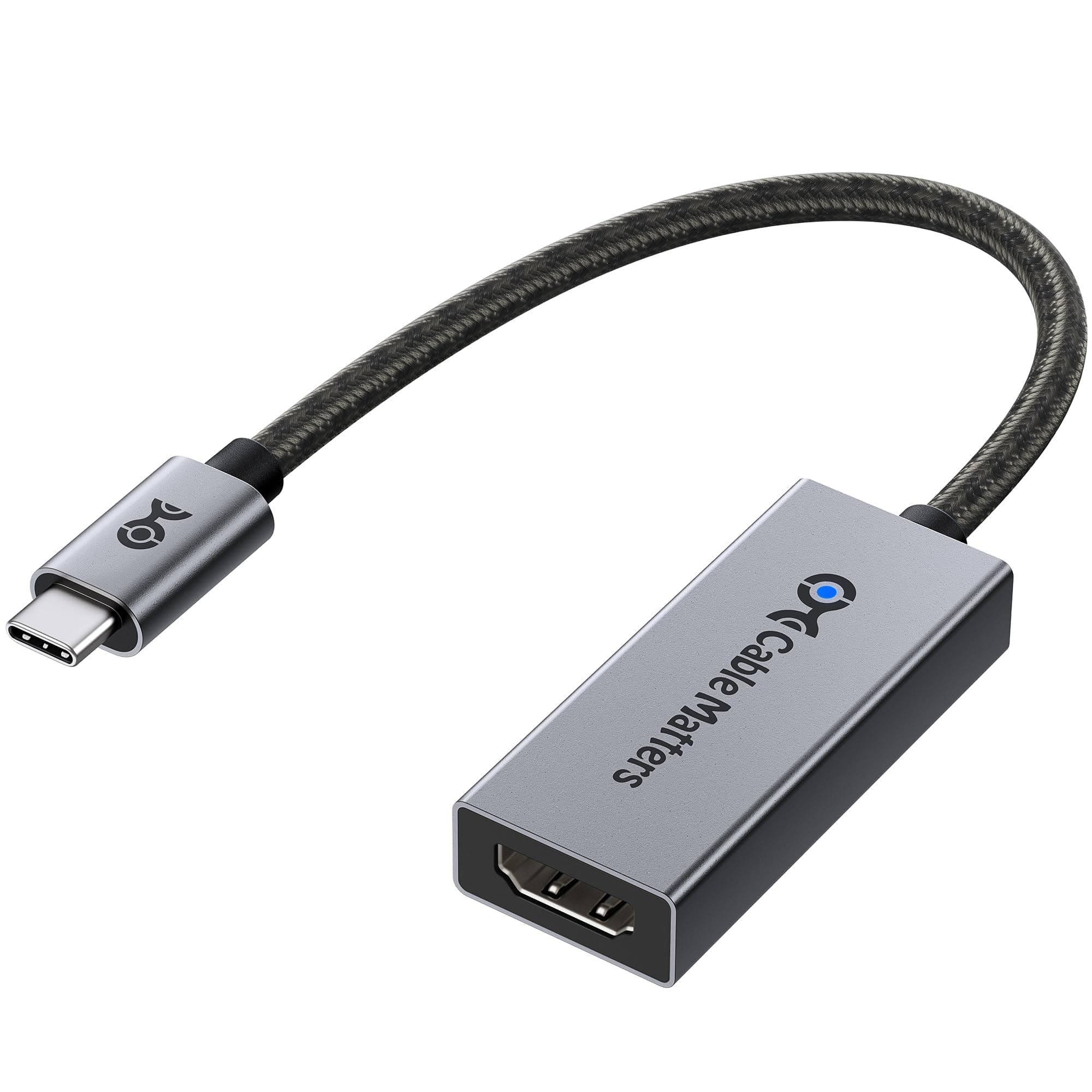
🚀 Elevate your display game with the ultimate 8K-ready USB-C to HDMI adapter!
The Cable Matters USB C to HDMI 2.1 Adapter delivers blazing 48Gbps bandwidth, supporting breathtaking 8K@60Hz and 4K@240Hz HDR visuals. Compatible with Thunderbolt 3, 4, and 5, it ensures seamless connectivity with the latest laptops and GPUs. Its premium braided cable and aluminum enclosure guarantee durability and style, while plug-and-play functionality makes setup effortless. Ideal for professionals and gamers seeking future-proof, ultra-high-resolution display performance.


| ASIN | B08MSWMXT4 |
| Best Sellers Rank | #57 in Thunderbolt Cables |
| Brand | Cable Matters |
| Color | Gray |
| Compatible Devices | Laptop, Projector, Television |
| Connector Type | USB Type C |
| Current Rating | 3 Amps |
| Customer Reviews | 4.3 out of 5 stars 835 Reviews |
| Finish | Metallic |
| Finish Type | Metallic |
| Item Weight | 0.02 Kilograms |
| Manufacturer | Cable Matters |
| Model Number | 201388-A |
| Number of Items | 1 |
| Number of Ports | 1 |
| Package Quantity | 1 |
| Power Plug Type | No Plug |
| Specific Uses For Product | TV, PC, Monitor, Laptop |
| UPC | 818707029640 |
| Unit Count | 1.0 Count |
| Warranty Type | Limited |
J**M
Plug and Play
I have a Dell laptop that is hooked up to a Samsung S95F by a Silkland Ultra A certified HDMI "Ultra High Speed" cable. I was unable to get the highest resolution and refresh rate out of the TV and laptop. I researched and determined that I needed to use the USB-C lighting connection on the PC to achieve this. I purchased this adapter, plugged it into the laptop, plugged the same HDMI cable into the adapter and it worked with no issues. I adjusted various settings and could get 3840x2160 at 120HZ. That is the highest setting and rate the laptop / tv combo is capable of (at 120). The connection was easy, plug and play, No extra or external power required, the size of the adapter really didn't change anything on my setup (location of laptop and cables connected to the tv). As far as sound quality goes I could discern no difference between the before and after, still sounds great. I am using this setup to watch streaming 4K movies and OTA TV. The tv is setup as a dumb tv and just a monitor. Last thoughts. There are so many factors that will stop you from achieving the highest rates possible. The big three needed to achieve this are, 1. Is your GPU and PC hardware actually capable of providing the desired rates. 2. Is the display that you are using actually capable of the desired rates. 3. And this is the big one. Are the cables and connectivity actually rated for you tp properly connect # one and two above. It took me several days to source the correct hardware and this device was the correct hardware in my circumstance.
C**N
4k 120hz on Mac
Works great. Gives me 4k 120hz on mac os through a thunderbolt 5 doc. I got the 201388 version and it took 2 minutes to flash the new firmware with a PC. Great it if you want 4k 120hz on mac.
R**.
The type c to hdmi 2.1 works with the lg 42c2 on 4k 120hz 12 bit RGB wtihout any issues.
This is the second time that I buy a type c/display port to HDMI 2. The first one was ULT-WIIQ-US 6.6ft, DP 1.4a to HDMI 2.1. Unfortunately, this cable had audio issues, it stutters every 30 seconds and after 4 days it stopped working on 4k 120hz RGB. I researched a lot on these adapters and I found out that my RTX 2070 support type c video out display port alt mode, so I searched these adapters too. It seems that many of these adapters suffers from overheating, signal loss when switching in and out of HDR. Also, some of them require USB power. It seems the most of these adapters use the same chipset, but, it is the firmware that cause these issues. Then I saw that Cable Matters provide firmware update for some of the display port/type c to HDMI 2.1 that mention many bugs fixes related to issues that I mentioned. I decided to buy the short adapter and buy a hdmi 2.1 cable instead of the cable type, as the adapter is more expensive than the cable and it reduce the chance for it to stop working properly. The longer the cable is, there is a higher chance for failure. As soon I got it I download the latest firmware update from Cable Matters website and saw that the cable is on older firmware, so I update it . It takes very short time, and it works without issues. I can send HDR signal without losing signal, the audio does not have any issues and as I wrote in the title, it works on 4k 120 Hz 12 bit RGB. I will update the review if the adapter will fail.
P**1
Worked for a bit, albeit with hiccups. Now, not really. I know I was pushing the limits though.
So I got this adapter in hopes of upgrading my 1660 Ti with a HDMI 2.1 port. Why? To run 4K @ 120Hz and Full RGB/ 444 for HDR purposes. I know, I'm stretching the bandwidth limits of the hardware. Technically the USB-C port which comes from the 1660 Ti cannot do the full 48 Gbps. A non-thunderbolt USB-C is speced to top out at 40 Gbps. I knew this before I bought the adapter. Yes, I got it to run the above. But I have now had the adapter for a couple of months and the image disconnects have just gotten worse. Now it is having difficulty even connecting at all. Perhaps something got cooked. It was getting rather warm. Not USB flash drive hot though. My biggest other complaint is that something is not translating with the audio channels. If I take the same HDMI cable and plug it into the 1660 Ti's HDMI port. I can get it to see my 4k/8k AVR at 24bit and even run Dolby Atmos no problem. But with this adapter and the mini displayport version of this adapter (which I also bought) I just cannot get the PC to run anything other than 16bit. Also, I cannot even get basic 5.1 to work properly anymore. It is intermittent and most of the time I end up getting the sub channel on the left rear and my center channel on the right rear. Sometimes it does work perfectly for a couple minutes though. And no, there isn't a mis-wired speaker, the home theater works fine with a Roku and PS3 attached. This is not an HDMI cable issue, as I am using a certified 8k cable. My conclusion is that if I want the above I need a new GPU or PS5, which is almost saying the same thing. This device will give you an additional video port at high resolution, but don't expect any multi channel sound to be reliably pulled through it or HDR.
B**S
Works Great
Works Great
S**N
Works with many, but not all devices.
I tried this adapter with various devices. For some of them it worked perfectly, such as my iPad Pro and an old Dell Laptop. With those it worked perfectly. However, it did not work when connected to the rear USB-C ports on a Microsoft Surface Dock2 with a Surface Pro 8 attached. I blame Microsoft more than I blame this adapter, as it seems to work fine with everything else.
C**L
Achieve 4K 120Hz on M1 Mac!!! This adapter is AMAZING
It's not often that I feel compelled to write reviews, but the performance of the C2 monitor has truly blown me away. Originally, I purchased this monitor for gaming but had an additional need for coding. My tool of choice for this is usually a Mac - an M1 Max to be precise, which unfortunately does not come with HDMI 2.1 support. This meant that upon connecting it to the stunning 42-inch C2 monitor, I was limited to 4k at 60 Hz. A thorough internet search led me to the Cable Matters adapter, touted as the solution to unlock 120 Hz. Although I was skeptical, the prospect was too tempting to resist. Upon receipt, I adhered strictly to the instructions I found online: I flashed the specific firmware using a Parallels virtual machine on my Mac and installed their firmware software from the Microsoft Store. What happened next can only be described as a mini miracle. By connecting the C2 monitor to my M1 Max Mac using an HDMI 2.1 cable and this adapter, the 120 Hz option suddenly appeared in my Mac display settings. To say I was thrilled would be an understatement! AND, this is not 4:2:2, it's RGB 10 bit 120hz!!! This is AMAZING!!! Best of all, there was no need to download additional software such as BetterDisplay. It was as simple as plug and play. I was able to achieve 120 Hz and elevate my visual experience to new heights! This product truly is amazing and well worth the investment.
P**K
This adapter finally allows my MBP to look better on my 65" OLED than a $40 fire stick
First off, I'm not a gamer. I don't need 120fps. Nor does this adapter give it to me on my MBP. For whatever reasons. But, I have always thought that it's incredibly foolish that I cannot get my 2019 i9 MBP to play live sports on my OLED TV better than a $40 fire stick. Makes zero sense. But, for whatever reason, and despite trying many different TB3 to HDMI adapters, the picture was never as good as a fire stick, or Apple TV. I had given up. I own both those streamers. And I'm not completely happy with either. I want the expensive Intel processor from my Mac Book to power the picture on the Television. This, finally, does that. When I use an HDMI 2.1 specific cable with this adapter to connect the TB3 port of my MBP to the HDMI 2.1 port of my Samsung s90c OLED... I get WOW! I get the wow I always wanted. I don't fricken care if it's 4k or 1080 whatever. (hint: I wouldn't even know how to look that up)... I've ran the test. I had the same hockey game playing on the Apple TV, the stick and the MBP through this guy... the MBP was clearer. Stronger. Smoother. Less glitchy. Better colors. Better clarity. Better sound signal to the basic TV speakers, I think. It was definitely louder than the other devices at the same TV volume, fwiw. But... everything was better. All of it. To my untrained eye there was nothing that the Apple TV or stick did better than the MacBook with this thing. Finally even this idiot can get the $3k laptop to look better on the TV than the fire stick.
Trustpilot
Hace 3 días
Hace 3 semanas