We remain fully operational. Our teams are working around the clock to ensure your deliveries continue safely.

Descargar la aplicación


Servicios al cliente
Sobre nosotros
Copyright © 2025 Desertcart Holdings Limited
Descargar la aplicación

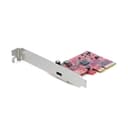
🚀 Upgrade your desktop with next-gen USB-C speed and power!
The StarTech.com 1-Port USB 3.2 Gen 2x2 PCIe Card adds a blazing 20Gbps USB-C port to your desktop via a PCIe 3.0 x4 slot, delivering full bandwidth for ultra-fast data transfers and 15W power delivery. Compatible across Windows, macOS, and Linux, this compact expansion card supports backward compatibility with USB 3.1/3.0 devices and installs easily with included brackets. Ideal for professionals demanding high-speed connectivity for NVMe drives, SSDs, and fast-charging mobile devices.


























| ASIN | B08T6FCF9S |
| Best Sellers Rank | #13 in Internal USB Port Cards |
| Brand | StarTech.com |
| Built-In Media | "PCI Express USB Card Full Profile Bracket (Installed) Low Profile Bracket Quick-Start Guide" |
| Compatible Devices | Personal Computer, Laptop |
| Customer Reviews | 4.4 4.4 out of 5 stars (241) |
| Hardware Interface | PCI Express x4 |
| Item Dimensions L x W x H | 2"L x 3.1"W x 0.9"H |
| Item Weight | 1.28 ounces |
| Manufacturer | StarTech.com |
| Model Number | PEXUSB321C |
| Operating System | Linux |
| Style Name | Classic |
| UPC | 065030891264 |
| Unit Count | 1.0 Count |
| Warranty Description | 2 Year Warranty |
M**.
ASMedia ASM3242 works really well!
I already have a USB C 3.2 Gen 2x2 20Gbps port on my motherboard (Aorus X570S Master), but I found out that the controller runs on a PCIe 3.0 x2 lane, which is not ideal. So I purchased this card thinking I will have two 20GBps port in total, and this being a PCIe 3.0 x4 controller, I'll get the full bandwidth. Installing the card was easy, it is tiny, and worked almost straightaway. I forgot that if I use the last PCIe slot, one of the M.2 slot will be disabled. So I had to move the M.2 SSD from the slot that shares the PCIe lane with the x4 slot to another M.2 slot. Restarted the PC, windows automatically installed the driver needed. Just as I thought, the card works faster than the built-in one, since it got the full x4 lane. It might work even better if I install it in the 2nd 16X slot, but I have a RAID controller installed there so couldn't do that. There was a nice 400MB/s bump, and the Acer Predator 4TB SSD installed in a Yottamaster 20GBps NVMe enclosure reached 2000MB/s on both read/write, which is sweet! Now I have 4 SSDs which can do my backups very very fast. A great card, works very well, and a no hassle installation. Just give it a slot where it can use PCIe 3.0 x4 lanes, and you are good to go. Also, a good 20GBps cable is recommended.
A**N
StarTech.com 1-Port USB 3.2 Gen 2x2 (20Gbps) PCIe Card
I recently installed the StarTech.com 1-Port USB 3.2 Gen 2x2 (20Gbps) PCIe Card in my system, and I’m very impressed with its performance. The installation was remarkably straightforward—essentially a drop-in process. I simply inserted the card into an available PCIe slot, and it was recognized immediately by my system without any issues. The transfer speeds are excellent, delivering the high-performance 20Gbps speeds promised. It's been a significant upgrade from my previous USB ports, especially when dealing with large file transfers and high-bandwidth peripherals. Overall, this PCIe card is a fantastic addition for anyone looking to boost their system's USB performance. The easy installation and impressive speed make it a great choice for both casual users and those needing top-tier performance. Highly recommended!
T**R
Consider this a USB problem solver
I used this to breathe some life into a very old X399 desktop system. I was looking to extend KVM + fast IO to the desktop over a mix of 3m and 4.5m cables, with the 4.5m being an OWC optical USB4 cable. For whatever reason the onboard 3.1 port on my X399 Designare only worked at USB 2 speeds when using the optical cable. Speeds were as expected with a 3m traditional copper cable but I couldn’t quite reach a convenient spot on the desk with 3m. I decided to gamble on this and it worked perfectly with the optical cable and Caldigit SOHO dock I’m using for desktop USB connectivity. Plug and play, zero intervention required on Windows 11.
J**Y
Super speedy.
Just worked. Easy to install (I panicked because I didn't think I had the right PCIe slot, but it fits in the big one, just doesn't use all of the pins), perfectly compatible without extra drivers in Windows 11. 2x2 is super speedy and was compatible with the drive I needed it for. Very good value.
M**E
Incompatible with ACER Aspire desktop
Does not work on a new ACER Aspire TC-1775-UR12 running Windows 11 that has a PCIe x16 slot. Gets the usual yellow icon next to the device in device manager. Power is getting to it, since when I connect my iPhone to it, the charging light comes on, but it does not open anything in Windows Explorer to indicate it can see the storage on my iPhone, hence, the defective card slot as indicated by device manager. Getting Error Code 10, indicating power failure.
M**G
No title.
It works better thany my prev USB 3.1 card or 3.2 Gen 1 card.
G**S
Works great and downward compatible. Great addition to my PCIe 4 PC!
This board works very well. I connected a couple of CF-Express B USB 3.2 Gen 2x2 readers (Transcend and Lexar) and I got the expected speeds without any problem. (More than 10Gbs, so certainly unobtainable with plain Gen 2 that is capped at 10 Gbs). I addition it worked with any other device I tried 3.2 Gen 2 and 3.2 Gen 1 . This is contrast with the 3.2 Gen 2 ports on my motherboard (ASUS ROG Crosshair VIII) that often have trouble working with 3.2 Gen 1 devices and are in general very picky. Very good experience for me! (Caveat: you should use the right cable. Not every C cable is the same, you need a 20 GBs cable. I used a 3.3ft Cable Matters USB4 (look for B094STPLX3) and it worked great.
M**R
solid product.
Good workmanship.
G**E
Using this in my motherboard's secondary PCIe 4.0 x16 slot (effectively x4). Bought this card since it was one of the only options to get a USB 3 Type C port at least 10Gbps to provide 3Amps of power without any additional power connections. Connected my Meta Quest 2 VR headset using the UGREEN 16ft USB-C cable for VR. Works perfectly, running PC VR games at max refresh rate 120Hz, & battery stays at 100%.
G**Y
I'm no expert in this area, i wanted an extra usb c output on my computer, as it only had one, and it was coping a hiding, and it seems to be doing the job OK
S**E
Qualità eccezionale, non c'è altro da dire. Usata per giocare in PCVR tenendo carico il Quest3, associato ad un ottimo cavo Type-c.
M**D
Product is excellent, but the delivery guy did not ring the bel. He threw it over the high fence of my house on a wet spot, knowing that I mentioned "strictly hand delivery" on Amazon App.
M**N
Ich baue mir sehr gerne meine PCs selbst. Da ich mir gegen Ende dieses letzten Quartals in 2025 mal wieder einen Mittelklasse Gaming PC zusammengestellt habe (reicht mir persönlich auch, ich brauche kein "High End") hatte ich jedoch leider übersehen, dass bei den von mir gewählten Komponenten ein USB-C Anschluss fehlte! Nun hatte ich noch einen PCI-Express Steckplatz frei und habe mich für den "StarTech.com 1-Port USB-C PCIe Adapter" entschieden! Dieser rüstet meinem Computer einen USB-C Steckplatz nach. Die Karte wurde gleich erkannt, die Treiber dafür automatisch installiert und sind - dank meinem Norton Driver Updater - auf dem neusten Stand. Nun kann ich unter anderem meine VR Brille "Meta Quest" mit einer guten Geschwindigkeit via USB-C per Link-Kabel an meinen PC anschließen und bietet mir weitere Möglichkeiten. FAZIT: Von meiner Seite aus macht das Teil genau das, was es soll und das sehr gut! Kaufempfehlung für alle, die ihren PC mit einem USB-C Anschluss erweitern möchten und die dafür noch einen PCI-Express Anschluss auf dem Mainboard frei haben!
Trustpilot
Hace 1 mes
Hace 3 semanas