We remain fully operational. Our teams are working around the clock to ensure your deliveries continue safely.

Descargar la aplicación


Servicios al cliente
Sobre nosotros
Copyright © 2025 Desertcart Holdings Limited
Descargar la aplicación

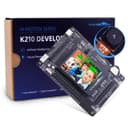


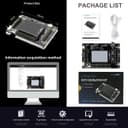
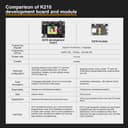
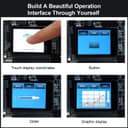
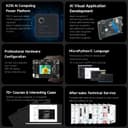
🤖 Unlock AI Vision: Build the future of smart robotics today!
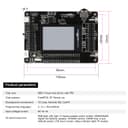
The Yahboom K210 Developer Kit is a compact, feature-rich development board powered by the SiFive RISC-V processor, designed for AI-driven machine vision and auditory recognition. Equipped with an HD camera, capacitive touchscreen, multiple sensors, and Wi-Fi connectivity, it supports Windows, Linux, and Mac OS environments. Ideal for smart home, robotics, and security applications, it offers extensive open-source resources and IoT remote control capabilities, making it a versatile platform for professional developers and AI enthusiasts alike.


| ASIN | B08MTFFH5W |
| Best Sellers Rank | 319,016 in Computers & Accessories ( See Top 100 in Computers & Accessories ) 3,623 in Motherboards |
| Box Contents | K210 |
| Brand Name | Yahboom |
| Compatible Devices | Computers (PCs, laptops, tablets), Camera, Capacitive touch screen |
| Country of Origin | China |
| Customer Reviews | 3.2 3.2 out of 5 stars (29) |
| Manufacturer | Yahboom |
| Manufacturer Part Number | 2 |
| Model Name | K210 Developer Kit |
| Model Number | 2 |
| Network Connectivity Technology | Wi-Fi |
| Operating System | Linux |
| Processor Brand | SiFive |
| Processor Count | 1 |
| RAM Memory Technology | LPDDR4X |
| Total USB Ports | 4 |
| Wireless Compability | DECT |
A**R
Check first on software support.
Didn't work properly. Also discovered hardly any supporting information on the programming and use. Very neat and if properly supported it would be a good board.
N**7
I got bought this to help me learn about A.I. and coding and so far i like it a lot very good teaching board and I hope to add it on my Pi Tank here soon.
R**A
It worked fine until it didn't. I don't know why but it had a bad firmware flash. Now it's stuck in some boot loop that is unrecoverable. There is ZERO support forums, it's a waste of $50.
L**E
Compra buena para empezar a programar objetos
M**G
Purchased this item to develop a RISCV forth compiler. Would need to have documentation for the processor cores and registers and peripheral devices but thats classified information and not being released to the public. this makes this product UTTERLY UNSUITED TO THE PURPOSE FOR WHICH IT IS PURCHASED. Unless you want to be doing nothing but hello world or canned examples dont bother with this, there is no documentation available for it just marketing wank
S**Z
This device is awesome because it is based on a K210 dual core Risc V processor. The Risc V processor is unique open source hardware. It has only recently begun to be available to consumers and is still in an early phase of development. It is more for exploring and learning what you might do with a Risc V board than it is a finished product. This product is not for the technically faint of heart, which should be clear because it is a "development board" which means single board computer where you figure out what to do with it. If you have never used a single board computer before (SBC) go get a Raspberry Pi and come back to this product when you have more experience. Yahboom tries to make this board as accessible as possible, but to quote Yoda "There is no try". When you get it you are directed to their website and a bunch of downloads. I'll save you some time. They don't work described. And the manual is written in some language that sort of looks like English but I think its really a Chinese dialect with an English alphabet. My suggestion: 1. Follow their instructions for the initial test and make sure that the camera and other features are working. 2. Ignore their instructions for installing the drivers. First go to Device Manager in your PC (if you aren't using Windows 10 I can't help you) and look for a serial com device driver that is not recognized. Uninstall that if there is one. 3. Google "ch341ser.exe". Download that. Do NOT use the ch341ser.exe in their tools folder - it does not work. Run ch341.exe that you download from the repository. The page I got mine from was all in chinese and the only thing on it I recognized was the file name. There is a possibility in Windows 10 that you might have to turn off "check driver signing". The way you do that is: hold down shift key while hitting restart. It will reboot you to a troubleshooting screen. Select the option to troubleshoot. A screen will come up that will instruct you how to turn off check driver signing (press F7 and reboot.) You may need to do this; I had to. Also I recommend when you run ch341ser.exe that you right click on it and select "Run as Administrator". My Windows 10 computer was very finicky about running any version of this driver. 4. Go back to Device Manager and locate the serial port. In mine it shows ch341 on port 5. 5. Then follow the Yahboom directions for flashing the software. You'll need to manually point the communications port to the serial port identified in your device manager. Once you've done that you will have the basic software installed on your device. I have been learning about and experimenting with single board computers. Software developed for other similar boards may work on this which is what made me go look for different drivers when the Yahboom supplied ones didn't work. The screen works well, and the camera, gyroscope and mic are interesting features that open a lot of possibilities. I'm guessing that over time there will be a community of users and developers around the Risc V processor who will open up a world of possibilities. It's still early in the lifecycle so the full ecosystem is yet undeveloped. That's why the Raspberry Pi is a good place to start with an SBC. The ecosystem is well established. It will also give you a better understanding how to use this Yahboom device and others like it.
Trustpilot
Hace 2 meses
Hace 4 días