We remain fully operational. Our teams are working around the clock to ensure your deliveries continue safely.

Descargar la aplicación


Servicios al cliente
Sobre nosotros
Copyright © 2025 Desertcart Holdings Limited
Descargar la aplicación


Buy anything from 5,000+ international stores. One checkout price. No surprise fees. Join 2M+ shoppers on Desertcart.
Desertcart purchases this item on your behalf and handles shipping, customs, and support to Mexico.
🎥 Elevate your content game—because your desk deserves a pro-level command center!
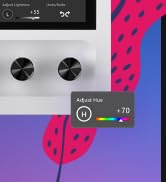
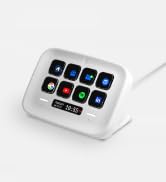
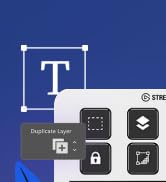
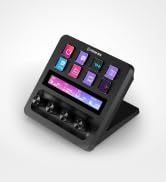
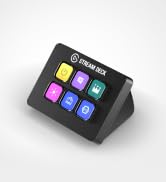
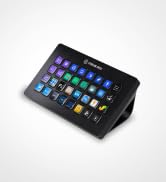
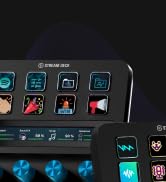
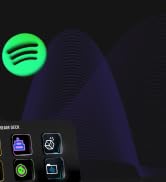
The Elgato Stream Deck MK.2 is a premium 15-key customizable LCD controller designed for creators and professionals. Compatible with Mac and PC via USB-C, it enables instant multi-action triggers across apps like OBS, Twitch, and YouTube. With powerful plugins, visual feedback, and a compact design, it streamlines workflows from streaming to editing, making it an essential tool for boosting productivity and creative control.





| ASIN | B09738CV2G |
| Additional Features | Customizable Macro Keys for App Control |
| Antenna Location | Content Creation, Live Production, Streaming |
| Best Sellers Rank | #215 in Video Games ( See Top 100 in Video Games ) #54 in PC Accessories |
| Brand | Elgato |
| Built-In Media | Stream Deck, Desktop Stand, USB-C Cable, Quick Start Guide |
| Color | Black |
| Compatible Devices | PC, Gaming Console, Smartphone, Tablet |
| Connectivity Technology | USB |
| Customer Reviews | 4.8 4.8 out of 5 stars (9,895) |
| Enclosure Material | Plastic |
| External Testing Certification | Não Aplicável |
| Global Trade Identification Number | 00840006640554 |
| Hand Orientation | Ambidextrous |
| Item Dimensions L x W x H | 4.6"L x 3.3"W x 3"H |
| Item Weight | 0.15 Kilograms |
| Keyboard Description | USB-C |
| Keyboard Layout | QWERTY |
| Language | English |
| Manufacturer | Elgato |
| Model Name | stream deck mk.2 |
| Model Number | 10GBA9901 |
| Number of Keys | 15 |
| Power Source | USB Powered |
| Style Name | Stream Deck |
| UPC | 840006640554 |
| Unit Count | 1.0 Count |
| Warranty Description | 2 year manufacturer |
D**A
Best desk accessory ever
I LOVE this gadget!! Is it required? No. Do I use it every day may times a day? YES! It’s got a small profile so it’s not obtrusive on the desk. I really do feel like it saves me time as accessing apps and such is very easy. What I didn’t realize was that the buttons are menu options. For example, for one of them I have it set to apps. When I select that it goes down into a sub menu where I have 9 apps configured for quick access. I thought each button would only have one shortcut use. I didn’t realize there was an option for submenus. It’s fairly easy to set up, the buttons are easy to use and it seems durable. I’ve noticed very little lag. What I haven’t been able to figure out is quick ways to mute. I have a MuteMe which I was hoping to replace with this, but so far it be not figured that out. I’ve had it for around 2 months and it’s my favorite desk accessory.
C**O
Perfect size, great build quality, and very easy to use.
The size and build quality are perfect, and the materials feel solid and premium. The keys are very smooth and respond quickly, which makes using it feel effortless. I haven’t had any compatibility or connection issues at all. The system is very complete while still being simple to use and customize. Overall, I think the price is reasonable for what it offers, and it’s a great tool for improving workflow and productivity.
N**K
Great find!
I ordered this to setup a number of shortcuts for my streaming channel, an RPG bot, and for my PC. It's been simple, intuitive, and a lot of fun to use! The software was a quick download, shipping was fast, and I got it on a good sale. Buttons are nice and responsive, and there are a ton of options for commands. Works great on my streaming channel, connected easily to my PC, and the size is perfect for my desk.
J**N
Elgato Stream Deck: Boosts Productivity Effortlessly
The Elgato Stream Deck MK.2 15-Key is more useful than I realized at first. Its customization options make it perfect for streamlining tasks, shortcuts, and creative workflows. While this particular model doesn’t allow you to adjust the viewing angle, it still performs extremely well and makes managing applications, streaming, and productivity a breeze. A fantastic tool for anyone looking to simplify their setup.
H**E
Great tech - but not just for streamers!
First, I’d like to say that while this is primarily for Windows, it can and does work in Linux. I have it set on my desk near my trackball, and with a quick jab of a button, I can bring up my browser, turn on some music, open up a file folder, mute my mic in Discord, and tons more things. Literally, it’s like a physical shortcut deck, and media controller, and program editor, and so much more - in one small device. The most powerful feature really, is the fact you can set one key that jumps you forward or backward one page - of the streamdeck. That means instead of only having 15 programmable keys, you have 14 on the first page, plus 13 on each following page, and as many pages as you can handle. I have mine set with 10. That’s 131 customizable buttons on a “15-key streamdeck” I would be shocked if someone needed more, but if you did, it’s expandable too. If you’re thinking about getting it for something other than streaming, stop thinking and start buying. It’ll do what you’re wanting and a lot more. If you *are* a streamer and don’t have this yet, why? This is a total game changer for streamers. Just buy it already. It’s worth every penny.
T**T
A Game-Changer for Streamers and Content Creators with Room for Improvement
I have been using the Elgato Stream Deck MK.2 for a variety of tasks, such as video production with OBS, facilitating Zoom meetings, and podcasting. While the product is truly innovative and has been a great addition to my setup, it does have a significant bug that needs addressing. The 15 customizable LCD keys are a fantastic feature, allowing me to instantly control my apps, tools, and platforms with ease. The one-touch operation makes triggering single or multiple actions incredibly simple, and the visual feedback confirms that my commands are executed successfully. The Stream Deck MK.2 also boasts compatibility with powerful plugins like Elgato 4KCU, OBS, Twitch, YouTube, Twitter, Discord, Spotify, and Philips Hue, making it an indispensable tool for content creators. The hotkey actions streamline workflows in film editing, music production, and photography. However, I have encountered a major issue when using multiple monitors in certain circumstances. My Stream Deck often freezes up, and attempting to end the process and restart it in Windows 11 does not resolve the problem. The only solution I've found is rebooting my computer, which can be quite inconvenient. Despite this bug, I'm giving the Elgato Stream Deck MK.2 a four-star rating because of its immense potential and usefulness when it functions correctly. I believe that Elgato will address this issue in future updates, making it an even more powerful tool for streamers and content creators. Overall, the Elgato Stream Deck MK.2 is a fantastic concept with room for improvement. Once the freezing issue is resolved, I have no doubt that it will become an indispensable tool for streamers and content creators everywhere.
A**E
I'm genuinely surprised at how many options there are for these buttons, and even more with how many free plugins you can download on their marketplace. I can control way more than I initially thought, as I was going in thinking I'd only use it for my VTuber expressions and soundboard stuff, but now I feel like I could make use of this on my regular day-to-day. The stream deck itself is the perfect size to not get in the way or take up too much space on your desk and at the same time you can still program folders upon folders, and pages of commands and buttons, so you don't necessarily need to buy a bigger stream deck with more buttons. The software is really smooth and easy to use, and works perfectly on Windows 10 even though it says it requires Windows 11 on the download page. All the settings you can choose for the text and icons are straight-forward and feel intuitive, you can even use any of your own PNG images or GIF files for the icons. It's as close to plug and play as possible and everything just... WORKS I highly recommend getting this, even if you're not a streamer cause you'll still find a plethora of ways to utilize it. Whether it's opening URLs from just a button, opening any of your applications, placing any world clock you want, joining a Discord voice channel with a press of a button, muting, deafening, making presets for where your windows open and align, etc. There's so much more to it than just typical streamer usage, but with such, there's a crazy amount of things that'll increase your quality of life and ease while streaming. Everything about this product screams high quality, including a very well-thought-out program. It'll be a massive timesaver for you.
A**R
In description it's MK.2 version. But I got first version. Not big deal for me - it's still usable. But it's wrong in description. Be carefully if you need exactly MK.2 version. Otherwise - no problem at all. Device works perfectly.
K**K
This product is useful, even for normal use or gaming. It has plenty of plugins and frequently updated software. If you need more buttons, you can add virtual buttons (visible on the monitor).
A**R
منتج معروف ولا يحتاج للتقييم
K**T
I LOVE IT SO MUCH! I’ve wished for one for years so I decided to cave and try the smallest one first.. now I have zero regrets buying this one! I use it constantly not just for my streaming but to capture clips in games, for video editing and even checking my temps! I love it so much! ❤️
Trustpilot
Hace 1 mes
Hace 1 mes