We remain fully operational. Our teams are working around the clock to ensure your deliveries continue safely.

Descargar la aplicación


Servicios al cliente
Sobre nosotros
Copyright © 2025 Desertcart Holdings Limited
Descargar la aplicación

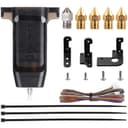
⚡ Level up your 3D prints with precision that never quits!
The Creality CR Touch Auto Bed Leveling Sensor Kit revolutionizes your 3D printing workflow by delivering ultra-precise, multi-point bed leveling compatible with popular Ender and CR-10 models featuring 32-bit V4.2.2/V4.2.7 mainboards. Its durable metal push pin ensures over 100,000 reliable triggers, while easy installation with multiple mounting brackets and firmware updates guarantees a hassle-free upgrade. Say goodbye to manual calibration and hello to consistent, high-quality prints every time.


| Best Sellers Rank | #8,993 in Industrial & Scientific ( See Top 100 in Industrial & Scientific ) #117 in 3D Printer Accessories |
| Brand | Comgrow |
| Color | Black |
| Compatible Devices | 3D Printer |
| Customer Reviews | 4.4 out of 5 stars 1,760 Reviews |
| Item Weight | 0.12 Kilograms |
| Material | Plastic Metal |
| Product Dimensions | 2.48"D x 1.61"W x 3.93"H |
P**S
Worth every penny
The CR Touch is an auto-leveling sensor designed to enhance the 3D printing experience, particularly when paired with 3D printers like the Creality Ender series. Here's a review highlighting its key features and benefits: 1. **Auto-Leveling Precision:** The CR Touch excels at its primary function—automatically leveling the 3D printer's build platform. It uses a precise probe to measure multiple points on the bed's surface, ensuring that the nozzle is always at the optimal height. This results in consistent first layers and improved print quality. 2. **Easy Installation:** Installing the CR Touch is relatively straightforward, especially if you follow the manufacturer's instructions or community guides. It's compatible with a variety of 3D printers, including the Creality Ender series, making it a popular choice among users. 3. **Compatibility:** This sensor is compatible with a wide range of 3D printing materials and can be used with both heated and non-heated beds. It's versatile and accommodates various printing requirements. 4. **Reduced Calibration Efforts:** With the CR Touch, manual bed leveling becomes a thing of the past. This not only saves time but also eliminates the frustration of fine-tuning the bed level before every print. 5. **Improved Print Adhesion:** Proper bed leveling enhances the initial layer adhesion, reducing the chances of print failures caused by warped or unlevel surfaces. 6. **Reliability:** Users often report that the CR Touch is reliable and accurate. Once set up correctly, it consistently ensures a leveled bed, reducing the need for frequent adjustments. 7. **Community Support:** The CR Touch benefits from an active and supportive community of users who share tips, settings, and troubleshooting advice. This can be invaluable for those new to auto-leveling systems. 8. **Price:** While it's an additional expense, the CR Touch is generally considered a worthwhile investment due to the time and hassle it saves in the long run. 9. **Longevity:** Many users have reported that the CR Touch is durable and has a long lifespan, making it a cost-effective choice over time. 10. **Print Quality:** The auto-leveling provided by the CR Touch often results in improved print quality, especially for intricate and complex models. It helps prevent issues like uneven layers and adhesion problems. In conclusion, the CR Touch is a valuable addition to a 3D printer, offering precise auto-leveling capabilities that greatly improve the printing experience. While it comes at an extra cost, the time saved and the enhanced print quality make it a worthwhile investment for both beginners and experienced 3D printing enthusiasts.
R**H
Why isnt every Ender getting one of these?
This is a fantastic upgrade for any Ender that doesn't have one. Granted I have this on four of my six Enders. I go to those four first. The other two don't get used as much just because they don't have it yet. I plan on adding this to the other two soon. I install it, flash the firmware, get the bed reasonably level, then auto level every time. Easy once its installed and I have way fewer issues after the install and calibration. And it is reasonably priced. Lots of videos out there on how to install this.
D**D
I couldn't be happier
I can verify that this is compatible with my Ender 3 V3 KE (even though it is not stated anywhere - they only list models that it can be added to, not models for which it is a compatible replacement part). It is a replacement for the CR touch sensor that I stupidly broke by leaving a large print on the bed and initiating Z Homing. This caused the pin on the initial sensor to bend and the machine startup tests would fail since it no longer passed it's test. Without that, it won't print! So, this is an identical part, just take the broken one off and replace it with this one. First i placed a magazine on the print bed - in case I dropped anything I didn't want it to scratch the hot plate. It's a little tricky unplugging the wire harness from the old one. I used a small flat-head screwdriver to gently work one side up and then the other until it popped off .. then there was still a little bit of glue that didn't want to let go ... I used a utility knife to carefully cut that, being sure to keep the blade pointed AWAY from the wires. After that .. nothing left to do - since it is a replacement, there is no need to go through modifying the firmware - that's stuff is already in place. I did take it through it's initial calibration steps again before printing. My printer went from dead to alive in just a few minutes <insert maniacal laugh>
W**S
Hardware: Great! Firmware Installation: Nightmare.
This is a difficult product to review. The hardware itself is fantastic. 5/5 stars. I worry that the ribbon cable from the sensor to the motherboard is a bit flimsy and hangs precariously close to the Y-motor, but some simple cable management should mitigate that. That said, the firmware implementation by Creality is just abysmal. Depending on which of Creality's three different websites I checked, I found no fewer than three different firmware editions that appeared to be correct for my Ender 3. The first two bricked the machine, to the point it wouldn't boot. The third would boot, but left the screen scrambled. As of January 1, 2023, there appears to be no official working Ender 3 firmware support for the CR Touch. I finally stumbled upon the 3D Printscape website and YouTube videos. This guy is an absolute godsend. He has diagnosed the problem with the current firmware and re-compiled a working version. If you have the scrambled screen issue, I would suggest searching for "cr touch firmware scrambled screen" and working through his library of videos on the process. Installation is not difficult at all if you can find good instructions. Unfortunately, that is somewhat out of Comgrow's hands. Comgrow can't point to a specific firmware, as Creality could upgrade firmware at any minute rendering their recommendation obsolete. To their credit, Comgrow support did try to assist with the issue. I just found 3D Printscape before they were able to solve it. Unless Creality gets their act together, successful installation is a matter of good searching skills and a bit of luck!
P**L
Game Changer
The Creality CR Touch Auto Bed Leveling Sensor is a game changer! I have two printers. One of them uses this CR Touch sensor, the other uses a BL Touch sensor. The CR Touch seems to be a bit higher quality. The probe tip is made out of metal, not plastic. Also, it appears that the design of the probe has improved over the years. I can see that there is now a nylon washer to absorb the shock of the probe tip retracting into its body. For me, it installed quickly and easily, and I get a perfect first layer every time. My favorite thing about this probe is its durability. A while back, I replaced my printer's extruder and had to reinstall the CR Touch. Well, I neglected to ensure that the cable to the CR Touch was well seated in it's connector and because of that, the probe deployed in the middle of a print, crashing into the model I was printing. Amazingly, this probe withstood that abuse and still yields repeatability test results within thousandth's of a millimeter! My one suggestion for the Creality team would be to make the probe's LED more visible (the LED is helpful, but it's in a charcoal black body, not nearly as visible as the one in the BL Touch sensor).
C**M
Broke fast
I bought this to replace my old cr touchb which lasted 5 years. After a little over a month it stopped working and the pin had some how bent. I tried reaching out to the support team via email.And the message system on here but got no response. And the chat function did not work at all
L**R
Worth the purchase price
TL;DR : Can be tricky to install if you are not experienced in working around electronics or modifying firmware. If you can follow the online instructions, it’s well worth adding to your Creality printer. Let’s acknowledge the 500 pound gorilla in the room : the installation of the CR touch is not hard, but it isn’t easy either. If you find the good tutorials on YouTube, study them and follow them to the letter this should be relatively easy to install as far as the mechanical engineering goes. Then there is the software engineering in the form of the firmware upgrade that must be installed to take advantage of the new hardware you just installed. I opted to run with the Creality firmware just to get up and running as quickly and easily as possible. *** NOTE *** This is not a true bed leveling device. It can only compensate to a limited degree for the bed not being leveled. You will still need to level your printer’s bed manually to a pretty precise level BEFORE running the bed leveling software. Think of this as a finishing touch rather than the be-all-end-all. I use a feeler gauge and manually move the print head to a rough 3x3 grid to start the bed leveling process *AFTER* installing the CR Touch, but *BEFORE* running the software leveling. Once I am satisfied the rough leveling is pretty good, then I throw out the rest of the instructions. I don’t care what, there WILL BE DIFFERENCES between cold leveling and normal printing temperatures leveling, and the stock instructions and firmware will do the leveling cold. I will only run the software once everything has been up to printing temperatures for at least 10 minutes. Trust me - this will pay huge dividends later. The other thing you can do as part of running the bed leveling software is to take time and several prints to dial in your z offset. Despite all my careful planning and instruction I found on YouTube and the internet in general, I found the best settings for my Ender 3 v2 were several hundreds off what should have been optimum. Once I used trial and error to discover that “sweet spot” I marveled at how much better my prints have been compared to before the CR Touch. This is especially true for “calibration” prints like Benchy or the CHEP cube. Since getting dialed in, I stand all amazed at how nearly flawless the Benchy prints have cranked out by the v2. Smooth as silk, and nearly no stringing at all. All other prints are leaps in quality better than before I installed the CR Touch. All in all, it is very much worth the cost to upgrade your Creality printer with a CR Touch.
C**S
A must have for any of the ender printers
Works so solidly, you will like your printer more than before. Fixes bed leveling issues. Set your z offset, level the bed with a sheet of paper, hit auto level on your printer. Prints work flawlessly now.
Trustpilot
Hace 2 semanas
Hace 1 día