We remain fully operational. Our teams are working around the clock to ensure your deliveries continue safely.

Descargar la aplicación


Servicios al cliente
Sobre nosotros
Copyright © 2025 Desertcart Holdings Limited
Descargar la aplicación

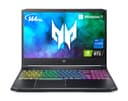
🔥 Game Hard, Work Smart — The Predator That Never Sleeps ⚡
The Acer Predator Helios 300 PH315-54-760S is a high-performance gaming laptop featuring an 11th Gen Intel Core i7-11800H CPU, NVIDIA GeForce RTX 3060 GPU with 6GB GDDR6 VRAM, and a 15.6-inch Full HD IPS display with a 144Hz refresh rate and 3ms response time. Equipped with 16GB DDR4 RAM, a 512GB PCIe Gen 4 SSD, and Intel Killer DoubleShot Pro for superior network performance, it delivers smooth multitasking, immersive visuals, and lag-free online gaming. Its advanced cooling system ensures sustained performance during intense sessions, making it a top choice for gamers and professionals seeking power and reliability.






| ASIN | B092YHJLS6 |
| Audio Output Type | Headphones, Speakers |
| Audio Recording | No |
| Automatic Backup Software Included | Talk |
| Available M2 Slot Count | 2 |
| Battery Average Life Standby | 6 Hours |
| Battery Cell Type | Lithium Ion |
| Battery Life | 6 Hours |
| Best Sellers Rank | #16,658 in Computers & Accessories ( See Top 100 in Computers & Accessories ) #2,339 in Traditional Laptop Computers |
| Bluetooth Version | 5.1 |
| Bluetooth support? | No |
| Brand | acer |
| Built-In Media | AC Adapter, Laptop, Power Cord |
| CPU Model | Core I7 11800H |
| CPU Model Generation | 11th Gen |
| CPU Model Number | i7-11800H |
| CPU Model Speed Maximum | 4.6 GHz |
| Cache Memory Installed Size | 12 MB |
| Camera Description | Front |
| Cellular Technology | Wifi |
| Color | Black |
| Compatible Devices | Laptop accessories |
| Connectivity Technology | wired, wireless |
| Control Method | Touch |
| Customer Reviews | 4.5 out of 5 stars 1,916 Reviews |
| Display Resolution Maximum | 1920x1080 |
| Display Technology | LED |
| Display Type | LED |
| Form Factor | Notebook |
| Graphics Card Ram | 6 GB |
| Graphics Coprocessor | NVIDIA GeForce RTX 3060 |
| Graphics Description | RTX 3060 |
| Graphics Ram Type | GDDR6 |
| Hard Disk Description | SSD |
| Hard Disk Interface | Solid State |
| Hard Disk Size | 512 GB |
| Hard-Drive Size | 512 GB |
| Hardware Interface | Thunderbolt 4 |
| Has Color Screen | No |
| Human-Interface Input | Keyboard |
| Item Dimensions L x W x Thickness | 14.31"L x 10.04"W x 0.9"Th |
| Item Weight | 5.07 Pounds |
| Keyboard Description | gaming,backlit |
| LAN Port Bandwidth | 1000 Mbps |
| Lithium-Battery Energy Content | 54 Watt Hours |
| Manufacturer | Acer |
| Memory Clock Speed | 4.6 GHz |
| Memory Slots Available | 1 |
| Memory Speed | 3200 MHz |
| Model Name | PH315-54-760S |
| Model Number | PH315-54-760S |
| Model Year | 2021 |
| Native Resolution | 1920 x 1080 pixels |
| Number Of Cells | 4 |
| Number of Ports | 7 |
| Operating System | Windows 11 Home |
| Optical Storage Device | No Optical Drive |
| Other Special Features of the Product | Multi-touch Gesture |
| Power Device | AC adapter |
| Processor Brand | Intel |
| Processor Count | 8 |
| Processor Series | Core I7 11800H |
| Processor Speed | 4.6 GHz |
| RAM Memory Installed | 16 GB |
| RAM Memory Slot Total Count | 2 |
| RAM Memory Technology | DDR4 |
| RAM Type | DDR4 SDRAM |
| Ram Memory Maximum Size | 16 GB |
| Refresh Rate | 144 Hz |
| Resolution | 1080p |
| Screen Size | 15.6 Inches |
| Speaker Description | 2 speakers (stereo) |
| Specific Uses For Product | Business, Gaming, Multimedia |
| Supported Monitor Maximum Quantity | 1 |
| Total Number of HDMI Ports | 1 |
| Total Usb Ports | 2 |
| Touchpad Feature | True |
| UPC | 195133349703 195133116251 |
| Video Output | HDMI |
| Video Processor | NVIDIA |
| Virtual Reality Ready | No |
| Voltage | 230 Volts |
| Warranty Description | One-year International Travelers Limited Warranty (ITW) and 24/7 access to a dedicated support team, specialized in the Predator brand |
| Warranty Type | Limited |
| Webcam Capability | Yes |
| Wi-Fi Generation | 802.11ax |
| Wireless Compability | 802.11ax |
| Wireless Technology | Wi-Fi |
F**K
Lifetime laptop
I bought this laptop at the end of 2021; it’s now 2026 and it’s still going very strong. The laptop has been fantastic for both games and work. I’ve played games such as Elden Ring and Rainbow on it; it did well with both. Additionally, I accompanied me through my entire undergrad degree with nothing but good performance. The screen is good and responsive, it could only be better if it was OLED. The keyboard is the best one I’ve had on a laptop, very responsive and solid. The only detail that is not great are the speakers, they are not loud, though quality wise they’re not bad.
J**Y
One of the best mid-tier gaming laptops available!
My gaming rig was on its way out, with an outdated i5 processor, GTX 1060 graphics card (which I paid too much for used on eBay) and 16GB of RAM, so my partner and I discussed what our next PC purchase would be. After much research, I found that the Acer Helios 300 provided a decent integrated graphics card (3060) that could play older AAA titles on Ultra, and newer ones on either High or Medium with little overclocking using stock settings most of the time. Most recently I played the Diablo IV Beta & the Resident Evil 4 remake on High settings, and it looked great on the 1920x1080 screen. On occasion I do plug it into my 4K LG Monitor, or the 4K TV in the family room via HDMI port or Mini Display Port (and doing so increasing the screen resolution to 3840x2160). At this point, its when the overclocking tool(s) become most advantageous. Yes, the fans are a bit loud, but that's normal for these devices. To combat this I pair either my Apple Airpods Max via BT or my Razer THX headset when gaming on the TV. I also use a cooling mat that has a couple fans on the bottom that help dissipate heat. I've also been using this laptop for school work which it does in a flash on anything Office 365. Webcam and built-in mic are more than enough for Zoom calls and proctored exams. This thing is overkill for school work. (Which is just an added bonus.) I've also done a bit of video editing using Adobe Premiere and it renders video files much quicker than my old PC. I'm not much of a content creator, but I imagine this computer would be great for extensive 4K video or other more complex projects. Finally, this machine has several options for expand-ability and future-proofing. Since purchasing it, I have upgraded the RAM to 32GB and have installed a second SSD drive (using the included adapter that came in the box). And I'm happy knowing that there is an empty M.2 slot available when I decide to install a third hard drive for when I need to. I have no qualms about the price, and believe it was more than fair for what's available on the market today. It's a solid mid-tier gaming laptop that's more than capable with keeping up with newer titles. With chip shortages, supply chain issues, not to mention the folks who do bitcoin mining grabbing up all the graphics cards, which in turn jack up prices to insane amounts, it was a no-brainer to replace my aging gaming rig with this laptop instead of holding out hope for a better graphics card in the future.
K**.
A lot of power in a small frame
This has been my daily driver computer for almost a year now and I've been very impressed. It's handled every game I've thrown at it and more. GPU: I'm going to do this first since this is arguably the most important part. I have the RTX 3060 version. The important thing to note is that this is the MOBILE 3060, which is slightly less powerful than the desktop 3060. It's nearly equivalent in power to a desktop 1070 Ti. I have been playing some pretty intensive games on it over the last year including, most recently, Baldur's Gate 3 on max graphics. I keep the screen refresh rate at 60Hz instead of the 144Hz that you can use because it saves battery while also allowing your GPU to rest a bit while gaming. I've also capped the FPS at 60 directly through the Nvidia app. Same reason there, I don't need 144Hz. In BG3, It keeps a consistent 50-60fps while using only about 50% of the GPU. I also consistently play games from Xbox Gamepass on here on max graphics with very little stutter or issues. All in all, I'm very impressed by what a mobile 3060 can do. Screen: The screen is a very bright, crisp IPS screen that's capable of up to 144Hz. The viewing angle is good and even from the side you can still make out details (albeit a bit dimmer). It gets very bright at max level, almost headache causing, so I personally keep the brightness at about 20%. Battery: Depending on what you're doing, the battery is...fine. If I'm running a game (not recommended on battery), I can get about an hour out of it. But if I'm just using it day-to-day with my settings (60Hz refresh rate, 20% brightness), I can get 3-4 hours of solid use. CPU: I've never had any issues with it multi-tasking or running any app or game. Even when using CPU intensive programs like Handbrake, it will max the CPU but still give you decent performance to continue using it for web browsing and videos. Cooling: The fans themselves are somewhat loud if you get in to heavy duty gaming and I do recommend getting a stand to prop it up to allow for airflow, which drastically helps. There is a physical turbo button which makes the fans go to 100% and are pretty effective at lowering temps but are also loud, so best to only use that with headphones. Under load in BG3, it will run about 60C, which is fairly low. In a more intense game, I have seen it get to 70-75C which is warmer, but still in acceptable range. Overall, I'd recommend giving this a buy if you want a solid gaming laptop but also a daily driver.
A**R
It's fine.
So far this computer has been good. I''ve played Doom Eternal and I am now playing Cyberpunk 2077 on it. The games look great and run well. It's a decently solid machine. I added 2 additional hard drives to it. I did not like how the casing comes apart to add the hard drives. It felt like very delicate procedure designed to break the casing. I got it done without breaking anything, but definitely watch videos on how to do it before you try. The bios is odd, I want to figure out how to set one of the added hard drives as bootable, but the bios doesn't seem to want me to do that...says something about window boot manager?. I would prefer the old c, d, f, g or whatever it used to be. Sometimes a guy just wants to set the boot order to 1st a non-bootable drive, then another non-bootable drive and then the bootable drive....actually I wanted to figure out if I could load win 10 on another drive and boot to it so I could run some older firewire audio hardware that doesnt support win 11. Guess that I may be too old or not motivated enough to figure it out. Speakers are tinney but ok. Good ports. Keyboard is ok. Sometimes computer is a bit wonky, locks up on weird stuff or won't boot a game, but I just restart it and everything is fine. The price was good. I am not sure why amazon thinks this thing has a touch screen. It doesn't. I just touched it and it didn't do anything.
J**Z
Excellent PC overall, gaming included
Nothing much to say, really. My main purpose reviewing is telling you about the gotchas in video for this PC. Overall, though, it is absolutely excellent. It is utra quiet even with the fans running at high speed. It does get hot, but no performance issues. What I learned about video setup: There are three display ports in this PC: 1. Mini DisplayPort v1.4. 2. HDMI port v2.1. 3. Thunderbolt port v4 (USB-C). All display ports are capable of 4K @60Hz at least. I run my PC connected to 2 LG UltraFine 31.5in monitors at that resolution and refresh rate. However, the DisplayPort function embedded in the Thunderbolt v4 port is run by the integrated Intel HD graphics card, NOT the nVidia RTX3060 card. This is VERY IMPORTANT for gaming: The Intel integrated graphics card will NOT support DirectX 12 Ultimate. On the other hand, displays connected through ports 1 or 2 above will be un by the nVidia RTX3060 card that does support DirectX 12 Ultimate. The difference is night and day. True, I am not loading the most hardcore games ever, but still. So you get a frame of reference, my main 2 games are Age of Empires II DE and Age of Empires IV. I run both in full desktop mode, meaning the 2 monitors treated as one big monitor. AoE II DE reports consistent FPS of 60 (I have V-Sync on, which limits FPS to that of the monitor's refresh rate) with all graphics settings on. AoE IV does not seem to have a way to show the FPS, but it does run super smoothly. So there. Enjoy this super high end PC at a super low price. Oh, and you MUST use quality 8K-graded cables. FYI, the HDMI cables that shipped with my LG monitors are garbage. Get Vanky or some other reputable 8K cables.
J**Y
(Detailed Review) TEMP FIX/BEST LAPTOP!
Okay, so I was hesitant on this laptop because some of the reviews mentioned bad temperatures. I was concerned with getting a laptop with bad thermal paste (which does happen). However, the laptop came super well! Lots of reviewers fail to mention the healthy temperature levels. Idle should be 30-45c. And under full load it should never go past 85c. EVER!!! If it goes past, it's likely it could either be, 1: Bad Thermal Paste/application, 2: Bad Fans, 3:Lack of contact with HeatSinks. 4: Bad Ventilation. If buying new, and the temps aren't matching, exchange it, as shipping can sometimes damage components. Laptops generally require maintenance. If heavy using, 1-2 Years. Make sure those temps never go past 85c. Over time you will have to replace the thermal paste or fans may give out. Arctic Mx4 is the best paste. Those are very very easy fixes. Just keep that in mind when buying ANY gaming laptop! If you are scared to tamper with it, buy some insurance and send it to acer. (Continuing with the review......) With poor ventilation I was reaching 85c. I bought a laptop cooler, the IETS with rubber rings. I'm getting incredible temperatures! Never going past 78c! This laptop is very heavy on proper Ventilation. If you look at the design there are a ton of vents from the bottom that push out through the top of the keyboard. S1I think a laptop cooler is necessary if you're gonna be gaming. This thing is incredible. I'm running games on High/Max settings (Elden Ring, warzone, apex) and getting awesome frames. I upgraded the ram to 32GB and this thing is a work horse. Dual rank 3200 32gb ram will increase your frames by about 15, and more opened tabs!! ;) I also installed a 2tb samsung ssd. (Which I highly recommend you do) It is much easier to install an nvme than the SATA one. So I would recommend getting a m.2 nvme. Opening the back piece for upgrades can be a challenge. There Is a trick to it, and it's likely you will break something if you don't get it right. So don't force it! So be very careful and gentle when doing it. Use a pick to slowly Pry it open. Pull from the vents back side. The battery can get kinda hot too. So make sure it's in a good spot. You can also set the battery charge level to 80% for longer battery lifespan. That's pretty much it! It's an amazing laptop for the price and power! Bang for your buck! Happy gaming!
W**T
Gets 100c hot while gaming with turbo on and a laptop cooling pad, and awful keyboard layout
What the title says. It's great for gaming if you want this laptop to never last then go ahead let it push and die in a year. I played games like hell let loose, halo infinite, elden ring, assassin's creed valhalla and also do a lot of rendering work and while it's normal for these games to get these laptops hot, this thing went up to 90c to 100c hot. This is with a cooling pad, and the fan running at turbo and some how managed to hit tjmax. The build is decent and has seen some abuse such as accidentally dropping it a few times and never noticing any substantial drop in performance. On the other hand, too bad it'll drop in performance anyways when the interior gets so hot that it needs turbo on all the time as the cpu gets so hot that it lowers the clock speed to save itself. Also, The predator button is the stupidest design choice i've ever seen and the program itself manages to take 20% of cpu load and make the laptop hotter by having the program running by itself. I don't care if I can change the predator button's settings, as having it where the num lock is annoying and shows how much acer cared about keyboard design when they first made this. Also installing ssd wasn't bad, but the tutorials are much like acer's monitor quality: bad. Didn't show me where to stick the slim thing to open up the laptop so i can install another ssd in there. For what it's worth and almost a year with this thing and I have a lot of resentment with this laptop, and that i'll use it until it dies and then go elsewhere. UPDATE: Oh yeah I forgot about about the overly sensitive mousepad. It's so bad that they thought adding the FN + f2 key would fix an obvious awful design issue that they think a bandage will prevent frustrations. If I Have to press fn + f2 key every time I had to switch from gaming to internet surfing to gaming then why should I even bother buying a laptop to begin with? That thing is neck deep almsot near the space bar that it gets in the way of communication. Meanwhile so many other laptops with similar designs such as small arrow keys to knowing where to place their mouse pad so when you place your hand on wasd, it shouldn't result in an accidental discharge in CS:GO and give away your position.
T**G
Great entry+ gaming laptop
I bought this laptop to dip my toes in the water for PC gaming and also to use as a personal PC for emails, browsing the web, etc. I used a separate monitor as I wasn't using this as a mobile gaming set-up. The version I got with the i7 and 3060 laptop GPU was great for warzone. I was able to run well above standard graphics on Warzone at about 100FPS. I never had any issues with overheating, although I did buy a cheap "fan deck" to put the laptop on. The fan isn't quiet, but that is to be expected with any gaming laptop, especially when under stress. I have since bought a full gaming desktop as I realized I did want to fully make the jump from console to PC but I gave this laptop to my wife who plays the Sims and Age of Empires and she has seen HUGE performance boosts compared to her older Asus Nitro 5. Her games run much smoother on this laptop. I would recommend this laptop to anyone looking to get into pc gaming or someone that is looking for a multi-use portable PC. Be sure to check the specs and reviews for the specific model you're buying as Amazon shows reviews for similar pcs with different internal specs.
Trustpilot
Hace 1 semana
Hace 3 semanas