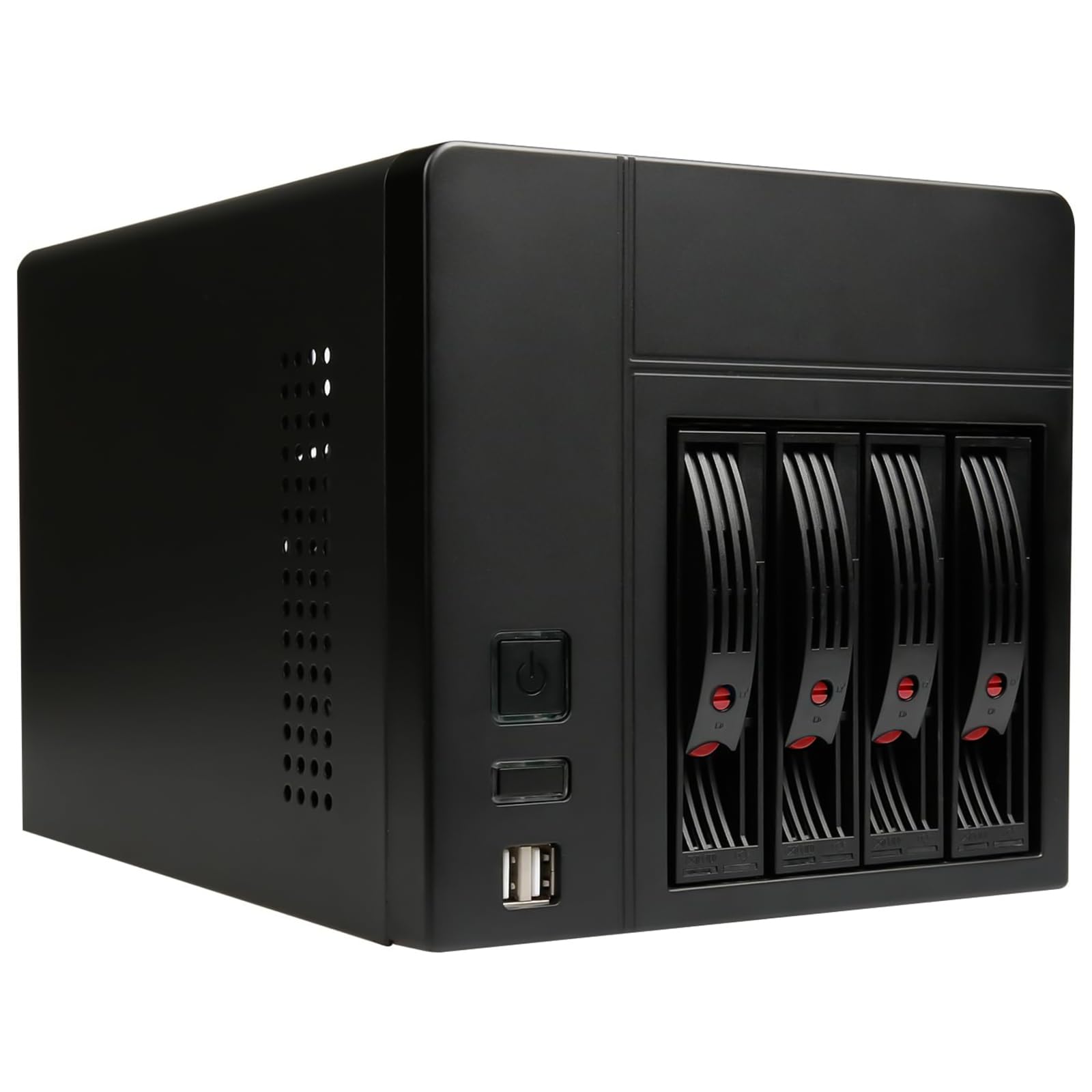
💼 Elevate your home office storage game with sleek, silent, and spacious NAS power!
The AUDHEID Mini-ITX NAS PC K3 Chassis is a compact, durable 4-bay DIY computer case designed for Mini-ITX motherboards and Flex power supplies. It supports both 2.5" and 3.5" hard drives, features a quiet 12cm rear fan for optimal cooling, and offers convenient front USB ports. Ideal for home office or enterprise network storage setups, it balances high storage capacity with a sleek, professional design.





| ASIN | B096FD8WVS |
| Antenna Location | Business |
| Best Sellers Rank | #1,127 in Computer Cases |
| Brand | AUDHEID |
| Case Type | Mini-Tower |
| Color | Black |
| Compatible Devices | Servers |
| Cooling Method | Air |
| Customer Reviews | 3.9 out of 5 stars 61 Reviews |
| Enclosure Material | Alloy Steel |
| Fan Size | 120 Millimeters |
| Hard Disk Form Factor | 2.5 Inches |
| Internal Bays Quantity | 4 |
| Item Dimensions D x W x H | 26.5"D x 19"W x 18"H |
| Item Height | 18 inches |
| Item Weight | 7 Pounds |
| Manufacturer | AUDHEID |
| Material | Alloy Steel |
| Model Name | K3 Chassis |
| Motherboard Compatability | Mini ITX |
| Number of Fans | 1 |
| Other Special Features of the Product | 12cm Silent Fan |
| Power Supply Mounting Type | Bottom Mount |
| Recommended Uses For Product | Business |
| Supported Motherboard | Mini ITX |
| Total USB 2.0 Ports | 2 |
| Total USB 3.0 Ports | 2 |
| Total Usb Ports | 4 |
N**D
Great Compact Case
Great Case. I struggled a good bit trying to get everything into position and screwed in, but that's the price of a tight fit. Make sure you have the right components beforehand! I ended up having to swap my power supply to a smaller unit to get everything in. Works perfect for a small media server. My only complaint is the dust accumulation. I've got 2 open disk slots that suck in a good bit of dust. That's to be expected of any PC I guess.
S**.
Annoying motherboard mounting design, sharp edges
Overall I'd consider this case adequate. Once everything is installed it is fine, but getting stuff installed is a pita. The way the motherboard mounts in this case is pretty annoying. I really don't see why they designed it to mount backwards the way they did instead of just moving the mounting posts back and letting it mount like normal. But, because of the way they designed it you have to connect all your wiring on the motherboard before mounting it, and it is very difficult to get the motherboard into place with the posts hitting things and very little room to maneuver. On my particular motherboard that I was using (an ASRock B660M-ITX/AC) the CPU 8 pin power connector interferes with the bottom left post and makes it very difficult to get mounted. Top that off with this being a motherboard with built in wifi and the wifi antenna connectors make it even more difficult. Once you finally get everything installed, pray you don't have to do any maintenance cause you'll have to take the motherboard out again to get to anything. Also of note, the stock CPU cooler doesn't really fit. It will hit the HDD cage. You need something really low profile like the noctua low profile cooler. Beyond the fitment issues, the fan that comes with the case is complete garbage. It is not even a 3 pin fan, wired with just 2 wires and conected to the SATA backplane for power. Meaning it runs at 100% all the time, and it's a noise fan. I swapped it for a Noctua that I connected to the motherboard. If you get a Flex PSU with a toggle switch you will also have to cut a notch out on the case because it does not have an opening that allows for that. Otherwise, my final complaint about the case is just that it has sharp edges in a lot of places. That combined with the tiny amount of space to work in means cutting and scraping up your fingers / hands while working in this case is inevitable. On the good side though, it is a nice compact case for a 4 bay nas build. The hdd trays aren't terrible. The outside of the case looks good and doesn't feel like low quality.
T**D
Simple compact design that just works
Threw in a small ITX board and filled it with disks. Add a PSU and off you go. Fan is quiet when running. Loudest part is the disks - may add some soundproofing since heat isn't an issue. Lights on the front are bright as heck. Just an FYI if that bothers you. I like it so I can see its on/working from across the room. Simple case is easy to work with and the drive trays work smooth too. No sharp edges and no complicated parts or fittings.
J**R
Nice, compact case for drive hosting
This is going to be a bit of a rant of what this case cannot do, and what it is not. But I think I'll be answering questions others may have. I bought this with a specific use case in mind, but also with a curiosity of expanding that use case. The images aren't clear regarding the amount of (or lack of) space for an expansion card in the one and only PCI(e) slot on these boards. Even without an expansion slot on the back, there's nearly no room at all between where a card would be and the top brace (where the motherboard mounting standoffs are attached) - Some very thin cards could possibly fit, however we're talking about maybe an surface mounted SD Card slot. I did find an NVMe adapter card where the NVMe stick is installed on the "back side" of the card - meaning the NVMe would be on the side toward the CPU - honestly a great idea. I have not purchased one, yet, but am contemplating doing so. Aside from that, the power supply would be in the way for even a standard half height video card size card - there's enough space for a 1.5-1.75" tall expansion card, and that's it. With that said - NO WHERE DOES THE MANUFACTURER STATE AT ALL that the case is compatible with the use of any PCI/PCIe cards, and there is no back slot for such a card either. I knew this going in, and was hoping there was enough space for an NVMe/PCIe adapter card. There is not, at least not for the standard run of the mill adapters. However, I did, as mentioned, find an adapter card with the NVMe slot on the "wrong" side of the card. This may work to add an NVMe drive to the board, however when/if I buy one, i will be adding a layer of plastic to the card to protect it from grounding on the support bracing of the case. Regarding the wrong-side adapter, I'm not positive the images just aren't reversed, but the text on it is correct. YMMV, but here's the adapter for those wanting it: https://www.amazon.com/Adapter-Express-Expansion-Support-Compatible/dp/B07JKR5C3Z Oh, one other thing - the motherboard I have, the 8pin PSU connector and CPU fan header are very close to the mounting hole (the one along the same side as the back panel, but furthest from the PCIe slot) - This made installing the motherboard very difficult with the IO shield installed. However, after bending part of the support bracing (same one as above) - I was able to make just enough clearance to install the mobo with the shield. This did move the mounting standoff out of place a bit, but I was able to re-aligh it by squeezing it upward with my thumb. As for the CPU cooling - there's only one Heatsink/fan I found that would fit - and still have headroom for air flow. https://www.amazon.com/dp/B07SQWT6BV - it does a good enough job with a Ryzen 3 3200G under it. Forget using water cooling, unless you want to drill and cut holes in the case. There's no room inside for the thickness of a radiator (the SATA cables are in the way, though maybe using 90 degree connectors might work - but even then, the 120mm radiator I have is still too wide to fit in the available space (it's 125mm x 140(ish)mm - a 120mm fan fits very snugly. With a motherboard with an NVMe slot, a reverse-sided NVMe PCIe adapter, and the 4 supplied HDD/SDD quick slot bays, there's enough space for up to 6 drives in this case. However, there is the potential for a 7th USB slim-line external drive to be "installed" above the drive bays, in front of the PSU. It's a tight fit, but it can be done. This bring me to another point - there is a little L bracket towards the front of the case where the PSU is installed. This is my first time with a Flex PSU, and assumed it was intended to be attached to the PSU. After a few minutes of fiddling with it - I realized I could just loosen the screw, swing the bracket out of the way, install the PSU and then swing the bracket back against the PSU, putting a bit of pressure on it as I tighten the screw. This held the PSU in place without any of the three exterior screws. This is probably not what it's actually for as it does have a hole for another screw. Perhaps it is intended to hold a 2.5" drive? Seems silly though as I've never seen a manufacturer have only 1 mounting point for a drive. As for the included fan - can't tell you if it works well. I replaced it with a Noctua PWM fan. The included fan is a 2-pin fan, which plugs into the SATA backplane, presumably a constant 100% operation. I'm building this as a VM server with file archiving, and as it will sit idle most of the time, I wanted a fan that wouldn't be running at 100% the entire time. There is no issues with removing the load from the backplane. It does seem like a fairly reasonably well built fan, but again, I have not had it powered on at all. There is a sheet of plastic with 2 strips of adhesive included with the case. After tinkering around a moment, the cutouts align with the 4 mounting standoffs, with the adhesive strips facing the case shell. This should be installed to the inside of the case shell, with the U shaped cutout towards the back and bottom. The protective plastic should be butted up against the flange with the screw hole, and aligned with the edge of the wide flanges at the bottom, which secure the shell to the bottom of the chasis. Basically, just align the plastic with the 4 mounting holes while the adhesive strips are facing outward. The front USB ports seem a little off when inserting a USB thumb drive. This might just be mine. It took a moment of jiggling, removing and reinserting the thumb drive to get it to register, haven't had issues with it since, however. Screw alignment is top notch on everything on this case. From the PSU to the shell, the fan, and motherboard standoffs. I've had inexpensive cases which had either oblong holes to account for lack of precision, or simply couldn't accept a screw because alignment was off that much. Not the case here. The quick release sleds for the drive bays are not self-inserting - meaning you have to press the drive in all the way, and then close the lever. The lever is great for releasing the drive, but does not pull it in. The drive bay cage has some minor issues in design. There is absolutely no drive insertion guidance, and mis-aligning a drive is very easily done. The drive should freely slide into place, and with no pressure until the SATA/power connector mating, which takes minimal pressure. If the drive takes any pressure to insert after the first inch or so, it's not properly in the slots. I've seen better designs, but I've also seen worse. I am, however, a bit spoiled with Dell's constantly improving drive bay sleds. That's one of the differences between a $4500 case and a $65 case. I did not test the sleds with 2.5" devices, however the 4x 3.5" HDDs I installed fit like a glove (no, not OJ's glove, just a well fitting properly sized glove) The screw holes all lined up perfectly as well. Don't try to game with it, don't expect to put any PCIe cards in it (other than very very low outline cards), and I would NOT run a Nuclear Reactor of a CPU in this thing, as all of the airflow comes over the drives. When looking for a CPU cooler, you'll pretty much be relegated to a cooler intended for a 1U rack server. Remember, the fan won't push air if it can't get any air - and even with this 1U cooler I have, airflow will still be choked a bit. Ultimately, for what it is, and is marketed as, this is a great little SFF case. Just try to find a motherboard that isn't crowed around the mounting hole in the (normally) top left corner. There's even a motherboard which I almost purchased for this project with the NVMe slot on the backside - it would had been perfect for this use, as the motherboard is mounted in from the bottom, giving easy access to the NVMe with removing only the shell. This is that motherboard, it also has more space around that troublesome mounting hole I described: https://www.amazon.com/gp/product/B07FVVNDFX/ Additionally, if it weren't for the cost, this case is really begging for 90 degree lateral SATA cables, but at $12+ each, that's $50 for all 4 bays. Going down and under the drives, or up and over - either would be sufficient to provide more space in front of the case fan. Here's some cables I was looking at for this: https://www.amazon.com/StarTech-com-18in-Angle-Serial-Cable/dp/B00AKS0YL2 - Even standard 90 degree cables would provide a bit more space, and a bit easier cable management. If at all possible, I highly suggest installing 2.5" drives - either HDD or SDD, as that will allow more air flow into the machine. Ok, rant over. I hope this was helpful to at least someone! Good luck!
J**K
replaced a WD 4 bay NAS
I had some old parts laying around (MINI ITX) and bought a new flex psu and put this together and now my WD 4 bay nas is collecting dust. I got sick of tired of Western Digital' abhorrent and brutally terrible software and lack of support/updates and decided to make my own NAS using Openmediavault. I will never buy a home/consumer prebuilt NAS system ever again and I wouldn't recommend WD NAS products to my worst enemy. Ditch all those overpriced commercial brands. If you get one for free from ewaste or a datacenter thats cool, use it... but don't buy those overpriced hunk of junks with crappy hardware capabilities. The case is super easy to build in and I have large hands. I bought a intel core i3 for 6 dollars on amazon and then put a passive service heatsink on it and then just put the one 120mm fan in this case with a 30 dollar flex psu and its working amazingly. I Just used the same 4 drives that were in my old NAS after rebuilding the array (backup/migration/initialization). This thing is running like a champ and I love it. Highly recommend.
I**X
Could be a great case, but has serious flaws.
I have built hundreds of systems, including many NAS systems. This case looked good initially, but was very disappointing to the point of being unworkable and I returned it. It's like they never tested many of the popular N100 and N305 based NAS ITX motherboards with this design. 1. Case fan is LOUD. 2. Case fan is DC only, so no speed control from motherboard, runs 100% all the time. I had to swap it out. 3. Vertical mounting of motherboard is difficult, aligning spacers to board holes requires some bending/flexing. 4. Once motherboard is mounted, very little room to plug cables in. In some case you have to put the cables on first, which makes it even more difficult to mount the motherboard. 5. Crossbar at top of case gets in the way of SATA cables. Even with thin cables I substituted, the cables rub up against the sharp edges of the bar - no bueno - see pics. 6. Spacer connected to crossbar gets in way of the front panel header - I had to shorten it to get it to fit- see pics. 7. Flex ATX power supply cutout is ridiculous, doesn't match most PSU's, blocks fan - see pics. 8. Because the motherboard bottom is VERY close to the lid, they provide a plastic square adhesive panel to prevent shorting out your motherboard accidentally. But the way it is designed, it isn't likely to stay attached - see pics. 9. 4x Drive cage is not removable - riveted in. If it was removable, installation of cables would be easier. 10. Front panel button controls look and feel cheap. Overall, the case is poorly designed, a big disappointment and a waste of my time. I sent it back.
Y**2
Good case but requires modification - Not ready to go out of the box
Firstly the case is nice and compact case but it requires way too much modification for the average user. The stock fan that is installed is very loud and only has 2 wires connected to the sata backplane and cannot be speed controlled. If noise matters to you you should replace it with a Noctua or at least something you can plug into the motherboard and control the speed of. The biggest out of the box issue with this case it the motherboard mounting holes. They are the wrong size for motherboard screws and the screws that come with it to fit are too small to be used on a motherboard the screw heads literally fall through the mounting holes in the motherboard. In order to mount a motherboard you need to go to home depot and buy a tap and die for a 6/32 hole. They sell this as a single bit for this size and you don't need a kit. It ran me about $6. Luckily since the holes are sized too small you can drill them out and re-tap them as the proper size. But you'll need your own screws for the motherboard since they are not included. I mounted a MSI H510I PRO WiFi ProSeries Motherboard in this case. I did not need to remove a post like another user did but your mileage may vary depending on the board you choose and the clearance. I put a i5-10400 in my motherboard and attempted to use the stock cooler. It "technically" works but in order to secure it to all 4 posts you need to flex the board a little since the cooler needs about 1 more cm of clearance. Due to that and loud noise under load I upgraded to a Noctua NH-L9i which fits with only a little extra room to spare. I've uploaded photos of both coolers installed. The power supply that comes recommended with this case by default does not fit because of the built in power switch. I bought a pair of snips at home depot and cut the case to accommodate the power supply (also pictured). I modified the power supply to fit a noctua as well since the reviews for it recommended it since its a loud psu. The lights on the reset button on the case are extremely bright in a dark room and flash when there is HDD activity. So I put some electrical tape over it. I wish the case had front panel USB 3 or better but I may mod the case later to add it if I end up needing it. The Hard drive sleds are very cheap but get the job done. If you plan on only pulling them out to swap the occasional dead drive they'll be fine, but if your going to swap drives around frequently you'll probably run into issues. Overall I would normally give this a worse rating for all the effort, legwork, modifications, and missing parts but there's no other case on the market right now that fits this niche need in this form factor. Once all the modifications are done it does work very well but it took a lot of work to get to this point. Due to the size it is difficult to get the motherboard in and out of the case but its doable if your patient and take it slow. You need to be very careful with how you route the cables so everything fits just right. I hope the maker takes this as a constructive review and uses it to perfect their product for others.
R**N
Liked this case
I liked the way this case looked, which was reason I purchased. I did have to make some modifications to case. Such as cutting back to fit PSU/cutting top mobo support to fit nvme PCIE slot and I removed the usb 2.0 header with a usb 3.0 mobo header. All in all good case very tight fitting but it is small which is what I wanted from this build. People complain about modifications but case says DIY so do it yourself or don't lol.
Trustpilot
Hace 2 semanas
Hace 3 semanas



