We remain fully operational. Our teams are working around the clock to ensure your deliveries continue safely.

Descargar la aplicación


Servicios al cliente
Sobre nosotros
Copyright © 2025 Desertcart Holdings Limited
Descargar la aplicación


Buy anything from 5,000+ international stores. One checkout price. No surprise fees. Join 2M+ shoppers on Desertcart.
Desertcart purchases this item on your behalf and handles shipping, customs, and support to Mexico.
🚀 Upgrade Your WiFi Game: Future-Proof Speed Meets Effortless Control
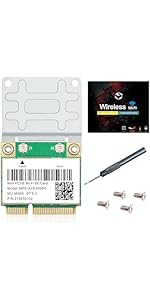
The REKONG MPE-AXE3000H WiFi 6E Mini PCI-E card transforms your laptop or desktop with tri-band WiFi 6E connectivity, delivering up to 5400 Mbps across 2.4GHz, 5GHz, and 6GHz bands. Featuring Bluetooth 5.3, OFDMA, MU-MIMO, and vPro technology, it ensures ultra-low latency, interference-free streaming, and enterprise-grade security. Compatible with Windows 10/11 and most mini PCIe laptops, it includes a screwdriver and screws for easy installation—perfect for professionals seeking a seamless, high-performance network upgrade.




| ASIN | B09F3CLKLH |
| Best Sellers Rank | #91 in Internal Computer Networking Cards |
| Brand | REKONG |
| Built-In Media | Screwdriver,screws |
| Color | multicolor |
| Compatible Devices | Laptop |
| Compatible Operating System Family | Windows |
| Customer Reviews | 4.5 out of 5 stars 390 Reviews |
| Data Link Protocol | 802.11AX, 802.11ac/a/b/g/n, wifi 6e |
| Data Transfer Rate | 5400 Megabits Per Second |
| Hardware Interface | Bluetooth |
| Item Dimensions L x W x H | 5"L x 5"W x 0.8"H |
| Item Weight | 0.03 Kilograms |
| Manufacturer | REKONG |
| Mfr Part Number | WiFi 6E |
| Minimum Required Operating System Version | Windows 10 |
| Model Number | WiFi 6E |
| Product Dimensions | 5"L x 5"W x 0.8"H |
| UPC | 788879389920 |
| Warranty Description | one year warranty |
F**.
Very Highly Recommend, Great Value
Used these as a replacement today in an HP 255 G2 and a Sony VIAO vpcee42fx. They had old WiFi 4/5 cards that were slow and did not have Bluetooth. After I swapped them (super easy installation on both) I verified that they both now have WiFi 6E (802.11 AX) as well as Bluetooth 5.3. On the VIAO I DID need to update the drivers. So without wifi the only way to do this is to connect ethernet FYI. ***So you may need an ethernet cable in addition to this card in order for it to work for you.*** Other than that they're both working and clients will be satisfied. Oh AANNNNDD it comes with a weird attachment I'll never use, but also 4 screws that seem to be universally compatible AND a screw driver that's perfect for working on most laptops. I wasn't able to work on one of them, but once I saw and used the included screwdriver, it worked for upgrading wireless cards and hard drives on both PCs. A lifesaver for sure. Top notch value
A**0
Wi-Fi Network card brings latest Wi-Fi standards and Bluetooth capability to old devices
Exactly what I was looking for. I purchased this item to replace the old 802.11 b/g/n Wi-Fi card on my very old laptop which lacked Bluetooth functionality, had the tendency to disconnect from my Wi-Fi network in the past, and was slow. It now connects to 5GHz Wi-Fi networks and has Bluetooth functionality built in! My laptop recognized it and after installing both the Wi-Fi and Bluetooth drivers, I had no issues related to functionality regarding to Wi-Fi. I ran a Speedtest and got a decent speed on my 5GHz Wi-Fi router, which was way faster than the old Wi-Fi card in my laptop. I haven't fully tested the Bluetooth functionality, I noticed that it connects to Bluetooth devices, but there is a minor lag when using the Bluetooth device (tested with a Bluetooth mouse), and it doesn't wake up from sleep from a Bluetooth device—this is not a big deal for me and it likely has to do with the age of my laptop, its BIOS limitations, and since the system I installed this card was originally designed to support Wi-Fi capability only. I've installed this Wi-Fi card on an ASUS X552EA-DH42 laptop which I've had since 2015.
M**H
Amazing performance for older machines
I've bought probably 4 of these for the older machines I own that use mini-PCIE for WiFi. Performance is outstanding for such old machines, and I've seen speeds upwards of 700mbit on good days. Bluetooth performance is good too; minimal dropouts and it can sustain full quality on heavy codecs like LDAC.
D**L
Phenomenal Value and Performance
Why did you pick this product vs others?: I like the tech specs and the extra of a screw driver and screws. Ease of installation: Installation on an old Dell Inspiron 15 3542 was incredibly easy. Wireless connectivity: The speed upgrade was phenomenal. I run the latest stable version of Ubuntu on this system, and the OS instantly recognized the new card. The original equipment wi-fi card only support 2.4G connectivity with an average of around 20-40 Mbps download and now is near-screaming at nearly 400 Mbps with 5G connectivity. I don't have a 6G connectivity option at this point, but I imagine it, too, would meet or exceed my expectations. I can't be more pleased (at this point) with difference in performance for this old laptop with this new wireless card.
C**N
Faster than original board.
Works great in my Dell Inspiron 17". Much faster. Download the drivers before installing. Use care removing the keyboard.
A**7
Upgraded old dell Inspiron 7000 series
Worked on old dell 17 Inspiron 7737. You will need to follow a youtube on how to take apart the laptop. And Like someone else mentioned I needed to swap the wire locations from old card to new. You can see the black word wLAN is now swapped. Also it is wise to already download the drivers needed, windows did not recognize it. I used driver's from the support page of fenvi.com model mpe-axe3000h
P**K
Avoid this device is not what it should be
Do not purchase this FAKE card. The card was tested under new full Windows 10 Pro 22H2 install with updates dated 1/4/2025 19045.5247 & Full fresh install of Windows 11 Pro 23H2 with correct updates dated 1/20/2024. Both operating systems would load default drivers for an Intel AC-7260. Intel® Driver & Support Assistant (Intel® DSA) reports the correct drivers installed as AC-7260. Removing all device drivers, turning off NIC, deleting from device manager and rebooting with device OFF to force the Intel® Wireless Wi-Fi Drivers for Windows® 10 and Windows 11* 12/17/2024 to install results in device manager show "This device cannot start (Code 10)" after the NIC is reenabled. Windows 11 device manager show this device as PCI\VEN_8086&DEV_08B1&SUBSYS_50708086&REV_CB (Intel AC-7260). On one side of the packaging it shows the device as supporing AC on the other AX.
M**D
WiFi ax in mPCIe form with bluetooth!!
One of the few WiFi ax chips in mPCIe form! If you have and want to keep an older laptop, it might not have the M.2 slots of present day. This card fits easily into a mPCIe slot though installation will highly depend on your laptop. Windows 10 detected the WiFi as 'Intel(R) Wireless-AX 210' automatically if you have an ethernet connection and connected quickly and easily to home WiFi. It even had a strong signal in a very weak area, still getting nearly 600Mb/s down and up. If you don't have a wired internet connection, make sure you download the WiFi drivers before installation! Pros: + add WiFi ax to an older mPCIe laptop + upgrade your bluetooth to 5 + includes 6GHz bands (faster speed, shorter range) + half-height for install on any/every mPCIe slot Cons/improvements: - only 2 antenna connectors (some laptops have 3) - could come with a small usb drive for the wifi drivers
Trustpilot
Hace 5 días
Hace 1 mes