We remain fully operational. Our teams are working around the clock to ensure your deliveries continue safely.

Descargar la aplicación


Servicios al cliente
Sobre nosotros
Copyright © 2025 Desertcart Holdings Limited
Descargar la aplicación

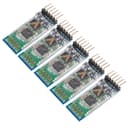
🚀 Elevate your IoT projects with wireless freedom and master-level control!
The HC-05 Bluetooth Module is a versatile 2-in-1 master/slave wireless serial transceiver operating at 3.6-6V, offering a 10-meter effective range and easy serial communication via SPP. Ideal for Arduino and microcontroller projects, it supports AT command customization and low power consumption, enabling seamless Bluetooth integration for Android devices (not iOS). This 5-pack bundle is perfect for professionals seeking reliable, flexible wireless connectivity in their smart gadgets.
| ASIN | B09GLLKLS4 |
| Best Sellers Rank | #62 in Bluetooth Network Adapters |
| Customer Reviews | 4.2 4.2 out of 5 stars (66) |
| Date First Available | September 18, 2021 |
| Item Weight | 1.13 ounces |
| Manufacturer | DORHEA |
| Package Dimensions | 4.37 x 2.05 x 0.55 inches |
R**H
Great Master Bluetooth module for Arduino
These are the master versions allowing connections to your Arduino projects. HC-06 is the Slave version. These all work as advertised and are easy to add to your project. Don't forget the passwords for base module is "1234"
D**O
Operates per spec
script to write device name. /* * David Dold * JDDL Design, LLC * * HC-06 differs from an HC-05. HC-06 are slave only devices, whereas HC-05 can be master or slave. * By default, no BT connection, an HC-06 device in AT mode @ 9600 baud between * * An HC-06 does not respond to "AT" * * The response from an HC-06 device for "AT+NAMEwhatever" is OKsetname * * LEDs flashing on the HC-06 indicate command mode, steady indicate a BT connection. * * NOTE: If you maintain a BT connection, via a terminal session or mobile app, then the AT commands * will simply transmit to the connected device. * * The HC-06 spoc sheet calls for divided resistors and RX, I've never done it... * * TROUBLESHOOTING * If you are unable to get this to work, confirm your rx/tx pins are correct. Confirm your wiring with a Serial BT Terminal. * On Android there are many to choose from. Pair your HC-06 with your phone, then connect to the device via the BT terminal app, * LEDs on HC-06 go solid. Run this sketch. Characters sent from the send textbox via the serial monitor or sent from the app, * echo on the opposing device. If your characters do not appear, re-check your wiring (hint is tx/rx reversed?). * * If you are using seperate power supplies for your Arduino device -and- the HC-06, the grounds must be bonded. * * Setting baud rate is for the hardware connection between * processor pid and the HC-06 device. BT connection is negotiated * between radios. */ #include <SoftwareSerial.h> #define BLUETOOTH_TX 10 #define BLUETOOTH_RX 9 #define BAUDRATE 9600 SoftwareSerial bluetooth(BLUETOOTH_RX, BLUETOOTH_TX); void setup() { Serial.begin(BAUDRATE); Serial.println("ready"); pinMode(BLUETOOTH_RX, INPUT); pinMode(BLUETOOTH_TX, OUTPUT); //setup bluetooth bluetooth.begin(BAUDRATE); bluetooth.flush(); delay(1000); bluetooth.write("AT+NAMELifeMCP"); } void loop() { //optionally, send characters via the SerialMonitor, this can be commented out and the bluetooth.write in setup() works. //outbound to HC-06 if(Serial.available()) { Serial.println("writing to bt"); while (Serial.available()) bluetooth.write(char(Serial.read())); } //inbound from HC-O6 if(bluetooth.available()) { Serial.println("BT Response"); while (bluetooth.available()) { delay(3); Serial.print((char)bluetooth.read()); } Serial.println(); } }
H**G
Worked well
These Bluetooth modules worked as expected. Really easy to set up and easy to use.
L**Z
Funciona perfectamente
A**N
I can't connect the CNC to Windows 11.
This HC-05 product, a pack of 5 pieces, only had one working unit. I don't recommend it to anyone.
P**E
These HC-05 use Version 5.0 firmware
I'm using this with an arduino to communicate with an OBD2 ELM327 in my car. The older HC-05 I used were version 2.0. These are version 5.0. The big difference for me is that the older HC-05 required an '$' to be prepended to commands intended to be passed-through to the ELM327. But the newer version 5.0 HC-05 units do not require it and just pass-through everything. The other issue Im working is that these newer units don't like the AT-INIT command for some reason. More later...
Z**Y
A great set for learners of Bluetooth
This set of Bluetooth modules is a great set for anyone who wants to learn how they work. I would highly recommend.
E**E
Nice modules
I was pleasantly surprised with how easy these were to use. I appreciate that the pins are labeled on the back of the circuit board. Be aware that there are 2 different voltages. Make sure to use a couple of resistors to get the voltage right. This will prolong the life of the module. Glad I bought a 5 pack. I will be using these on more projects.
Trustpilot
Hace 2 semanas
Hace 2 meses