We remain fully operational. Our teams are working around the clock to ensure your deliveries continue safely.

Descargar la aplicación


Servicios al cliente
Sobre nosotros
Copyright © 2025 Desertcart Holdings Limited
Descargar la aplicación

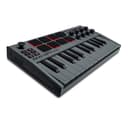
🎶 Your portable studio weapon for next-level beats and melodies
The Akai Professional MPK Mini MK3 is a compact, USB-powered 25-key MIDI controller designed for professional and aspiring music producers. Featuring velocity-sensitive keys, 8 backlit MPC-style pads, 8 assignable knobs, and a 4-way joystick, it offers dynamic control over virtual instruments and effects. With Native Kontrol Standard (NKS) integration and a curated Komplete 15 Select software bundle, it delivers instant access to premium sounds. Lightweight and portable, it’s perfect for on-the-go creativity, backed by a 1-year warranty and compatibility with both Mac and Windows platforms.


| ASIN | B08ZNV41PD |
| Additional Features | Backlit Drum Pad, Compact, Digital Display, Integrated Effect, Portable, Programmable, Touch Sensitive Pad |
| Best Sellers Rank | #162 in Musical Instruments ( See Top 100 in Musical Instruments ) #1 in Computer Recording MIDI Controllers |
| Brand | Akai Professional |
| Brand Name | Akai Professional |
| Color | Grey |
| Compatible Devices | Devices with USB connectivity and supporting Windows or Windows 7 platforms, such as computers and compatible USB-MIDI interfaces. |
| Connectivity Technology | USB, 1/4" (6.35mm) TS input for sustain pedal Input |
| Connector Type | USB 2.0 Type B |
| Control Method | Touch |
| Control Type | Keyboard Controller |
| Customer Reviews | 4.6 out of 5 stars 30,412 Reviews |
| Hardware Interface | 1/4-inch Audio, USB 2.0 Type B |
| Hardware Platform | usb |
| Human Interface Input | Keyboard |
| Included Components | MPK mini, USB Cable, Software Download Card, Quickstart Guide, Safety & Warranty Manual |
| Instrument | Keyboard |
| Instrument Key | Any |
| Item Dimensions D x W x H | 7.1"D x 12.5"W x 1.9"H |
| Item Type Name | MPK Mini MK3 - 25 Key USB MIDI Keyboard Controller With 8 Backlit Drum Pads, 8 Knobs and Music Production Software Included |
| Item Weight | 0.9 Kilograms |
| Keyboard Description | Ergonomic |
| Manufacturer | inMusic Brands Inc. |
| Material Type | Durable High-Grade Plastic |
| Model Name | MPK Mini |
| Model Number | MPKMINI3G |
| Model Year | 2020 |
| Noise Control | None |
| Number of Keys | 25 |
| Outer Material | Plastic |
| Platform | Mac, Windows |
| Product Dimensions | 7.1"D x 12.5"W x 1.9"H |
| Product Style | MPK Mini Only |
| Size | 25 Key |
| Special Feature | Backlit Drum Pad, Compact, Digital Display, Integrated Effect, Portable, Programmable, Touch Sensitive Pad Special Feature Backlit Drum Pad, Compact, Digital Display, Integrated Effect, Portable, Programmable, Touch Sensitive Pad See more |
| Supported Software | MPC Beats, Hybrid 3 by AIR Music Tech |
| Total USB 2.0 Ports | 1 |
| Total USB Ports | 1 |
| UPC | 694318025659 |
| Unit Count | 1.0 Count |
| Warranty Description | 1 year manufacturer. |
J**A
Great Starter Midi to Introduce Yourself to Music Production.
I’ve owned this for a few years now and it’s been amazing, Its as simple as plug and play then bam, make music. I have treated it roughly and its still running as if it were day 1, quality is genuinely amazing they have to raise their prices. Key factors: - Compatible with both Windows and Mac (Mac owners will need an adaptor for usb type a) - It comes with a few apps that I didn’t personally found use in but I’m sure other people will. - Any midi instrument available in a daw alongside plugins will be playable through this keyboard.
L**N
Great time with great presets.
May take some time to setup and get playing. Also MIDI control of devices can take a lot. Awesome and endless Presets. Very flexible and great price.
L**Y
Good for a beginner like me, and probably pros as well
It's a pretty good little keyboard, haven't had any issues. Set up is easy and simple for a beginner like me, and its all logical
J**T
Great piece of kit
I recently purchased the AKAI MPK Mini mk 2 as an additional MIDI keyboard to use with my laptop, mainly as a means of adding a degree of portability to composing. That being said, I have since been using it with my iMac and Dorico so that I do not have to keep unplugging and plugging in my main MIDI keyboard. I have tried the AKAI MPK Mini on Cubase and everything seems to work well. I have also been using it with Dorico on Mac and it works equally well. It seems a solid piece of kit and very playable, despite the small keys and their limited number. I think it is perfect for the purpose that I had in mind as it is very compact and rugged. It is easy to switch the octave up and down, which given the limited number of keys is important. If you want something compact, rugged, and nicely versatile you should perhaps check this out .
A**R
can only be installed for versions of Windows that are designed for the following architecture: x64"
Seems like a great unit. Might be important to know you need a 64bit OS (windows 11), but it also requires a 64bit processor. So if your PC/Laptop has an ARM processor this will not work on your computer. It gives this error "this program can only be installed for versions of Windows that are designed for the following architecture: x64" when installing MPC beats. Other software would not install as well.
K**N
Compact, Versatile MIDI Controller That Fits My Indie Workflow
I bought the Akai MPK Mini MK3 for my music production setup as an indie artist, and it’s been a very useful addition to my workflow. The size is perfect for a home studio—compact enough to fit on my desk but still functional for writing melodies, bass lines, and chord progressions. The keys feel responsive, and the backlit drum pads are great for programming beats and percussion. I also like having the knobs for quick adjustments while producing, especially when shaping sounds or tweaking effects without reaching for the mouse. Everything integrates smoothly with my software, and setup was straightforward. It is ideal if you’re working in a smaller space but still want creative flexibility. It’s intuitive, portable, and reliable, making it a solid choice for indie artists who want to produce music efficiently without a bulky setup.
T**R
Good budget and mini midi keyboard
The product is quite reliable and portable. Really good quality for the price.
R**A
Don't let the color fool you; this is an incredible instrument
I waited a couple of months before writing this review. There's a lot to dive in and I wanted to write a review short enough to read that contains everything you need to know. For your money you get two things, the hardware (the MK3) and some free software, MPC Beats. The MK3 is a 25-key USB MIDI keyboard. In addition to the 25 keys, there are selection buttons on the left and right, a joystick/knob, 8 drum pads, 8 knobs, and a teeny-tiny LCD for younger users with better eyeballs than mine. They keyboard has a tiny bit of weight to it, but you won't mistake it for a paperweight. Keep in mind that on its own, the keyboard does nothing, It only works when plugged into a computer, running software. The free DAW software Akai provides is MPC Beats. MPC Beats has approximately 9 million buttons and options, so don't expect to figure it out in an hour or even a day. There are so, so many features. You can of course make tracks, loops, patterns, and so on. There are tons and tons of free instruments available. It can get confusing as to which can be assigned to the keys and which are assigned to the drum pads. Fortunately there are tons of video MPC Beats tutorials online, which can teach you the ropes. The free version of MPC Beats has one major limitation in that songs are limited to 8 MIDI tracks and 2 "audio" tracks (which could be used for vocals or samples). If you're just wanting to create loop based music, 8 tracks are actually quite a bit. If you do eventually outgrow MPC Beats, you can upgrade to the pay version, MPC 2.0, which allows 128 tracks, all of which can be MIDI or digital audio. So, what's to say? There's a bit of a learning curve with the software and figuring out what all the buttons on the keyboard do. It has been a while since I played around with a DAW and so it took me a couple of days to wrap my head around everything. Again, there are lots of YT tutorials out there that will point you in the right direction, and the more you play around with things, the better you'll get. Physically the keyboard's looks may not impress your studio friends, but there's no reason why you couldn't create a hit song with this thing.
Trustpilot
Hace 3 semanas
Hace 2 semanas