

🖱️ Elevate your workflow with silent precision and all-day comfort — because your hand deserves the best.
The Logitech Signature M650 Wireless Mouse is engineered for small to medium hands, featuring a 2-year battery life, 3000 DPI laser sensor, and SilentTouch technology that reduces click noise by 90%. It offers versatile connectivity via Bluetooth or Logi Bolt USB receiver, customizable side buttons through Logitech Options+, and an ergonomic design with rubber grips for extended comfort. Compatible across major platforms including Windows, macOS, Linux, ChromeOS, iPadOS, and Android, it’s a premium productivity tool crafted with recycled plastics and built to last.
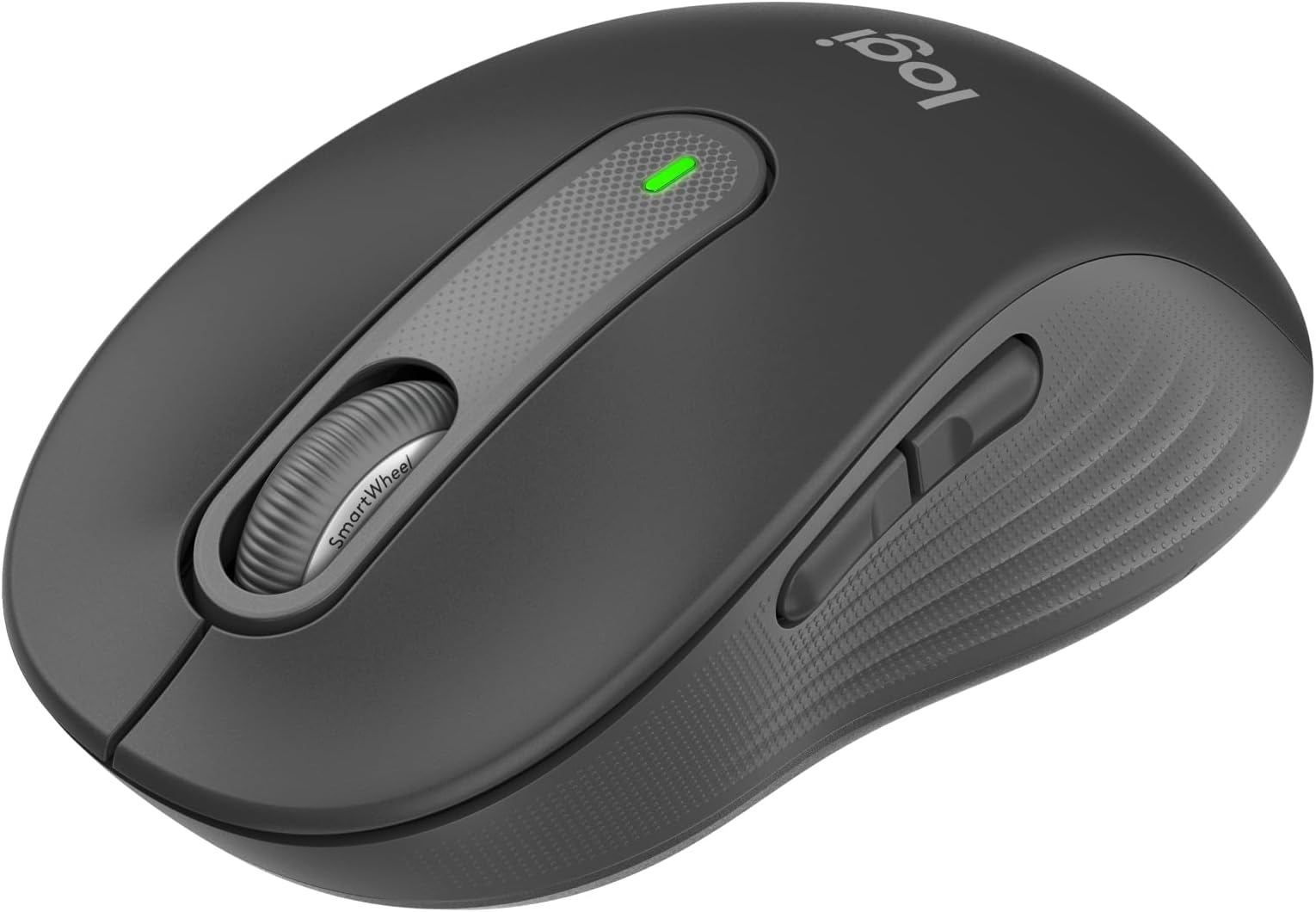


| ASIN | B07W6G822T |
| Antenna Location | Office |
| Are Batteries Included? | Yes |
| Are Batteries Required | Yes |
| Battery Average Life | 2 years |
| Best Sellers Rank | 264 in Computers & Accessories ( See Top 100 in Computers & Accessories ) 17 in Mice |
| Box Contents | Single AA battery, Logi Bolt USB receiver (if connected via Bolt) |
| Brand Name | Logitech |
| Button Quantity | 3 |
| Colour | Grey |
| Compatible Devices | Android devices, Chromebook, Mac, Personal Computer, iPad |
| Country of Origin | China |
| Customer Reviews | 4.5 4.5 out of 5 stars (11,899) |
| EU Spare Part Availability Duration | 24 Months |
| Enclosure Material | Graphite, Rubber |
| Global Trade Identification Number | 05099206097223 |
| Hand Orientation | Ambidextrous |
| Hardware Platform | Chromebook, Mac, PC |
| Item Dimensions L x W | 10.7L x 6.1W centimetres |
| Item Type Name | Wireless Mouse |
| Item Weight | 101.2 Grams |
| Manufacturer | Logitech |
| Model Name | Signature M650 Wireless Mouse |
| Model Number | 910-006253 |
| Mouse Maximum Sensitivity | 3000 Dots per Inch |
| Movement Detection | Laser |
| Network Connectivity Technology | USB |
| Number of Batteries | 1 AA batteries required. (included) |
| Operating System | Android™ 8.0 or later, Chrome OS, Linux, Windows® 10, 11 or later, iPadOS 13.4 or later, macOS® 10.10 or later |
| Pattern | Textured |
| Power Source | Battery Powered |
| Product Features | Soundless, Wireless |
| Product Finish Type | Matte |
| Product Warranty | 2 year manufacturer |
| Range | 3000 dots_per_inch |
| Style Name | Right Handed |
| Theme | Panda |
| Unit Count | 1.0 Count |
T**A
Well built, great size for small hands, very quiet, great quality
This tiny white rodent landed on my doorstep this morning! I spent some time weighing this up with the others in the logitech stable: the mx anywhere and the logitech mx vertical. I dismissed the vertical after considering that it might probably feel too odd (it needs adjustment, and I am at the age where it gets increasingly more difficult to adjust to new tech). So it as a toss up between this mouse and the logitech mx anywhere. Now I have a logitech mx mini keyboard which is superb. Great quality keys which is made of a premium feel plastic - very solid and matt to the touch, and a metal body - basically solid. So I was tempted by the logitech mx mouse too. But read good things about the signature. Also it's half the price of the mx, so I plumped for that in colours not dissimilar to that of my mx keyboard. It feels satisfyingly weighty and solid in the hand. Great size for small hands like mind. Very smooth fast scrolling and yes, they didn't lie - very very quiet clicks and scrolls. (I was fed up with my last non-logitech mouse which squeaked like real mice). If you want a really quiet mouse, this does the trick. Set up was instantaneous - no messing about. I like how you can store that little connector thingy (I am not techie) within the casing of the mouse so if I need to take it into the office, I know I can store it away with little fear of losing it. But what I like best is actually how it feels - premium matt plastic casing and textured rubberised sides to make it easier to grip, plus just the solidity and weight of the feel of the mouse. I work almost all day at my computer, and I have been very careful trying to buy the best versions of accessories recently. This mouse fits the bill - if you are someone like me: someone who works all day at the computer, someone who is not a techie/graphic designer/gamer type user but a heavy user nonetheless, someone who isn't techie and just wants a good quality accessory because you appreciate good work tools (so I have a top of the range premium business laptop, buy moleskine notebooks, use premium fountain pens, anglepoise desk lamps - that sort of quality). This mouse is perfect for my needs.
B**I
A clever mouse
Pros: Good for larger hands, like mine. Good weight for work and casual gaming Very responsive and silent buttons Nice touch High quality scroll wheel with 2x speed function Enough functions for most Can be further configured from Logitech Software Easy connection with Bluetooth or dedicated wireless dongle. (can be connected to 2 different devices this way and can be switched between the 2 with a button) Very good price, especially with the current discount Cons: Mechanicall nothing so far Software - Logitech wants me to install yet another software (Logitech Options +) to control this device, thought the other Logitech devices (RGB keyboard, gaming mouse, microphone, headset) use another software (Logitech G). I am sure it makes sense for the developers, but none of these softwares are flawless and I do not like to increase the number of otherwise unnecessary apps. Luckily the mouse works well without the control app.
T**L
The essence of a well made mouse
A truely well made and solid mouse. There are others which cost more, but this one is a great model for the price point, features, silent yet noticeable clicks, versatility and ease of setup. I've been through a fair few mouse offerings from Logitech: basic & gamer. But this one has been by far the most well received that I've even bought one for the home desktop and another for the office. There are two offerings a large and this a small. The large have been employed for the desktops, and the small as a more travel size to accompany the laptop. There are sufficient buttons to ease web navigation, and a smart wheel that really does help when trying to scroll down that endless thread of an email! When coupled with a Logibolt, and an MX keyboard they are a highly portable, comfortable & consistent pair.
N**E
The M650 mouse is a good 'daily driver'
I have used this mouse on a daily basis, mostly for a full working day, for about the last 15 months. Tasks are mostly general office productivity-type. I am left-handed, but my hands are small, so the smaller version was preferred to the larger version which comes in both left- and right-handed variants. As a result the two small extra function buttons, being placed on the left, are not usable by me. But that's OK - I can just ignore them. The mouse has been connected via the logi bolt receiver and also via bluetooth with several laptops and also an ipad. Over the years I have purchased a number of mice, mostly from Logitech, both cheaper and more expensive, and the M650 is one of two that I retain. I am quite selective, and I would buy the M650 again. Pros: - good size, and comfort. - reasonable weight (~95g) in the hand: not too heavy, not too light. - reliable connectivity in both bolt and BT modes. - battery life seems excellent. I think that I have replaced the battery once in 15 months. Cons: - switching connectivity modes is less convenient than others eg the MX Anywhere 2. - not cheap (£30 at time of purchase), but still good value IMO, given the positives esp comfort.
D**B
Great Value Mouse
Very good mouse, espically for the price. Bought for use primarily with a MacBook Air M4 and works flawlessly. Makes me wonder if the extra money I spent on my Logitech MX Master 3S was worth it... Pros -Great size - fits my large hands well -Good responsivity/accuracy -Easy to connect with both bluetooth and included wireless receiver -Good weight - easy to tranport in a bag without noticing -Handy side buttons, my primary reason for purchase as I liked them on my other mouse (MX Master 3S) Cons -None
P**M
Väldigt nöjd! Snabb leverans som vanligt! 👍🏻
B**K
4 aylık kullanımdan sonra yorum yapıyorum. Bu fareyi aldığımdan beri iş ortamında sıklıkla fareyi kullanmaya başladım, zira tüm gün touchpad ile çaışmak hem bilek hem de kolumu yoruyordu. Logi Options uygulaması ile tüm tuşların kişiselleştirilebilir olması, fare hızı ve scroll hızı ayarları olması güzel. Elbette bluetooth ile kullanıldığında polling rate farkı hissediliyor. İçinde gelen Logi Bolt adaptörü biraz daha yardımcı olsa da üzerinde USB-A bulunmayan Macbookta kullanım için her seferinde Hub bağlamak lazım. iPad ile kullanımı kolay ve iPadOS26 ile iPad’i fiziksel klavyesiz bir Macbook gibi hissettiriyor, oldukça kullanışlı. Normalde fareleri Claw grip kullanıyordum, fakat L modelini alıp Palm griple kullandığımda elimin gün içinde daha az yorulduğunu farkettim. Büyük boyunu (L) bu yüzden öneririm. Fiyatı 2-3 katı olan diğer alternatiflerine göre, çoklu makro kullanımı ve cihazlar arası kullanıma ihtiyacı olmayanlar için daha ideal bir model bence M650.
S**F
Most convenient and sturdy mouse, Great options ad functions in relation to model and price, especially with Logitech Options+ SW! Just remember the "L" letter in the mouse description is for Large Hands, while it could come with smaller size. Remember to pick the right size before ordering the mouse. Other than that, it is a well-designed and almost silent-clicks mouse, convenient with business use for large hands. Perfectly Suits my day-to-day needs.
G**S
Super souris, très très silencieuse absolument ce que je recherchais
C**N
Utilisation pour télétravail. Souris très silencieuse est agréable a la prise prise en main. La molette est également ultra silencieuse et c'est agréable :)
Trustpilot
Hace 5 días
Hace 1 semana