We remain fully operational. Our teams are working around the clock to ensure your deliveries continue safely.

Descargar la aplicación


Servicios al cliente
Sobre nosotros
Copyright © 2025 Desertcart Holdings Limited
Descargar la aplicación

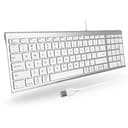
⌨️ Elevate your desk game with style and precision — no compromises, just pure productivity.
The Macally Wired Keyboard is a sleek, space-saving 98-key USB-A keyboard designed for Mac and Windows users. Featuring a unique 2-zone layout, quiet scissor switches, and a premium silver aluminum finish, it offers a plug-and-play wired connection with 16 shortcut keys to enhance productivity. Backed by lifetime support and a 2-year warranty, it’s the perfect stylish upgrade for professionals seeking efficiency and elegance.


| ASIN | B08S37RRL4 |
| Additional Features | Compatible Apple Keyboard with Numeric Keypad, Mac Keyboard Wired, Macbook Keyboard, Space Saving Wired Keyboard for Mac and Windows, iMac Keyboard, Mac Mini Keyboard |
| Antenna Location | Office |
| Brand | Macally |
| Built-In Media | Wired Keyboard, User Guide |
| Button Quantity | 98 |
| Color | Silver Aluminum |
| Compatible Devices | Laptop, PC |
| Connectivity Technology | USB-A |
| Customer Reviews | 4.4 4.4 out of 5 stars (323) |
| Enclosure Material | Stainless Steel |
| Generation | Wired Keyboard |
| Hand Orientation | Ambidextrous |
| Is Electric | Yes |
| Item Dimensions L x W x H | 36.8L x 12.4W x 1.5H centimeters |
| Item Weight | 12.7 Ounces |
| Keyboard Backlighting Color Support | Single Color |
| Keyboard Description | USB Wired Keyboard for Mac and Windows |
| Keyboard Layout | QWERTY |
| Language | English |
| Manufacturer | Macally |
| Mechanical Keyboard Switch Model | scissor |
| Model Name | ACEKEY2MA |
| Model Number | ACEKEY2MA |
| Number of Keys | 98 |
| Number of Sections | 1 |
| Power Source | Wired |
| Style Name | Wired Keyboard for Mac and Windows |
| Switch Type | Mechanical |
| UPC | 701107499802 |
| Unit Count | 1 Count |
| Water Resistance Level | Not Water Resistant |
イ**ト
Windowsに繋げたいと思って気軽に購入したら、日本語変換ができなくて最初大変でした。 設定を変えたらスムーズに使用でき、キーの感触は指への負担も少なく快適です。 同じような苦労をされる方がいらっしゃるかはわかりませんが、念のため下記に設定変更方法を残します。 Windowsでの設定方法: 1:設定アプリを開く:「Windows」キー + 「I」キーで設定アプリを開きます。 2:時刻と言語を選択:「時刻と言語」をクリックします。 3:言語と地域を選択:「言語と地域」をクリックします。 4:日本語のオプションを選択:日本語の項目から「…」をクリックし、「言語のオプション」を選択します。 5:Microsoft IMEを選択:Microsoft IMEの項目から「キーボードオプション」を選択します。 6:キーの割り当てを有効化:「キーの割り当て」が無効になっている場合は、有効に変更します。 7:Ctrl + SpaceにIME-オン/オフを割り当てる:「キーの割り当て」画面で、「Ctrl + Space」の割り当てを「IME-オン/オフ」に設定します。
L**Y
I honestly like this Macally Wired Keyboard for Mac better than Apple’s own keyboard. The keys feel smooth and responsive, with just the right amount of feedback when typing. I love that it has a full numeric keypad , super helpful for work and everyday use. It connected instantly, no setup needed, and the build feels solid and high-quality. For the price, this keyboard is such a great find reliable, comfortable, and stylish. Definitely recommend it to anyone looking for a better alternative to the Apple keyboard!
N**Z
El teclado es muy similar al de apple, es silencioso, y suave, sin embargo, las teclas de Pgup y Pgdn se quedan pegadas y de repente mueve los elementos o el cursor sin que uno les de push.
S**G
Excellent keyboard
太**光
Macにも兼用出来るのでキーの位置にズレはありますが、慣れれば問題なくしようできました。
Trustpilot
Hace 2 semanas
Hace 3 días