We remain fully operational. Our teams are working around the clock to ensure your deliveries continue safely.

Descargar la aplicación


Servicios al cliente
Sobre nosotros
Copyright © 2025 Desertcart Holdings Limited
Descargar la aplicación
Buy anything from 5,000+ international stores. One checkout price. No surprise fees. Join 2M+ shoppers on Desertcart.
Desertcart purchases this item on your behalf and handles shipping, customs, and support to Mexico.
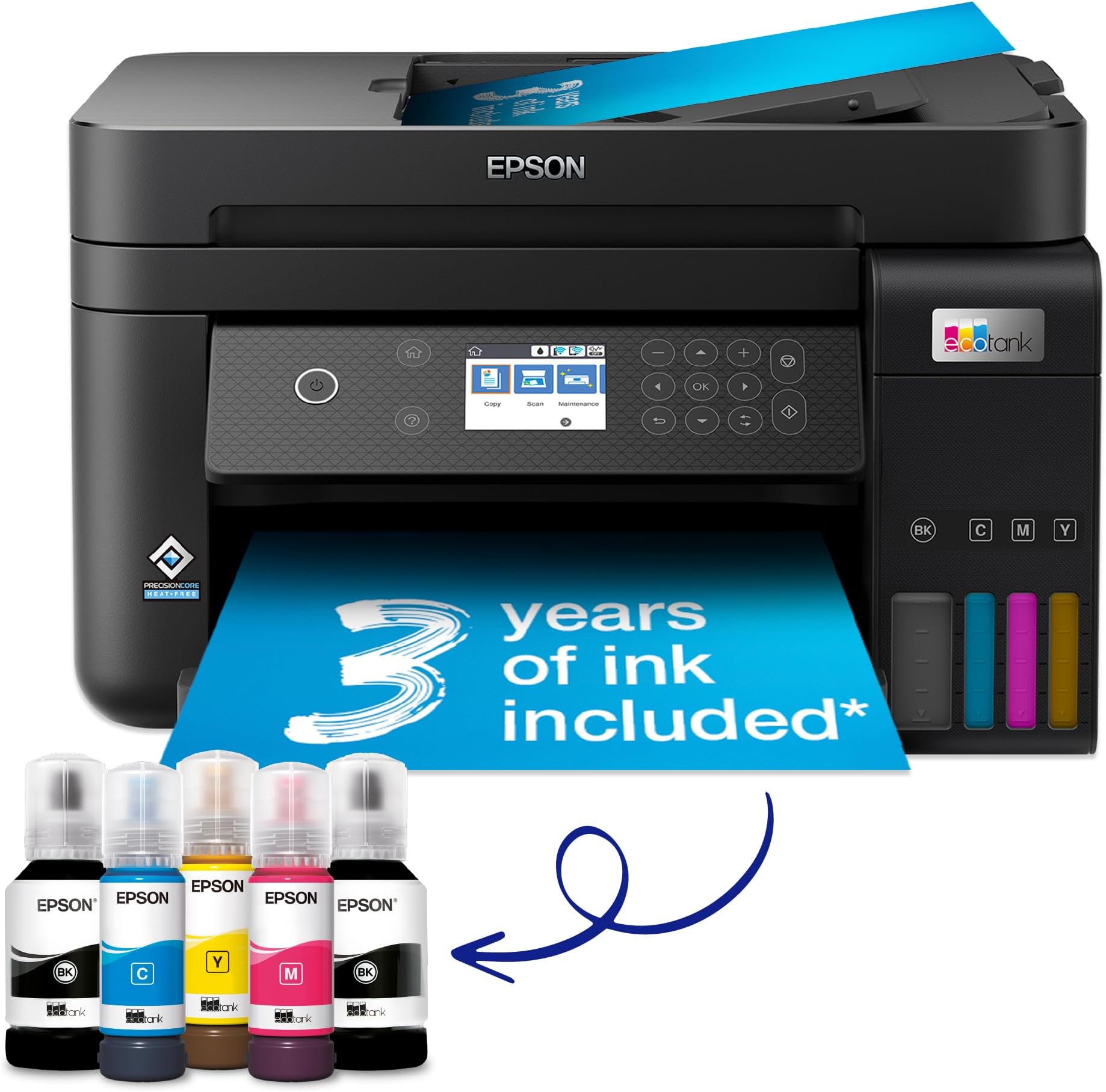
💼 Print smarter, save bigger, and stay connected—your office’s new MVP.
The Epson EcoTank ET-3850 is a compact all-in-one A4 printer designed for home and small office use, featuring ultra-high capacity ink tanks that provide up to 3 years of ink and save up to 90% on printing costs. It supports wireless and Ethernet connectivity, mobile app control, automatic double-sided printing, and a 30-page document feeder, delivering professional-quality prints at speeds up to 15.5 pages per minute.
| ASIN | B09GL13VHV |
| Additional Printer Functions | All In One |
| B&W Pages per Minute | 33 |
| Best Sellers Rank | #1,962 in Computers ( See Top 100 in Computers ) #5 in Ink Tank Printers |
| Brand | Epson |
| Built-In Media | Ink bottles, extra black ink bottle, LCD screen, paper tray, power cord, instruction manual |
| Color | Black |
| Color Depth | 24 bpp |
| Color Pages per Minute | 20 ppm |
| Compatible Cartridge | Epson ink cartridges for model ET-3850 |
| Compatible Devices | Smartphones |
| Control Method | App |
| Controller Type | Android |
| Customer Reviews | 4.2 4.2 out of 5 stars (328) |
| Display Type | LCD |
| Dual-sided printing | Yes |
| Duplex | Automatic |
| EU Spare Part Availability Duration | 3 Years |
| Global Trade Identification Number | 08715946683775 |
| Hardware Interface | Ethernet |
| Ink Color | Black |
| Item Dimensions D x W x H | 34.7D x 37.5W x 23.1H centimeters |
| Item Type Name | Inkjet Printer |
| Item Weight | 6.7 Kilograms |
| Manufacturer | Epson |
| Maximum Copies Per Run | [Estimate] Varias centenas |
| Maximum Copy Resolution Black and White | 2000 dpi |
| Maximum Copy Resolution Color | 4800 x 1200 dpi |
| Maximum Copy Speed Black and White | 33 ppm |
| Maximum Media Size | A4 |
| Maximum Print Resolution Black and White | 600 dpi |
| Maximum Sheet Capacity | 250 |
| Maximum print Resolution Color | 4800 x 1200 |
| Model Name | EcoTank ET-3850 |
| Model Number | C11CJ61401 |
| Model Series | ET(EcoTank) |
| Number of Drivers | 3 |
| Number of Ethernet Ports | 1 |
| Number of Trays | 1 |
| Other Special Features of the Product | Auto-Duplex, High Yield, Mobile Printing Capability, Compatible with Mobile Phone & PC, |
| Output sheet capacity | 250 |
| Paper Size | A4 centimeters |
| Power Consumption | 12 Watts |
| Print media | Glossy photo paper |
| Printer Connectivity Type | Wi-Fi |
| Printer Output Type | Colour |
| Printer Type | Inkjet |
| Processor Count | 1 |
| Resolution | 4800 x 1200 |
| Scanner Type | Flatbed |
| Series Number | 38 |
| Specific Uses For Product | Home printing, Home office printing, Photo printing, Document scanning |
| Unit Count | 1 Count |
| Warranty Description | 12 months Carry in, 50,000 pages |
R**L
... gerne wieder und habe das Gerrät immer noch und läuft ohne Klagen. Benutze es ca. 1 x im Monat
J**G
My old HP Multi-function printer was ruined during a house move so I was looking for a quality replacement. I have alway bought HP as I like the software and quality of the kit but was fed up with the cost of the ink and print head cleaning. After much research, I saw the Epson ink tank printers scoring highly in a number of independent reviews. It seemed to me that the initial cost of the machine was off-set by the low cost of ink over the long-term. The features of the ET3850 were exactly what I was looking for; quality printing (including auto-duplex), scanning and wifi printing from mobile devices. It was easy to set up and the ink filling process was easy and spill-free using the foolproof fittings which differed for each colour to avoid mistakes. Connecting it to my wifi network was also easy although it did take a little time to update its firmware early in the process. I have 2 minor niggles when comparing it with the various HP models I’ve owned: 1) the software is not as user friendly or as comprehensive, but it works, 2) pressing the off button does not switch the machine off, you have to then use the menu buttons to change an option and then confirm with the ok button before it switches off. Although some might find this a benefit, I find it annoying that I have to press 3 different buttons to switch it off. On the plus side, as well as good quality printing, the machine seems to be able to print decent quality when started up even when it hasn’t been used for a while. I found that the HPs often required head cleaning and test printing which wasted paper, time and expensive ink! So far, I haven’t had to do this at all. Overall, I think this model is good value when looked at over a two or three year period and hope it last much longer than that. Having owned and used it for a few months now, I would buy it again.
E**C
Très bonne qualité d'impression tant sur du papier ordinaire ou du papier glacé photo. Il faut juste s'assurer de bien régler les paramètres. Le recto verso fonctionne bien avec un temps de séchage entre les couches. Le scanner n'est pas très rapide mais très correct. Le logiciel de scan ne permet pas de réglages avancés mais il fait le travail. Fonction copie autonome bien pratique et plus vite disponible qu'une imprimante laser.
S**N
Attention produit venant d'angleterre et est livré avec cordon d'alimentation anglais Prevoir un autre cable ou un adaptateur
G**F
The setup is really clunky, Epson really should able to do better. They recommend downloading an App which I wouldn't bother doing again. My Mac found the printer straight away, the Epson software couldn't detect the printer, then couldn't, then could. Besides this annoyance the printer is excellent, performs really well. Ink refill is seamless and no mess.
Trustpilot
Hace 1 mes
Hace 2 meses