We remain fully operational. Our teams are working around the clock to ensure your deliveries continue safely.

Descargar la aplicación


Servicios al cliente
Sobre nosotros
Copyright © 2025 Desertcart Holdings Limited
Descargar la aplicación

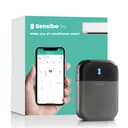
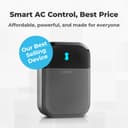
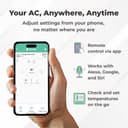
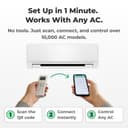
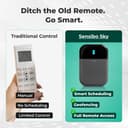

❄️ Stay cool, save green, and never miss a beat with Sensibo Sky!
Sensibo Sky is a compact, WiFi-enabled smart controller that upgrades any remote-controlled air conditioner or heat pump into an energy-efficient, voice-activated climate system. Featuring dual temperature and humidity sensors, geofencing, and a 7-day scheduler, it delivers personalized comfort while cutting cooling costs by up to 40%. Compatible with Google Assistant, Alexa, and Siri, it offers effortless DIY installation and remote control via mobile and desktop apps, making it the ultimate smart home HVAC upgrade.


| ASIN | B01MU2YSR4 |
| Additional Features | Portable,Eco Friendly,Energy Efficient,Lightweight,Wifi |
| Air Conditioner Application | Air Conditioner |
| BEE Star Rating | 3 Star |
| Best Sellers Rank | #49,959 in Tools & Home Improvement ( See Top 100 in Tools & Home Improvement ) #60 in Home Automation Hubs & Controllers |
| Brand Name | Sensibo |
| Cable Length | 1 Meters |
| Color | Gray |
| Compressor Type | rotary_scroll |
| Control Method | App, Remote, Voice |
| Controller Type | App Control |
| Core Material | Copper |
| Customer Reviews | 4.2 4.2 out of 5 stars (5,936) |
| Efficiency | [ENHANCES EFFICIENCY] |
| Form Factor | Portable |
| Global Trade Identification Number | 07290016037098 |
| Installation Type | Split System |
| Inverter Type | Has Inverter |
| Is Electric | Yes |
| Is Outdoor Unit Required | No |
| Is Product Cordless | No |
| Item Dimensions D x W x H | 2.17"D x 3.23"W x 0.67"H |
| Item Weight | 2.4 ounces |
| Manufacturer | Sensibo |
| Model Name | Sensibo Sky |
| Model Number | SEN-SKY-01 |
| Noise | 1 Decibels |
| Number Of Circuits | 1 |
| Power Source | Corded Electric |
| Seasonal Energy Efficiency Ratio (SEER) | 15 |
| Start Year | 2018 |
| Unit Count | 1 Count |
| Voltage | 140 |
| Warranty Type | Lifetime |
| Wattage | 1 watts |
| Window Opening Maximum Height | 0.67 Inches |
| Window Opening Maximum Width | 3 Inches |
| Window Opening Minimum Height | 0.67 Inches |
| Window Opening Minimum Width | 3.23 Inches |
M**E
Simple and effective
So I've had this for about 3 years using it with a window air conditioner can't tell you the brand off that my head it works quite well occasionally the IR broadcast doesn't make it to the air conditioner but that's very few and far between and tends to be when adjusting the volume up or down so it might be off by a degree on occasion it's easy to fix just switch it back to Fan adjust up or down so that the app matches the device and then continue using schedules work great climate react Works quite well I have the issue where my window air conditioner will let it get quite hot in my room if it's cooler outside but I'm allergic to cut grass so sometimes I still need the air conditioner on even when it's nice out so the climate react can help prevent it from getting overly hot in the room when it's set to auto on the air conditioner which is a lifesaver sometimes on top of that if you do pay for the subscription there are a lot of very interesting and potentially useful add-ons I personally I don't use it but I have in the past and since I used it and they have added a lot more capability however I'm not sure how many of them would actually function with my air conditioner which is pretty old it's 10 years old or so but basically as long as it has an infrared receiver this device will work with any air conditioner maybe even heating unit. It'll also keep track of how long the device has been on and when the built-in filter to your air conditioner should be checked which is quite nice to just get a notification on the phone because when my air conditioner it's a little orange light that unless you're standing right in front of it you're not going to notice at least I don't. One last thing I don't have a Lexus I can't State how well it works with that however Google Assistant Works quite well the only issue I have is that you can only set it with Google Assistant to heat cool and fan you can't set it to the auto setting and I don't know if that's the restriction from my air conditioner or if it's because of Google but to be honest it's not the end of the world either and if I need to turn it on remotely having it set to cool is fine and then when I get home or when I can pull out my phone or something I can adjust it.
S**N
Quick setup with a google quirk.
Quick setup, works like a champ. Actually much smaller than I expected! Mine is on a perpendicular wall, 20 feet away from the unit. IR blasters seem powerful and multi-directional. Note that if you are setting up with google, make your account with a password rather than password-free. If you do it wrong, like I did, you can add a password by using “forgot password “ option on sign in.
M**N
product works, but company is not truthful
First, the good news: The Sensibo Sky product works pretty well, at least if you own a recently-purchased Mitsubishi mini-split AC system. Since that is the only AC system that I've used the Sensibo Sky with, I can't say how well the Sensibo Sky works with any of the myriad other AC systems that are out there. One other bit of good news: If you send the Sensibo support folks a question, they will respond promptly with good, clear English. Now, the bad news: The Sensibo support folks may respond to your question with complete lies. This puts you, the buyer, in a tenuous situation at best. I have a Mitsubishi minisplit system, with four indoor "head" units. I want to be able to remotely control these units. That is exactly what the Sensibo Sky product (and other products, such as the Cielo Breeze) is designed to do. The Sensibo product consists of two parts: A small indoor device that you near your AC unit, and an app that goes on your phone. When you setup each indoor device, you use your existing AC remote control to "teach" it what kind of AC you have. Once taught, the indoor device will send infrared (IR) signals to your AC system. For example, if you want to turn one of your AC systems on, you open your Sensibo app on your phone, click on whichever AC unit you want to control (you need one Sensibo Sky unit per AC system), then click the "on" button on your app. This sends a signal through the Internet to the relevant Sensibo Sky device, which sends an IR signal to your AC system to turn it on. In the same way, you can set the temperature, fan speed, etc. All this works pretty well, as long as there is no power outage where your AC systems are located. A power outage is one of the most common ways for the Sensibo unit to become out-of-sync with your AC system. If your AC system was on when the power outage happened, the Sensibo app will think your AC system is still on when the power returns. But it won't be. Your AC system will be off. When you look at the Sensibo app on your phone, it will say the system is on. When you click on the app to turn the AC system off, the result can be unpredictable. Before I purchased the Sensibo Sky unit, I asked Sensibo support about this little problem, and they told me that they have solved this problem with a feature that will automatically re-sync the Sensibo unit with your AC. That's not true, and they know it. What the "sync" feature does is it allows you to manually tell the Sensibo app which state your AC is in .... but you have to be physically there, next to your AC system, to know this! After I bought the unit, I saw how the sync feature actually works, and I told the Sensibo Support folks that they had mislead me. I asked them if there was anything that could be done to ensure that the Sensibo Sky unit in sync stays with the AC system. They told me no. Again, this was a lie. The actual truth is that, if you own a modern Mitsubishi mini-split system, you can ensure that the Sensibo system is properly synchronized with your Mitsubishi system simply by sending two consecutive on/off commands via the Sensibo app. For example, suppose the Sensibo app says that your system is on. That might or might not be true -- you have no way of knowing if you are not physically present. You simply use the Sensibo app to click "off" then click "on". If the Mitsubishi system was already off, the first command will be ignored, then the second command will turn the system on again. After I discovered this (via extensive testing that I did), I pointed this out to the Sensibo support folks. They responded that they already knew this to be the case! Why they misled me twice in a row is ... beyond me. If you don't have a modern Mitsubishi mini-split system, the trick I described above might not work for you. It's all dependent on how the remote controls work for your specific system. Now that I know how this product works, I'm quite happy with it. My particular use-case is a vacation rental. Using my Sensibo Sky app, I can remotely turn the AC units on before my renters arrive so that my unit is nice and cool for them when they arrive. And after my renters leave, I can ensure that the AC is turned off so that I don't waste money cooling an empty rental unit. The same thing applies during the winter. The Sensibo company sells a bunch of other features that you need to pay for ($/month), but I am not using any of them, and I never intend to. As long as the Sensibo company stays in business and supports this app, I'll be happy.
D**E
Integrates with my Google Home!
Amazing device! Integrated my Minisplit with my Google home in less than 5 minutes! Robust options.
L**S
Does what it says
This product works as advertised, but installation should be very clear that it needs to be within a few feet of the unit to program properly.
D**H
Nightmare to reset
Update one week later. not worth buying since my power supply goes out often (being on an island) and I have to rest the thing each time by physically inserting a paper clip to press a button on its side. You can’t use the app to reset it either. I run short term rentals on an island (explains the recurring power outages) and this was meant to be for turning the aircon on and off before a guest arrives or after they leave. Since it keeps getting disconnected from the network, it’s now become pointless. I’ve just had a guest leave the aircon on for 13 hours straight, while they went out for the day. I can’t do anything about it since I can’t go into the house (since they’re renting it). - - - Few days after installing: Nightmare to reset once your WiFi network is disrupted. Unable to get it back on any network. Taking hours so far.
J**J
Some limitations initially, but quickly worked it out with their awesome customer service.
Update: I should have updated this some time ago but been putting it off for too long. I initially the device had some limitations for my preferred use, as can be read in my initial review below. However, I contacted Sensibo customer support and they were able to set up a date and time with me to go over the various missing functions. A few days later, the device worked the way I wanted, with all the functions of my Daikin mini-split the way I wanted them to work. What can I say, the device now works the way I wanted. Given it some thought, and it kind of makes sense they cannot have detailed settings for the hundreds (thousands?) of different AC units in the world, right out of the box, but the fact that they're more than willing to work with you to get the device working the way you want, makes up for it all in my opinion, hence the updated 5 stars from originally 4. I'm about to order a second device for another AC unit, they definitely made me a happy customer! :) === Original review: After the installation of a new "dumb" mini split A/C unit, I wanted something that I could use to make the unit more "smart", and after having compared several devices, I felt Sensibo was the one coming closest to what I wanted. Unfortunately, it is not without some dislikes. Let me start by saying that the install was very simple. You place the device somewhere in range of the infrared eye of the A/C unit, plug the device in, make sure you have the app downloaded, and then follow the setup instructions on your app. In my case it started with simply turning the A/C unit on and off while aimed at the Sensibo device, and the Sensibo registered what remote I had. At this point things started to work, almost flawlessly. I'm saying "almost flawlessly" because it had some hiccups. For some reason, when I started using the Climate React function (which basically uses either the actual temperature, feel temperature, or humidity levels to do something), it turned out it wasn't always working (meaning, the log said the device turned on or off, but it didn't actually do anything, no blue indicator light that it was transmitting, nothing). I contacted support, and while I received an answer that did not actually help me at the time, the device miraculously started working correctly. Another thing that did not work right away was, while the device did register the IR signals for my remote for the most basic functions, it did not actually see the other functions my remote and A/C unit has available. It only showed Cool, Dry, Fan, few fan levels and that was about it. My actual A/C unit, however, is capable of so much more. So I contacted support again (who, by the way, is the main reason they are getting four stars, and not just three), giving them my remote control's product number, and I received a quick reply back, telling me that they updated my Sensibo's settings and that I should log out and back into the app. Sure enough, much more functions became available for me to control. I like that I am able to have my A/C unit turn on and off automatically at a specific feel temperature setting through Climate React, which seems to be about right. My A/C unit is capable of doing this on it's own, but that does mean it has to stay on (it switches between cool and fan in that case), so the Sensibo makes it more efficient by using less electricity. Another thing I like is that it is hooked into the Google Homes, and can simply ask Google what temperature it is inside, ask it to turn the A/C on or off etc. One thing I don't like, and this is pretty major to me, as it makes me turn off Climate React at times and use the original A/C remote control instead, is that Sensibo is not capable of controlling my vertical and horizontal fan slats independently. My A/C unit is capable of 3D airflow (up/down/left/right), and while Sensibo is capable of doing that, it is unable to just do left/right or up/down by itself, while my A/C unit does have that capability. I personally don't like the fan slats going up/down, as it blows cold air straight onto us, so I like them to be in the most upper position (my A/C unit calls that the "comfort setting"), Sensibo isn't able to do this, and keeps setting the slats back to the middle position, meaning it blows air onto us. I also like to have my A/C unit automatically blow the air from left to right with the vertical slats, so the entire room gets cool air, but the Sensibo is again incapable of doing this by itself. Meaning I still end up using the original remote from time to time, making the Sensibo a bit obsolete. While I do recommend this product as it works, if I had a better understanding of it all in advance, I would probably not have purchased the Sensibo due to the limitations. The reason I am keeping it and wont be returning is simply because I hope they will update the software at some point, adding the missing features, or perhaps make it self-learning so we can add the missing features ourselves.
T**B
Unbelievably Frustrating
After over a decade on Amazon, this is my first ever review of a product. I have never dealt with a piece of tech this absolutely frustrating. When I initially received the unit, it would not connect to my WiFi, regardless of how many times I tried. I am using a 2.4GHz router, which this unit requires. After Googling some tips, I found their support page, which describes a process to manually connect the device. I tried about 20-30 times, spending 2 hours before it finally connected. Then, 2 weeks later, it suddenly stopped communicating with my A/C, so I had to reset it. Resetting required me to scan the QR code again. Where’s the QR code? It’s on the back of the device. Where’s the device? It’s stuck to my wall using the adhesive patch that came with it. I had to tear the thing off my wall, destroying the adhesive patch. I then spent another 2 hours trying everything to replicate the initial installation, but it just wouldn’t connect to my WiFi. I’ve never dealt with any device this frustrating. I’m not exaggerating. It’s unbelievable that, in 2024, I had to spend hours trying to get a piece of tech to simply connect to my WiFi. While the Sensibo was connected to my WiFi, it worked really well. The subscription is a complete waste, and the “AI” is laughable. Don’t waste your money. All you need is the On/Off option and the Timer. Every other “feature” is useless and a money grab. If you go to their support page, the most popular article is “How to manually connect your Sensibo to your WiFi.” It’s the very first thing you see. And it doesn’t even work. This is not a rare occurrence. After some research, I decided to go with the Cielo Breez Eco. It’s cheaper and connects to my WiFi immediately (shocker).
Trustpilot
Hace 2 semanas
Hace 2 meses