We remain fully operational. Our teams are working around the clock to ensure your deliveries continue safely.

Descargar la aplicación


Servicios al cliente
Sobre nosotros
Copyright © 2025 Desertcart Holdings Limited
Descargar la aplicación


📺 Elevate your screen game—wireless, seamless, and seriously 4K!
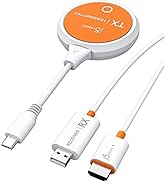
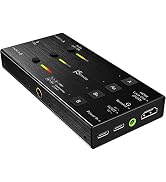
The j5create ScreenCast 4K Wireless Adapter (JVAW76) enables wireless mirroring and extending of screens from mobile phones, tablets, and laptops to TVs or monitors. Supporting AirPlay, Miracast, and Chromecast, it works across Windows, macOS, iOS, and Android devices. With up to 50 feet wireless range, 4K resolution support, customizable backgrounds, and PIN security for Miracast, it’s designed for professional and personal use in homes, offices, and travel. Its compact form factor and external antenna ensure strong, reliable connections without Wi-Fi dependency for Miracast.
















| ASIN | B09JG8QRZD |
| Best Sellers Rank | #7,534 in Electronics ( See Top 100 in Electronics ) #45 in Streaming Media Players |
| Brand | j5create |
| Color | White |
| Compatible Devices | Television |
| Connector Type | HDMI |
| Current Rating | 1 Amps |
| Customer Reviews | 4.0 4.0 out of 5 stars (168) |
| Item Dimensions | 0.43 x 1.26 x 3.74 inches |
| Item Weight | 0.17 Pounds |
| Manufacturer | j5create |
| Model Number | JVAW76 |
| Number of Items | 1 |
| Number of Ports | 1 |
| Package Quantity | 1 |
| Power Plug Type | No Plug |
| UPC | 847626005695 |
| Unit Count | 1.0 Count |
| Warranty Type | Limited |
D**P
Really happy with this
This is a great device. I have a somewhat older, lower cost TV with limited features. It was easy to setup and wirelessly connect my laptop to the TV. This allows me to display my photoshop work live and see it at the final size. Well worth the cost.
M**Y
Best wireless display adapter!
We needed to find an alternative for the Microsoft wireless display adapter, and we ended up finding an upgrade! We have multiple conference rooms with tvs at my work and some of the Window laptops would not connect to the Microsoft WDA. When Microsoft discontinued them, we found these and LOVE that you can cast Apple devices to it. And every Windows laptop has been able to cast effortlessly. Devices do not need to be connected to WiFi, which is an added bonus. All that needs to be done is connect to the TV and cast! We're in the process of replacing all of our Microsoft devices with these.
J**.
Easy setup
Have not used it a lot just yet, but it was easy to setup and connect to with laptop and iphone.
T**T
Great for Windows/Android but Unacceptable for macOS/iOS
I am an IT professional. I purchased this item as a possible solution to cast a to a TV so that you could easily mirror a desktop computer to a TV without having to run cables between them. It is pretty fantastic if your environment only has Windows and Android devices. You can easily add it to your wifi network and configure it from your computer. My favorite part was that it displayed the connection instructions on the TV so end users can easily be reminded what (very simple) steps need to be followed to mirror to the TV Unfortunately, the macOS and iOS options are unacceptable. In order to connect such a device, you have to disconnect form your current network and connect to the ad hoc network being broadcast by the j5create ScreenCast. Then you can use Airplay to mirror. So, unless you have a wired connection, you lose your connection to the internet. Additionally, the thought of having hundreds of end users needing to be trained on how to accomplish the goose, grain, and fox puzzle of connecting to this network but remembering to disconnect to avoid internet connectivity issues is the stuff of nightmares for people in my line of work. If you are blessed to be in a Windows only environment, this is a rock solid solution. But, I'm looking for an OS-agnostic single solution to deploy enterprise wide, so I must keep looking.
D**Z
goo
good
R**T
Cant believe they try to sell these.
Cant believe they try to sell these. The device has issues connecting with every device I tried (windows, android, and IOS). If and when you get it to connect there is nothing good. Image quality is very bad, there is a constant left to right "wave" that occurs as a sort of buffering along with image artifacts ranging from slightly noticeable to the entire screen flashing in random colored blocks. I bad image quality and glitches weren't enough the device also drops connection after a few minutes constantly. There was a firmware update but if anything, the update made the device worse.
J**M
Pricey but effective
This was a little more than I wanted to pay at the time, but it works flawlessly. Great way to hook any (essentially) device to a tv/monitor very quickly without running cables.
N**C
I can now use my computer with my TV.
The instructions were a little to be desired. The instructions said, "The Admin gateway will disconnect when the ScreenCast is connected to your wireless internet," but this one would not. I was unable to get my computer to connect with this unit, until my secretary showed me how to "cast" it to the unit (Windows & K). Now that I know how to cast it, it is working fine. The unit has an on & off switch on it so I can turn it off when I am not using it, but I have to remember to turn it back on when I want to use it. Overall, I like this unit.
P**.
Disappointing, had great hope for this , after trying to follow some differcult instructions and going back and forth with no luck, 1 hr of trying to set up , I gave up! And was quite expensive,
T**Y
Works great
B**P
Produkten fungerar inte tillfredsställande. Den tappar ofta kontakten med datorn. Efter att ha mailat tillverkar blev jag rådd att köpa en annan produkt då detta tydligen är ett kännt problem. Jag ville då att dom ska ta tillbaka produkten men jag måste vända mig till tillverkaren.
F**C
Très bien
B**Y
It was extremely easy to set works great no problem so far streaming no buffering problem
Trustpilot
Hace 1 mes
Hace 3 semanas