We remain fully operational. Our teams are working around the clock to ensure your deliveries continue safely.

Descargar la aplicación


Servicios al cliente
Sobre nosotros
Copyright © 2025 Desertcart Holdings Limited
Descargar la aplicación

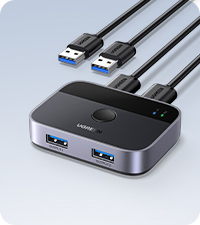
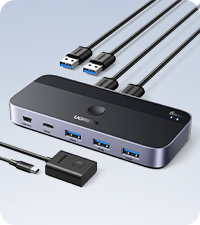
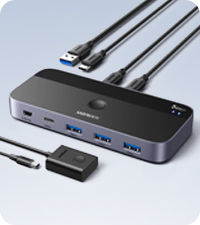
🔄 Switch Smarter, Work Faster: Your USB Hub for the Modern Multitasker
The UGREEN USB 3.0 Switch Selector lets two computers seamlessly share four USB devices with ultra-fast 5Gbps transfer speeds. Featuring a one-button switch and LED indicators, it supports high-power peripherals via an optional USB-C power port. Compatible with all major OS platforms and driver-free, this compact, plug-and-play device is designed to streamline your workspace and maximize productivity.




| ASIN | B01N6GD9JO |
| Actuator Type | Push Button |
| Best Sellers Rank | #16 in KVM Switches |
| Brand | UGREEN |
| Brand Name | UGREEN |
| Circuit Type | 2-way |
| Color | Black |
| Connectivity Protocol | Usb |
| Connector Type | Usb |
| Contact Material | Metal |
| Contact Type | Normally Open |
| Control Method | Touch |
| Current Rating | 2000 Milliamps |
| Customer Reviews | 4.2 out of 5 stars 4,545 Reviews |
| Global Trade Identification Number | 06957303837687 |
| Included Components | 1 x USB 3.0 Switch, 2 x 1.5m USB 3.0 Data Cable |
| International Protection Rating | IP55 |
| Item Dimensions | 4.09 x 2.01 x 0.59 inches |
| Item Weight | 150 Grams |
| Manufacturer | Ugreen Group Limited |
| Material Type | Acrylonitrile Butadiene Styrene |
| Model | 30768 |
| Mounting Type | Plug-In Mount |
| Number of Items | 1 |
| Number of Positions | 4 |
| Operating Voltage | 5 Volts |
| Operation Mode | ON-OFF-ON |
| Specification Met | Ip55 |
| Switch Type | Push Button |
| Terminal | Physical |
| Unit Count | 1.0 Count |
| Upper Temperature Rating | 80 Degrees Celsius |
| Warranty Description | 24 Months Warranty Service by UGREEN |
| Wattage | 10 watts |
A**H
Works almost perfectly for my needs
Update: 12/2/2021 I have been using this switch for nearly 3 years, switching between personal and work computers every single weekday, sometimes multiple times a day in that time, as well as moving it to a new desk setup, and it has worked and continues to work flawlessly. I am very pleased with this device and cannot recommend it highly enough, even if it were to fail tomorrow. Original Review: I set up a docking station for my work laptop at my home office desk where I also use my personal computer. I quickly realized that swapping USB adapters for mouse and keyboard every time I wanted to switch between work and personal computers was a hassle and unnecessary wear and tear on the ports. Once I also realized that the built-in DAC in my work laptop was garbage when I was trying to listen to some music on Pandora while I worked, I decided to look for a USB switch and came across this one. I am happy to report that the UGREEN USB 3.0 switch works almost perfectly with my setup. I have it connected to my personal computer and my laptop dock. Plugged into the front, I have my mouse adapter, wired keyboard, and a standalone DAC. I even used the 4th USB port for another keyboard adapter so that I can use my wireless keyboard from my couch when I want to switch the computer display over to my TV, and this works great as well. Pressing the button on top of the UGREEN unit quickly switches control from one computer to another with no delay. A small, non-intrusive blue LED indicates which computer is active. Mouse, keyboard, and the audio DAC all immediately work correctly on the selected computer. The only thing that I sometimes have issues with is if the computer I am switching to is asleep. In that case, moving the mouse or pushing a key on the keyboard does not wake up the computer like it normally would, and I have to press the power button on the computer to wake it up. I'm not sure why this happens but it seems like if the USB connection was not active when the computer was put to sleep, it does not make the connection until it is manually woken up. I have checked in my power settings to make sure that USB ports are not turned off when the computer is asleep, as this would be an obvious cause for the issue, but that is not the case. This is a minor inconvenience since my personal computer and dock power buttons are both easily accessible, but would be nice if it worked. The UGREEN unit is quite small and sits inconspicuously on my desk on top of my audio mixer. To keep the cables managed cleanly I do have to make a 180 degree bend with my two wired connections (keyboard and DAC) to route the cables back behind the switch. If I just had 4 USB adapters plugged in, that wouldn't be an issue. The only way to fix this would be to have all the ports on the back, and then the unit would have to be larger in size to accommodate 6 ports on one side instead of 4. The switch is very lightweight (which means stiff cords sometimes lift it so it doesn't sit flat) and has a cheap feeling plastic housing with no mounting provision if you wanted to attach it to something, but these are minor complaints as it works well enough. It appears you can power the switch with micro USB if your devices require a lot of power (if you were wanting to charge something via USB for example), but even with the backlit keyboard I am using, I do not have this switch connected to power, and it and my devices work just fine. Overall I am happy with the UGREEN USB 3.0 switch. If it were able to always make a connection with a computer that is asleep when switched to, I would be even happier, but that may not even be the fault of the switch. I definitely recommend this if you are looking to share inputs between two computers without having to plug and unplug cords, dongles and adapters.
A**S
Works well
Using this to switch my keyboard and usb input desk speakers from computer to computer. Sits behind my keyboard and is easy to access when i need it. Seems to be good for a basic switch
T**.
Good for office work, bad for gaming
ATTENTION GAMERS: This device will cut the polling rate of your USB devices down to 1/8th their set speed! 8000 Hz = 1000 Hz, 2000 Hz = 250Hz, 1000 Hz = an abysmal 125 Hz. This appallingly bad for gaming focused keyboards and mice. For everything else, I'll keep this short and sweet. It's plug and play, does everything you expect. With a click of a button you can switch your USB devices between two computers. Perfect for someone like me who shares their desk for both work and play. I've used it at work for 4 years without issue.
A**X
The best KVM I've ever used, hands down!
I own three of these already. That's how much I love them. These work really great. They can be powered by a microUSB cable plugged into a separate charging port, or they can be charged by the USB bus of either computer they're connected to. All three of mine are not connected to power via the microUSB port and they all work flawlessly. Here's the way I use all three of mine, in case anyone's wondering. I have 4 computers. Two Windows 10 PCs, and two Macbook Pros. Well one of the MBPs is a company machine. I have a UGREEN KVM on the left, one in the middle and one on the right. I'm a streamer so I have a 2 PC setup, a gaming PC and a stream PC. I'm left handed so I have the mouse on the left side of my keyboard, for gaming but I also use a Magic Trackpad on the right to control the Macs. I've always been ambidextrous with pointing devices but prefer the mouse on the left for gaming. The keyboard is plugged into the center KVM. The mouse (along with the center KVM) is plugged into the left KVM. The Magic Trackpad (along with the center KVM) is plugged into the right KVM. The left KVM switches the mouse and center KVM between the gaming and stream PC. The KVM on the right switches the Magic Trackpad and the center KVM between my home Macbook Pro and my company's Macbook Pro. The center KVM switches the keyboard between the PC side or the Mac side. So I can use the same keyboard with all four machines, and since the PC and Macs have their own dedicated pointed devices on different sides of the keyboard, this works very well for me. I have a Magic Keyboard I was using with the Macs when I had only two UGREEN KVMs but my desk was way too cluttered and it was a pain to find space for both keyboards. Now I only need one keyboard and I can easily control everything. These are great products. Even if I had a 4 computer KVM I would never be able to so easily switch between two the way I do now, but I suppose a possible con is that these only come in the 2 computer (and maybe 3 computer?) variety but not 4. Another thing that I'd like to see UGREEN improve on is putting the USB inputs on the back. Having them on the front is a bit of an eye sore and a pain, you can see in the pics the one on the right is lifted off the table at a diagonal angle due to the cables in the front being forced to turn around and go to the back, but it's not a big issue. Also one of the biggest headaches of not being allowed to work using my personal computer has been how to do it. For the longest time I was swapping out cables etc. with the Macs and occasionally glitches would arise, I'd have to reboot the computer, etc. It was a hassle. Now it's easy peasie, thanks to UGREEN! Thank you UGREEN!
C**H
Flawless
Plug and play. Works great. Easily switches between one Windows computer and another running Debian 13.
A**E
Causes my devices to intermittently fail
I really wanted to like this thing. I have two computers at work and wanted to be able to share a keyboard, mouse, headphones, and flash drive between the two. This device perfectly fit the bill and I excitedly ordered it. I really thought I would be soon showing off my new toy to the other office drones, proud of my mastery over desk space utility and efficiency. Today, I have finally completely given up on it and will be tossing it in the trash (aka, selling it on craigslist lol) The problem started with my mouse, a brand new Logitech G603. At first I thought there was an issue with the mouse because it would work perfectly, but then, without warning or reason, I would get ridiculous mouse lag. I am talking over a second between mouse movement and cursor movement. Removing and reinstalling the usb receiver would alleviate the issue temporarily, but it would always come back. I did a bunch of research into the problem and found that usb switches can be the problem. I plugged it directly into my tower and sure enough... no more issues. Onto the headphones. I use a bluetooth receiver to connect to my Beats Studio Wireless. I've had these headphones for about five years now and they have been absolutely rock solid, they connect to everything and never lose connection. I've loved and used them so much I recently replaced the ear cups because they were falling apart! Now, with plugging the BT USB receiver into this switch I would intermittently experience a background static. Again, reinstalling the receiver would temporarily alleviate the issue but it always comes back. Furthermore, it has started dropping the connection. At first I was worried my trusty beats were finally failing me. A distressing thought with replacements commanding a hefty price tag. But again, I've plugged the receiver directly into the tower and now experience clear audio with no drop outs. Now, to be fair (but not so fair I give a star back, lol), my keyboard, a Logitech G613 and my thumb drive, a sandisk whatever micro thingy, have had no issues. Also, it switches back and forth just fine. Maybe you think that deserves an extra star. Maybe there are inherent issues with USB switches that are technically impossible to overcome to work with the high bandwidth devices I am trying to use them with. Maybe... maybe. But I don't care. If all my devices don't switch from computer to computer, it's useless to me and therefore one star. Sorry not sorry. Ignore my review if you have a different use case or (gag) a low bandwidth mouse.
D**.
Fantastic!! NO Input Lag, NO back-feeding power, NO disconnects, Clean Power! Working with Mac & PC!
I did a lot of research and ordered a few units to test, this is the keeper! I had many questions prior to pulling the trigger and maybe my long-winded review will help someone else out there... SETUP: I am a gamer and a creative. I have my gaming PC hooked up to a 48" LG OLED. I recently added a Mac Mini to the setup as the "flagship" M2 Pro Mini FINALLY has HDMI 2.1 support (4K/120Hz @ 4.4.4. 10 Bit). I am also a custom mechanical keyboard collector FREAK. I didn't want to have to keep switching keyboard/mouse each time I swapped from my PC to my new Mac but I also wanted to make sure that a cheap USB switcher didn't fry my VERY expensive keyboards or computers! I did sooooo much research and landed on this unit and a 4 usb/4 PC StarTech unit. Well, I cancelled the StarTech as it was triple the cost, I only needed it for 2 PCs and this one works fantastic! I also asked around the keyboard community and people brought up this UGREEN unit time and time again... POWER: Because of my very expensive keyboard habit I was VERY worried about supplied voltages and of course back-feeding power. I used a USB multimeter to determine that there is ZERO power being back-fed to the computer's USB port when not in use. This is unfortunately a VERY common problem with some of the cheaper USB switchers/KVM. I tested power at the devices AND the lines going to each client and everything was flawless. HOWEVER I would HIGHLY recommend purchasing an external power supply!! I did notice that if it was bus powered that the 5v USB line would drop down a little too low for my taste and below USB spec. Probably wouldn't "harm" anything but one might experience wonky behavior from their devices, especially things like bright RGB keyboards, external hard drives, bus-powered audio equipment etc. I purchased this power brick unit - https://a.co/d/ienOG3u which I highly recommend! I also through a multimeter on the power supply and it passed with having very clean voltage. The power brick linked above is perfectly in spec with what the manufacturer suggests (5V 2A). With the external power supply connected the 5V line at the devices were now within USB spec (+/- .25v). With a full on RGB keyboard the 5V line was close to being on the money and was pulling about 400mA, right where it should be for USB 2.0 devices. NOTE: that the unit does NOT come with a micro USB cable OR power brick! MOUNTING & INCLUDED CABLES: I have a very large, deep desk and each machine is on separate sides of my 48" display. Another pet peeve of mine is cable management. I don't like having any cables visible on top of my desk or on the floor, with the exception of an artisan coiled keyboard cable ;). That being said running the USB cables included wouldn't reach with having the unit mounted under my desk. I mounted it with some 3M mounting tape (not included) but do note there is no mounting points on the unit so you're on your own there. I placed the unit on the right hand under side of my desk and can easily find the button due to the "ring" design of the button, it's very easy to find while not looking at. The only downside is that you can't see the status lights. I purchased some longer quality USB 3.0 cables and it was a non-issue on both PC and Mac! SWEET! To the PC I ran a 10' cable and to the Mac I used a 6'6" cable - remember the power brick is VERY important at this distance!! The unit comes with 2 x 1.5m cables (4.92 feet). Cons: - USB Devices will "Sleep" with the computers off but RGB keyboards etc will still be lit up if using the external power. This is highly dependent on the device and YMMV. - Once either client (PC/Mac) goes to sleep you can no longer wake them by jiggling the mouse/hitting keys on the keyboard IF it was switched to the alternate computer when it fell asleep. This is by design on both PC and Mac as a safety/security feature. It's no big deal though, you can just hit the power button to wake either type of machine and the USB devices come back alive again even at the login screen. - Switching is very fast when comparing to other units but switching is not perfectly instantaneous. It is usually about ~2 seconds. - Glossy Black Plastic = Finger Print Magnet! - Didn't include a power brick/cable That's it! Hope you enjoyed the review! I do want to mention that I have only tested this with mouse and keyboard... I have no need for external storage or swapping audio devices or other high powered USB devices... BUT I do highly recommend this unit and I ALWAYS update my reviews if stuff goes sideways. So far I'm very impressed and extremely happy I didn't have to go down a rabbit hole of dozens of KVM/USB Peripheral Switchers. BUY IT (and the power brick/cable)!
J**N
Doesn't work with all USB devices; Sometimes stops working
I want to give this 5 stars, and if I'd rated it on day 1, I would have given it 5/5. The best things are being able to use my favorite keyboard and mouse with both my work laptop (win 7 pro) and home laptop (win 10 home). I can also share a USB drive, which makes swapping data from one computer to the other very easy. Using a simple thumb drive, I get 64Gb of shared space. It's sooooo nice! After years of pining for this functionality, it's finally mine!!!! But... two days after using it on 2 laptops, I restarted one laptop, and then both laptops stopped recognizing the switch as a functioning USB device. After many restarts of both machines, plugging and unplugging, I figured out that when this happens, I have to unplug it from both machines and remove the thumb drive. Then I have to plug one laptop back in, then the thumb drive, and then the second laptop. THEN it starts working again. Now that I know this, I haven't had a problem since; however, remembering yet another workaround to make something simple work is frustrating. If I couldn't apply this workaround consistently (or avoid the issue by not restarting), it would have gotten a lower rating. The other issue came about a week after I was using the switch. I bought a 2TB backup SATA-to-USB drive. Because the switch does not have its own, non-USB power source out of the box (I think it's capable but doesn't come with the proper cable), I could not add the backup drive to the switch. I was very sad; this was supposed to help simplify a very large photo project. I want to give it 2.5 stars, but I'll up it to 3. I'm still bummed by the missing functionality an quirkiness of the switch, but I'm still using it, and it's still very handy to have only one keyboard and mouse on my small desk.
Trustpilot
Hace 1 mes
Hace 1 semana