We remain fully operational. Our teams are working around the clock to ensure your deliveries continue safely.

Descargar la aplicación


Servicios al cliente
Sobre nosotros
Copyright © 2025 Desertcart Holdings Limited
Descargar la aplicación




Buy anything from 5,000+ international stores. One checkout price. No surprise fees. Join 2M+ shoppers on Desertcart.
Desertcart purchases this item on your behalf and handles shipping, customs, and support to Mexico.
❄️ Stay Cool, Stay Ahead — Because Your CPU Deserves the Frostflow Edge
The ID-COOLING FROSTFLOW X 280 is a high-performance AIO liquid CPU cooler featuring a large 280mm radiator and dual 140mm PWM fans delivering up to 76.8 CFM airflow. It supports a wide range of Intel and AMD sockets, operates quietly at a maximum of 32.6 dB, and includes stylish white LED lighting on the pump, making it an ideal choice for professional-grade, visually striking PC builds.


| ASIN | B0BLS3372N |
| Best Sellers Rank | #28 in Water Cooling Systems |
| Brand | ID-COOLING |
| Brand Name | ID-COOLING |
| Compatible Devices | Desktop |
| Cooling Method | Water |
| Customer Reviews | 4.5 out of 5 stars 3,445 Reviews |
| Included Components | radiator, cooling fan, mounting hardware |
| Item Dimensions L x W x H | 4.72"L x 0.98"W x 4.72"H |
| Manufacturer | ID-COOLING |
| Material Type | Polycarbonate |
| Maximum Rotational Speed | 2500 RPM |
| Noise Level | 30 Decibels |
| Number of Items | 1 |
| Part Number | FROSTFLOW X 240 AZ |
| Power Connector Type | 2-Pin |
| Product Dimensions | 4.72"L x 0.98"W x 4.72"H |
| Unit Count | 1.0 Count |
| Voltage | 12 Volts |
| Wattage | 4.8 watts |
J**N
Cheap, powerful, and literally a breath of Fresh Air!
DEAR GAWD! my old piece is more than 7 years old, it's average temp was 195⁰F. And that was AFTER a new coat of thermal paste WITH medium graphics at 40 fps. Before that I was boiling water everytime I so much as had 2 apps open at once! I bought this after seeing a YouTube short only to realize how cheap these liquid coolers can be. I thought the average was $120! After getting everything in order and removing my stock cpu fan that came with the pre-built pc. I dam near cried from how beautiful it looked. For the first time in years, I got to witness Ultra Graphics at 70 fps (Satisfactory using a 200 hour save file) with discord and Spotify open at the same time, and the CPU never even touched 170⁰F! Here i was thinking I needed to spend $2,000 for a whole new PC, when all I needed was a $55 Liquid CPU Cooler! If you have an old tiny fan for a cpu cooler that came WITH the pc, I suggest you upgrade that by now. You can pick a fan tower or a liquid coolant ALL IN ONE like me, (all i had to do was plug in 2 cables) but hey thats up to you. All I'm saying is, with a Geforce RTX 3060, and a i5 10600kf. I have definitely wasted years of potential by inefficiently cooling my CPU from pure negligence. Please look into proper coolant systems, whether it be fans or liquid coolers. And during the installation i looked up videos and tutorials, as well as asking Google Gemini for help when it came to the BIOS settings. (Very well worth it) Just dont buy a pre-built and expect a tiny fan to keep up with your new graphics card. If you want a cheap but incredibly efficient way to cool down, even if your computer is kinda getting old, I highly recommend this. Do your research, and see if it's compatible. And don't be afraid to try. After all, You might be surprised how much of a difference $50 can make to a $1,500 PC
S**A
Great product
Good quality, easy installation, Keeps my cpu cool, fit literally perfect in my 280mm supported case, I had no problems getting it to work, looks good and is really quiet I recommend this and I would buy it again.
N**O
Great for the price.
You get what you pay for, however for me it was quite amazing, I had a AMD stock cooler that came with my CPU when I bought it (AMD RYZEN 5 5600X), The price of this cooler does it amazing justice. it's good for small cases, just not too small, it comes with mounting for AMD and INTEL sockets, the instructions are not entirely clear as they are mostly Russian (I can speak Russian, so it was fine for me), but it was straight forward enough as long as you went with it. As you'd expect from a A.I.O you will need a CPU fan header, (Or a pump header) but after you should be good, no it's not RGB yes it is only white L.E.Ds, looks good in an all-white gaming setup, it's quite strong actually it didn't feel cheap and felt really good in my hands, it keeps my CPU around 30C unlike that cooler fan... 70 idle.. which isn't horrible, but to be honest the month before that it was actually only idling at 60 so it was getting worse as time went on. Now to the point, should you buy this? Well... depends what you have in your PC, just because your computer isn't fully up to date on new cards and CPUs doesn't mean you have to buy a new CPU fan/AIO. However, if your PC is beginning to really overheat then maybe it would be good to get something better or even an AIO. now you're asking to get to the point about this one. Yes, in my opinion this is a great option! BUT it comes with downsides, for one. Yeah, it's an AIO, but I personally don't think it could handle up to date technology like I9 13900k or anything too much lower than that, could it keep it running at a decent idle temp, sure... just do your research and work with the size of your case. A.I.O must be handled with care and understand that you know what you are doing to install it correctly, sometimes it could not benefit you and you could lose a ram area as well using one. For this A.I.O It was small enough for a full 4 stick access... (Barely) as I don't use RGB ram sticks and use normal server type gaming ones, they are kept small with heatsinks on them that are small enough to work so I was happy I didn't have to buy anything smaller. so, no fret over it, just be careful of your ram size or if you have 2 sticks instead of 4 like I do (I have 64GB of ram) you should have no issue whatsoever, on another note. For this size, build, cooling, price and the way it looks, yes, it is worth buying, it's not like NZXT or like Artic cooling or some of the top brands, however for most situations it is a great choice. Now here is the main info. * It does not feel like it was built cheap * Great packaging! * Comes with Intel and AMD support * The instructions are half Russian so just be aware and use some common sense and understand what it shows you. * They include a warranty I believe... Though not 100% sure I sort of forgot! * No, I don't think it will work well with a small ITX or Micro-ATX motherboard, but you won't know until you try. * Fans included (Run about 1500 - 2000 RPM at max) Here are some cons to this. Like I said, it may not fit well with a small ITX or Micro-ATX motherboard case! be aware of that! It is only 2 fan AIO making it 240. It can keep your CPU cooled really well, just try not to force it into your case as it may not fit well with Ram sticks and may not be a good option, again I do not know about newer CPUs!!! ...it is sort of hard to install as is with all AIO fans... so just be aware of that too. Overall, I give it a 4.8/5 only because of the installation instructions and actually putting it in the computer were hard to get, it was easier cause I knew Russian but not everyone does which is why I must put it at 4.8/5, Producers of this product, if you are reading my Review, please make a full detailed instruction guide for English and Russian, That would be appreciated for all newer people to installing a A.I.O, Thank you for your time reading this, I hope it helped. Feel free to check out my Twitch (Givemesolace) I stream literally all the time! hope you will stop by. Have a great day thank you. And thank you for allowing me to make a detailed review ID-COOLING Appreciate it.
B**D
A no-frills, GREAT, budget 280mm AIO Liquid CPU Cooler
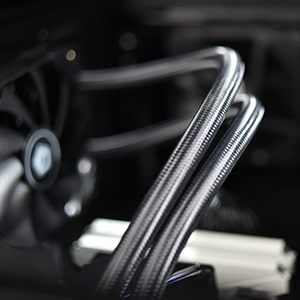
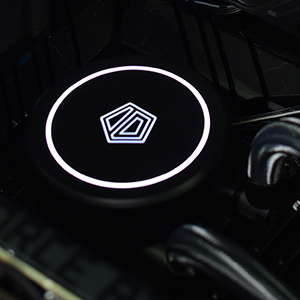
===TL;DR=== For the price point and the performance this cooler offers, I am beyond satisfied with my purchase and definitely recommend this cooler for anyone looking to get a no-frills, high performance, 280mm AIO without having to break the bank. ---------------------------------------------------------------------------------------------------------------------------------------- ===PROS=== ▶ Price ▷ Paid $49.99 (pre-tax) ▶ Performance ▷ 280mm Radiator vs a 240mm radiator = More surface area and larger fans that can run at lower RPMs to achieve the same level of cooling performance ▷ Works well being setup as a front intake push configuration ▷ It keeps my i7-11700K temperatures in check even under extreme synthetic load (230-250w sustained at 4.5GHz all core) with temps staying between 90-93c. ▷ Under a more reasonable load (125-150w), temps hover around the mid 50's! ▷ Under idle, temps hover around 30C or below. ▶ Fans ▷ The included 140mm fans come with a highly compact and convenient daisy chaining connector to reduce the amount of wires to route ▷ Fans move A LOT of air. Especially at higher RPMs ▷ The fans do their job without being obnoxiously loud as well. The loudest noise they make is from pushing air through the radiator when at higher RPMs. ▶ No Frills ▷ Installation was quick and easy ▷ Only 2 connectors / cables for the whole unit (one for the pump, and one for the daisy chained fans) ▷ Neutral design on the pump for both the lighting and logo (white LED ring with backlit pentagonal logo) ▷ No additional software needed to operate the unit ===CONS=== ▶ Pump ▷ Pump does have a noticeable hum to it at 100% speed, but reducing the speed to 75-80% makes it virtually inaudible over the rest of the system fans ▷ Wish the tubing connecting the pump and radiator was a little bit longer for easier routing ▶ Fans ▷ Wish the fan motors were quieter. Don't get me wrong, they are quiet, but they do make a noticeable sound. Overall, the sound isn't that disrupting to me because I am able to keep the fans spinning at a constant PWM of 35% (~750RPM) while maintaining great temperatures on my i7-11700K during most usage scenarios. ▶ Lighting / LEDs ▷ Very minor, but you can't turn off the LEDs on the pump even if you wanted to because their activation and brightness is directly controlled by the voltage being supplied to the pump. ===OTHER THOUGHTS=== I recently upgraded the CPU in my PC that I built back in 2021 from an i5-11600K to an i7-11700K. As part of the upgrade, I wanted to replace the CPU cooler I was using (be quiet! Dark Rock 4) because I had planned to transition the i5 and the previous CPU cooler into a Media Center PC build. Paying $49.99 (pre-tax) for a 280mm AIO feels like a steal because even the cheapest 120mm AIOs are sold at around $35 in price. So to only pay $14.99 more (pre-tax) to get OVER DOUBLE the amount of surface area is more than worth it! I have this cooler mounted as a front intake using a push configuration on my be quiet! Pure Base 500DX case. I ensured to mount the radiator inlet / outlet tubes oriented at the bottom to aid in preventing air bubbles from frequently entering the pump. I had originally wanted to mount it at the top of my case as an exhaust using a push config but I was unable to due to some clearance issues with the dual 8-pin CPU power cables going into my motherboard. Due to the physical size of the GPU I am using and the relatively compact nature of the case I am using, I had to route the tubes over the top of my GPU because the tubes are relatively short and it was the only way I could ensure the inlet and outlet remained at the lowest point of the loop. But, aside from a minor aesthetic difference, it was no big deal because I was able to get everything (tightly) squeezed in without any clearance issues. Overall, installation was easy although the installation guide was pretty minimal on instructions provided. I did not use the included thermal paste as I have another paste I prefer to use (Zalman ZM-STG2) so I cannot comment on that. I really like that they have a "daisy chaining" connection for the included fans so only having to connect and route 2 total wires was very nice. As mentioned in my Pros, I am running this on an i7-11700K. I have the pump set to run at 75% until the CPU temp reaches a sustained 90C where it then increases to 90% and then up to 100% if temps were to reach a sustained 95C. I have the fans configured to run at 35% PWM until CPU temperatures reach a sustained 90C where they increase to 70% PWM and then up to 100% PWM if temps were to reach a sustained 100C. Under normal gaming and usage loads, the pump never increases its speed past the 75% mark and the fans never increase their speed past the 35% mark which means that everything remains cool and quiet! This is one of the benefits of running a larger radiator with larger fans is that you are able to run everything at lower speeds to reduce noise levels while still maintaining low temperatures (see the Pros for more details on the CPU temps). To conclude, for the price point and the performance this cooler offers, I am beyond satisfied with my purchase and definitely recommend this cooler for anyone looking to get a no-frills, high performance, 280mm AIO without having to break the bank or pay for things like RGB, USB connection or other non-essential features.
M**D
Solid Budget AIO
I have been using this cooler for a couple of years on my 2700x and it works great and looks pretty nice as well. It's just like any other expensive aio, just like 1/2-1/3 the price. Same quality, works just as good, mounts the same, etc. The only thing missing is RGB, but that is only if you want it (which i didn't), you can turn the lights off too. There is a little noise from the fans, but hardly noticeable, which seems pretty solid since its been on nearly constantly between school, work, and gaming for 4, almost 5, years.
B**S
Affordable AIO That Gets The Job Done
I was looking to upgrade from my basic AMD CPU fan cooler, and I've always wanted to switch from fan to liquid cooling. AIOs can be extremely expensive though, but after some research, I stumbled on ID-Cooling's AIO. This thing will get the job done at a great price. The installation is relatively easy, even as a beginning PC person, but I do recommend watching some installation videos as well. At times things were unclear, but other videos helped me get everything up and running. Once installed, the AIO looks extremely sleek but simple. The noise level, at this time, is completely silent outside of the initial movement of water upon first turning on my PC. The cooler does a great job at keeping my CPU (mid 30s to upper 40s celsius) at good temperatures, even while multitasking/during light games. I definitely recommend the white if you want some contrast in a black case as well. The only con: as others comment on, bolting in this AIO can be tricky to say the least. While the screws will fit/screw into your case (most likely), it may take a minute. A potential reason could be the size of the system, but the screws also seem a little weird (if you ask me). I do recommend double checking that you have the space to prevent the cables from getting bent or having some weird layout. Overall, great AIO if you don't need anything crazy and care about RGB!
J**N
Inexpensive but good!
I was a little skeptical at first because the price was so low compared to other similar products with "big brand names." However, I decided to give it a try (price was low enough that I was willing to risk that it would be complete crap and lose my $55). To my surprise, it seems well made. It's seems every bit as sturdy as the name brand one that came with my Gaming PC that has failed now after several years of running 24/7. I installed this new inexpensive one and the system is right back to CPU temps that are comparable to the temps the original name brand cooler maintained. I have an i7-11700KF. It's been idling at about 40°C. Playing Fortnite it goes up to about 55°-67°C. I've been monitoring the temps and so far after more than 18 hours of continuous running the temps have never exceeded the 67°C that I got while playing Fortnite. Doing normal stuff like web browsing and playing videos and music on the PC only yields temps of 42°-45°C. I researched what "good temps" are for my processor. This is what I found. The normal operating temperature for an Intel Core i7-11700K CPU is around 40 degrees Celsius. The maximum operating temperature for this CPU is 100°C. If the CPU exceeds the maximum operating temperature, problems such as random resets can occur. It is recommended to keep the temperature under 75°C, although 80-85°C would not be dangerous. Based on this information, I would say this inexpensive cooler is a great deal. It's keeping my CPU well within and even below the optimal temps. I had no trouble installing it. It's very quiet. I guess only time will tell if it lasts, but so far so good. I would definitely recommend to others and I would buy it again tomorrow if the cooler in one of my other PCs failed.
S**N
Price to Performance is Strong
Ryzen 5 3600, MSI MPG B550 Gaming Plus, MSI Mech 6700xt, EVGA 600w White, PNY 1TB Gen 3 MVMe, Zalman i3 Neo White Case. Max boost 4.15 MHz 1.294v max 58c under full load. PC is ultra silent and very cool. Keeps cpu well under control. All clean white esthetic looks good for any build. Price for performance is strong with this one and I definitely recommend if on a budget, or just want to save for other components.
Trustpilot
Hace 2 meses
Hace 3 días