We remain fully operational. Our teams are working around the clock to ensure your deliveries continue safely.

Descargar la aplicación


Servicios al cliente
Sobre nosotros
Copyright © 2025 Desertcart Holdings Limited
Descargar la aplicación

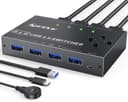
🔌 Power your multi-device workflow with speed and style!
The MLEEDA USB 3.0 Switch Selector is a professional-grade 4-port KVM switch that enables seamless sharing of USB peripherals across four computers. Supporting ultra-fast 5Gbps data transfer, it features both push button and wired remote switching for ultimate convenience. Compatible with all major operating systems and built with durable aluminum housing, this plug-and-play device streamlines multi-computer setups while offering lifetime warranty assurance.


| ASIN | B0B74SPYFN |
| Actuator Type | Push Button |
| Best Sellers Rank | #113 in KVM Switches |
| Brand | MLEEDA |
| Brand Name | MLEEDA |
| Circuit Type | 4-way |
| Color | Black |
| Connectivity Protocol | Usb |
| Connector Type | Plug In |
| Contact Material | Aluminum |
| Contact Type | Normally Open |
| Control Method | Remote |
| Controller Type | Push Button |
| Current Rating | 2 Amps |
| Customer Reviews | 4.0 out of 5 stars 712 Reviews |
| Included Components | USB Switch 4 Computers,4*USB Cable;USB Power Remote. |
| International Protection Rating | IP54 |
| Item Dimensions | 4.02 x 2.56 x 0.75 inches |
| Item Weight | 380 Grams |
| Manufacturer | MLEEDA |
| Material Type | Aluminum |
| Model | USB 3.0 Switch 4 Computer |
| Mounting Type | Plug In Mount |
| Number of Positions | 4 |
| Operating Voltage | 5 Volts |
| Operation Mode | Button Switch or Wired Remote |
| Specification Met | CE |
| Switch Type | Push Button |
| Terminal | Solder |
| UPC | 754525154969 |
| Unit Count | 1.0 Count |
| Warranty Description | Lifetime Warranty |
| Wattage | 5 watts |
S**F
10 Port KVM comes with USB cables but not HDMI cables, wired remote connector is fragile.
The first unit I received did not work properly on some ports, so Amazon shipped me a 2nd unit. The 2nd unit is working properly. The device comes with 10 USB-3 cables (USB-3 Type A Male to USB-3 Type A Male) to connect the KVM to 10 computers. Unfortunately, it does not come with HDMI cables, so I ordered 10 cables about the same length as the USB cables. When you connect the cables to the back of the KVM be sure to DISCONNECT the remote control switch box: the microUSB connector there is fragile - I did not do this on the first unit and keeping the remote control switch box was a challenge (the connector had to be pulled slightly down to make a good connection). Once connected, the active computer sees a USB hub for the keyboard and mouse and any other USB devices connected. While the manufacturer claims a storage drive can be used on the KVM, I would not recommend it: when switching between computers only 1 computer sees the USB hub so if there is a USB drive connected and you switch machines without telling the computer it is going to lose a drive the drive is not disconnected in the correct sequence, which could result in drive corruption. The time to switch between computers is roughly 4 seconds or so, not the fastest but not terrible. I have one machine connected with HDMI and USB extension cables since it is more than 1.5m from the switch, and that works fine with a 1K (1920x1080) monitor. I have not tried a higher resolution monitor. The KVM works with wireless keyboard/mouse (Logitech) and wired devices. I have 2 Windows 11 computers (one Intel, one AMD), 3 LINUX (AMD) computers, 1 LINUX (Intel) miniPC computer and one Raspberry Pi 5 (ARM) connected to the KVM. No issues on any of them on the 2nd KVM unit. The company was very responsive during the period where I was having trouble with the 1st KVM. They responded to requests via Amazon in a very responsible manner. With a $30 discount this was an excellent buy at $139. Connecting that many cables to one device is never easy but the layout was not difficult although you must make sure the cables are completely inserted into the ports. Just be sure to disconnect the wired remote so the MicroUSB port is not damaged while connecting wires in the back.
R**D
Excellent Switch, Does what it is supposed to do!
This is a great device, I am really happy with it. The wired switch is excellent, has a nice feel and click to it. It is of great quality despite being so lightweight. The actual unit itself is sturdy, well made, and is very responsive. I have no issues running this between two computers with all ports in use. I should note, you may experience weird behavior if the unit does not have its USB power line connected to it when it comes to sleeping/hibernating/waking up. I noticed the computers would not turn on after going to sleep or into hibernation mode. Once plugged in, everything works well. If you expect this to instantly switch over between computers, it is an unrealistic expectation. By design, the computer thinks the USB has just been plugged in, and the computer takes a second to scan and initiate necessary drivers, so there will always be a half second or second delay when swapping between computers. Excellent product, buy with confidence
L**S
Works great.
I got the 10 port KVM Switch. It comes with 10 USB cables but no HDMI cables. It is working with 2 Linux and 2 windows servers and 1 Windows 10 pro computer. I have a USB wireless keyboard with trackpad. No problems connecting any of them. I like that it shows the connection number, I don’t have to guess what computer is active based on position and trying to read the little port numbers. 3 things that irritate me with it: 1) There is no keyboard sequence to change connections. Like cntr cntr 3 to switch to port 3. 2) there is no auto switch to show all connections in sequence if you need to monitor all 10. 3) The darn remote switcher that you can set next to you and select which computer to see, uses a micro USB connector that is loose, does not click in. Works if nothing touches it or pulls on it. I’m concerned it may stop working in the future. I an not using the RS232 connection All in all. Works very well.
S**Y
Don't purchase. Avoid.
Even though this brand says "MLEEDA" its actually a KCEVE brand from China. Maybe even like a back-alley mfg trash can in China. Not sure. But the first unit sent out was garbage, it as the 8 port. I thought I was getting a different brand 10 port, but no, they duped me into the same knock-off brand. Good lord. Now for what is wrong. Port 2 doesn't work, doesn't recognize my normal HDMI Intel NUC gaming machine port, where even the other KVM did. I had the unit plugged into AC power, and it seems to require it, not just a "good thing". Docs say only if you need for high speed displays, well thats not true. It wont even power on, unless the power supply is plugged in. So basically this brand seems to be garbage, and just for really run of the mill Intel NUC style boxes.
@**D
Great KVM switch with superb build quality
Great KVM switch with superb build quality, including the remote, which I surprisingly love. Switches in 1-2 seconds without device reconnection issues. Supports my ASUS desktop, Lenovo LEGION laptop, Dell desktop, ThinkPad, Raspberry Pi 5, and rotates Pi 4s, 3s, and Zeros. High-quality cables included. All three USB-A ports work, including with a 4-port USB 3 hub. Using a 7-port USB 3 powered hub for keyboards and mouse dongle with no issues. Logitech webcam switches flawlessly. Some ports used for USB-only devices (no video) work as expected for Pi status screens.
J**R
Works but reboots by itself occasionally, and I have one PC requires me to reboot it to see
I purchased two of these, one to use daily and the other to sit in my closet as a backup. I am going to leave this for both units. I installed it without issues, but I am noticing that it will reboot every now and then. Screen goes black , number on display is off then comes back within a few seconds. Not the end of the world, but worth mentioning. My second issue is I have one computer (its a year old - Intel i7-13700,64GB,4TB NVME, Nvidia 3060 Ti Graphics Card) and just about every time I turn it on, I get no display on the monitor, have to reach up and turn the power switch off and back on. The it works fine. I tried looking for a support page for this device; thinking I might need to flash the firmware. But it doesn't appear to be a support page for it. Just and email. I am using Cable Matters 6' HDMI cables found here on Amazon. I've been using there stuff for years without problems. Last info I have this connected to a Samsung 40" 4K TV which work flawlessly with my old 1080 KVM. This unit is a inexpensive compared to my old KVM, so I am willing to just live with it now, but I am going to find another 4K KVM soon. I probably should have tested it more than a few days before buying a 2nd one.
B**Y
Good Budget KVM. No complaints.
Very happy with the switch. FYI, it only comes with USB cables, not HDMI so make your own arrangements for those. Sturdy construction on mine. I noticed some of the other reviews said they had loose ports on theirs. Easy to setup. replaced a 4 port switch that was dying. No complaints. There is a RS232 port on the front that I haven't tried as well a dip switch labeled 2k/4k. Wired remote has a good cord and readout that shows which # box you're connected to. I wish it had 2 monitor outputs but I'll live and I knew before I bought it.
J**.
Works great when paired with Jetkvm
Works great I’m using this in my rack setup in conjunction with jetkvm and can do whatever I need remotely from my desk. Works great and price is decent just need to come up with a 3d printable rack mount for it.
Trustpilot
Hace 1 semana
Hace 1 mes