We remain fully operational. Our teams are working around the clock to ensure your deliveries continue safely.

Descargar la aplicación


Servicios al cliente
Sobre nosotros
Copyright © 2025 Desertcart Holdings Limited
Descargar la aplicación

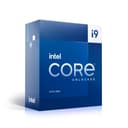
🚀 Power your passion with the ultimate 24-core beast!
The Intel® Core™ i9-13900K is a 13th Gen desktop processor featuring 24 cores (8 Performance + 16 Efficiency), 36MB cache, and turbo speeds up to 5.8 GHz. Designed for gamers, creators, and professionals, it supports PCIe 5.0, DDR5/DDR4 memory, and is unlocked for overclocking. With advanced thermal technologies, it delivers sustained high performance for intensive multitasking, gaming, and creative workloads.


| ASIN | B0BG67ZG5R |
| Best Sellers Rank | 25,952 in Computers & Accessories ( See Top 100 in Computers & Accessories ) 61 in CPUs |
| Box Contents | Desktop Processor |
| Brand Name | Intel |
| Cache Memory Installed Size | 36 MB |
| Customer Reviews | 4.4 4.4 out of 5 stars (797) |
| Item Dimensions L x W | 6L x 4W centimetres |
| Manufacturer | intel |
| Model Number | BX8071513900K |
| Platform | Windows 10 |
| Processor Brand | Intel |
| Processor Core Count | 24 |
| Processor Count | 24 |
| Processor Number of Concurrent Threads | 32 |
| Processor Series | Core i9 |
| Processor Socket | LGA 1700 |
| Processor Speed | 3 GHz |
| Product Warranty | Box: 3 Year Limited Tray: 3 Year Limited |
| Secondary Cache | 36 MB |
| Wattage | 125 watts |
S**N
Its a BEAST
I installed this CPU a month or so ago now, alongside 64gb RAM, on an ASUS TUF Gaming Motherboard. The TLDR; It's lightening quick, and It's super easy to install. As with all CPU's care should be taken when installing and handling the CPU, but other than that it's relatively straight forward. All I have to say, is this CPU is a beast. Like its so overkill for the average user. In for gaming it is just overkill. It is the perfect CPU for me, but also for those who do intensive work loads, such as running running large data models for AI purposes. My particular use case for this CPU was to allow me to build a virtual lab to which I could analyse malware in an virtual sandbox, whilst also emulating real world hacking attacks. At present I am able to run several virtual machines with no performance issues. As you can probably imagine, this power hungry beast can get warm, but with an adequate cooling solution, there should be no issues in keeping the PC nice and cool. I have paired this CPU with an AIO, and also additional fans for the case to ensure there is a lot of air flow to ensure that the thermals are a good temperature. My advice to anybody purchasing this CPU - go for it - it's well worth the investment, while at the same time you'll be future proofing your soon to be BEAST of a machine for the next 10 years.
S**T
Working perfectly
CPU working just as it should be. People's main concern with this product is obviously the temps. To reassure people, and from a VFX artist's perspective, my temperatures are respectable. I have the Corsair H170I ELITE CAPELLIX 420 mm AIO attached to it. When running tasks like having Opera open with even 30 tabs, Spotify, file browser and settings all open at the same time, my temps max at 34 degrees Celsius. When I'm in Unreal engine it never goes above 45 (but yes it is mainly GPU real-time rendering). it will use around 10 % of the CPU still however. in Cinema 4d viewport it will never go above 34c, when rendering a 4k 3d scene it ranges from 70-86 degrees Celsius max. whatever software I'm using whether it's Adobe software, c4d, unreal, Houdini, Davinci, it will never hit over 90c. Installation was absolutely fine and considering this was the first ever system I've built, so it demonstrates how easy it was to put into the motherboard if you just follow instructions to a tee. The H170I also comes with pre-applied thermal paste so I didn't even have to worry about that which was a bonus. and it's obviously doing its job at transferring all that heat. My clock and boost speeds are normal too. my PC specs FYI msi meg ace z790 4090 suprim x i9 13900k H170I cosair AIO
H**E
Lightning Speed
I upgraded to this from an I7-4790K and while i was pleased with this I am even more impressed with it once installed. Happy with it but I will note that it does get hotter than my previous I7, the i9 can be tamed with a decent (not over the top) AIO despite the media screaming its head off that this is a volcano.
N**G
Banging processor!
Fast, capable and stable. Does run a bit hot but coupled with water cooling all’s good.
M**X
The worst of Intel CPUs to date
Terrible. Chips degrade constantly and you'll end up replacing them quickly. They throw up random errors when they degrade that make you think it's another component causing issues, but it is always this pile of garbage. Very fast while they work.
N**N
Pure power
Upgraded from 9900k to 13900k and I’m very happy with my decision. As much as I loved my 9900k, unfortunately it was dragging my RTX 4080 down and was getting bottlenecked. Keep in mind this is a HOT cpu though. I thought my 9900k was already hot but after installing 13900k, it’s definitely running about 10c hotter on my 360 AIO. I still haven’t touched the manual overclock as this cpu auto boosts to 5.5ghz
O**.
Great processer
Despite long delivery distance, came in perfect condition. It is one powerhouse of a cpu, only thing to bear in mind is that it does run pretty hot
K**V
Whoa
First 1 that arrived was oddly dead on arrival but ordered a second and got it installed today. Can't believe how fast it is. It requires a fair amount of bios tinkering to get the voltage under control but once you get it into a more sane temperature range its a monster.
T**C
Je passe d’un i9 12900k à un 13900k et je peux vous dire qu’il y a une différence à vue d’œil ! Certain diront que c’est pas possible ou que c’est minime et de leur répondre : Essayer avant de parler ! Le lancement et l’exécution des applications,jeux etc… se charge plus rapidement . Dans certains jeux j’ai même gagné quelques FPS en plus. J’ai un AIO de 360,au repos je suis a 30* , en full game je dépasse pas les 65*. Par contre en bench je monte jusque 93* au cœur le plus chaud (coeur 5). Mais rien d’alarmant. Je recommande ce processeur ,par contre je ne passerai pas sur un 14700k/14900k car là aucun intérêt et par contre ça va être une vraie chaufferie ! MAJ avril 2024: Toujours au top le cpu,même avec les dernières informations concernant Intel/carte mère comme quoi la série des 13/14 planterai en lien jeu/appli personnellement je n’ai aucun soucis et jamais eu de plantage. Noctua/Grizzly + aio 360 = bon mariage.
T**O
El Intel Core i9-13900K es el procesador insignia de la 13ª generación de Intel, conocido como Raptor Lake. Destaca por su arquitectura híbrida que combina núcleos de alto rendimiento (P-cores) y núcleos de eficiencia (E-cores), ofreciendo un equilibrio entre potencia y eficiencia energética. Especificaciones técnicas: Arquitectura: Raptor Lake-S Proceso de fabricación: Intel 7 Socket: LGA1700 Núcleos: 24 (8 P-cores y 16 E-cores) Hilos: 32 Frecuencia base P-cores: 3.0 GHz Frecuencia base E-cores: 2.2 GHz Frecuencia máxima turbo: 5.8 GHz Caché L3 (Smart Cache): 36 MB TDP base: 125W Compatibilidad de memoria: DDR4-3200 y DDR5-5600 Rendimiento: En pruebas de rendimiento, el i9-13900K ha demostrado ser uno de los procesadores más potentes del mercado. En aplicaciones de un solo hilo, supera a su predecesor, el i9-12900K, y ofrece mejoras significativas en cargas de trabajo multinúcleo gracias al aumento en el número de E-cores y a las frecuencias más altas. En gaming, se posiciona como una de las mejores opciones, ofreciendo altas tasas de fotogramas y un rendimiento consistente. Consumo y temperatura: Uno de los aspectos a tener en cuenta es su consumo energético. Bajo cargas de trabajo intensivas, el i9-13900K puede consumir más energía que sus competidores, lo que se traduce en temperaturas operativas más elevadas. Es recomendable contar con una solución de refrigeración eficiente para mantener el procesador en rangos de temperatura óptimos. Conclusión: El Intel Core i9-13900K es una opción destacada para entusiastas y profesionales que buscan el máximo rendimiento en tareas exigentes y gaming. Su arquitectura híbrida y mejoras en frecuencias y número de núcleos lo convierten en una opción sólida en el segmento de alta gama. Sin embargo, es esencial considerar sus requerimientos de energía y asegurarse de contar con una refrigeración adecuada para aprovechar al máximo sus capacidades, uso un gabinete con 6 ventiladores de 120mm y un disipador de aire DeepCool AK400 Digital de 120mm ya que este procesador no trae, de esta manera el rango de temperatura haciendo stream y gameplay simultáneamente es de 70 a 80 grados... no suele superar esas tasas.
P**K
It runs warm with an air cooler, but when paired to only a 240 AIO under heavy load it never reaches 70 c. It’s perfect for my use case.
D**Y
I use it with a BeQuiet Dark Rock 4 Pro cooler and very rarely do I see thermal throttling even when gaming.
ا**ن
تقيمي للمعالج 0 من 10 بسبب الدروبات والمشاكل
Trustpilot
Hace 1 mes
Hace 3 semanas