We remain fully operational. Our teams are working around the clock to ensure your deliveries continue safely.

Descargar la aplicación


Servicios al cliente
Sobre nosotros
Copyright © 2025 Desertcart Holdings Limited
Descargar la aplicación

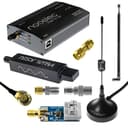
📡 Elevate your radio game—catch signals others miss!
The Nooelec NESDR Smart HF Bundle is a premium software defined radio kit covering 100kHz to 1.7GHz frequencies, featuring the Ham It Up v1.3 upconverter housed in a sleek aluminum enclosure. This all-in-one set includes multiple antennas, a balun for impedance matching, and essential adapters, making it ideal for serious SDR enthusiasts and professionals. Manufactured in North America, it offers robust build quality, a 2-year warranty, and round-the-clock technical support, perfect for those ready to dive deep into HF/UHF/VHF radio exploration.
| ASIN | B0747PX3NZ |
| Analog Video Format | PAL |
| Antenna | Radio |
| AntennaDescription | Radio |
| Best Sellers Rank | #32 in External TV Tuners #425 in Portable FRS Two-Way Radios |
| Brand | NooElec |
| Color | Black |
| Compatible Devices | computers, smartphones, monitors, audio/video equipment |
| Connectivity Technology | USB |
| Connector Type | USB |
| Customer Reviews | 4.3 out of 5 stars 947 Reviews |
| Includes Remote | No |
| Item Weight | 321 Grams |
| Manufacturer | Nooelec Inc. |
| Mfr Part Number | 100764 |
| Model Number | NooElec NESDR SMArt HF Bundle |
| Tuner Type | VHF |
| UPC | 616469146069 |
3**T
You need to be willing to tinker!
This is a great piece of tech and I have barely scratched the surface in its capabilities. It was purchased to be able to listen to FT8 transmissions. In the future it will be used in many ways I can not imagine yet. Please note that a great deal of learning is needed to truly get this thing working how you need it too. Also the infinite levels of tweaking will kill a mere mortal. First off I would like to point out that after I purchased this I received an email from the seller outlining that the drivers are very important. Thank you to the seller! Follow their directions and it is pretty painless, as long as you are familiar with software installation. If not then Youtube is your friend. This is the first time a vender has warned me ahead of getting their product. The CubicSDR software that they ask you to use, I did not like, but it works. May be fine for you. So far I have settled on using AirSpy SDR, it pipes the audio to a Virtual Cable software and it then sends it to WSJT-X. Just search this on Youtube if you are interested. It seams to display everything I am wanting. Waiting on my cables to hook up my radio. Stinking covid... I watched a pile of video's and read what I could find before I got this. If there is a better one for the cost, I did not find it. There are more expensive ones that will transmit as well. Now I want to call out the guy that said you could use 75 ohm TV coax when you are listening only... Well if you tweak it for about 10 hours, sure you can hear something. Maybe even get some FT8 through it. But no you will not like it at all. I'm no rocket surgeon, but I can tell you what I see. The Ham It Up converter that I received requires a -125,000,000 Shift to be put into the SDR software. It is important, at least in AirSpy that the offset has comma's in it. Even though it shows dots in the menu. This was close to an hour of Googling. This guy does run hot! So far it has not given out. But I place it where it can get as much air as possible. Lessons I learned the hard way: Extend your USB cable before you use a length of cable between the SDR and your antenna. I found that if I had a 16 foot of "China Best RG-58u" in the mix, I received no signals that could be processed for FT8 and mostly noise. The cables and adapters just produced to much loss i guess? The connectors that I received are good. Use a meter to test the ones you get, just to be sure. Cables that you buy need tested as well. The antenna's that you get, make sure you know which one to use. Bigger is not always better. Look online for an antenna calculator and plug in the frequency you want to hear and it will give you the 1/4 wave length, then setup your antenna accordingly. Look up this kit on youtube and see how to configure the balun for longwire and dipole antennas. This is the only antenna that has worked for me. The others are for wave lengths I'm not interested in yet. One antenna will not do everything. I did try using this on a Raspberry Pi 3b+ and a Pi 4 2 gig and I found that the cpu was not enough to get rid of clipping in the audio. Pi's are great, but not for this in my mind. The software was running the cpu's at 100%. I now run it on a Windows 10, i7 . Nothing is lost and it runs at 20% cpu.
J**S
Lots of Fun for a low low price.
This is a BARGAIN! Ive had so much fun playing with this SDR. Some Caveats, follow the emailed instructions to the letter. The instructions for the driver loading software are incorrect. They say the device will show up as NE SDR.... it does not... it shows up as Bulk Device.... the instructions tell you the address of the device which does show up correctly. Once the driver was loaded I loaded the software and have had a blast with it.... no its not a Flex Radio... but it is a well built little sdr thst you can shove in your laptop bag so you have a radio with you on business trips... the Ham it upconverter is great too. One thing the description is wrong about saying NE SDR covers 100 khz to 1.7 GHz...this is incorrect. NE SDR natively covers 25 MHz to 1.7 GHz. You need to use the upconverter to receive below 25 MHz. You also need to put a -125 Mhz offset in the SDR software. Once you do you can receive HF Ham Stuff and shortwave. This is really a good deal. Highly recommended!
S**K
One the best entry level SDR units
Good value for money, well made. While it is an entry level model, It functions well as advertised and is recommended for beginners as it’s software compatibility is superb across various operating systems. It is fully supported by most open source SDR software.
C**Y
Easier to get working than people seem to say
The other reviews had me ready for a rabbit-hole of setup. I thought it was going to take hours getting this kit to work on my computer, with lots of troubleshooting. I have next to no experience with radio but was able to get this up and going within minutes. All I had to do was 1. Insert the USB SDR 2. Install WinSDR drivers using Zadig utility 3. Install SDR software (you might need to run a batch file in your selected software's install folder to enable SDR) 4. Enter the -125 MHz offset into your software. Turn off offset when Ham It Up isn't upconverting signal. That's it. It's not that hard as some people make it out to be. It's a nice kit that works as expected and I'm really happy with my purchase.
R**R
Fun Hobby
This is a great technical hobby, and this is an inexpensive way to get into it! There's lots of excellent free and open source software available no matter what computer you hook it up to. There's a bit of a learning curve, but once you get going with it there are lots of things you can do with it.
W**T
A lot of fun for the money!
This is a great starter kit. The first receiver dongle was intermittent, which resulted in a replacement being sent quickly. Since then, I bought a second RTL-SDR dongle. And neither the replacement or new one has given me the first problem. I'm buying a second up converter shortly. Be sure you install the driver EXACTLY as instructed. NOTE ON SPURS: Not all SDR software allows this receiver to perform at its peak. Too many programs run AGC much too high - it makes things seem more sensitive, but this causes overloading, and stations showing up everywhere. Receive quality almost rivals some of my "Big Name" ham radio gear under many circumstances.....rivals, but not exceeding.... I use the SDR receiver on a laptop with Windows 10, as well as a Motorola Z2 Play and Samsung Tab 4 via OTG adapter cables so the dongle can receive power from a LiION battery which powers the up converter as well. The dongle will definitely get quite warm, this is completely normal!
M**S
This stuff did NOT work for me! A bad of stuff???
This is my experience-yours might vary. I would give this package of mismatched devices 0 Stars. It does not work out of the box. There is no plug and play with it. It is a USB dongle with a HAM it up box with it- for what, I don’t know… does it do something, its unexplained. There is no manual, no instructions , no step by step do this, No software included to load into the computer- NOTHING! I have been around computers my whole life. I loaded SDR++ and other software programs that supposedly work with Nooelec Smart/ Ham it up. None of it works! I did hours of troubleshooting and reading BS on the internet and I even went to Nooelec website-no help and nothing to help. So beware. My observation/my experience- I bought a bag of something, but what?? It did not work for me. Maybe, if you can devine the secrets to the Universe or actually build HF Radios from thin air, but for the rest of us, think twice! This was my experIence. Good luck to you! If you want a workable radio that works thru all of the bands AM thru HAM or Satellite, you are going to have to spend the big bucks. Don’t waste your time and money on cheap non working parts, pieces of scrap that won’t load into any software program and won’t make a pop or static noise of any kind. By the way, I contacted Nooelec. They referred me to a youtube video THAT DIDN’T HELP! Again, maybe your experience will vary and maybe you’ll be lucky. For me, I’m saving my pennies to buy a REAL RADIO that works! I’m done wasting my time with junk ( my opinion of course).
T**I
Neat little product with a unnecessairily steep learning curve due to poor documentation.
TL;DR: NESDR is easy to get started with, make sure you can run the software before purchase. Ham it up is very picky about antennas and didn't work for me with any included or commercial antenna I tried, buy a spool of wire to make a long antenna if you don't have one already. I'm going to review this in multiple sections as this bundle really has two parts: the NESDR radio and the Ham It Up upconverter. The NESDR is easy to use and has a good quickstart guide, I was able to get it up and running receiving broadcast FM quickly. The NESDR has a range of 25MHz - 1.7GHz and is based on the popular RTL2838 chip. I recommend installing the software ahead of time to make sure it will run, I made sure I had CubicSDR working before the radio came in and that made getting started very fast, I was able to pick up broadcast FM within a few minutes of getting SDR installed (without the upconverter). Know that this bundle contains *NO* documentation beyond a business card with a URL to start.nesdr.com, so be sure to read that documentation ahead of time and be confident that you know how to install the radio and drivers as that's all you're going to get. The Ham It Up is a neat unit, but is genuinely hard to get started with due to wholly insufficient documentation. I was ready to write it off as junk before I finally figured out its antenna needs. Here is what you need to know from my hours of frustration: - Offset is 125MHz, so a 25MHz signal will be upconverted to 150MHz - It has a upconvert range of 100KHz to 60MHz, good for AM and shortwave bands. US FM broadcasting can't be used as a passthrough/upconvert test to get started as the frequency is too high. - It doesn't work with any of the included antennas, or any commercial antennas I tried. I was only able to achieve acceptable reception with the balun, 100' of wire as an antenna strung outside in the trees, and a good ground. Think crystal radio when setting up the antenna for the upconverter. - Once the wire was strung outdoors I was able to pick up commercial AM broadcasting, some HAM chatter in the 40 meter band, and shortwave stations in the 11MHz range, and acceptable CB reception. - Documentation for this is even worse than for the NESDR. Be prepared to be frustrated until you figure it out. Also be advised this bundle does not come with BNC or PL259 adapters. If you want to use existing antennas for you'll probably need more adapters than this kit provides. Be advised directly connecting a CB antenna with no impedance matching yielded very poor reception; I don't know what the input impedance with this unit is but I'm willing to bet BNC/PL259 will need a matching transformer which is why they didn't include it. It did come with a USB cable for the Ham It Up, so they must have added that after the reviews about it not having one.
Trustpilot
Hace 2 meses
Hace 2 días