We remain fully operational. Our teams are working around the clock to ensure your deliveries continue safely.

Descargar la aplicación


Servicios al cliente
Sobre nosotros
Copyright © 2025 Desertcart Holdings Limited
Descargar la aplicación
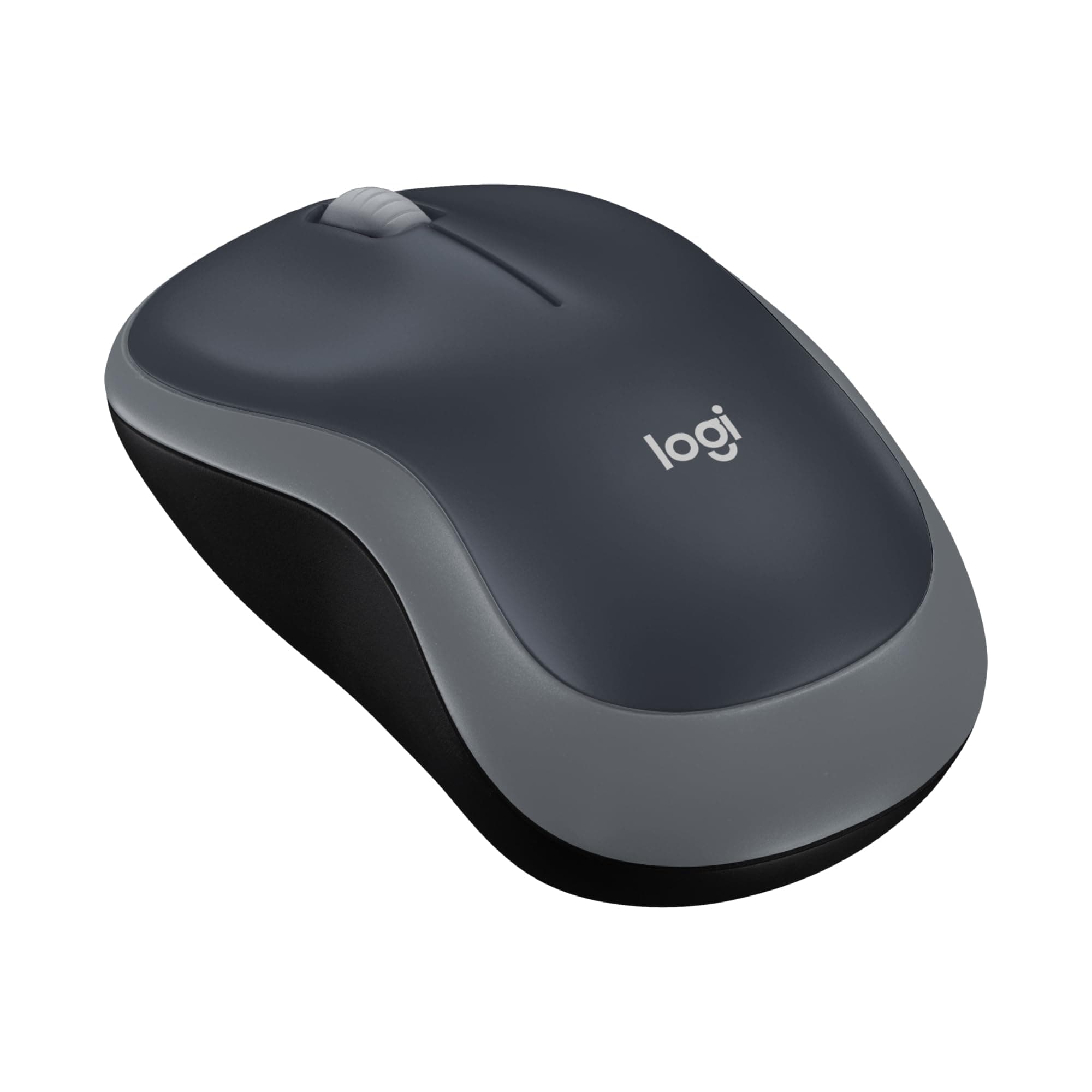
🖱️ Elevate your workflow with wireless precision and all-day power—because your productivity deserves the best.
The Logitech M185 Wireless Mouse offers reliable 2.4GHz wireless connectivity with a compact, ambidextrous design. Featuring 1000 DPI optical tracking and a 12-month battery life powered by an included AA battery, it ensures smooth, precise control for both right- and left-handed users. Compatible across PC, Mac, and Linux platforms, this eco-conscious mouse is crafted with recycled materials and certified carbon neutral, making it a smart, sustainable choice for professionals seeking effortless productivity.


| ASIN | B00552K0GM |
| Antenna Location | Home, Laptop, Office |
| Are Batteries Included? | Yes |
| Are Batteries Required | Yes |
| Battery Average Life | 12 months |
| Best Sellers Rank | 16 in Computers & Accessories ( See Top 100 in Computers & Accessories ) 1 in Mice 2 in PlayStation Legacy Systems |
| Box Contents | tiny leave-in USB nano receiver, possibly 1 AA battery |
| Brand Name | Logitech |
| Button Quantity | 3 |
| Colour | gray |
| Compatible Devices | Personal Computer |
| Country of Origin | China |
| Customer Reviews | 4.5 4.5 out of 5 stars (123,551) |
| EU Spare Part Availability Duration | 2 Years |
| Embellishment Feature | Logo |
| Enclosure Material | Plastic |
| Hand Orientation | Ambidextrous |
| Hardware Platform | PC |
| Item Dimensions L x W | 9.9L x 6W centimetres |
| Item Weight | 2.65 Ounces |
| Manufacturer | Logitech |
| Model Name | Wireless Mouse M185 |
| Model Number | 910-002235 |
| Mouse Maximum Sensitivity | 1000 Dots per Inch |
| Movement Detection | Optical |
| Network Connectivity Technology | USB |
| Number of Batteries | 2 Lithium Metal batteries required. (included) |
| Operating System | Linux |
| Pattern | M185 Compact Size |
| Power Source | Battery Powered |
| Product Finish Type | Matte |
| Product Warranty | 3 years |
| Range | Up to 10 meters |
| Style Name | M185 Mouse |
| Theme | Butterfly |
| Unit Count | 1.0 count |
P**H
Simple and great!
Recently replaced my old one I'd had for about 6 years which eventually broke due to my butter fingers dropping it lots of times. Didn't like a more expensive other brand I bought for my personal laptop as it was too complicated. This is simple, cheap only in terms of the cost, and does the job, so I replaced my broken one with the exact same one I had for over 6 years.
H**Y
Small mouse with AA battery
This tiny Bluetooth mouse is really good. Comes with a AA battery and is not rechargeable. The design is ergonomic and button placement and the fit is efficiently designed. Gliding and scrolling is very convenient and does not have high noise level. Provides good value for money.
R**.
Keep it as a back-up. Then buy an Ergonomic Logitech - if your income allows.
Universal compatibility – supposedly your mouse will work with whatever computer you've got now or later, right? Well, I picked up a Pebble 2 keyboard and it just wouldn't work. My computer literally couldn't find it even though I had it sitting right there. if you're claiming universal compatibility, that should be standard, shouldn't it? I've actually bought tons of keyboards and mice from this company over the years, and this was my first real failure. Haven't completely lost faith yet, but it's shaky. My friend asked me for a mouse recommendation, so I suggested the Anker 2.4G Wireless Vertical Ergonomic Optical Mouse. My son is left-handed, but this mouse is designed for right-handed users. Here's what's surprising – my left-handed son actually prefers the Anker over an ambidextrous logitech. Never comfortable with computers anyway. She liked traditional designs and wasn't a heavy user, so the ergonomic benefits didn't really appeal to her as much as they could. Logitech feels decent in both hands and definitely beats using a touchpad. That's true, but it's still not as good as a proper ergonomic design. Plug and play setup is straightforward – unlike the Pebble, it just worked every single time. I've bought these in red, grey, and blue. The colours are pretty basic, the design is nothing fancy, but it's cheap and it performs. Skip the jokes and just get one, except for the Pebble 2. That one's frustrating Keep it as a back-up. Then buy an Ergonomic Logitech - if your income allows. The Pebble looks sharp and feels nice, but it doesn't actually function properly. I could tolerate occasional connection drops, but this device is basically just sitting there looking pretty. When it comes to durability and reliability, this mouse doesn't blow anyone away, but it gets the job done. The Pebble is more ambitious but ultimately fails to deliver. M185 is a massive seller that's reliable but boring. It's the safe choice. Reinventing things only works when they actually function flawlessly. When you're pioneering new features, you expect problems, and yeah, you'll find them. "Shrinking product world" trend that's better for people with smaller hands. Hopefully the reliability doesn't take a hit because of it. I just retired a WD external drive that was absolutely massive and lasted over 10 years. It probably could've gone longer than the entire lifespan of whatever the newest generation will be. My cautious friend got her mouse now and took my M185 to test it alongside hers. Logitech makes these amazing ergonomic mice that are literally supposed to help with your health, right? The thing that's absolutely infuriating - they're charging prices that are considerable. If you're a pensioner already struggling with medical bills, good luck affording one of these "health-saving" mice. It's frustrating because the people who actually NEED these ergonomic solutions the most are the ones getting priced out.
R**Y
Good purchase.
Super neat little rodent. Very smooth operation, even without a mouse mat.
S**I
Glides very smoothly
I bought the Logitech M185 Wireless Mouse and it is very good value for money. The mouse is easy to use and connects quickly with the USB receiver. It feels comfortable in my hand and works smoothly every day. The battery lasts a long time, so I don’t need to change it often. Overall, I am happy with this mouse and it is perfect for daily use.
T**A
Great mouse that works and feels good to use.
Very happy with this mouse, nice to use and just works! I recommend if you need a new one - my old windows surface mouse stopped being repsonsive.
F**S
Great mose
Great wireless mouse. Works perfectly. On the smaller side perfect to transport it around
D**N
Easy to setup and smooth operation
Logitech products are always top quality & easy setting up
D**A
I had a problem finding the USB. A picture sent by Amazon helped me
A**Y
Como un usuario ávido de tecnología, siempre estoy en busca de productos que no solo cumplan con mis expectativas, sino que también superen mis necesidades diarias. El Ratón Logitech Logitech M185 es un ejemplo perfecto de cómo la innovación y la ergonomía se combinan para ofrecer una experiencia excepcional. Una de las primeras cosas que noté al probar este ratón fue su diseño ergonómico. Logitech ha logrado crear un dispositivo que se adapta perfectamente a la mano, lo que permite largas sesiones de trabajo o juego sin fatiga. La forma contorneada y los botones cuidadosamente ubicados hacen que cada clic sea preciso y cómodo. La conectividad inalámbrica es otro punto destacado de este ratón. La tecnología inalámbrica avanzada de Logitech garantiza una conexión estable y sin demoras, lo que es crucial para mí, especialmente durante sesiones de juego intensas o trabajos que requieren precisión milimétrica. Además, la duración de la batería es impresionante. Puedo usar este ratón durante días sin necesidad de preocuparme por quedarme sin energía en el momento menos oportuno. Esto es especialmente conveniente para personas como yo, que a menudo están en movimiento y necesitan un dispositivo confiable que esté listo para funcionar en cualquier momento. Otro aspecto que realmente aprecio es la personalización. Con el software de Logitech, puedo ajustar fácilmente la sensibilidad, asignar funciones a los botones y crear perfiles específicos para diferentes aplicaciones o juegos. Esto me permite adaptar el ratón a mis necesidades exactas y optimizar mi flujo de trabajo o experiencia de juego. En resumen, el Ratón Logitech es una verdadera joya en el mundo de los periféricos de computadora. Su combinación de diseño ergonómico, conectividad confiable, duración de la batería y personalización lo convierte en una opción imprescindible para cualquier persona que busque un ratón de calidad que mejore su productividad o experiencia de juego. Estoy encantado con mi compra y lo recomendaría sin dudarlo a colegas, amigos y familiares.
K**H
This mouse is fantastic, and is so soft and smooth and easy to use.
L**A
Excelente e tem durabilidade alta
M**H
The Logitech keyboards and mouses is very good always. that one is best choice with this price.
Trustpilot
Hace 1 mes
Hace 4 días