We remain fully operational. Our teams are working around the clock to ensure your deliveries continue safely.

Descargar la aplicación


Servicios al cliente
Sobre nosotros
Copyright © 2025 Desertcart Holdings Limited
Descargar la aplicación
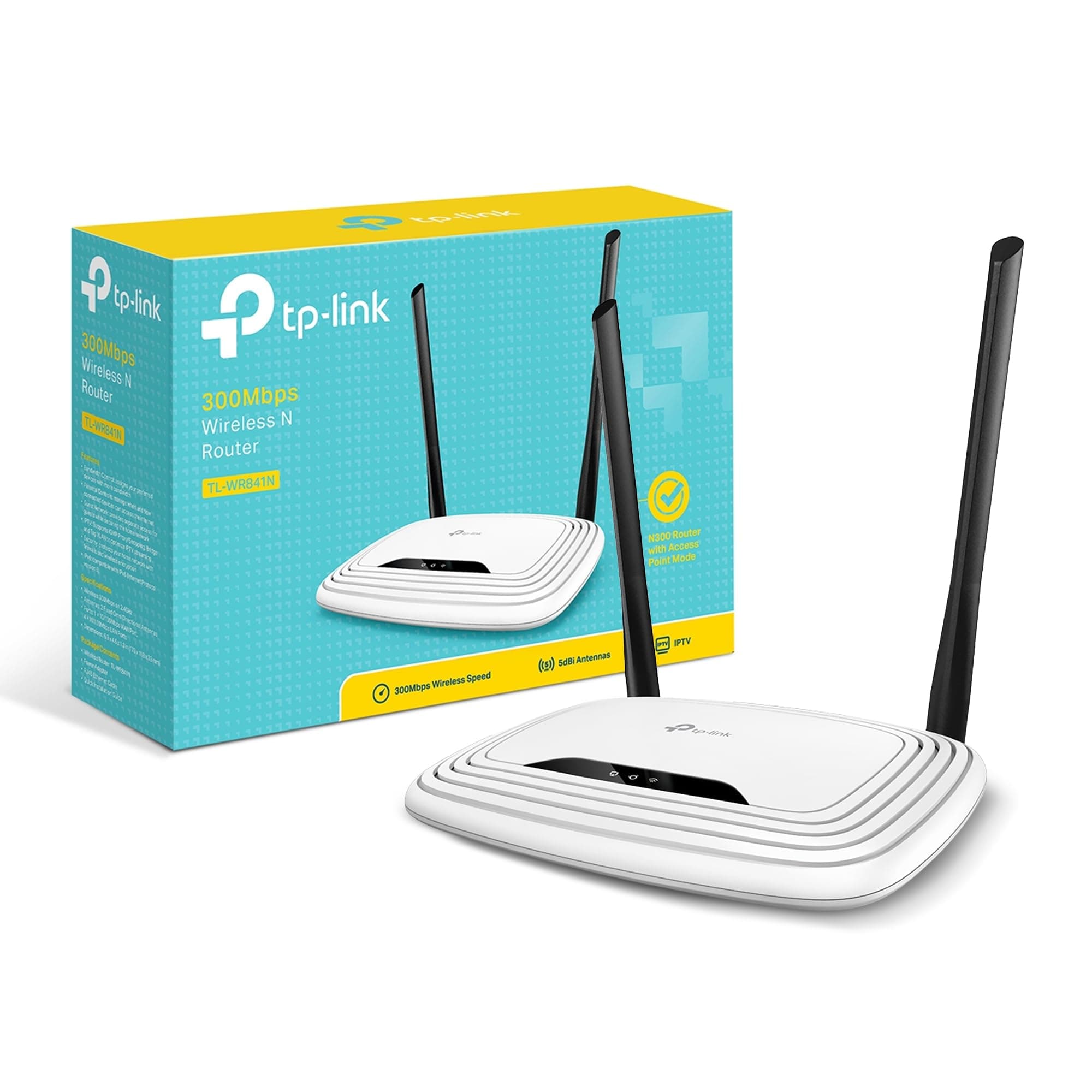
🚀 Elevate your Wi-Fi game—fast, secure, and hassle-free connectivity!
The TP-Link TL-WR841N is a Wi-Fi 4 router delivering up to 300Mbps on a 2.4 GHz single band, equipped with two fixed antennas for enhanced coverage up to 50m². It supports easy wireless security via WPS, offers 5 Ethernet ports with 100 Mbps LAN bandwidth, and is compatible with all major browsers for straightforward setup. Ideal for HD streaming, gaming, and multi-device households, it combines affordability with reliable performance and a 3-year warranty.


| ASIN | B001FWYGJS |
| Antenna Location | Home, Commercial, Public |
| Antenna Type | Fixed |
| Best Sellers Rank | 1,078 in Computers & Accessories ( See Top 100 in Computers & Accessories ) 7 in Routers |
| Box Contents | Wireless N Router TL-WR841N, Voltage Adapter, CD, Quick Installation Guide |
| Brand Name | TP-Link |
| Colour | White |
| Compatible Devices | Not |
| Connectivity Protocol | wireless |
| Connectivity Range | 50 Square Metres |
| Connectivity Technology | Ethernet, Wi-Fi |
| Control Method | App |
| Controller Type | App Control |
| Country of Origin | China |
| Coverage | 50 m² |
| Customer Reviews | 4.3 4.3 out of 5 stars (77,547) |
| Data Transfer Rate | 300 Megabits Per Second |
| Frequency | 2.4 GHz |
| Frequency Band Class | Single-Band |
| Is Electric | No |
| Is Modem Compatible | Yes |
| Item Dimensions L x W x H | 17.5L x 11.7W x 3.3H centimetres |
| Item Part Number | TL-WR841N |
| Item Weight | 8.82 Ounces |
| LAN Port Bandwidth | 100 Mbps |
| Manufacturer | TP-Link |
| Manufacturer Part Number | TL-WR841N (UK) |
| Maximum Upstream Data Transfer Rate | 300 Megabits Per Second |
| Model Name | TP-link N300 |
| Model Number | TL-WR841N |
| Number of Antennas | 2 |
| Number of Ports | 5 |
| Operating System | Ja |
| Other Special Features of the Product | Maximum temperature 0 - 40 °C, QoS, Removable antennas, Reset button, Security algorithm: 128-bit WEP, 152-bit WEP, 64-bit WEP, SSID, WPA, WPA-PSK, WPA2, WPA2-PSK, WPS, VPN Support (PPTP, L2TP, IPSec), Web-based management |
| Product Warranty | 3 year |
| Security Protocol | WPS |
| UPC | 845973051242 |
| Unit Count | 1.0 count |
| Wi-Fi Generation | Wi-Fi 4 |
| Wireless Compability | 802.11b, 802.11g, 802.11n |
M**R
Affordable and great!
I'd suffered and endured the dubious Virgin Media "Superhub" long enough. I decided I'd try a new router after reading all the similar problems on the Virgin Media forums. I didn't want to spend too much money, so reading the generally positive reviews of this router, and that others had even used it for the same reason, I went for it. Setting it up was incredibly simple, although I have had previous experience. But honestly the hardest part was probably setting the old VM box to "Modem" mode.. Anyway! Afterwards I wired in this new router, logged on to it wirelessly, went into its admin menu, clicked the automatic setup wizard and.... Bosh. Done! I didn't bother with the enclosed CD, I guess it would've installed unnecessary gunk on my PC, I have no idea what's on it. So setup took literally a couple of minutes, including untangling wires. Really easy. Performance has been fantastic. I immediately noticed a dramatic improvement over the old VM box. Before I'd have to click on a link on my wirelessly connected PC, and wait. Then perhaps click again. Same with all other devices. It was like the router just wasn't bothering to connect to the internet. Now it works properly. Ping and download speeds are epic. Before the ping could be pretty high, and download speeds could sometimes be fast, but somewhat variable and inconsistent. Now downloads are fast and rock steady. We have an xbox hooked up via wireless, in a bedroom the opposite end of the flat (It's a late 70s build with some pretty thick concrete walls to get through). It used to hover around the 1 bar of signal on the xbox "Find Wireless" section. Now it hovers around the Maximum point, occasionally dropping only by 1 bar. Playing games had gotten to the impossible point, and party chat was a stuttering mess of choppy voices and impossible to understand. Now, perfect. So signal is strong and very dependable. I stream media to a wireless radio, xbox etc. Worked perfectly out of the box. My wireless printer that had seemed very temperamental before is now fully co-operating. I read a couple of reviews where people said they had to reset... Mines been on permanently for a few weeks now without a single issue. I did ensure that I had the latest firmware on the TP-Link website, turns out it already had it installed. Maybe that helps? Anyway its behaved perfectly for me. So overall I rate this a fantastic router for my pretty basic needs. £20 for this is a bargain. It made my Virgin Media internet work how it was supposed to be. How Virgin who had such a fantastic reputation for speed could then couple that with such a poor piece of equipment is unbelievable. But this solves it. It's just a shame that I have to keep my stupid, large "Superhub" hooked up in modem mode alongside this great router. Buy it. It's great.
J**N
Inexpensive, easy to configure and has proved reliable - a great product!
I bought this to use as a replacement for our Virgin Media Super Hub as, when our housing estate was built a couple of years ago, most people took on Virgin Media for their broadband services as they had a special offer for all new owners at the time. This now means that within a few hundred feet there are countless Super Hub ID's and our connection has become more and more unreliable. We have had a couple of replacement Hubs from VM but they haven't really cured the problem so I decided to change tack. Having read some of the reviews for TP-Link Cable WiFi Router and looking at how other people solved poor VM WiFi problems I decided to purchase for installation our loft space with a view to making the WiFi signal in our home more robust. One the router arrived and was out of the box I switched the Super Hub into Modem mode, ran a CAT5 cable from the Modem port up into the loft space, plugged it into the TP-Link Router and turned on. For first time use I used a wired connection with the laptop to log into the TP-Link Admin page and within a couple of clicks of a mouse the router had found the cable model and the connection was live. A few more clicks later and I had configured the WiFi as we would want it and all of our devices found the new SSID quickly. I then reviewed the basic security setting and made a few simple changes to make sure the router was as secure as I needed to be and, after a quick reboot, we were ready to go. The total installation time was no more than fifteen minutes and that included putting a couple of screws into a joist to mount the router for best signal strength. The router has been in place for about a month now and so far it has been excellent. Unlike the previous Super Hub there has been no drop out or no need to reboot (albeit I believe there is a setting where you can do this on a daily basis at a set time) and the connection has been very stable. We run 2 PC's, 1 Laptop, 2 FireTV's, 3 Mobile Phones and a CCTV system that can be viewed live and the router is dealing with all of this in it's stride. It not unusual for both Fire TV's to be streaming at the same time without an issue and our work laptop can be quite heavy on data when using a VPN connection and, again, the router has been trouble-free. There are lots of other features of the product such as Guest WiFi, Bridges, DMZ's etc. which are all over and above what we really need but am pleased the features could be used should our requirements change. All in all, for the price we paid and the issues we were having with a Super Hub, this is an excellent piece of kit for a home WiFi setup. It was quick and simple to set up, provided a good level of security for our devices and so far has been faultless.
P**N
Allt fungerade som det skulle! Snabb frakt och bra produkt!
B**.
Installation facile. Fonctionne bien .
H**1
Este router neutro TP-Link TL-WR841N es perfecto para usarlo en casa. Dado el precio y el público al que va dirigido, tengo que decir que es un equipo inmejorable tanto en precio como en prestaciones. Mención especial al Wi-Fi, pues ofrece una señal inalámbrica de gran alcance. Pasando a analizar el firmware, diría que el que viene de origen ya ofrece muchísimas más opciones que cualquiera de los routers que ofrecen habitualmente las compañías de telecomunicaciones. Al parecer, para un uso más profesional, quizás este firmware se queda algo corto. Según he leído por internet este router cuenta con un hardware estupendo que de cierta manera queda un poco desaprovechado por el firmware que lleva instalado de origen. Así que podría llegar a considerarse casi obligatoria la instalación de alguna versión del famoso firmware de DD-WRT que es completamente compatible y amplia muchas de las posibilidades de este router. Pros: - Fácilmente configurable. - Señal inalámbrica de gran alcance. - Económico. Realmente es un precio de derribo. - Soporta OpenWRT y DDWRT. Ideal para aquellos a los que les gusta trastear. Contras: - No lleva ningún puerto USB, por lo que no podremos crear un NAS o compartir una impresora. - Tanto los cuatro puertos ethernet para LAN como el puerto WAN, son 10/100Mbps (son Fast Ethernet, no Gigabit Ethernet). La necesidad de comprar un router me vino dada a una serie de viajes que iba a realizar, en los que sabía que sólo iba a disponer de una sola toma de ethernet y que obviamente no iba a ser suficiente para cubrir mis necesidades de conectar más de un dispositivo (tanto por ethernet como por Wi-Fi). Valoré la adquisición de un router de viaje, sin embargo el sobrepeso y las mayores dimensiones de este frente a las diferentes opciones diseñadas exclusivamente para viaje, no me suponían mucha diferencia, ni en lo relativo a lo económico, ni a lo relativo a las prestaciones. Por ello, me decanté por un router completamente funcional como este, y que bajo mi criterio personal no supone unas dimensiones ni peso exagerados para llevar (obviamente depende de la naturaleza del viaje, que en mi caso era establecerme en varias residencias de estudiantiles).
N**R
Dieser (TP-Link) Router lässt sich sehr schnell und einfach einrichten. Der Router kann über die StandardIP 192.168.0.1 (admin/admin) oder über den Netzwerkordner (Windows7) direkt und ohne zusätzliche Software eingestellt werden. Das Menü reagiert sehr schnell, enthält auf einem Blick alle wichtigen Hauptpunkte. Daneben werden auf der rechten Seite im Menü des Routers anwenderfreundlich auch die Einstellungen (in Englisch) erklärt. Die Funkqualität in unserem mehrstöckigen Haus übertrifft meinen alten Router geringfügig! Alles was ich brauche ist in diesem Gerät integriert. So etwa alle üblichen "Einwahlmöglichkeiten" mit dem Internet Provider, DHCP mit IP-Reservierung, MAC-Adress-Filter und sogar eine kleine Nutzungsstatistik für jedes verbundene Gerät. Bandbreitenkontrollen und Elternkontrollen sowie Port-Weiterleitungen runden das gute Gesamtpaket ab. Und das war noch nicht alles... Was mich sehr freut ist die sehr geringe Leistungsaufnahme von nur 1,5 Watt bei voller Funktionalität! Mein voriger Router "zog" 5,5 Watt. Ein Wermutstropfen war, dass man die Konfigurationsdatei nach dem Firmwareupdate nicht mehr fehlerfrei von der Vorgängerversion laden konnte. Hierzu bedurfte es nach der fehlerhaften Konfigverarbeitung eines Neustarts des Geräts, dann waren die Settings da und auch der Router lief wieder problemlos. Daher empfehle ich das Update VOR der Einrichtung. Zunächst hatte ich auch ein leises Hochfrequenzpiepen des Steckernetzteils vernommen (bin da recht sensibel). Momentan fällt mir kein Störgeräusch mehr auf. FAZIT zu TP-Link TL-WR841N: Ich bin mit diesem Gerät vollkommen zufrieden. Es übertrifft meine Erwartungen. Vor allem die sehr leichte und schnelle Bedienbarkeit bei guter Funktionalität gefallen mir hervorragend. Dass ich inklusive Versand nicht einmal 20 EUR zahlen musste (und mir das Gerät auch sehr schnell zugeschickt wurde) lassen das Produkt in meinen Augen konkurrenzlos positiv dastehen. Wer also einen einfachen, sehr schnellen und leistungsstarken WLAN-Router mit tollem Funktionsumfang sucht kann hier gut fündig werden. Wie die Langzeitstabilität aussieht, kann ich erst in einigen Monaten beurteilen. PS: Zuvor hatte ich ähnliche WLAN-Router anderer (namhafter Marken) in Betrieb in einem Privathaushalt mit zwei LAN-Rechnern und fünf WLAN Clients, die mitunter gleichzeitig laufen. Fazit (ACHTUNG, andere Marken!): Das eine Konkurrenzprodukt hat im Dauerbetrieb in acht Jahren zwei Netzteile "gefressen". Das andere Konkurrenzprodukt ist sehr träge in der Menüreaktion und hat ein furchtbares, hochfrequent piepsendes Netzteil (gibt mehrere dieser Berichte hier bei Amazon) :/
R**L
Cumple su función , por el precio es muy bueno , mi módem sólo tiene salida ethernet pero con este TP-LINK puedo conectar muchos aparatos vía wifi y jala excelente, distribuye muy bien el internet aparte de que tiene más salidas para aparatos vía ethernet, llegó en tiempo y totalmente nuevo y en caja sellada, así que recomiendo ampliamente a el proveedor y a Amazon, tiene varias funciones como la de escoger que aparatos wifi (con la Mac de cada aparato) se conecten a internet y también puedo seleccionar que aparatos no quiero que se conecten a internet, además de que su configuración es sencilla, y se puede poner en español para configurarlo, hasta la fecha ya a más de un mes de usarlo funciona excelente. Por el precio la verdad estoy feliz de haberlo comprado, no es un repetidor hasta donde tengo entendido, como les comento, lo conecte vía ethernet para que mis aparatos que usan wifi puedan tener internet y recalcó que distribuye bastante bien el internet , aparte de que uno puede seleccionar la frecuencia a la que llegue el internet.
Trustpilot
Hace 3 semanas
Hace 1 día